


PPC for Startups: How to Build B2B SaaS Ad Campaigns

Learn how to build PPC for startups in this eight-step guide for B2B SaaS. Launch smarter campaigns, skip costly mistakes, and drive predictable growth.
SaaS PPC


%20-%20new%20v2.png)
Silvio Perez
Founder @AdConversion
Pay-per-click (PPC) for startups is an advertising model that relies on paid ads to put your product in front of the right buyers at the right time.
A PPC single campaign can spark valuable sales conversations, validate your positioning, and build a predictable pipeline.
The challenge is making every click count when B2B SaaS startup budgets are tight and competition is fierce.
Read on to learn how to build your first PPC campaign in just eight steps and turn every advertising dollar into long-term growth.
How Do You Know If Your Startup Is Ready for PPC?
Your startup is ready for PPC if you’ve validated your product, know your ideal buyers, and can afford the clicks.
You've achieved product-market fit
Pay-per-click isn't where you find product-market fit. It's where you capitalize on it.
You should already have customers who have bought your product for the same or similar reasons and have reliable messaging that rarely changes.
Those signals show you've moved beyond experimenting with your product and can start investing in customer acquisition.
For example, if your cybersecurity platform keeps winning deals on the promise of reducing incident response time, you can use PPC to scale that value proposition.
You have a well-defined ideal customer profile (ICP)
Targeting broad audiences wastes ad spend on clicks that might never convert.
So, don’t invest in paid media unless you know the industry, company size, job title, and pain points of your B2B buyer persona.
For instance, an HR SaaS startup shouldn't target all HR professionals. If its most valuable customers belong to this segment, it can focus on people operations directors at 200- to 1,000-employee technology companies that want to automate onboarding.
The more specific your ICP is, the easier it becomes for paid platform algorithms to find similar buyers.
Just don’t overdo it.
While LinkedIn Ads allows you to have a minimum audience size of 300 members, it recommends a minimum of 50,000 to drive results.
You can afford the cost per click (CPC)
B2B clicks aren't cheap, especially for SaaS.
GrowthSpree’s 2026 Google Ads report puts the average CPC for all SaaS industries at $8.50–$14.00, with cybersecurity reaching $18.
The reason is simple: you're bidding against established vendors with much larger pockets.
If your budget only covers a handful of clicks each day, you'll run out of money before you know whether your campaigns are working.
So, check available ad platform benchmarks in the SaaS industry to get a better idea of what you’re in for and if you can afford it.
Should You Manage PPC In-House or Work with an Agency?
You can manage PPC in-house if you have the time and expertise to do it well. Otherwise, you should work with a PPC agency.
When to manage PPC in-house
Managing PPC advertising yourself gives you full control over every decision.
You decide which ad platforms to test, how to structure your campaigns, which audiences to target, and where every dollar goes.
This option works well if your team knows the ins and outs of paid media and can give it the attention it deserves.
Keep in mind that PPC isn't something you set up once and then leave on autopilot.
You need to continually monitor performance, review search terms, test new ad copy, build landing pages, and look for growth opportunities.
If your team can handle all that on a daily basis, keeping PPC in-house makes perfect sense.
You can take AdConversion’s free online course on building a paid media program to get a better sense of what this entails.
When to work with a PPC agency
Hiring a SaaS PPC agency is the better option if your marketing team is already spread too thin.
A small marketing team can’t effectively juggle B2B SaaS search engine optimization (SEO), content, email campaigns, product launches, and paid media.
If no one has time to review ad performance for days or weeks, small issues can burn through your budget without anyone noticing.
Plus, learning how to build winning PPC campaigns in-house can take months of trial and error and wasted spend.
A PPC agency, like AdConversion, gives you access to experienced paid media strategists, copywriters, designers, and conversion rate optimization (CRO) specialists who handle everything for you.
AdConversion’s SaaS PPC Agency specializes in building revenue-first paid advertising programs for Series A+ startups.
The team starts by getting to know your product, ICP, and go-to-market strategy.
AdConversion then builds you a full-funnel paid media strategy designed to attract, nurture, and convert the right accounts.
You also get end-to-end PPC management across Google, LinkedIn, Meta, Reddit, YouTube, and other paid channels.
This includes everything from ad creative production and landing page design to round-the-clock tracking, optimization, and reporting.
AdConversion continuously tests new ad formats, keywords, and messaging to bring in more pipeline and revenue from the same ad spend.
Step 1: Create a Growth Hypothesis
A growth hypothesis turns your pay-per-click campaign into a measurable experiment instead of a guessing game.
Write down the assumption you're trying to prove
Every campaign should start with one written hypothesis.
Keep it simple:
We believe [ICP] struggles with [problem]. If we offer [solution], they'll [primary conversion]. We'll know we're right if [success metric].
This single statement should guide all your PPC campaign decisions.
Here's an example for a cybersecurity startup:
We believe IT Directors at healthcare companies struggle to detect ransomware early. If we offer a free security assessment, they'll book a demo. We'll consider the campaign successful if the cost per sales-qualified lead [SQL] stays below our target.
Focus on one thing at a time
A paid campaign should test one hypothesis, not five.
Focus on one audience, one problem, one solution, one primary conversion, and one success metric.
This way, you'll know exactly what caused the campaign to succeed or fail.
Define what success looks like
Set a primary conversion based on what you’re trying to achieve.
This could be a demo booking, free trial, consultation request, or any other action that moves prospects further down the sales funnel.
Then figure out what result will validate your hypothesis.
Decide how long you'll run the campaign, choose the key performance indicator (KPI) you'll judge it by, and define the result it needs to achieve before you can call it a success.
Step 2: Calculate Your PPC Campaign Budget
Calculate your PPC campaign budget by working backward from the results you want to achieve.
Start with your conversion goal
Put a number on the primary conversion you’ve chosen for your growth hypothesis.
For instance, your goal can be to produce 20 demo bookings.
That's the number you'll use for every calculation that follows.
Estimate how many clicks you'll need
Estimate your landing page conversion rate.
If you don't have historical data yet, look for B2B SaaS landing page conversion benchmarks from a trusted source. Use the lower end of the range.
Do the math using this formula:
Required clicks = Conversion goal ÷ Landing page conversion rate
If your goal is 20 demos and your landing page converts 5% of visitors, you'll need 400 clicks to reach this goal.
Calculate your campaign budget
For this part, you need to estimate your CPC.
The good news is that every major PPC platform estimates CPC before you launch.
Google Ads uses Keyword Planner, LinkedIn Campaign Manager gives audience forecasts, and Meta, Reddit, and other platforms estimate your CPC during campaign setup.
Once you have your estimates, apply this formula:
Campaign budget = Required clicks x Estimated CPC
If your estimated CPC is $12 and you need 400 clicks, your starting campaign budget is $4,800.
Turn your campaign budget into a daily budget
Decide how long you want to run the test for.
Don't stop after one week just because the results look disappointing.
You should give your campaign at least 30 days and enough traffic to produce meaningful data before making major changes.
But keep in mind that paid media algorithms need at least 30 to 60 days of conversion data to start finding higher-quality leads.
Divide your campaign budget by the number of days in your testing period.
A $4,800 campaign running for 40 days gives you a daily budget of $120.
That becomes your starting point.
Once you've gathered enough data, you can increase or reduce your ad spend.
You can also use AdConversion’s free Google Ads Budget Calculator to easily plan your daily, monthly, and quarterly budgets.
Step 3: Choose the Right PPC Channel
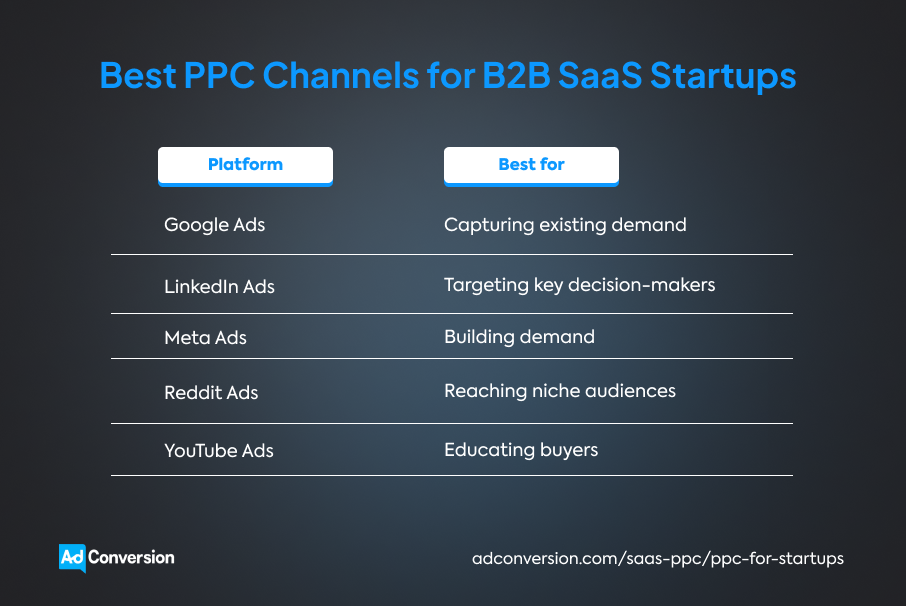
Choose the right PPC channel based on how your buyers discover solutions, not what’s most popular.
You should also keep these best practices in mind:
- Start with only one PPC channel to give your budget enough room to produce meaningful results.
- Pick the channel that gives you the best chance to learn what works without overspending.
- Once you've built a winning campaign, use those insights to expand into other PPC channels.
Google Ads
Google Ads captures buyers the moment they start looking for a solution.
That's a big advantage for seed-funded and Series A startups because you don’t have to create demand first.
Someone searching for ‘SOC 2 compliance software’ or ‘employee onboarding platform’ is already comparing vendors.
This makes Google Ads one of the fastest ways to validate your growth hypothesis.
The only downside is competition. Established software categories usually attract more advertisers, increasing CPC.
At the same time, if nobody searches for your solution yet, there won't be enough demand for Google search ads to capture.
So, Google Ads shouldn’t be your first channel if you're creating a brand-new software category.
LinkedIn Ads
LinkedIn Ads allow you to decide exactly who sees your ads.
You can target key decision-makers by industry, company size, location, job title, job function, and seniority.
For example, a cybersecurity startup can narrow its reach to heads of information security working for financial services companies with 500 to 2,000 employees in the United States.
This precision only pays off once you’ve validated your ICP and know who influences buying decisions.
However, premium targeting comes with a premium price tag.
So, skip LinkedIn Ads if you’re still experimenting with your messaging or have a small testing budget.
Meta ads
Meta ads create demand and build brand awareness before buyers start searching.
You can use them if you're introducing a new product category or solving a problem prospects aren’t aware of yet.
Meta ads also give you a fast way to test messaging.
You can quickly see which pain points, headlines, and offers resonate most with your target audience.
Those insights can later improve your Google Ads campaigns, landing pages, and even your sales messaging.
If buyers already compare products through Google Search, use Meta ads as a supporting channel rather than your primary pipeline source.
Reddit Ads
Reddit Ads helps you reach buyers while they're discussing the problem your product solves.
Instead of interrupting users, your ads appear alongside conversations that are already happening.
For example, a data analytics startup can advertise in Reddit communities where data engineers compare business intelligence (BI) tools, discuss data pipelines, or ask for recommendations for analytics platforms.
Just remember that Reddit users value authenticity, so promotional messaging rarely performs well.
You have a better chance of engaging buyers through educational ads that solve a specific problem.
YouTube Ads
YouTube Ads gives you more time to explain complex products.
A short product walkthrough can explain a workflow, showcase a feature, and show the outcome before asking someone to book a demo.
For instance, a utilities SaaS platform can show how AI automates field inspections in a two-minute video.
Once buyers understand the value, they're much more likely to respond to your Google or LinkedIn ad campaigns.
Step 4: Create Your First PPC Campaign
Create a PPC campaign that’s easy to manage and delivers the right message to the right buyers.
Build a clean campaign structure
Don't overcomplicate your first campaign.
Start with one campaign and two or three tightly focused ad groups.
Each ad group should cover one closely related topic to keep ads relevant and results easy to analyze.
For example, a cybersecurity startup could create separate ad groups for endpoint detection, endpoint response, and managed endpoint security.
You’ll immediately see which topic attracts the most clicks, produces more qualified leads, and deserves more budget.
At the same time, you can quickly spot issues you need to fix before they become a major problem.
Target buyers who are ready to act
Every click should have a real chance of becoming a customer.
If you're using Google Ads or Microsoft Advertising (formerly Bing Ads) start with keyword research.
Prioritize commercial keywords that signal buying intent. Look for searches like 'endpoint detection software,' 'HR onboarding software pricing,' 'business intelligence platform,' or 'book a product demo.'
Then build a negative keyword list to filter out low-value searches such as jobs, salary, free, course, template, or definition.
If you’re running LinkedIn ads for SaaS, build one audience around your ICP. Narrow it down using firmographic and role-specific filters.
The more targeted your LinkedIn audience is, the less ad spend you'll waste.
Write ads that sound like the buyer
Skip PPC marketing slogans like 'The Future of Cybersecurity Starts Here' or 'Transform Your Business with AI.'
Use the words your buyers already use when describing their problem.
Lead with the outcome buyers want, explain why your solution is different, and finish with one clear call to action (CTA).
AdConversion’s 10 B2B SaaS copywriting tips might come in handy at this point.
Create three to five ad variations before launching.
Test one angle at a time by changing only the headline, benefit, or CTA. That way, you'll know exactly what improved your results.
Design creatives that support your message
Your visuals should support the promise your ad copy makes.
Use product screenshots, short demo videos, or simple illustrations that help buyers understand the value of your software in seconds.
Instead of using a generic stock photo of people shaking hands, you can show how your HR SaaS platform automates onboarding or tracks employee progress.
Step 5: Build a Dedicated Landing Page
Build a dedicated landing page that delivers on your ad’s promise, answers buyers’ questions, and builds credibility.
Tailor the landing page to your ad
Your landing page should continue the conversation started by your ad.
Focus on the same problem, messaging, and offer that made visitors click in the first place.
If your LinkedIn Ads campaign targets finance leaders struggling with manual reporting, your landing page should cover automated financial reporting, not all your product features.
Buyers should never have to wonder whether they've landed in the right place.
Answer buyer questions before they ask them
Don't make prospects hunt for information.
Your landing page should quickly explain who the product is for, which problem it solves, how it works, and what outcome buyers can expect.
Skip long feature lists and focus on the results visitors want to achieve.
For instance, an HR SaaS platform shouldn't lead with 'AI-powered onboarding workflows.' It should explain how it helps HR teams reduce onboarding time, eliminate repetitive admin work, and create a consistent employee experience across every office.
Give visitors proof before asking them to convert
B2B SaaS buyers are skeptical by nature. They expect proof before they trust your claims.
Add customer logos, testimonials, case studies, review scores, certifications, or measurable results throughout the page.
These trust signals build credibility and encourage visitors to convert.
For more practical guidance, check out these 10 tips for building B2B SaaS landing pages.
If all this sounds a bit too technical or time-consuming, you can hand off execution to AdConversion’s SaaS Landing Page Agency.
That's what B2B SaaS startup Warmly did, and it paid off.
AdConversion rebuilt the startup’s landing page, which increased its conversion rate by 366% and average time on page by 160%.
Check out the full Warmly case study for more details.
Step 6: Set Up Tracking Before Launch
Build a tracking system that follows every prospect from the first ad click to closed revenue, and then launch your PPC campaign.
Give every campaign its own identity
You should always know where your leads come from, and UTM (Urchin Tracking Module) parameters make that possible.
These small tracking tags added to your landing page URLs help your customer relationship management (CRM) system and analytics platforms identify the source of each click.
Your only job is to keep naming consistent across every PPC channel, campaign, and ad.
Even small differences, like google-paid and google_ads, can split the same targeted traffic into separate reports, making the data harder to connect.
You can use AdConversion’s free UTM generator to create standardized URLs and keep reporting clean from day one.
Follow buyers beyond the first conversion
A demo booking doesn't mean your campaign was a success.
Some demo requests become customers, while others disappear after the first sales call.
So, your tracking should move beyond the landing page.
Connect your ad platforms to your CRM so you can follow every prospect from click to SQL, opportunity, and closed deal.
You'll quickly see which campaigns generate revenue and where prospects drop out of the buying journey.
Help PPC algorithms find better buyers
Most PPC platforms, including Google, Microsoft, LinkedIn, and Meta, learn from the conversion data you share.
That's why your CRM shouldn't just collect revenue data. It should also send important sales milestones back to your ad platforms through offline conversion tracking.
Make sure your CRM stores the unique click IDs from your PPC channels when someone clicks your ad.
Then configure your CRM to automatically send updates to your ad accounts when a lead turns into an SQL, an opportunity, or a customer.
This data helps paid media algorithms identify buyers more likely to become customers.
Put all your data in one dashboard
Tracking campaign results across multiple platforms every day is exhausting and inefficient.
Instead, build one dashboard that connects your ad accounts, CRM, and analytics tools and updates automatically.
This gives your marketing and sales teams a single view of performance rather than three different fragments of it.
If setting all this up sounds like another full-time job, AdConversion can help.
The agency builds custom Paid Revenue Dashboards that pull live data from every PPC platform and your CRM in one place.
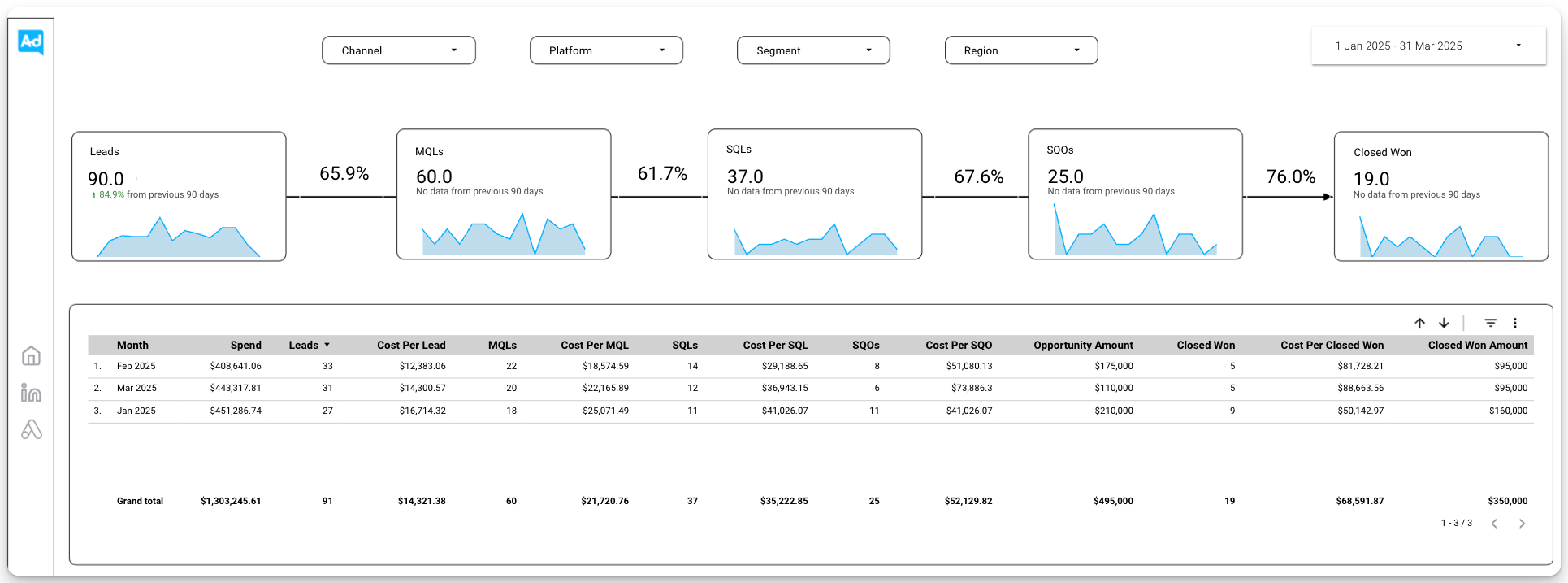
You can analyze performance by channel, campaign, or sales stage without jumping between tools.
AdConversion’s dashboards prioritize the metrics that matter most to B2B SaaS startups, like cost per SQL, return on ad spend (ROAS), and closed-won revenue.
But they also show impressions, click-through rates (CTRs), CPC, and conversion rates to give you a full picture of performance.
Step 7: Evaluate Results Using the Right Metrics
Evaluate your PPC campaigns based on how efficiently they produce pipeline and revenue.
Find out if you're attracting the right buyers
A campaign that fills your CRM isn't necessarily a good campaign. So, look beyond lead generation.
Focus on SQLs, sales-qualified opportunities (SQOs), opportunity creation rate (OCR), and pipeline velocity.
Together, these metrics show how many prospects become real sales opportunities and how quickly they move through the pipeline.
Make sure your acquisition costs stay under control
Generating pipeline is only half the story. You also need to know how much you're paying to get it.
Track efficiency metrics like CPC, cost per SQL, cost per conversion, customer acquisition cost (CAC), and lifetime value (LTV) to CAC ratio.
These numbers help you understand whether your acquisition costs are sustainable in the long term.
Let revenue guide your next move
Revenue is the metric that settles every debate.
Closed-won revenue, annual recurring revenue (ARR), ROAS, and pipe-to-spend ratio tell you which channels deserve more budget and which ones need a different approach.
Ads on LinkedIn can easily cost twice as much per click as those on Meta. But if it also generates twice the pipeline and recurring revenue, it's money well spent.
Find out more from AdConversion’s complete guide to tracking and measuring PPC return on investment (ROI).
Step 8: Decide Whether to Pause, Optimize, or Scale the Campaign
Decide whether to pause, optimize, or scale the campaign based on real performance data.
Pause campaigns that drain your budget
Some campaigns simply aren't worth saving.
If you've collected enough data and your campaign still misses its goals, stop spending money on it.
Low CTRs, poor conversion rates, or plenty of leads that never become SQLs usually point to a bigger issue that more budget won't fix.
The good news is that you don't have to monitor every campaign manually to avoid wasted spend.
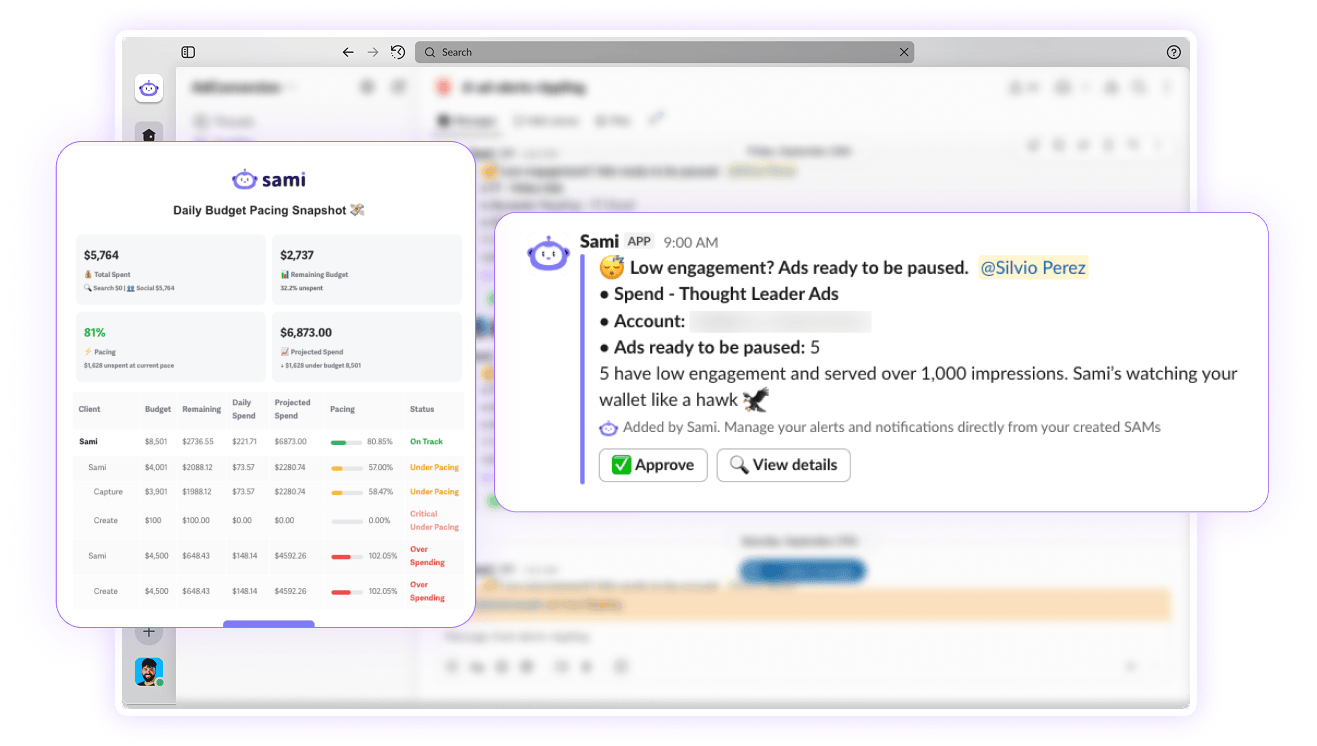
You can let Sami, AdConversion's proprietary AI ad automation tool, watch over your ads 24/7.
If an ad exceeds your target cost per acquisition (CPA) without producing conversions, Sami automatically pauses it.
Optimize campaigns that show potential
A PPC campaign doesn't have to be perfect to be worth keeping. The trick is knowing what to improve.
A low CTR usually means your ad copy or creatives need work.
On the other hand, a high CTR paired with a low landing page conversion rate points to a post-click problem.
Make one change at a time and give it enough time to prove itself.
Test a new headline, swap in fresh creatives, refine your targeting, or expand your negative keyword list before moving on to the next experiment.
Sami can help with optimization too.
The AI sidekick catches ad fatigue by monitoring changes in your CTR. If it stays below your average for 90 days, Sami immediately sends you a Slack alert.
Sami also lets you know if your ad account hasn’t generated any impressions in the past 24 hours, so you can act quickly.
Scale campaigns that consistently deliver
Don't mistake higher budgets for a scaling strategy.
First, make sure your campaign consistently hits your targets for pipeline, ROAS, CAC, and closed-won revenue.
Then increase your budget gradually while monitoring performance after each adjustment.
If your campaign keeps delivering the results you want, you can expand to new channels.
Sami can automatically increase or pull back spend based on campaign performance.
This helps you scale winning campaigns faster without having to manually check performance every day.
Sami also gives you access to a live budget and KPIs dashboard.
You can see which campaigns are on pace, which ones are overspending, and where performance needs attention at any given moment.
This makes it much easier to spot problems early and scale winning campaigns.
What Common PPC Mistakes Should Startups Avoid?
The most common PPC mistakes startups make usually start with poor planning, weak execution, or misinterpreting campaign data:
- Launching PPC before you're ready burns through your budget without teaching you much. Wait until you've validated your product, nailed your messaging, and know exactly who you're trying to reach.
- Trying to target everyone spreads your budget too thin. Start with one ICP, one PPC channel, and one offer. Once you've found a winning formula, you can expand.
- Sending ad traffic to your homepage gives buyers too many distractions and too few reasons to convert. Every campaign deserves its own landing page that picks up where the ad left off.
- Obsessing over clicks instead of customers is misleading. A campaign with a higher CPC can still be your best performer if it continues to generate sales opportunities and revenue.
- Treating PPC as a one-time setup will get you nowhere. Review your search terms, refresh your ad creatives, and test new ideas regularly to keep campaigns profitable as buyer behavior and competition change.
Over to You
PPC for startups gives you the chance to learn what resonates with your buyers and turn those insights into lasting growth.
Every campaign teaches you something valuable, and every improvement moves you one step closer to a scalable acquisition engine.
Whenever you're ready for an extra set of expert hands, have a quick chat with AdConversion.
Frequently Asked Questions (FAQs)
Q1. Should startups run PPC before achieving product-market fit?
No. PPC works best once you know exactly who you're selling to, why they’re buying, and what messaging gets them to act.
If you're still figuring those things out, paid ads will mostly burn through your budget while creating more questions than answers.
Use PPC to scale what's already working, not to discover it.
Q2. Is Google Ads or LinkedIn Ads better for B2B startups with limited budgets?
For most B2B startups, Google Ads is the better place to start because it captures buyers actively searching for a solution.
LinkedIn Ads becomes more valuable once you know exactly who your buyers are and you need to reach specific decision-makers.
Q3. How long should a startup run a PPC campaign before making a decision?
A startup should run a PPC campaign for at least 30 days before making any decisions. That gives you enough time to collect meaningful data, identify early trends, and let platform algorithms learn.
Avoid making constant changes during that period, or you'll keep resetting the ad platform's learning process.
Q4. Can PPC help validate demand before raising funding?
Yes, a well-run PPC campaign can show whether buyers respond to your messaging, which offers produce qualified leads, and how much it costs to acquire customers.
Those insights help you refine your go-to-market strategy and give investors real data to support your growth story.

.png)
Related Articles
PPC for Startups: How to Build B2B SaaS Ad Campaigns

12 Best SaaS PPC Agencies to Scale Growth in 2026
Join 0,000 B2B marketers leveling up their paid advertising skill set! 🚀
Join 0,000 B2B marketers leveling up their paid advertising skill set! 🚀


