


LinkedIn Ads for SaaS: The Complete B2B Playbook

Learn how to build LinkedIn Ads for SaaS that reach the right B2B buyers, generate qualified pipeline, and turn ad spend into measurable revenue.
LinkedIn Ads



%20-%20new%20v2.png)
Silvio Perez
Founder @AdConversion
LinkedIn Ads for SaaS gives you a direct line to the decision-makers who influence and approve software purchases.
Done right, running LinkedIn ads can help you start meaningful conversations, stay visible throughout long B2B buying cycles, and bring more revenue opportunities into your pipeline.
Getting there isn't always easy. Rising costs, disappointing lead quality, and inconsistent results frustrate even the most experienced B2B marketers.
Learn how to build a LinkedIn Ads program that attracts the right buyers, turns interest into sales conversations, and delivers measurable business impact.
Why Do LinkedIn Ads Work for B2B SaaS?
LinkedIn Ads work for B2B SaaS because they help you get in front of the right people, build credibility, and turn ad spend into qualified pipeline.
Reach decision-makers directly
If you want your B2B SaaS solution to sell, you need to engage the people who can actually influence or approve purchases.
LinkedIn Ads gives you access to a professional network where business leaders actively consume industry content.
What’s more, you get advanced targeting filters that help your ads reach the right decision-makers in your SaaS niche.
Influence buying committees
B2B SaaS deals typically involve more than one person.
A prospect might discuss your solution with managers, executives, finance teams, or operational stakeholders before making a decision.
With LinkedIn Ads, you can build brand awareness across the entire buying committee.
The more stakeholders recognize your brand, the more likely they are to pick you when the timing’s right.
Support long B2B sales cycles
B2B SaaS purchases don’t happen overnight.
Buyers usually spend weeks or months researching solutions, comparing vendors, and discussing options internally.
LinkedIn Ads keeps your company on their radar during that long buying journey.
If your brand repeatedly shows up while prospects are scrolling on LinkedIn, it’s almost impossible for them to forget you.
Generate higher-quality pipeline
Not all leads are created equally. Unqualified leads only create extra work for your sales team without actually contributing to revenue.
Thanks to its precise audience targeting, LinkedIn Ads attracts more sales opportunities with a real chance that they’ll convert into customers.
Just don’t expect it to be cheap.
GrowthSpree’s 2026 LinkedIn Ads report puts cost per lead (CPL) for B2B SaaS at $100–300.
Add one more touchpoint in the buyer’s journey
B2B SaaS buyers interact with multiple touchpoints before they book a demo or talk to sales.
They might discover your brand through paid search today, read a blog post two weeks later, and finally respond to an email campaign a month later.
LinkedIn Ads creates one more touchpoint in the buyer’s journey.
This additional exposure builds familiarity and trust, helping your other demand generation channels perform better.
How Do You Target the Right SaaS Buyers with LinkedIn Ads?
To reach the right SaaS buyers with LinkedIn Ads, use the platform’s targeting options to narrow down your audience.
1. Define your ideal customer profile (ICP)
Open your customer relationship management (CRM) system and look at the customers that bring in the most revenue.
Find out what these companies have in common. Check for patterns in industry, company size, location, annual revenue, and growth rate.
Then use those same attributes to set up company-level targeting in your LinkedIn Campaign Manager.
For example, you can target California-based healthcare organizations with 501 to 1,000 employees, an estimated annual revenue of $100 million, and a 20% growth rate.
2. Target entire buying committees
Once you’ve found your target companies, focus on who’s involved in the purchase decision.
If you’re selling compliance software to financial institutions, the final decision might rest with a chief risk officer, a compliance director, an operations manager, and a chief procurement officer (CPO).
Use the Job Title, Job Function, and Seniority filters in LinkedIn Campaign Manager to make sure your ads reach all those key decision-makers.
3. Layer firmographic and professional filters
LinkedIn Ads gives you dozens of targeting options. The trick is using the right mix of filters.
Your best bet is to apply LinkedIn’s ‘AND’ logic to combine firmographics with role-specific attributes.
For example, you can target the telecommunications industry AND companies with 201-500 employees AND chief procurement officers.
You can narrow down your audience even further using LinkedIn Ads exclusions.
This feature helps you block poor-fit leads using the same company and job-related filters.
4. Build retargeting audiences
Don’t rely exclusively on cold audiences.
If you already have a list of target accounts for your account-based marketing (ABM) program, upload it to your LinkedIn Campaign Manager using Matched Audiences.
This allows you to focus your ad spend on companies and contacts that already fit your ICP.
Next, implement a B2B retargeting strategy.
Install the LinkedIn Insight Tag on your website to send personalized ads to visitors who have engaged with your pages or content.
You can also retarget people who watched your LinkedIn video ads, interacted with your single image ads, or opened a lead gen form.
These audiences already know your brand, so they’re much easier to push toward a demo request or sales conversation.
For more tips and tricks, check out AdConversion’s guide to creating LinkedIn audiences that convert.
How Do You Build A LinkedIn Ads Funnel That Generates Pipeline?
You can build a LinkedIn Ads funnel that generates pipeline by creating separate campaigns for each stage of the buyer’s journey.
Step 1: Educate before you sell
Most buyers start searching for solutions only when their problem becomes too expensive, risky, or time-consuming to ignore.
Your job is to get in front of them before that happens.
Use top-of-funnel LinkedIn ads to help prospects understand the challenges they face and the cost of ignoring them.
Your ads can promote benchmark reports, industry research, trend analyses, and thought leadership content tied to the problem your product solves.
If you sell cybersecurity software, you can advertise a report on the high costs of ransomware attacks or the rise of AI phishing threats.
The goal is to get on the buyers’ radar and create demand before they start comparing vendors.
Step 2: Capture active demand
Once buyers start looking for solutions, give them proof that your product can solve their problem.
Put your software in the spotlight through LinkedIn ads that promote case studies, demos, ROI (return on investment) calculators, and comparison guides.
A finance automation platform could promote a case study that shows how one of its customers reduced the month-end close time from ten to four days.
Results like that push prospects to reach out to sales or to request a demo.
Step 3: Nurture buyers over time
Interest doesn't automatically turn into pipeline.
A prospect can spend months researching, comparing alternatives, and discussing options internally.
During that time, keep showing up with retargeting LinkedIn ads that answer the questions holding them back.
You can advertise customer success stories, integration guides, security documentation, onboarding resources, or implementation timelines.
By the time buyers are ready to make a decision, your company will feel more like a trustworthy partner than a stranger.
Step 4: Work with a LinkedIn Ads agency
Running a full-funnel LinkedIn Ads program requires significant time and resources.
You need to constantly refine targeting, produce new ad creatives for each buying stage, test new angles, and keep a close eye on performance.
If you feel like you can’t give every part of the funnel the attention it needs, you can hand off execution to a LinkedIn Ads agency.
AdConversion’s B2B SaaS LinkedIn Ads Agency breaks down your current setup to find what's holding your campaigns back.
It looks for audience gaps, messaging issues, weak conversion paths, and wasted ad spend.
The agency then builds you a full-funnel strategy where every LinkedIn Ads campaign has a specific job to do.
Your new ad program will tackle everything from qualified lead generation and demand capture to engaging high-value accounts and bringing back warm leads.
AdConversion also handles the entire creative process for you. The team writes ad copy, designs visuals, and builds dedicated landing pages for each LinkedIn Ads campaign.
The agency continuously experiments with new ad formats and offers to find what resonates most with your B2B buyer persona. So you can rest assured the audience won’t get tired of your ads.
Then, when you're ready to step up your paid acquisition game, AdConversion can build a multi-channel strategy for you.
The agency runs paid media programs across Google, YouTube, Meta, Reddit, and other platforms, so you can reach buyers wherever they are.
Which LinkedIn Ad Formats Work Best For B2B SaaS?
Choosing the best LinkedIn ad formats for B2B SaaS depends on where your buyers are in their journey and what you want them to do next.
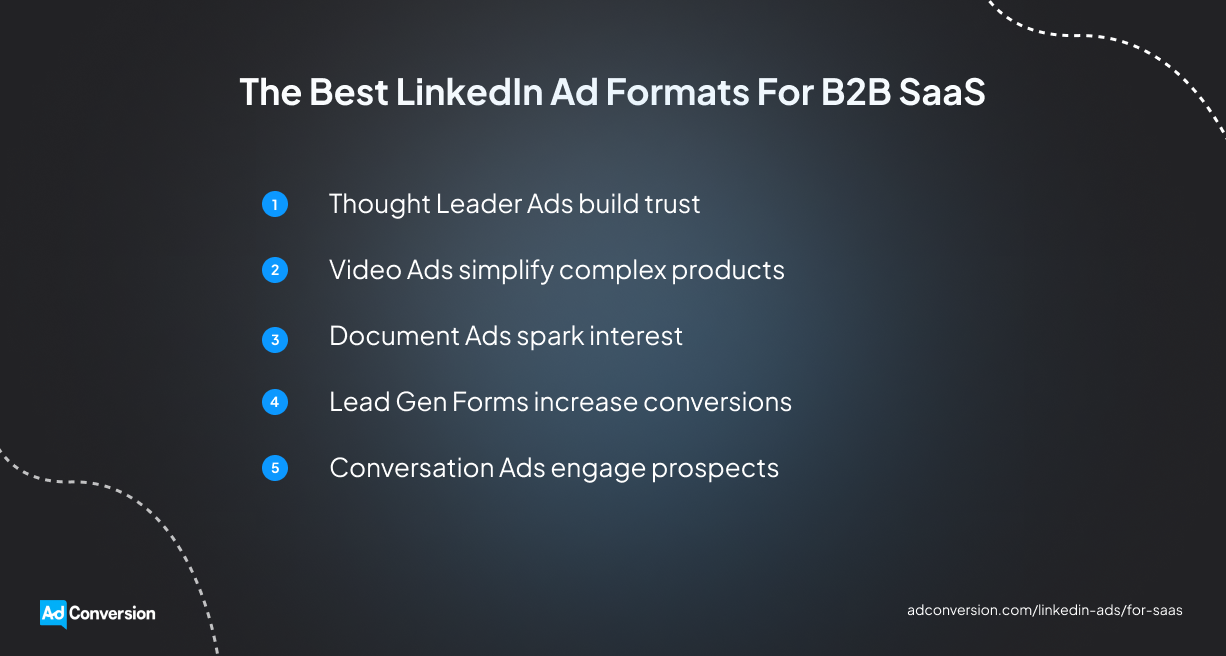
1. Thought leader ads build trust
Thought leader ads let you promote LinkedIn posts published by your team members or execs on their personal accounts.
Experts, founders, and practitioners have the industry experience to back up their claims, so buyers tend to trust them more than brands.
For instance, a founder sharing lessons from a failed implementation project will likely engage more users than a standard company update.
Use these ads to amplify thought leadership content that sparks conversations and positions your team as experts.
They work especially well at the top of the funnel, where credibility matters more than product features.
ZenABM’s 2026 LinkedIn Ads report shows that thought leader ads also dominate performance with a 2.68% click-through rate (CTR) and a $2.29 cost per click (CPC). In fact, they are six times more efficient than single-image ads.
Learn more from AdConversion’s 10 tips to creating winning LinkedIn thought leader ads.
2. Video ads simplify complex products
Video ads show your software in action and make complex solutions easier to understand.
You can use short product walkthroughs, feature demonstrations, and customer success stories to educate buyers.
Keep your video ads short and focused, so your audience can quickly understand the product’s value.
For example, a supply chain platform can show how it reduces manual inventory planning time to under 30 seconds.
3. Document ads spark interest
Document ads let prospects preview a PDF without leaving LinkedIn.
Use this ad format to promote long-form assets like benchmark reports, buying guides, research studies, and industry playbooks.
Instead of asking buyers to leave LinkedIn to access the document, you let them sample the content first.
This way, prospects can decide if the asset is worth downloading before sharing their contact info.
You can also gate the full document behind a lead gen form to create a direct path from engagement to lead generation.
4. Lead gen forms increase conversions
Lead gen forms allow buyers to submit their info without leaving LinkedIn.
Since the platform automatically fills in much of the user's info, prospects can submit a form in seconds. This convenience improves conversion rates.
Use lead gen forms to get more LinkedIn webinar registrations, demo requests, and asset downloads.
5. Conversation ads engage prospects
Conversation ads send buyers interactive LinkedIn messages that let them choose what to do next.
Instead of pushing every prospect toward the same call to action (CTA) you can give them options.
One button can lead to a demo request, another to a case study, and another to a product guide.
These interactive ads can be very effective if you’re targeting an entire buying committee where each stakeholder cares about something different.
For instance, you can share product integrations for IT directors, ROI-related case studies for CPOs, and security documentation for chief information security officers (CISOs).
Explore AdConversion’s 14 tested LinkedIn Ads ideas to see how you can put all these ad formats to work.
How Do You Measure LinkedIn Ads Performance for B2B SaaS?
You can measure LinkedIn Ads performance by linking campaign data to your CRM and tracking every prospect from click to closed revenue.
Connect LinkedIn Ads to your CRM
If your marketing and revenue data live in separate systems, you're flying blind.
Integrate LinkedIn Ads with HubSpot, Salesforce, or your preferred CRM.
Then create fields that capture campaign name, ID, ad format, and lead source whenever a prospect converts.
Once a lead books a demo, becomes an opportunity, or closes a deal, you'll know exactly which LinkedIn Ads campaign produced that outcome.
Without this connection, you're just measuring form submissions instead of business results.
Track pipeline instead of lead volume
Generating leads means nothing if those prospects never turn into opportunities.
One LinkedIn Ads campaign can produce 200 leads that never speak with sales. Another can produce 20 leads that create six figures in pipeline. If you only look at lead volume, both campaigns appear successful.
Track metrics like sales-qualified leads (SQLs), opportunities, cost per SQL, and pipe-to-spend ratio.
These numbers tell you whether your ad budget is generating revenue potential or simply filling your CRM with contacts.
Measure conversion rates across the funnel
Track conversion rates from lead to SQL, opportunity, and customer for each LinkedIn Ads campaign. Then compare the results.
This allows you to quickly spot bottlenecks and fix what’s broken.
For example, a LinkedIn ad promoting a free cybersecurity assessment might produce lots of demo requests but very few SQLs. That's usually a sign your targeting or offer attracts the wrong audience.
Tie campaigns to revenue outcomes
Revenue attribution tells you which LinkedIn Ads campaigns actually drive business growth. Based on this data, you can make smarter budget decisions moving forward.
But be patient, as these results don’t show up overnight in long B2B SaaS sales cycles.
To measure outcomes more efficiently, you can build a revenue dashboard that centralizes marketing and sales data or let AdConversion do it for you.
AdConversion builds custom Paid Revenue Dashboards that connect directly to your LinkedIn Ads account and CRM.
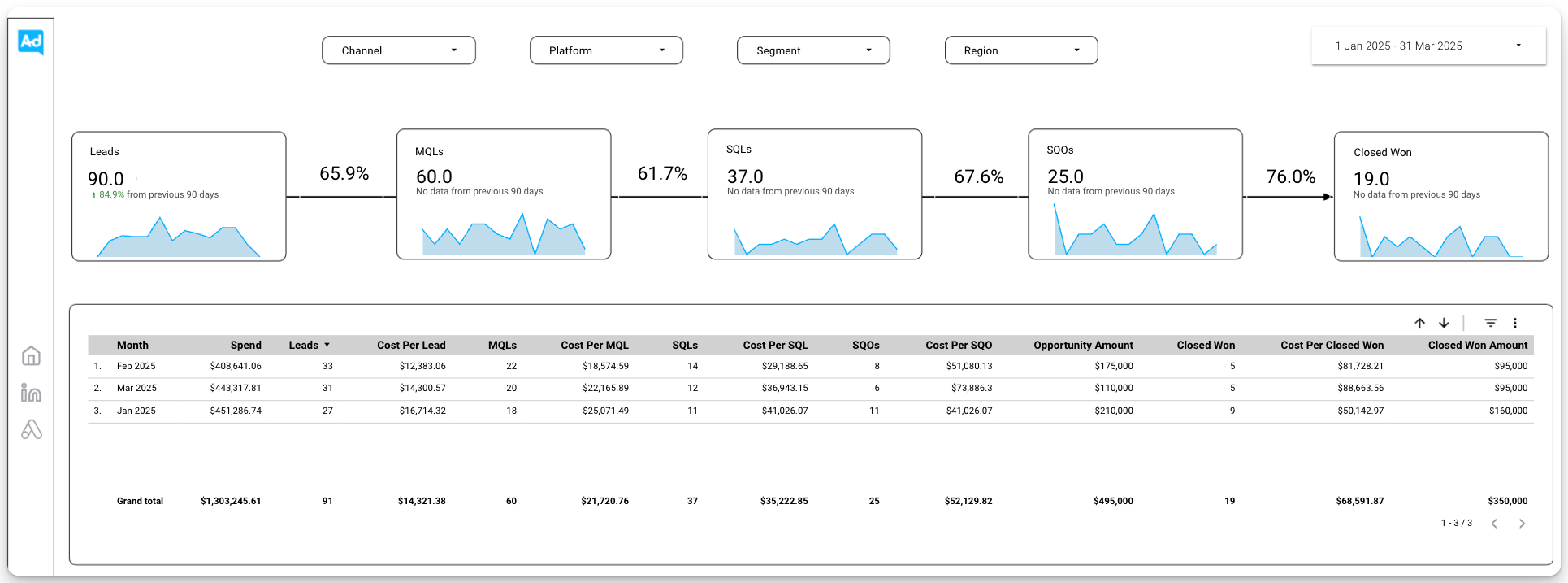
The data updates automatically, so you can check campaign results at any given time.
The dashboard prioritizes revenue metrics like cost per SQL, return on ad spend (ROAS), and closed-won revenue.
But you can also see impressions, CTRs, and conversions, so you have access to all the data in one place.
AdConversion can even connect the dashboard to your other ad platforms, including Google, YouTube, Meta, and Reddit, to give you the full picture.
How Do You Optimize LinkedIn Ads For Better SaaS Results?
You can optimize LinkedIn Ads for better SaaS results by fixing what's holding campaigns back and doubling down on what's already working.
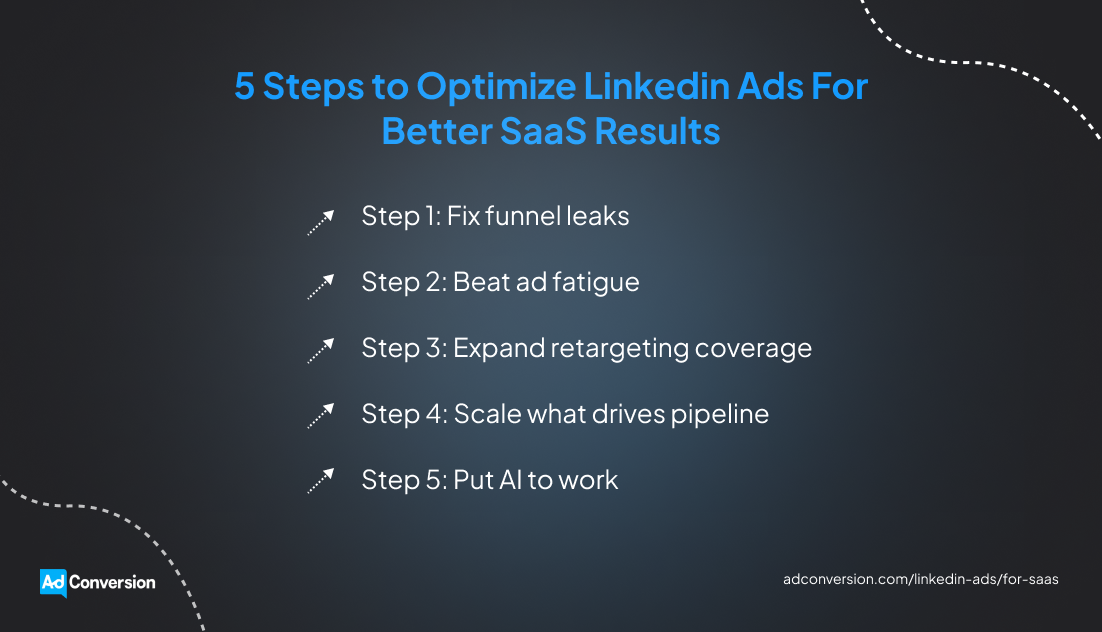
Step 1: Fix funnel leaks
Don't rush to blame the LinkedIn Ads campaign when results start slipping, as it’s not always the culprit.
You might be dealing with one of these scenarios:
- If prospects click your ads but ignore your form, your landing page or offer might need work.
- If they request demos but rarely show up, your follow-up might be the problem.
- If demo attendees rarely become opportunities, sales and marketing might not agree on what a qualified lead looks like.
Find the place where buyers drop off and fix the leak.
Step 2: Beat ad fatigue
Your audience can only see the same LinkedIn ads so many times before tuning them out.
A declining CTR and rising CPC usually signal that ad fatigue is setting in.
When that happens, don't just swap out a headline or CTA and hope for the best. Test a new angle altogether.
If your current LinkedIn ads focus on product features, switch to customer outcomes. Or if you've been promoting case studies, try out industry research or benchmark data.
Give buyers a reason to pay attention again.
Step 3: Expand retargeting coverage
Don’t base your entire retargeting strategy on website visitor behavior.
A person who watched 75% of a product demo video has shown real intent. So has someone who opened a lead gen form, downloaded a report, attended a webinar, or engaged with a document ad.
Build separate LinkedIn Ads audiences around those actions and tailor your campaigns to each group.
The more buying signals you use, the more opportunities you create to re-engage qualified prospects.
Step 4: Scale what drives pipeline
If a campaign consistently generates opportunities, don't leave it on autopilot.
Increase budget gradually and watch what happens to opportunity volume, cost per SQL, and pipe-to-spend ratio. If performance holds, keep scaling.
At the same time, don't let CPL dictate your decisions.
A campaign generating SQLs at $250 each can outperform one generating low-quality leads at $75.
Follow the revenue, not the vanity metrics.
Step 5: Put AI to work
Optimizing LinkedIn ads manually gets harder as your account grows.
More campaigns mean more bids to adjust, budgets to monitor, ads to review, and performance issues to catch.
Your team can’t keep an eye on everything around the clock, but Sami, AdConversion’s proprietary AI ad optimization tool, can.
Sami watches over your LinkedIn Ads account 24/7 and reacts instantly to performance changes.
It can automatically increase budgets and bids on campaigns that consistently perform well and pull back spend when results start slipping.
Sami also knows when to cut losses. If an ad exceeds your target cost per acquisition without delivering conversions, Sami automatically pauses it.
This AI sidekick also keeps an eye out for ad fatigue and removes weak creatives before they drag down performance.
Sami keeps your team in the loop at all times. It sends Slack or email alerts whenever it makes a change and delivers daily budget pacing summaries.
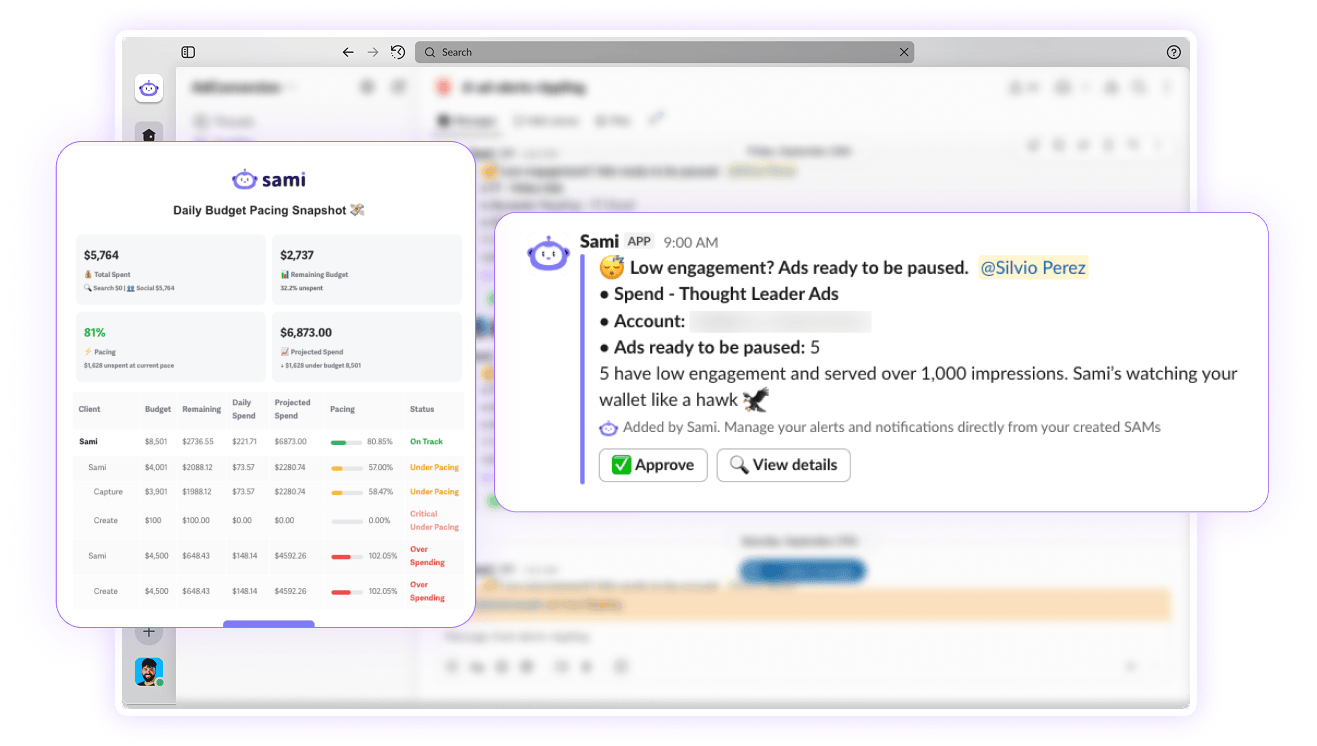
The platform also lets you track budget and key performance indicators in real time to see which LinkedIn Ads campaigns are on pace, which ones are overspending, and where performance needs attention. This helps you spot small issues before they turn into expensive problems.
Over to You
LinkedIn Ads for SaaS rewards companies who think beyond clicks, lead volume, and short-term wins.
To get the best results, treat the platform as a place to spark conversations, earn trust, and stay present while buyers work through complex decisions.
If you need someone to run LinkedIn Ads for you or want to scale, have a quick chat with AdConversion.
Frequently Asked Questions (FAQs)
Are LinkedIn Ads worth it for B2B SaaS companies?
Yes, LinkedIn Ads are worth it for B2B SaaS companies. They help you reach key decision-makers, stay top of mind during long buying journeys, and build trust before buyers start comparing vendors. The platform isn't cheap, but the number of opportunities it can generate makes it worthwhile.
Should you use LinkedIn lead gen forms or landing pages?
You should use both. Use lead gen forms for fewer clicks and faster conversions. They work well for webinar registrations, gated assets, and demo requests.
Use a landing page when buyers need more context before converting.
Are LinkedIn Ads better than Google Ads for B2B SaaS?
LinkedIn Ads and Google Ads complement each other, so you should use them together. Google Ads helps you reach buyers actively searching for solutions, while LinkedIn Ads gives you more control over who sees your message. Both platforms can support demand generation, ABM, and retargeting.

.png)
Related Articles
Top 10 LinkedIn Ads Automation Tools for B2B Marketers in 2026
12 SaaS LinkedIn Ads Agencies to Drive Pipeline Growth in 2026
LinkedIn Ads for SaaS: The Complete B2B Playbook
Join 0,000 B2B marketers leveling up their paid advertising skill set! 🚀
Join 0,000 B2B marketers leveling up their paid advertising skill set! 🚀


