


Guides
How to Optimize Meta Ads for B2B SaaS in 7 Steps
%20-%20new%20v2.png)
Optimizing Meta Ads can help your B2B SaaS business lower acquisition costs, bring in more qualified leads, and squeeze more out of your ad budget.
The hard part comes when performance starts slipping, but there’s no obvious reason why. You could spend hours tweaking campaigns and still miss what’s actually getting in the way.
Learn how to optimize Meta Ads by finding the problem first, making changes with a purpose, and knowing when a campaign is ready for more budget.
Table of Contents
How Does Meta’s Algorithm Affect Ad Optimization?
Step 1: Fix Your Meta Ads Conversion Data
Step 2: Find What’s Hurting Meta Ads Performance
Step 3: Clean Up Your Meta Ads Campaign Structure
Step 4: Adjust Your Meta Ads Bids and Budgets
Step 5: Refine Your Meta Ads Audience Targeting
Step 6: Test Your Meta Ad Creative
Step 7: Fix Your Meta Ads Post-Click Performance
Frequently Asked Questions (FAQs)
How Does Meta’s Algorithm Affect Ad Optimization?
Meta’s algorithm now makes more ad delivery decisions for you, so optimization requires fewer manual tweaks. Your job is to give the platform better creatives, useful signals, and enough stability to learn.
Ad creatives affect who sees your ads
Meta uses more than your audience settings to figure out who might be interested in an ad. The creative itself can point the ad platform in the right direction.
Two of Meta’s AI systems play a big part here:
- Andromeda narrows tens of millions of eligible ads down to a smaller group of relevant candidates. From there, Meta uses ranking models to determine which ads to show to each user.
- GEM (Generative Ads Recommendation Model) learns from signals such as ad creative, advertiser goals, measurement data, and how people interact with ads. It then passes those learnings to other recommendation models, helping them make better predictions.
You don’t need to keep track of every model working behind the scenes. What matters is that Meta has much more to learn from than the audience you select in Ads Manager.
Give it genuinely different creative concepts to work with, not five versions of the same ad with a new headline or background.
Better inputs help Meta
The more Meta automates ad delivery, the more it relies on the signals you give it to understand what you want.
These signals come from different parts of your ad campaigns. They include your campaign objective, conversion data, and the actions people take after seeing your ads.
Meta uses that information to predict which people are more likely to deliver the result you’re optimizing for. So, better inputs give the algorithm a clearer picture of what a valuable outcome looks like for your B2B SaaS business.
Too many edits hurt
Giving Meta enough stability to learn is just as important as giving it the right inputs.
Every time you make a significant change, Meta’s algorithm needs to adjust how it delivers your ads. Some changes can also send the ad set back into the learning phase, which delays results.
That’s why constantly tweaking campaigns can do more harm than good. A short-term change in cost per acquisition (CPA), click-through rate (CTR), or conversion rate doesn’t always mean you need to step in.
If you want to brush up on the fundamentals before getting into optimization, check out AdConversion’s full guide to Meta Ads for SaaS.
Step 1: Fix Your Meta Ads Conversion Data
Your optimization is only as good as the conversion data behind it. Make sure Meta Ads sees conversions accurately, optimizes for the right action, and learns which leads actually matter to your B2B SaaS business.
Fix bad event data
Start with the basics and check if Meta Ads is recording your conversions correctly.
Review your Meta Pixel and Conversions API (CAPI) data in Events Manager. Look for missing or duplicate events, unusual jumps or drops in volume, and conversions that fire when they shouldn't.
Pay special attention to deduplication if you send the same event through both the Pixel and CAPI. Meta needs to recognize those as the same conversion rather than count them twice.
For example, one demo request shouldn't show up as two leads just because Meta received it from both your browser and server.
Pick better conversion events
Don’t let a high lead count fool you. For B2B SaaS, more conversions don’t mean much if the people behind them aren’t a good fit.
If you optimize for every demo form submission, Meta can get very good at finding users who’ll fill out that form. But that can include students, job seekers, and tiny companies that will never make it past qualification.
Once you have enough data, move the optimization event further down the funnel. A sales-qualified lead (SQL) or booked meeting gives Meta Ads a much better idea of the people you actually want to attract.
Send better data back
Meta can’t learn from what happens to a lead in your customer relationship management (CRM) system unless you send that information back.
Use the Conversions API for CRM to share outcomes that happen later in the sales cycle, such as qualified leads, opportunities, and customers.
Say your cybersecurity company gets 50 demo requests from B2B Meta ads. A few weeks later, sales turns eight of them into opportunities and closes two deals. Sending those updates back shows Meta which of the original leads produced real opportunities and customers.
Over time, Meta Ads can connect the conversions it generates today with the sales outcomes that show up in your CRM weeks or months later.
Step 2: Find What’s Hurting Meta Ads Performance
When Meta Ads performance slips, don’t start changing everything at once. Follow the numbers from delivery to pipeline to find the source of the problem.
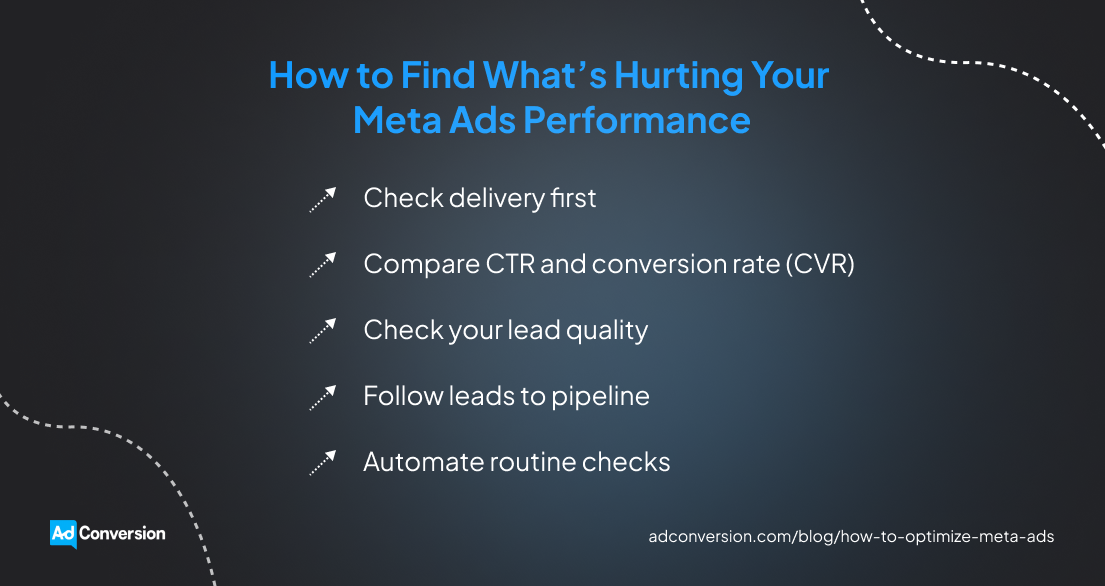
Check delivery first
Make sure Meta is actually delivering your ads as expected.
Open Ads Manager and look at ad spend, impressions, cost per mille (CPM), and cost per result. Compare them with what you normally see, not some universal benchmark.
If you usually spend $500 a day at a $30 CPM, but CPM suddenly jumps to $45, reaching 1,000 people now costs 50% more. This can increase your cost per result even if your ads are performing just as well once people see them.
Before you blame the whole campaign, dig a little deeper. Break down the numbers by ad set and placement. You might find that one ad set has become much more expensive while the rest are doing just fine.
Compare CTR and conversion rate (CVR)
See what people do after Meta shows them your ads.
If CTR drops while delivery stays steady, fewer people are interested enough to click. This could mean your creative is losing momentum or Meta is reaching poor-fit audiences.
On the other hand, an ad might keep getting a 1.5% CTR while CVR falls from 8% to 4%. People are still clicking at the same rate, but only half as many convert once they reach your landing page. This tells you the drop is happening after the click.
If you don’t look at these metrics together, you could waste time changing an ad that’s still doing its job well.
Check your lead quality
Don’t let a good CPA convince you that everything is working.
An HR platform might cut its CPA from $200 to $130, only to discover that most of the new leads work at 20-person companies when its product is built for organizations with 500+ employees.
Go into your CRM and check the qualification data behind those Meta Ads conversions. Focus on criteria such as company size, job title, industry, or any other sign that the lead matches your ideal customer profile (ICP).
Then compare how many leads from each campaign actually qualify. A $200 CPA can still be the better deal if those leads are much more likely to become customers.
Follow leads to pipeline
Qualification gets you closer to the truth, but pipeline tells you whether those leads actually produce results.
Track Meta leads through your CRM and compare campaigns by sales opportunities, pipeline, and closed revenue. The longer your sales cycle, the easier it is for Meta’s top-line metrics to hide what those leads eventually become.
Two ad campaigns could each produce 10 qualified leads. But if the first generates one opportunity in the pipeline worth $200,000 and the second generates four worth the same, they’re clearly not delivering the same value.
AdConversion can audit your existing Meta Ads setup and campaigns to uncover wasted spend and missed opportunities that aren’t always obvious from the numbers you see in Meta.
Automate routine checks
Instead of spending your day refreshing Ads Manager to track performance, you can use a Meta Ads automation tool.
Sami, AdConversion’s AI sidekick, watches over your campaigns 24/7 and takes repetitive work off your plate.
Just connect your Meta Ads account, choose the no-code automations you want to run, and tell Sami which key performance indicators (KPIs) to keep an eye on.
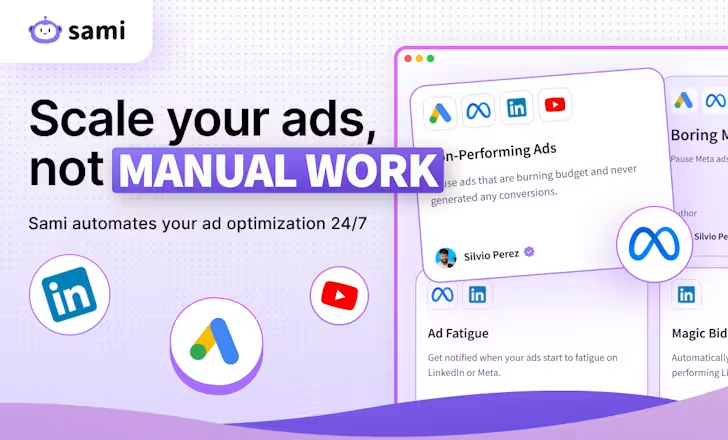
From there, Sami handles routine checks for you:
- If your account goes 24 hours without an impression, it gives you a heads-up in Slack so you can investigate what’s happening.
- It checks your campaigns every hour and automatically pauses ads that blow past the CPA or another KPI limit you’ve set.
- It also catches ads that keep spending without bringing in any conversions and pauses them before they waste even more budget.
But you don’t have to let Sami make every call for you. It can take action automatically or send its recommendations to Slack first, so you can approve or reject them.
Step 3: Clean Up Your Meta Ads Campaign Structure
Too many campaigns and ad sets can spread your budget and conversion data too thin. Keep them separate when you need more control over a test, then consolidate them once you know what’s working.
Separate what you're testing
Give every test a fair shot before you pick a winner.
Imagine you’re A/B testing two target audiences. Put each one in a separate ad set, show both the same ads, and set a budget for each ad set.
If you throw both audiences into the same ad set, Meta decides where to spend. It might put most of your budget behind one audience before the other has generated enough data to tell you anything useful.
Keeping test audiences separate solves that problem. Both get enough budget to produce data, and you get a much cleaner comparison.
Bring proven campaigns together
Once the test is over, all those separate campaigns and ad sets can start working against you.
If you get 30 qualified demo requests a month and you split them across six similar ad sets, each one offers very little data to learn from.
Look for ad sets that are chasing the same conversion, target similar audiences, and no longer need separate budgets. Those are good candidates to consolidate.
This gives Meta more data to work with and more freedom to put your budget where it’s getting results.
You can still keep some things separate when there’s a good reason to. For instance, a B2B account-based marketing (ABM) campaign might need its own budget so it doesn’t have to compete with your broader campaigns.
Change one thing at a time
When you’re cleaning up your Meta Ads campaign structure, resist the urge to fix everything at once.
If you consolidate ad sets today, leave your bids and budgets alone. See how the new structure performs before changing something else.
Otherwise, your CPA might jump from $180 to $240, and you won’t know why.
The same goes for performance improvements. Changing one thing at a time tells you what worked, so you know what’s worth keeping and scaling.
Step 4: Adjust Your Meta Ads Bids and Budgets
Your bids and budgets can help Meta Ads spend more efficiently, but they can’t rescue a campaign that isn’t working. Once you have enough performance data, you can use it to control costs and scale winners.
Check restrictive bid settings
If a campaign isn’t spending its budget, check whether your bidding strategy is getting in the way.
Cost caps and bid caps give you more control over acquisition costs, but tighter doesn’t automatically mean better. If you set them too low, Meta Ads might struggle to find enough opportunities to spend on.
Imagine your education software ad campaign normally generates qualified leads at around $250. Dropping your cost cap to $150 doesn’t force Meta to find the same leads for $100 less. You might simply get fewer of them.
Before tightening your bids, check whether the limit you’ve set lines up with what the campaign can realistically achieve.
Add controls with enough data
Don’t rush into cost controls before you know what a realistic acquisition cost looks like.
Look at your campaign history first. You need enough conversions to see what you typically pay for the outcome you’re optimizing for.
Use that historic data to set a realistic cost cap. Meta will use it as a target for your average cost per result while still trying to maximize results.
Just remember that a cost limit only controls how Meta bids. It doesn’t fix weak creatives, poor conversion data, or leads that never turn into pipeline.
Move budget to winners
Put more budget behind the campaigns that produce better business outcomes, not simply the cheapest leads.
If a more expensive campaign keeps generating more qualified opportunities, a lower CPA isn't much of a win.
Use pipeline and revenue data to find your best-performing Meta ad campaigns and move more budget toward them.
This might mean accepting a higher CPA up front to get a better return on ad spend (ROAS) further down the funnel.
Increase budgets gradually
When a campaign is working, don’t throw a lot more budget at it overnight.
A campaign might generate qualified leads at a $250 CPA on a $300/day budget. But that doesn’t automatically mean it can spend $1,000 a day and keep delivering the same results.
Increase the budget gradually and watch what happens as you spend more. If CPA starts climbing or the extra leads stop turning into qualified opportunities, you may be pushing the campaign beyond what it can efficiently scale to.
And don’t get hung up on rules like increasing your budget by 10% or 20% at a time. No magic percentage works for every Meta Ads campaign.
Let your own numbers set the pace. Keep scaling while the additional spend still brings in qualified leads and pipeline at an affordable cost.
Set automatic budget protections
You don’t need to manually watch every Meta Ads campaign to make sure spend stays on track.
Sami’s Budget & KPIs dashboard brings your spend, pacing, and key metrics into one view. This way, you can quickly see if your campaigns are spending as planned. If they’re not, Sami recommends automatic fixes that you can approve in one click.
You don’t even have to open the dashboard every day. Sami sends a pacing summary straight to Slack and email each morning, so you can catch underspending or potential overspending before it starts costing you results.
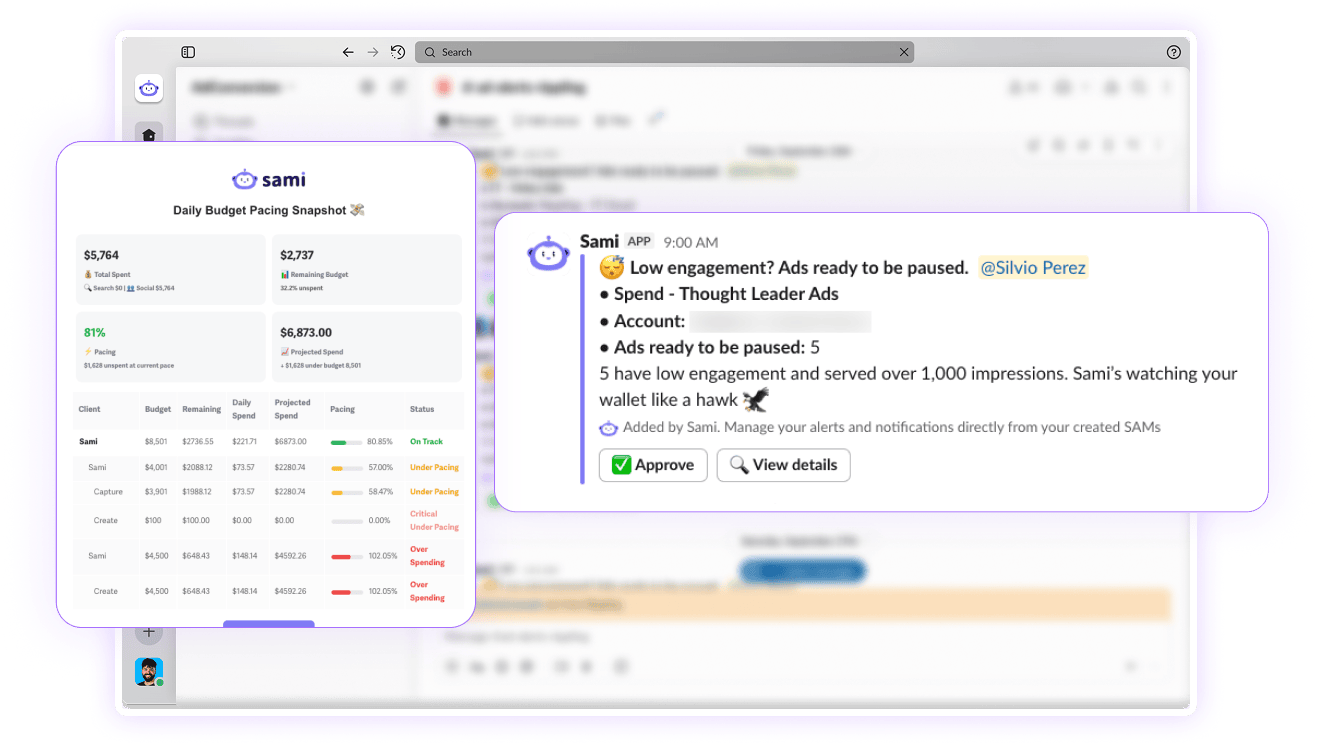
Sami also lets you set up budget protections:
- Budget Pacing automatically increases or decreases your Meta Ads campaign budgets based on performance. If you want more control, you can set a maximum daily budget or require manual approval.
- Budget Protection gives you a heads-up once you’ve spent 80% of your monthly Meta Ads budget. When you hit the full amount, Sami pauses all campaigns and starts fresh the next month.
- Ad Scheduling pauses your ads at the end of the day and switches them back on the next morning. This prevents Meta from burning through your budget too early, leaving you with no impressions or reach for the rest of the day.
Step 5: Refine Your Meta Ads Audience Targeting
Better Meta Ads targeting doesn’t always mean narrowing your audience. Find where your best leads are coming from, build on what’s working, and give Meta more room to grow.
Find your best audiences
Find which audiences actually attract good-fit buyers.
Don’t judge them on CTR or CPA alone. Compare how many leads qualify, turn into opportunities, and eventually generate pipeline or revenue.
A data analytics platform might get $120 leads from one audience and $190 leads from another. But if the $190 leads consistently come from Chief Data Officers at 500+ employee companies and turn into opportunities, that’s the audience worth building on.
Take a closer look at your B2B retargeting too. You can use UTM parameters to separate traffic coming from tightly targeted LinkedIn or Google Ads campaigns and see how those visitors perform on Meta.
Just don’t keep narrowing your custom audiences because it looks better on paper. The more specific you get, the faster you can run out of people to reach.
Build on your best first-party data
If you’re getting the wrong leads, check the audience insights you’re giving Meta.
A lookalike audience built from every lead in your CRM can send the platform in the wrong direction. This list can include people who downloaded an e-book, booked a demo but never qualified, or simply weren’t a good fit.
Try giving Meta a better starting point. Build your lookalike audiences from customers, sales opportunities, booked meetings, or other high-intent contacts.
You can play with the audience size too. Start with a one-percent lookalike, then test two percent if you need more room to scale. Just keep an eye on the leads coming through as you go wider.
A bigger audience isn’t much help if sales staff suddenly have to sift through twice as many poor-fit leads.
Test broad when it makes sense
If your best audiences are working but you can’t get much more out of them, try broad targeting.
This gives Meta Ads a larger pool of people to choose from instead of limiting delivery to the audiences you’ve built yourself.
A Pixel with plenty of conversion history and ads that clearly speak to your ICP can help the algorithm figure out who’s worth reaching.
Consider your market size as well. An HR platform selling to thousands of companies gives Meta much more room to explore than enterprise software built for a few hundred target accounts.
Learn more about Meta Ads B2B targeting from AdConversion’s full video tutorial.
Step 6: Test Your Meta Ad Creative
Once you know you’re reaching the right people, turn your attention to the ads they see. Test different ideas, messages, and formats to find what gets the right buyers to stop, click, and convert.

Test bigger creative ideas
Don’t waste your tests on tiny changes that won’t teach you much.
A new background color or slightly tweaked headline can wait. Start with creative concepts that look and feel completely different.
You can test a customer story against a product demo, a before-and-after against a meme, or a pain-point ad against one focused on the outcome.
The goal is to find out which ideas your buyers actually respond to, not whether they prefer blue or green.
Get your message and design right
A good idea still needs the right message and design to land.
Get specific with your Meta ad copy. ‘Improve your security operations’ doesn’t give someone much reason to stop scrolling. But ‘Spend less time investigating false positives’ speaks to a problem security teams deal with every day.
Specific problems also give you a more natural way to create urgency and motivation. You’re giving buyers a reason to care now instead of forcing urgency with another ‘Act today’ call to action (CTA).
Then make sure the design helps sell that message. The main point should be easy to spot, the text should be easy to read, and the visual should support what you’re saying.
Adapt creative to placement
Don’t assume an ad is bad just because it struggles in one placement.
Check your placement breakdown in Meta Ads Manager first. You might find that a square Feed ad performs well but falls flat when Meta serves it as a 9:16 Story.
That’s a format problem, not necessarily a creative problem.
You can keep the idea but adapt the asset to the placement using the right ad specs. Rework a static Feed ad for Stories, turn it into a vertical Reel, or use carousels when the message needs a few frames to tell the full story.
Watch for creative fatigue
Keep an eye on ads that used to perform well but are starting to lose momentum.
If your audience keeps seeing the same ad, CTR starts falling, and CPA begins climbing, then ad fatigue might be setting in.
Just don’t use frequency alone to decide if an ad is tired. A higher frequency can be perfectly fine if the ad is still bringing in qualified leads at a reasonable cost.
Sami can help you beat ad fatigue through automation. Its Ad Fatigue Detector checks your ads every week. If frequency is high and CTR drops below your 90-day average, Sami sends you a real-time Slack alert. That’s your cue to refresh your creative assets.
And you don’t always need to throw the whole ad away. A new hook, visual, social proof point, or format can give a winning idea another run.
Build on your winners
When you find an ad that works, squeeze more out of it.
Keep the core idea, but change how you bring it to life. For instance, you can turn a customer story into a short video, static image, or carousel. Or you can try a product demo with a different use case.
This gives Meta Ads more creative assets to work with without sending you back to the drawing board every time.
AdConversion’s B2B SaaS creative services can take the entire Meta ad creative process off your plate. Its copywriters and designers handle everything from coming up with new concepts to writing the copy and designing the ads. They also test your creatives and use what performs best to guide the next round of ads.
Watch AdConversion’s Meta Ads for B2B tutorial for more tips on getting your creatives, targeting, and overall approach right.
Step 7: Fix Your Meta Ads Post-Click Performance
If people click your Meta ads but don’t convert, or plenty convert but aren’t a good fit, look beyond the ad. The problem could be your landing page, form, or the size of the ask.
Match your ad and landing page
Your landing page should continue the conversation your Meta ad started. Keep the same problem, promise, audience, and offer all the way through.
If your ad tells security teams they can spend less time investigating false positives, the landing page should lead with that same problem. Sending people to a generic cybersecurity page forces them to hunt for the reason they clicked in the first place.
Make sure the CTA lines up too. If the ad promotes a product demo, the page shouldn’t suddenly push a free trial or a vague “Get started” button.
AdConversion builds dedicated landing pages for each Meta Ads campaign, so the message and offer stay consistent after the click. Its conversion rate optimization (CRO) specialists also keep improving your pages after launch by testing new copy, offers, CTAs, and page elements.
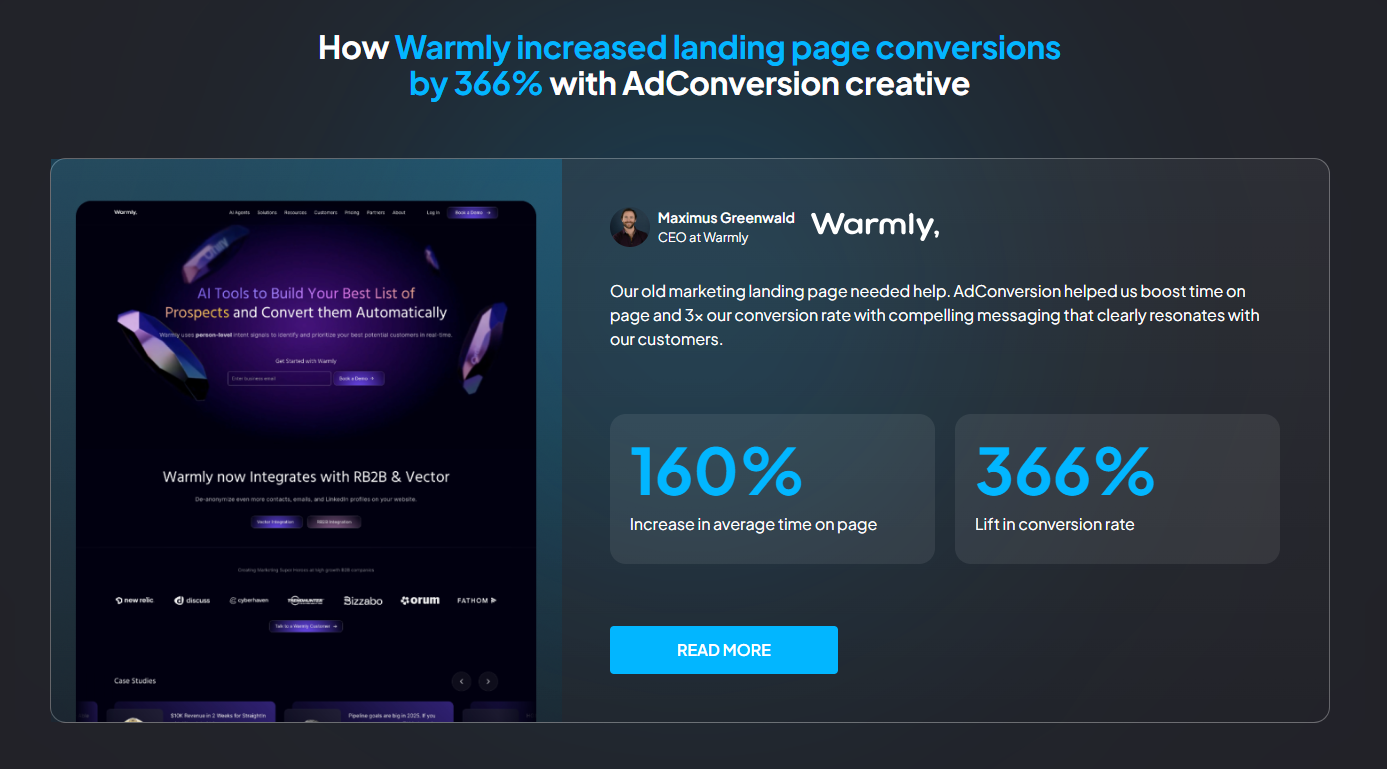
This approach helped Warmly increase its landing page conversion rate by 366% and average time on page by 160%. For more details, read AdConversion’s Warmly case study.
Add questions that qualify
If Meta keeps sending leads that go nowhere, make people put a little more thought into submitting the form.
Meta’s prefilled forms can make converting almost effortless. Someone can tap through so quickly that they barely remember converting when sales follows up.
To prevent this ‘social amnesia,’ add a few qualifying questions about company size, role, or other criteria your sales team uses to determine fit.
You can also test higher-intent form settings that ask people to review their information before submitting.
You might end up with fewer leads. That’s fine if more of them are worth a sales conversation.
Cut unnecessary form fields
Make sure your qualifying questions don’t turn into an interrogation.
If the right prospects reach your form but drop off before submitting, your forms may be creating too much friction.
Keep the fields sales actually uses to qualify leads and cut the ones that simply collect extra information. If removing a field wouldn’t change what sales does with the lead, test the form without it.
You still get everything you need without making prospects do unnecessary work.
Try a smaller ask
Sometimes the ask is simply too big for where the buyer is in their journey.
A cold prospect who sees your enterprise software ad for the first time might not be ready to talk to sales yet. So give them another way in.
A lower-commitment offer can help you capture interest without forcing an immediate sales conversation, such as registering for a webinar or starting a free trial.
You don’t need to rebuild your whole offer strategy. Test an ask that better matches how ready that audience is to buy. Then see whether more of those prospects eventually move further down the funnel.
Over to You
Knowing how to optimize Meta Ads for B2B SaaS makes it much easier to spot what needs your attention.
You can trace the problem, fix what’s actually getting in the way, and leave everything else alone. That makes every optimization more intentional and every dollar you spend easier to defend.
And if you’d rather bring in some backup, have a quick chat with AdConversion.
Frequently Asked Questions (FAQs)
How do you know if Meta Ads need optimizing?
Look for a pattern, not one bad day. Rising CPA, falling conversion rates, weaker lead quality, or less pipeline from the same spend can all point to a problem. Compare the change with your usual performance. If it sticks around, dig into the numbers and find out what’s driving it.
How long should Meta Ads run before optimizing?
There’s no magic number of days to wait before optimizing. It all depends on your spend, expected CPA, conversion volume, buying cycle, and what you’re testing. A tracking issue or campaign that stops delivering needs attention now. A small CPA jump after a couple of slow days probably doesn’t.
How do you scale Meta Ads without increasing CPA?
You can’t guarantee the same CPA as you spend more. Start with campaigns already bringing in qualified leads and pipeline, then increase your budget gradually. Watch what each extra dollar gets you. If marginal CPA increases too much or lead quality drops, ease off.
Does editing a Meta ad reset the learning phase?
Not every Meta Ads edit has the same effect, but significant changes can disrupt delivery and send an ad set back into learning. Don’t tweak campaigns just because you haven’t touched them lately. Make a change when you have a clear reason or hypothesis, then give Meta time to adjust before changing something else.

Meta Ads for SaaS: The B2B Playbook That Gets Results
Meta Ads for SaaS puts your software in front of potential buyers as they scroll Facebook and Instagram. It can help you spark interest, capture demand, and generate pipeline.
But getting there isn’t always easy. B2B targeting can be messy, lead quality can disappoint, and yesterday’s winning ad can quickly lose momentum.
Learn how to tackle these challenges with smarter campaign structures, targeting, creatives, measurement, and optimization.
Table of Contents
Which SaaS Business Models Benefit Most From Meta Ads?
Why Do Most SaaS Companies Struggle With Meta Ads?
How Do You Build a Meta Ads Strategy for SaaS?
How Do You Structure Meta Ads Campaigns for SaaS?
How Do You Set Budgets for SaaS Meta Ads Campaigns?
What Targeting Strategies Work Best for SaaS on Meta Ads?
What Meta Ad Creatives Work Best for SaaS?
How Do You Measure Meta Ads Performance for SaaS?
How Do You Optimize Meta Ads for SaaS?
Frequently Asked Questions (FAQs)
Do Meta Ads Work for SaaS?
Yes, Meta Ads can work for SaaS, but success depends on your business model, audience, offer, sales motion, and creatives.
You can use Meta for demand generation, high-quality lead generation, prospect conversion, retargeting, and lead nurturing across long sales cycles.
For example, one AdConversion client had previously focused most of its paid social efforts on LinkedIn. After expanding to Meta, the company generated $800,000 in new business pipeline from the channel.
But that doesn't mean Meta will work the same way for every SaaS business. A product-led growth (PLG) company looking for free trial signups has very different goals from an enterprise with a long sales cycle and a small target market.
That's why Meta needs a clear job description in your wider acquisition strategy. And you need to judge it by business results that actually matter.
Which SaaS Business Models Benefit Most From Meta Ads?
Meta Ads can work across different SaaS business models, but the role you assign it should match how customers buy your product.
Product-led SaaS
You can use Meta Ads when your product has a large pool of potential users, and people can experience its value on their own. The platform helps you reach new users at scale and give them a low-friction way to try the product.
Free trials and freemium plans offer users an easy way to go from ad to product. There’s no demo call or sales conversation standing in the way.
Just remember that more free trial signups don’t automatically mean more customers. You still need to attract people who are likely to use the product and eventually pay for it.
Sales-led SaaS
Convincing cold audiences to book a demo right away can be a tough ask. A lower-friction Meta Ads offer allows buyers to get to know your product first.
You can offer them a useful guide, webinar, or another asset that solves one of their problems.
Retargeting can then keep your product on the buyer’s radar as that initial interest grows.
Enterprise SaaS
Enterprise SaaS is a different ball game. You’re typically dealing with a smaller group of target accounts, long sales cycles, and several stakeholders who are making decisions about the deal.
Meta can help you stay in front of those accounts and reach more of the buying committee. That might include finance, legal, executives, or other stakeholders who weren’t part of the original conversation.
You can even advertise to open opportunities. Social proof, customer stories, and content that tackles common objections can give buyers another reason to keep the deal moving.
Why Do Most SaaS Companies Struggle With Meta Ads?
Most SaaS companies struggle with Meta Ads because they use strategies that don’t match how the platform works or how B2B buyers make purchasing decisions.
Common mistakes include:
- Treating Meta like e-commerce. SaaS buyers rarely see one ad and make an immediate purchase. Your campaigns need to account for a longer journey from first touch to a closed deal.
- Expecting Google-level intent. People aren’t actively searching for your solution while scrolling Facebook or Instagram. Your ads need to grab their attention and create interest first.
- Trying to copy LinkedIn targeting. Meta doesn’t offer the same professional targeting data. You need other ways to help the platform find the right buyers.
- Asking for too much too soon. A cold prospect might not be ready to book a demo. So you need to create lower-friction offers that give them an easier first step.
- Optimizing for cheap leads. A low cost per lead (CPL) means nothing if those leads never become qualified opportunities or customers.
- Running generic ad creatives. Generic messaging makes it harder to attract and qualify the right buyers. Your Meta ads need to make it clear who the product is for and why they should care.
- Judging Meta by lead volume alone. Lead numbers only show part of the story. You can easily back the wrong campaigns if you don’t check what happens after ad conversion.
How Do You Build a Meta Ads Strategy for SaaS?
Build your Meta Ads strategy around the results you want, the offer you’ll promote, the conversions you care about, and your available resources.
Start with business outcomes
Give Meta Ads a specific goal before you start building campaigns.
Maybe you want to bring in more sales opportunities, activated users, customers, or revenue. Start with that outcome and work backward.
This gives the rest of your strategy a clear direction. You can then choose offers, conversion signals, and campaigns based on what you’re actually trying to achieve.
You’ll also be able to evaluate performance against meaningful SaaS results, instead of vanity metrics.
Match offers to intent
Match your offer to how much you can realistically ask from your audience.
A guide or webinar gives someone an easy way to engage with your brand. A free trial asks them to spend more time using the product, while a demo requires them to talk to sales.
Pick the offer that makes sense for the audience you’re trying to reach. Then create a call to action (CTA) that will push them toward the next step.
A simple offer can work well with a Meta Instant Form that automatically collects contact details without the lead having to leave the platform.
But if your offer needs more explanation, building a dedicated landing page is your best bet.
Identify meaningful conversion signals
Figure out which conversions tell you that your Meta ads are bringing in the right buyers.
For sales-led SaaS, a prospect becoming a sales-qualified lead (SQL) or opportunity is more valuable than a form submission. For PLG, activation and paid conversion matter more than the initial signup.
Decide which of those milestones matter before you launch. You’ll need them later to separate campaigns that simply generate any conversions from campaigns that generate valuable conversions.
This distinction will help you decide which ad campaigns to optimize, pause, or scale.
Choose in-house or agency support
Work out whether you have the people and expertise to handle Meta Ads for B2B SaaS in-house or need outside support.
Running paid social requires campaign strategy and management, creative production, landing pages, tracking, optimization, and reporting.
If you’re missing several of those capabilities, a B2B SaaS marketing agency like AdConversion can cover them.
AdConversion Agency gives you access to a full team of B2B SaaS paid media strategists, copywriters, designers, and conversion rate optimization (CRO) specialists.
The team learns the ins and outs of your product, ideal customer profile (ICP), and go-to-market motion. Based on those insights, they build a full-funnel Meta Ads strategy to reach, nurture, and convert the accounts you care about.
AdConversion then takes the day-to-day work off your plate. It runs your Meta Ads campaigns, creates the ads, builds SaaS landing pages, optimizes performance, and handles reporting.
And because Meta Ads is only one piece of the puzzle, AdConversion can connect it with Google Ads, LinkedIn Ads, Reddit Ads, and other paid channels. So you get a cross-channel strategy focused on bringing in more pipeline and revenue.
How Do You Structure Meta Ads Campaigns for SaaS?
Structure your Meta Ads campaigns around the parts of the B2B buying journey you want to support, and keep the setup as simple as possible.
Use prospecting to find new buyers
Meta Ads prospecting campaigns help you reach potential buyers who haven’t interacted with your business yet.
Structure these campaigns around the conversion you want, whether that’s a lead, free trial, or demo request.
Keep existing customers, SQLs, and other warm audiences out of prospecting so your ad budget stays focused on finding new buyers.
Retarget buyers who already know you
B2B retargeting campaigns give you another shot at users who previously showed interest but didn’t take the next step.
Build your Meta Ads retargeting pool from meaningful interactions, such as website visits, content downloads, video engagement, or trial signups.
You can also retarget qualified traffic you’re already paying to bring in through Google Ads or LinkedIn Ads.
Accelerate deals already in your pipeline
Meta Ads can also help you move open opportunities closer to closed deals.
Set up pipeline acceleration campaigns around the opportunities your sales team is actively working on. You can use them to stay in front of existing contacts and reach more people involved in the buying decision.
Keep the audience synced with your customer relationship management (CRM) system. This way, prospects enter the campaign when they become opportunities and leave when the deal is no longer active.
Keep your structure simple
Don’t create a new campaign or ad set every time you want to A/B test something.
Keep campaigns together when they share the same objective and conversion goal. Split them when you need separate control over budget or optimization.
The same goes for ad sets. Create separate ones only when you genuinely need to test or manage audiences independently.
Otherwise, consolidate. You’ll avoid spreading your conversion data across too many places and give Meta more information to optimize with.
How Do You Set Budgets for SaaS Meta Ads Campaigns?
Set budgets for your Meta Ads campaigns based on what you can afford to spend and where that money can make the biggest impact:
- Work backward from your business goals. Look at what a new customer is worth and what you can afford to pay to acquire one. Then consider how many customers or qualified opportunities you want Meta to generate and use those numbers to set your total budget.
- Prioritize the campaigns that matter most. Don’t automatically divide your budget evenly across every campaign. Put more of your available spend behind the ones that support your current goals.
- Factor in audience size. Prospecting usually takes up more budget because you have a larger pool of potential buyers. Retargeting and acceleration audiences are much smaller, so you can stay in front of buyers without spending as much.
- Give each campaign enough budget to produce useful data. If your total budget can’t properly support every campaign, run fewer campaigns. Otherwise, you’ll spread your ad spend so thin that you won’t be able to tell what’s actually working.
- Adjust budget allocation as results come in. Your starting split isn’t set in stone. Move more budget toward the campaigns driving better business results and pull back where performance isn’t holding up.
What Targeting Strategies Work Best for SaaS on Meta Ads?
The best Meta Ads targeting strategies for SaaS start with the data you trust most, then give the platform more room to find new buyers as you scale.
First-party audiences improve precision
Your CRM already holds some of your best targeting data, so use it.
Upload lists of contacts who’ve shown real buying intent. These can include past marketing-qualified leads (MQLs), booked meetings, demo no-shows, existing customers, and more.
Meta can match those contacts to its users, giving you a much tighter audience to target.
Just don’t slice your data too thin. Small lists and low match rates can quickly limit your reach, especially if you sell to a niche ICP.
Start a little broader, then tighten your targeting based on the data and performance you see.
Lookalikes extend proven audiences
Meta’s Lookalike Audiences help you find more people like the buyers you already know.
For example, you can upload your existing customers and build a one- or two-percent lookalike from that list. This lets Meta find new users with similar characteristics.
You can repeat the same process with other CRM segments.
Third-party data gives you more options
Eventually, you’ll run out of first-party data to work with. When you hit that wall, third-party data can help you get more specific about who you reach.
Upload your target account list to third-party data providers like Primer and Metadata. They’ll find the contacts who work at those companies, which you can then feed to Meta to build custom audiences.
This helps you run account-based marketing (ABM) campaigns and get closer to the targeting precision you’re used to on LinkedIn.
Broader audiences enable discovery
Once you’ve taken first- and third-party data as far as it can go, you can give Meta Ads more freedom to find new buyers.
With Meta Advantage+, you can loosen your targeting and let the platform figure out who’s a good fit for your ads. Meta uses its own signals, including your ad content, to find relevant users within a broader audience.
This strategy has a better shot when your ad creatives speak directly to your ICP, as it shows Meta the kind of buyers you’re trying to reach.
For a step-by-step walkthrough, check out AdConversion’s full Meta Ads B2B Targeting Tutorial.
What Meta Ad Creatives Work Best for SaaS?
The best Meta ad creatives for SaaS make your product, the problem it solves, or the outcome it delivers easy to understand at a glance.
Product demos show value
Product demo ads show buyers what your software actually does instead of asking them to take your word for it.
Keep each video ad focused on one problem or use case. Show what the user is struggling with, how your product helps, and what changes as a result.
You don’t need to squeeze every feature into one ad. A quick screen recording of one useful workflow can make your value much easier to grasp.
And don’t overproduce it. A simple demo that gets to the good stuff quickly feels much more at home in the Meta feed than a professional two-minute product tour.
Human-led videos build trust
Founder, customer, and user-generated content (UGC) video ads put a real person behind your message, which makes it more credible and relatable.
Use these ad creatives to call out a familiar pain point, share a useful insight, tackle an objection, or explain how someone solved a problem with your product.
Keep the delivery natural. You want content that someone might actually stop to watch on Facebook or Instagram.
The opening matters too. Lead with the problem, result, or insight instead of wasting valuable ad time introducing your SaaS company.
Bold statics surface problems
Static image ads work best if you include a bold message that stops buyers from scrolling.
Feature a problem your ICP instantly recognizes, a result they want, or a point of view that grabs their attention. Keep the visual simple enough so the message lands immediately.
This is also a good place for creative testing. Push beyond traditional graphics with a before-and-after concept, meme, product illustration, or customer result.
Carousels explain complex products
When one visual can’t tell the whole product story, a carousel ad gives you more room to break it down.
Use the sequential cards to walk buyers through a workflow, unpack a more complex use case, or move from the problem to the solution one step at a time.
Just don’t turn the carousel into a feature catalog. Give the ad one story and make every card move that story forward. Even prospects who only swipe through the first few cards should understand what your product can help them do.
Whichever ad format you use, keep testing big creative ideas instead of endless micro-variations. Meta analyzes your ad copy, images, carousels, and video transcripts to decide which ads to serve and who might be interested in them.
See how ad creatives fit into the bigger campaign picture in AdConversion’s beginner’s guide to becoming a Meta Ads expert.
How Do You Measure Meta Ads Performance for SaaS?
Measure Meta Ads performance by tracking what happens after the click, so you know which campaigns drive pipeline and revenue.

Step 1: Set up conversion tracking
Start by giving Meta a clear view of what people do after they interact with your ads.
Install Meta Pixel on your website to track actions like landing page visits, form submissions, demo requests, and free trial signups.
Then pair it with the Conversions API (CAPI), which sends conversion data to Meta from your server, website platform, or CRM.
Using both gives Meta more conversion data to work with. CAPI can also capture events that browser-based Pixel tracking might miss because of ad blockers or connectivity problems.
Just make sure you’re tracking the actions that actually matter to your business. A page view is useful, but a qualified demo request tells you much more about buying intent.
Step 2: Connect ads to your CRM
Meta Ads tells you someone converted, but your CRM shows you what happens next.
Connect your Meta Ads account to your CRM so you can see which leads turn into SQLs, opportunities, and customers.
Use UTMs (Urchin Tracking Modules) to keep track of the campaign, ad set, and ad behind each lead. AdConversion’s free UTM generator makes this easy.
Step 3: Prioritize pipeline over vanity metrics
Once your tracking is in place, judge Meta Ads by the quality and business value of the leads it generates.
Impressions, click-through rates (CTRs), cost per click (CPC), and cost per mille (CPM) help diagnose campaign performance issues.
For instance, a low CTR might point to a weak creative, while a high CPM could signal an expensive audience.
But these metrics only tell you what’s happening inside your campaigns. They don’t tell you whether your ad spend is creating value for the business.
For that, focus on metrics tied to actual sales outcomes, like cost per SQL, cost per qualified opportunity, pipeline generated, and revenue.
How Do You Optimize Meta Ads for SaaS?
Optimize Meta Ads for SaaS by cutting wasted spend, giving winning ads more room to grow, and refreshing creatives before performance starts to slip.
Meta Ads automation tools can take some of that day-to-day work off your plate, helping you catch problems early and act on opportunities faster.
Cut persistent underperformers
Some Meta ads need more time to prove themselves, while others keep dragging on your budget with nothing to show for it.
Give new ads enough time and data before making a call. Look for the ones that consistently miss the key performance indicators (KPIs) you’re optimizing toward.
The tricky part is catching those underperformers before they burn through your budget.
Sami, AdConversion’s AI ad automation tool, monitors your Meta ads around the clock. It checks your campaigns every hour and can automatically pause any ads that have underwhelming KPIs.
If you’d rather approve changes yourself, it can send you recommendations to Slack first.
Shift budget toward winners
When a Meta Ads campaign is consistently delivering the results you want, give it more room to grow.
Scale gradually and watch what happens as spend increases. A campaign won’t necessarily show the same cost per acquisition (CPA) when you put more money behind it.
And don’t let cheap leads fool you. If another campaign costs more up front but brings in better opportunities, spending more on it could have a bigger impact.
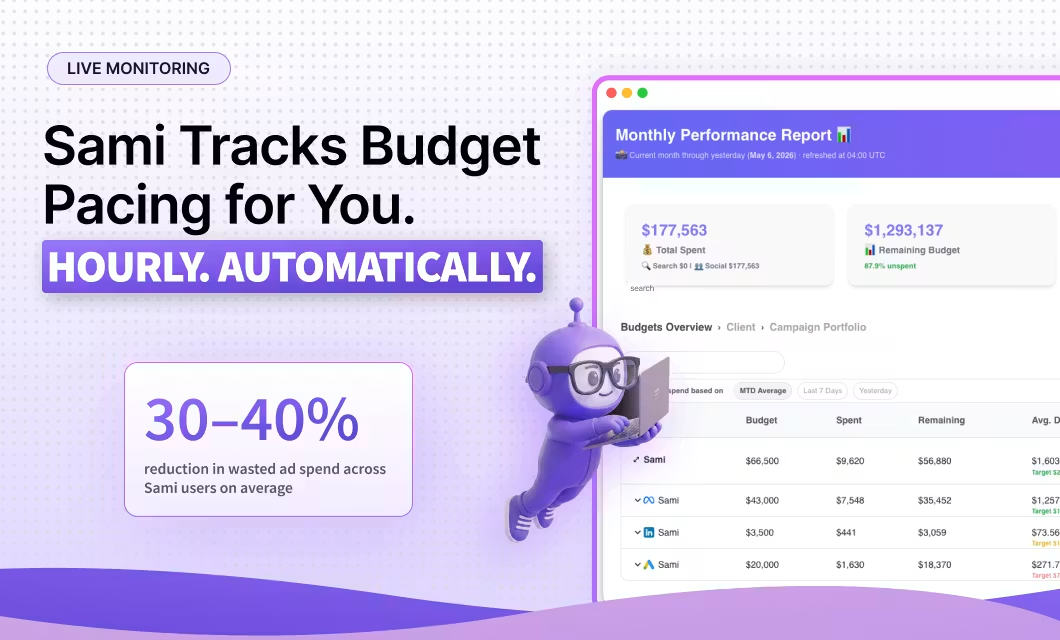
Sami helps you keep those budget shifts tied to performance. The AI sidekick automatically increases budgets for top-performing campaigns and pulls back on weaker ones.
Refresh tired ad creatives
Even your best Meta ad can lose momentum once people have seen it too many times.
Watch frequency and CTR together. If frequency keeps climbing while CTR drops, people might be getting tired of your ad creatives.
That’s your cue to bring something fresh into the mix. Just don’t settle for swapping a headline or changing one small design element. Give people a reason to stop scrolling with a new ad format or creative concept.
Sami helps you beat Meta Ads fatigue with automation. Its ad fatigue detector sends you a Slack alert when frequency rises and CTR falls below the ad’s 90-day average. You can then take a closer look and decide whether it’s time for a fresh creative.
Protect your overall ad spend
Meta Ads can burn through money, so make sure your campaigns don’t blow past your monthly budget too soon.
Monitor pacing as the month unfolds, especially when you start scaling winners. A few budget increases can push your monthly spend higher than expected if nobody’s keeping track.
Sami gives you a couple of guardrails here. Its Budget & KPIs dashboard shows your spend, pacing, and key metrics at a glance. If there’s an issue, Sami recommends automatic fixes, so you know exactly what to do.
Sami’s budget protection automation goes one step further. It alerts you when you’ve spent 80% of your monthly Meta Ads budget and it can automatically pause your campaigns once you hit your spending limit.
Explore AdConversion’s complete guide on how to optimize Meta Ads for B2B SaaS for a more detailed, step-by-step walkthrough.
Over to You
Meta Ads for SaaS can open up a lot of room for growth if you approach it with a clear plan and stay curious about what the data is telling you.
There’s no magic setup you can copy and leave running forever. Just keep learning from your buyers, trying new ideas, and putting your money behind what actually moves the business forward.
If you need a fresh perspective on where Meta could fit into your paid media mix, have a quick chat with AdConversion.
Frequently Asked Questions (FAQs)
Q1. Are Meta Ads or LinkedIn Ads better for B2B SaaS?
It depends on what you need the channel to do. LinkedIn Ads gives you much tighter B2B targeting, while Meta Ads can help you reach buyers at greater scale and often at a lower cost. Don’t treat it as an either-or decision. The two channels can work well together across the buying journey.
Q2. Are Meta Ads or Google Ads better for SaaS?
Google Ads and Meta Ads catch buyers in different moments. Google Search Ads are great for reaching people already searching for a solution like yours. Meta Ads, meanwhile, can get your software in front of potential buyers before they start searching. Using both can help you capture existing demand while also creating more.
Q3. Should SaaS companies use Meta Instant Forms or landing pages?
Test both and let the lead quality decide. Meta Instant Forms make it easy for buyers to convert without leaving the platform, so they can generate more leads. Landing pages add a bit of friction, but they can help explain complex offers and bring in higher-quality prospects. Compare SQLs and qualified opportunities, not just form fills or CPL, before picking a winner.
ChatGPT Ads for SaaS: A Full Guide to OpenAI's Ad Platform
ChatGPT Ads for SaaS is still brand new, which makes it both exciting and a little unpredictable.
OpenAI launched its advertising platform in February 2026, and it has been shipping new features ever since.
You'll still run into a few rough edges, from limited campaign objectives to B2B SaaS eligibility questions that haven't been fully answered yet.
But that's the price of getting in early.
This guide brings together OpenAI's official documentation and AdConversion's first-hand experience running pilot campaigns.
Everything in this article reflects ChatGPT Ads as of July 2026. But don't be surprised if OpenAI has rolled out a few more updates by the time you’re reading it.
Table of Contents
What Are the Current Limitations of ChatGPT Ads for SaaS?
When Should SaaS Businesses Start Investing in ChatGPT Ads?
How Do You Launch Your First ChatGPT Ads Campaign for SaaS?
How Do You Measure ChatGPT Ads Performance?
What Are ChatGPT Ads?
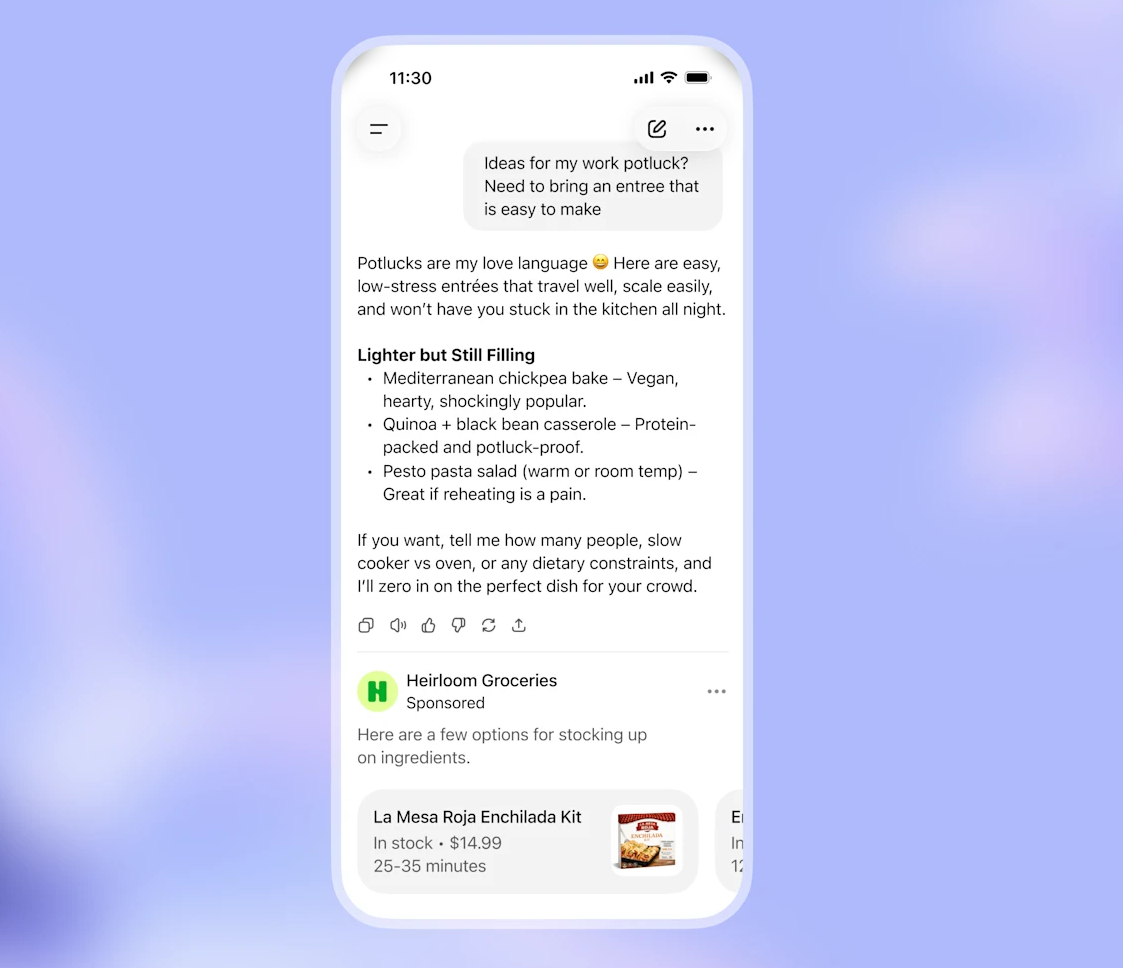
ChatGPT ads are sponsored placements that appear below ChatGPT answers during AI conversations.
The format is refreshingly simple. Each ad includes only:
- Your brand name and favicon
- A headline and a short description (max. 100 characters)
- A small thumbnail image
- A link to your landing page
OpenAI labels every placement as sponsored, so users can easily tell it apart from the AI’s response.
What makes ChatGPT Ads stand out is the unique advertising experience it creates.
Instead of fighting for attention on search results pages and social feeds, your brand becomes part of the user’s research process.
You can reach potential buyers while they ask questions, compare vendors, or explore new solutions with AI search.
This gives you a brand new touchpoint to add to your paid media mix.
How Do ChatGPT Ads Work?
ChatGPT Ads match your ads to relevant conversations while using a familiar paid media campaign structure.
Context hints replace keyword targeting
If you've spent years building keyword lists in Google Ads, you now need to break that habit.
Instead of choosing the exact searches you want to target, you provide context hints.
These hints tell OpenAI what your product does, who it's for, and the types of conversations it belongs in.
Think of them as conversation themes that match the questions people are asking and the problems they’re trying to solve.
The more context hints you give, the easier it becomes for ChatGPT to find relevant opportunities for your ads.
Conversations determine ad relevance
ChatGPT Ads doesn't decide whether to show your ad based on a single prompt or keyword.
It looks at the entire conversational context to understand what the user is trying to accomplish.
If the chat signals commercial intent and your product could genuinely help the user, OpenAI will display your ad.
For example, someone asking ChatGPT 'What is HR software?' isn't ready to buy, so they won’t see any ads. But once they start comparing platforms and pricing, an HR software ad would fit right in.
This contextual targeting might just be one of the platform’s biggest advantages.
Campaign structure mirrors traditional ad platforms
The good news is that ChatGPT Ads Manager isn’t an entirely different ballgame if you’re used to managing Google Ads for SaaS.
The account follows the same hierarchy you're accustomed to: campaigns contain ad groups, and ad groups contain individual ads.
You can also choose a campaign objective and submit bids that determine how your ads compete for ad delivery.
This familiar structure makes the learning curve much shorter.
User trust and brand safety come first
ChatGPT Ads doesn't chase ad impressions at all costs.
If a conversation involves sensitive topics like self-harm, violence, hate, or fraud, your ads simply won't appear.
This policy protects the user experience and your brand’s reputation.
OpenAI also goes over your ad copy, images, and landing pages with a fine-tooth comb before they go live.
Misleading claims, deceptive offers, impersonation, prohibited products, and other restricted content won't pass the review.
OpenAI can reject your ad, reduce its reach, or ask you to fix it before it runs.
If you keep breaking the rules, you risk losing access to ChatGPT Ads altogether.
What Are the Current Limitations of ChatGPT Ads for SaaS?
ChatGPT Ads is still in its early stages, so you should expect some limitations in accessibility and features.
Platform access is limited
Getting into ChatGPT Ads isn't as simple as creating an account.
The Ads Manager is still in beta, and OpenAI continues to expand access in phases.
Right now, only businesses in the US, Canada, the UK, Australia, New Zealand, Japan, and Korea can apply.
Even then, you'll need OpenAI's approval before you can launch your first campaign.
If you haven’t gained early access to the beta version, as AdConversion had, don’t despair.
ChatGPT Ads is still developing and needs more time to reach maturity.
Campaign objectives are in short supply
If you're used to mature paid media platforms, you'll notice a few gaps straight away.
As of July 2026, ChatGPT Ads only supports Views and Clicks as campaign objectives, with Conversions still in development.
This means you can’t yet optimize for leads or sales as you would on Google Ads.
Targeting isn't fully mature
OpenAI’s targeting capabilities still have a long way to go.
Geographic targeting is limited to the same countries where advertisers can access the platform.
Plus, ChatGPT ads only appear to users on the Free and Go plans.
If your ideal customers use Plus, Pro, Business, Enterprise, or Edu plans, they won't see your ads.
This means part of your target audience could be out of reach before your campaign even rolls out.
Reporting has room to grow
ChatGPT Ads reporting is another area that's still catching up.
You'll see top-of-the-funnel metrics like impressions, clicks, and click-through rates (CTRs), but not much beyond that.
OpenAI recently added the option to set up conversion tracking, which is a step in the right direction.
But you still can't connect ad spend to pipeline, revenue, or other business metrics that matter most to B2B SaaS teams.
You also can't see which conversations triggered your ChatGPT ads because the platform doesn't offer conversation or placement reports yet.
This makes it much harder to understand what actually drives performance or wasted spend.
Some SaaS businesses might not qualify
OpenAI currently supports a relatively small number of advertising categories.
The problem is that most of them seem to favor B2C brands more than B2B companies.
For instance, you have lifestyle and household goods, local services, and travel and experiences.
The ad policies also mention digital products, but don't clearly define them.
And since you don’t know which SaaS products actually qualify, campaign approval becomes unpredictable.
Fintech companies face even more restrictions because OpenAI currently allows only general financial software and educational resources.
When Should SaaS Businesses Start Investing in ChatGPT Ads?
SaaS businesses should start investing in ChatGPT Ads once they’ve built a paid acquisition engine that produces consistent business results.
Experiment once your marketing works
Don't make ChatGPT Ads your first paid media channel.
Start testing it after you've achieved success on major ad platforms like Google Ads, LinkedIn Ads, or Meta Ads.
By then, you'll already know which offers generate pipeline, which messaging resonates with buyers, and which landing pages convert.
That puts you in a much better position to experiment with a new channel than if you simply go in blind.
Start with a small test budget
You don't need to bet your entire ad budget to see whether ChatGPT Ads deserve a place in your paid media program.
Treat it like any new channel and start with a learning budget of around five to ten percent of your monthly ad spend.
Gather data, learn what works, and scale only once you see measurable results.
How Do You Launch Your First ChatGPT Ads Campaign for SaaS?
Launch your first ChatGPT Ads campaign for SaaS by aligning your ads and landing pages with the conversations your ideal buyers are having.
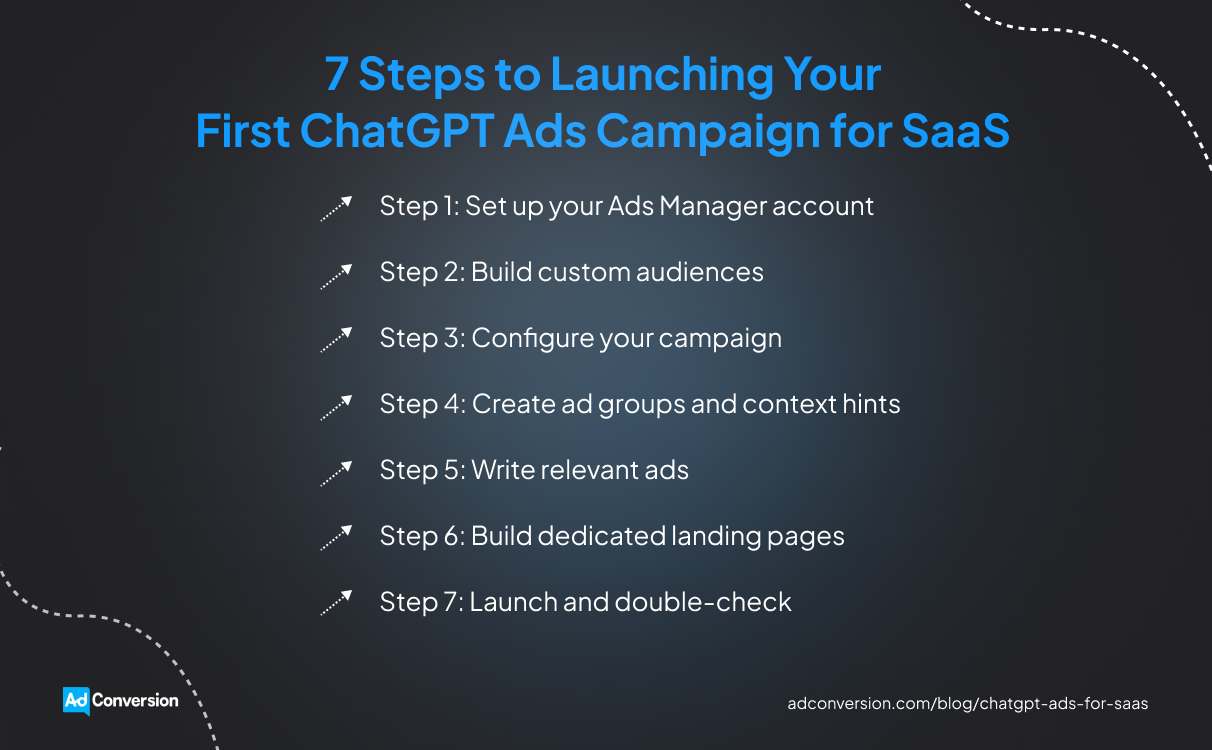
Step 1: Set up your Ads Manager account
Start by signing in to ChatGPT Ads Manager with your OpenAI account and completing the onboarding process.
You'll need to enter your business details, verify your account, and wait for OpenAI to review your application.
Once you're approved, finish setting up your account information, billing profile, and payment method.
You can then invite other team members to help manage your campaigns.
Step 2: Build custom audiences
Custom audiences is one of the latest features in ChatGPT Ads, and it's a welcome addition for B2B SaaS marketers.
Setting up a custom audience is pretty straightforward.
You upload a list containing either email addresses or phone numbers for your customers or prospects, then wait for OpenAI to match the data.
Just make sure the list is properly formatted because ChatGPT Ads only accepts one identifier type per file.
Once your custom audience is set up, you can use it to include or exclude users from a campaign or adjust your bids for specific audience segments.
Your audience needs at least 25,000 matched users to be eligible, although OpenAI recommends aiming for 100,000 users or more for the best results.
Step 3: Configure your campaign
Use the campaign objective to tell ChatGPT Ads what you’re trying to accomplish.
If your goal is to get your brand in front of more people, choose Views, which uses CPM (cost per thousand impressions) pricing. If you'd rather drive traffic to your website, go with Clicks, which uses CPC (cost-per-click) pricing.
Choose carefully because you won't be able to change the objective once the campaign goes live.
Your budget deserves just as much attention.
The new daily budget option is a huge improvement because it gives you more control over your ad spend.
During early testing, AdConversion saw one ChatGPT Ads campaign spend its entire lifetime budget in a single day because that was the only available option at the time.
Set your maximum bid based on OpenAI’s recommendations, then adjust it as you learn more about how the platform behaves.
Pick start and end dates that give your campaign enough time to collect meaningful data before making changes.
Step 4: Create ad groups and context hints
Keep each ad group focused on a single conversation theme instead of trying to squeeze every use case into one campaign.
For example, a cybersecurity SaaS company could create one ad group for buyers comparing endpoint protection platforms and another for IT teams looking to reduce ransomware risk.
This makes it much easier to keep your ads and context hints aligned.
Your context hints should describe the conversations you want to join, not the keywords you want to target.
Think in terms of moments like 'user is comparing HR platforms' or 'user needs help automating employee onboarding.'
Based on AdConversion’s pilot ad campaigns, broader yet highly relevant context hints tend to outperform extremely narrow ones.
If you're not sure where to start, ask ChatGPT or Claude for help.
Feed the AI your customer interviews, testimonials, or sales call transcripts. Then ask it to identify the questions, pain points, and buying signals that show up most often.
Those insights make excellent context hints.
For more details, check out AdConversion’s tutorial on ChatGPT Ads targeting.
Step 5: Write relevant ads
Your ChatGPT ad creatives should feel like a natural next step in the conversation, not a promotional banner.
Write a headline that immediately tells the user how your SaaS product can help.
Instead of 'HR Software for Growing Companies,' try 'Simplify Employee Onboarding with AI.'
Use the ad description to build on the headline’s promise by highlighting one clear benefit or outcome.
Every word counts when you have limited space, so focus on what the buyer actually cares about.
ChatGPT Ads only supports small thumbnails that don't leave much room for detailed graphics or product screenshots.
A simple illustration that reinforces your headline is your better option.
Step 6: Build dedicated landing pages
Sending every visitor to your homepage is one of the fastest ways to lose potential customers.
Instead, create a landing page that matches the promise in your ChatGPT ad.
If your ad promises to help companies build real-time dashboards, take visitors straight to your data analytics solution.
Align your page headline, body, and call to action (CTA) with your ad messaging to keep the experience consistent from click to conversion.
Add UTM parameters to every landing page URL to identify traffic from a specific ChatGPT Ads campaign.
You also need to make sure every page loads correctly and is accessible to OpenAI's crawler. Otherwise, your ads might not pass the review.
Building dedicated landing pages for every campaign isn't always realistic, especially if you're juggling multiple launches at once.
If that's the case, bringing in a SaaS landing page agency, like AdConversion, can save your team a lot of time.
AdConversion builds and optimizes landing pages for all types of paid media campaigns, including ChatGPT Ads.
The team also keeps tabs on your pages once they go live, constantly testing new offers, messaging, and CTAs to increase conversions.
For example, AdConversion's work with Warmly shows how redesigning a landing page resulted in a 366% jump in conversion rates and a 160% increase in average time on page.
Step 7: Launch and double-check
Hitting Publish isn't the finish line.
Once your campaign is approved, keep an eye on its status in ChatGPT Ads Manager to make sure your ads are actually delivering.
If you see 'Not serving,' don't panic. Hover over the status to find out what's causing the issue.
In many cases, a quick edit and resubmission are all it takes to get your campaign back on track.
If you’re dealing with something more serious, such as policy violations, business verification issues, or billing problems, you need to resolve it before your ads can start running.
How Do You Measure ChatGPT Ads Performance?
You can measure ChatGPT Ads performance by combining platform metrics with conversion data to understand what's actually driving results.
Keep an eye on available metrics
As of July 2026, the ChatGPT Ads Manager lets you monitor:
- Impressions
- Clicks
- Spend
- CTR
- Average CPC
- Average CPM
- Conversions (only if you set up conversion measurement)
This gives you an idea of how your campaigns are delivering and how efficiently you're spending your ad budget.
Just remember that conversion data can take 24 to 48 hours to appear in Ads Manager, so don't expect immediate updates.
Set up conversion measurement
If you want to know whether your ChatGPT ads are driving trial sign-ups, demo requests, or other valuable actions, you'll need to set up conversion measurement.
OpenAI currently supports three measurement options:
- JavaScript Pixel is the quickest way to start tracking conversions. Once you add the code to your website, it will automatically record the actions users take after clicking your ChatGPT ads.
- Image Tag loads a small tracking image when someone reaches your conversion page. It's a simple alternative if you can't use JavaScript, but it doesn't offer the same level of access.
- Conversions API sends conversion events directly from your server to OpenAI instead of relying on the user's browser. It's the most reliable option for SaaS companies already using server-side tracking because it's less affected by browser restrictions and ad blockers.
Analyze your campaign reports
Checking reports should become part of your regular optimization routine.
ChatGPT Ads lets you compare performance across campaigns, ad groups, and individual ads, making it easy to spot winners and underperformers.
You can also switch to charts to spot performance trends over time or export your data as a CSV file for deeper analysis.
Over to You
ChatGPT Ads for SaaS is still finding its footing, but the opportunity is already hard to ignore.
Getting started now gives you a chance to learn the platform before everyone else joins the party.
Stay curious, keep experimenting, and let the data guide your decisions.
If you'd like a second opinion before launching your first campaign, have a quick chat with AdConversion.

Reddit Ads for SaaS: The Complete Guide to Campaign Strategy
Reddit Ads are among the most underestimated paid acquisition channels for SaaS, but they differ significantly from other platforms.
Cost-per-click (CPC) on Google and LinkedIn keeps climbing. Meta's targeting has never fully recovered. Reddit sits there with lower costs, highly engaged niche communities, and buyers who are actively researching solutions.
And yet, most SaaS teams either ignore it or try it once without a solid framework, only to walk away disappointed.
This guide fixes that. Here's what it covers:
- What Reddit Ads are and which ad formats matter for SaaS.
- The budget you need to get meaningful data.
- How to track and attribute conversions without undercounting Reddit's impact.
- The most common mistakes SaaS marketers make on Reddit, and how to avoid them.
Table of Contents
What Differentiates Reddit Ads from Other Advertising Platforms?
How Can a SaaS Business Benefit from Reddit Ads?
What Budget Do SaaS Companies Need for Reddit Ads?
How Should You Structure a Reddit Ads Campaign for SaaS?
How Do You Track and Attribute Reddit Ads Conversions for SaaS?
Common Reddit Ads Mistakes SaaS Marketers Make
What Real SaaS Reddit Ads Results Look Like: Case Studies
What Are Reddit Ads?
Reddit Ads are paid placements that appear natively inside Reddit's feeds and subreddit conversations (much like promoted posts within niche forums) alongside organic posts.
They're managed through the Reddit Ads Manager and can target users by:
- Subreddit community
- Keyword
- Interest
- Behavior
Unlike other platforms, users aren't passively scrolling on Reddit. They're instead actively researching tools and asking peers for recommendations. That means your ad shows up in the middle of a conversation your potential buyer is already having.
Reddit Ads runs on an auction system with three bidding models:
- Cost-per-click
- Cost-per-thousand impressions (CPM)
- Cost-per-view (CPV) for video
Here's how every Reddit ad format maps to a SaaS use case:
For most B2B SaaS teams, the formats worth starting with are image ads, free-form ads, video ads, and lead generation ads.
These provide the best balance of native feel, targeting control, and conversion potential.
What Differentiates Reddit Ads from Other Advertising Platforms?
The main difference between Reddit Ads and other advertising platforms or social networks is how targeting works.
On Google or Quora, you reach buyers based on what they're searching for.
On LinkedIn, you reach them based on their professional roles.
On Reddit, however, you reach them based on what communities they belong to.
That community context changes the creative style and tone of your content, the way your offer is framed, and how buyers are likely to respond. For example, an ad that converts on LinkedIn may get downvoted on Reddit.
Here's how Reddit stacks up against every major alternative:
Reddit is not a replacement for any of the other channels. It fills a specific gap (mainly, community-based awareness and consideration) that other platforms struggle to reach cost-effectively.
How Can a SaaS Business Benefit from Reddit Ads?
Reddit isn't the right channel for every SaaS company. But for the ones it fits, it offers advantages that Google, LinkedIn, and Meta usually can't replicate:
- Access to high-intent buyers in the mid-research stage: Reddit users aren't passively scrolling. They're asking peers which tools to use, reading product teardowns in their category, and comparing vendors in real time. Your ad appears in that conversation.
- Lower CPCs than any major B2B channel: Reddit's average CPC for B2B SaaS audiences sits between $0.60 and $2.50, compared to $8.50–$14.00 for non-branded B2B SaaS keywords on Google Search and $10–$16 on LinkedIn.
- Subreddit targeting reaches niche ICP communities: No other platform lets you target r/devops, r/cybersecurity, or r/startups directly. For SaaS products with a well-defined ideal customer profile (ICP) this precision is hard to match.
- Community credibility transfers to your brand: Ads that feel native to a subreddit borrow trust from the community itself. That's a meaningful edge for SaaS companies trying to break into markets where buyers are skeptical of outbound.
- Complements demand capture channels: Reddit builds awareness before buyers start searching. Teams running Google Ads often see improvements in branded search volume and conversion rates after adding Reddit to the mix.
What Budget Do SaaS Companies Need for Reddit Ads?
A SaaS company typically needs $1,500–$3,000 per month to run a meaningful Reddit Ads test, according to Stackmatix's 2026 Reddit Ads cost guide. That’s generally enough to cover two to three campaigns with sufficient data to optimize.
Reddit's minimum is $5 per day, but in practice, that buys roughly two to three clicks, which isn’t enough for the algorithm to learn. The practical floor is $50–$100 per day per campaign to allow enough room for that.
Beyond averages, your budget may vary based on several factors:
- Funnel stage: Conversion campaigns optimized for demo requests run at 2–3 times higher CPC than awareness campaigns.
- Subreddit targeting tier: Mid-tier communities of 100,000–500,000 members deliver comparable engagement to large subreddits at 30–40% lower CPMs.
- Audience size: Narrow ICP targeting limits available inventory and pushes CPCs up.
- Creative testing: Reddit audiences are sensitive to tone. The fix is to reserve 20–30% of your budget for testing angles and formats before scaling.
- Sales cycle length: Longer B2B SaaS cycles require nurturing budgets across multiple funnel stages, not just a single push to convert fast.
How Should You Structure a Reddit Ads Campaign for SaaS?
Successful Reddit Ads campaigns aren’t just a single ad set thrown at a broad audience.
They’re structured systems with a clear conversion goal and audience. They are also:
- Matched to a funnel stage
- Targeting by intent
- Segmented by persona
- Tested deliberately
Here's how to build a Reddit Ads campaign, step by step.
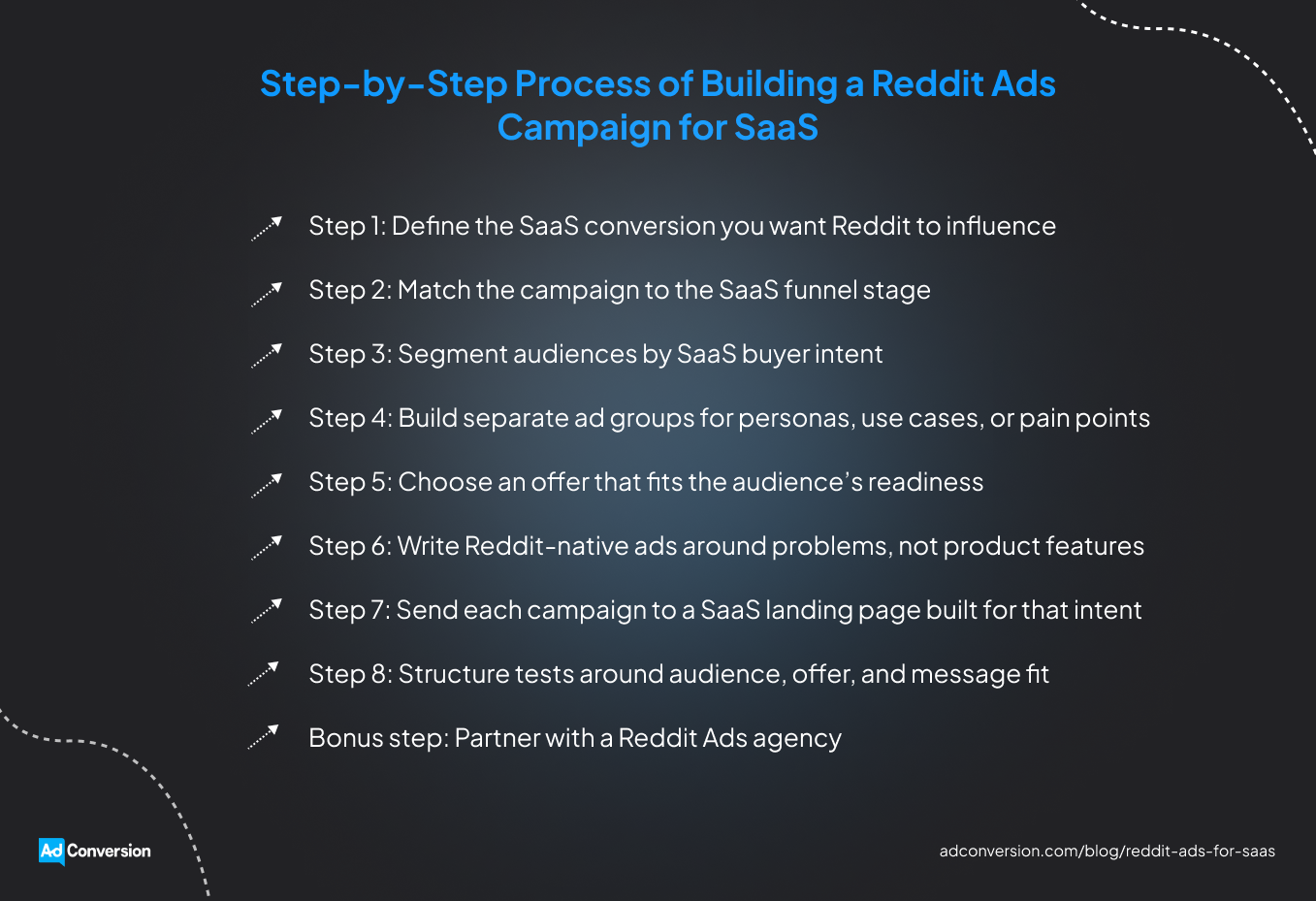
Step 1: Define the SaaS conversion you want Reddit to influence
Pick one conversion goal per campaign, for example:
- Demo requests
- Trial signups
- Freemium activations
- Webinar registrations
- Content downloads
Reddit can influence any stage of the buyer journey, but trying to drive awareness, leads, and pipeline from the same ad set dilutes the message and makes results hard to read.
Decide what the purpose of this campaign is before writing a single ad.
Step 2: Match the campaign to the SaaS funnel stage
A campaign targeting cold subreddit audiences should look different from one retargeting people who already visited your pricing page. Each group is at a different point in the journey, and the ad needs to reflect that.
Top-of-funnel campaigns tend to perform best when they lead with the pain point, keeping things educational rather than salesy.
Bottom-of-funnel campaigns can be more direct, since that audience already understands the category. Demos, free trials, comparison pages, or implementation-specific content all work well here.
Step 3: Segment audiences by SaaS buyer intent
Not everyone scrolling a relevant subreddit is equally close to making a decision, and the targeting should reflect that range.
A few useful segments to separate:
- Broad category communities for general awareness
- Niche problem-based subreddits for people already dealing with the pain point
- Competitor-related discussions
- Keywords for audiences actively researching
- Retargeting pools for anyone who has already engaged with the brand
Someone casually browsing r/cybersecurity is in a different headspace than someone comparing tools against a specific competitor, so your ad messaging should differ too.
Step 4: Build separate ad groups for personas, use cases, or pain points
Most SaaS products serve more than one type of buyer, so it's best not to put every prospect into a single ad group.
Developers, RevOps managers, founders, and IT leaders might all be potential users of the same product, but they care about different things.
Building separate ad groups for each, with pain points, proof, and custom calls to action, is a great way to make the ad feel like it was written for them, even though the product is the same.
Step 5: Choose an offer that fits the audience’s readiness
A cold Reddit user who's never interacted with the brand before usually isn't ready to book a demo the moment they see an ad.
For lower-intent audiences, softer offers tend to work better, such as templates, benchmark reports, calculators, or teardowns of relevant problems.
The bigger asks, such as free trials, demo requests, or comparison pages, are better saved for warmer audiences who've already shown some engagement through retargeting or prior interaction.
Step 6: Write Reddit-native ads around problems, not product features
Ads that lead with product features tend to blend into the internet noise, and Reddit users have little tolerance for that.
Leading with the problem instead tends to work better.
Write in a way a particular Redditor would talk about something useful they just found, in plain language. Corporate jargon like ‘unlocking potential’ or ‘next-level solution’ is worth avoiding completely.
Polished stock photography also underperforms here. Screenshots, simple graphics, or text-first formats that feel native to the platform do better than anything that looks like a billboard.
You shouldn’t try to disguise that your post is an ad (it rarely works and tends to erode trust). Just meet your audience where they are.
Step 7: Send each campaign to a SaaS landing page built for that intent
The ad's job is to earn the click. The landing page's job is to deliver on what was promised, not a generic homepage.
If the ad leads with a specific pain point, the landing page should address that pain point right away rather than making the visitor search for it.
Keeping the landing page focused helps too: one offer, one clear call to action, and minimal distractions.
For lead-gen offers, trimming the form to only the necessary fields further improves conversion.
For more practical guidance, check out these 10 tips for building B2B SaaS landing pages.
Step 8: Structure tests around audience, offer, and message fit
The culprit for an underperforming Reddit campaign could be the wrong audience, the wrong offer, or the wrong message. Without a clear testing structure, it's hard to know which one it is.
A cleaner approach is to test one variable at a time:
- Starting with distinct audience segments shows which ones respond well.
- Once a segment shows promise, you can test different offers and hooks to narrow things down further.
- From there, scaling the combinations that consistently produce qualified leads (not just clicks) is the most efficient way to maximize your results.
Bonus step: Partner with a Reddit Ads agency
If you don’t have the time or resources to build and manage campaigns yourself, let a SaaS Reddit Ads agency, like AdConversion, do it for you.
AdConversion Agency researches your market, competitors, and relevant subreddits before building a strategy around your ICP.
From there, it creates Reddit native ad creatives that fit naturally in discussions instead of interrupting them.
Campaigns never sit on autopilot either. The agency keeps testing new audiences, messaging, offers, and bidding strategies to improve performance.
AdConversion also builds landing pages that pick up where the ad leaves off, giving prospects another reason to book a demo.
How Do You Track and Attribute Reddit Ads Conversions for SaaS?
Reddit's impact is easily misjudged if the tracking is set up wrong. Most SaaS teams rely on the Reddit Pixel alone and miss a significant portion of conversions from technical audiences who run ad blockers.
The right setup has two layers.
- Install Reddit Pixel across all site pages to capture standard conversion events, such as demo requests, trial sign-ups, and content downloads.
- Configure Reddit's Conversions API (CAPI) for server-side event delivery, bypassing browser-level blocking and filling the gaps Pixel misses.
From there, add UTM parameters to every Reddit ad and make sure they feed into your CRM (e.g., HubSpot or Salesforce). This lets you track Reddit-sourced contacts through every funnel stage:
- Marketing-qualified lead (MQL)
- Sales-qualified lead (SQL)
- Opportunity
- Closed-won
You can use AdConversion’s free UTM generator to create them.
There’s one caveat worth noting here: Reddit's default attribution window is 28 days, meaning any conversion that occurs within 28 days of someone clicking your ad is credited to that campaign.
For B2B SaaS with longer sales cycles, this undercounts Reddit's influence.
A buyer who clicks a Reddit ad and then converts through branded search a month later shows up in Google's report, not Reddit's. Make sure to treat your CRM as your main data source for lead attribution instead of Reddit’s Ads Manager.
Here are the metrics you should track across every campaign:
- Click-through rate (CTR) and CPC: Early signals of creative and audience fit.
- Cost per lead (CPL) and cost per SQL: Pipeline efficiency.
- Trial sign-up or demo request volume: Conversion output.
- Lead-to-SQL conversion rate: Lead quality.
- Pipe-to-spend ratio: Revenue impact.
- Engagement rate (upvotes, comments): How native the ad feels to the community
AdConversion’s Data Analytics Agency makes tracking and analyzing campaign results much easier.
The team builds you a custom Paid Revenue Dashboard that integrates with your Reddit Ads account and CRM, bringing all the data into one place.
This dashboard updates automatically, so you can check pipeline and revenue metrics in real time.
AdConversion can also connect your other ad accounts to the same dashboard to give you a complete view of paid media performance.
Common Reddit Ads Mistakes SaaS Marketers Make
Reddit punishes lazy advertising more than any other platform. A misaligned ad doesn't just underperform; it gets downvoted, criticized, and damages brand perception in the communities you're trying to win over.
Most SaaS teams that write off Reddit as ‘a channel that doesn't work’ have made at least one of these mistakes:
- Repurposing ads from other platforms: Corporate language, polished visuals, and feature-focused copy get ignored (or ridiculed). Ads need to be written in a conversational, problem-first way that’s tailored to the Reddit community you target.
- Targeting too broadly: Broad interest categories waste budget on low-intent users. The biggest advantage of Reddit is its precise subreddit targeting.
- Judging performance too early: Just like with other platforms, Reddit's algorithm needs time to learn. Pulling campaigns after only one or two weeks of conversion data is one of the most common reasons teams conclude Reddit doesn't work.
- Ignoring the comment section: Promoted posts have open comment sections. Unaddressed negative comments are visible to every subsequent viewer. It’s important that someone on your team monitors and responds to these.
- Optimizing for CPL instead of pipeline: A low cost per lead can be misleading if those leads don’t reach your sales reps. Track cost per SQL and pipeline-to-spend ratio instead.
What Real SaaS Reddit Ads Results Look Like: Case Studies
Here are three case studies from Reddit’s success stories that show what happens when you get both your targeting and creatives right.
Kolide: 2x CTR above benchmark, 3x more efficient CPC
Kolide, a device security software company, used Reddit to grow readership for its Kolidescope newsletter among IT and cybersecurity professionals.
By targeting relevant communities and interests with carousel ads, it achieved CTR double the benchmark, with CPC three times more efficient than expected.
Kolide leveraged the fact that Reddit's security and IT communities are highly engaged and actively looking for exactly this kind of content.
Chargeblast: 75% reduction in customer acquisition cost
Chargeblast, a chargeback management SaaS, ran a full-funnel Reddit strategy combining interest targeting, community targeting, and lookalike audiences to reach e-commerce and fintech buyers.
The result was 50% lower cost per acquisition (CPA) than projected, and 40% lower CPA specifically from lookalike targeting. Founder Qi Cao called it the best experience he'd had across all ad platforms.
Bitly: 1.6x CTR above goal, 25% more site clicks
Link management platform Bitly used community and keyword targeting to reach users who are actively researching relevant topics, rather than those passively scrolling.
Its campaign drove over 10,000 new users to the site, with CTR above both the target and the industry average.
Visitors sourced from Reddit also spent more time on Bitly's site than traffic from other platforms.
Over to You
Reddit is a unique platform for advertisers, with distinct targeting logic, creative standards, and audience expectations. Users who are active on it have a lower tolerance for anything that feels like an ad.
That said, B2B SaaS teams willing to meet buyers where they are have an advantage on Reddit. They can leverage the platform to lower CPCs, engage niche audiences, and source leads from communities their competitors are ignoring.
If you want help building a Reddit Ads program that drives a qualified pipeline, book a call with the AdConversion team.

How To Get Your Ad Budget Approved In 2024
Looking to ask your boss or client for more ad budget?
This can feel really uncomfortable the first time but I promise it gets easier.
With a simple shift in mindset and some solid tactics you’ll be securing budget in no time.
Here are 3 simple but effective steps for you to implement before having that budget conversation.
TABLE OF CONTENTS
Step 1: Pull the numbers
Your client or boss wants to be successful.
They want to surpass their goals (just like you).
If you can show them how your increased budget will make this happen, they will gladly give it to you.
Remembering this will help you release the anxiety associated with asking for more budget.
The key is you need to sell your stakeholders on WHY they should invest more and the way you'll do that is by building a case that makes them as certain as possible.
Don’t assume your clients or managers will be able to realize this on their own.
Build a no-brainer case that makes saying anything but yes sound illogical.

This starts with pulling the numbers 👇
Answer your critical questions
Put your investor hat on and answer critical questions such as:
- Which channels are performing best?
Ex: Google Ads driving the most opps at the lowest cost
- What's the overall blended trend? (paid + organic)
Ex: Opps are increasing QoQ at a 25% lower cost
- What's the current return on investment?
Ex: $6 pipe-to-spend and 150% ROI
Depending on your company, goals, and what you’re asking budget for this will vary.
Brainstorm all of the key questions you’ll need to pull data to answer.
The difficulty of this step will vary on your current level of reporting.
If you don’t already I HIGHLY recommend building a Paid Media dashboard that connects your ad spend to pipeline and revenue performance reported in your CRM.
Here’s an example of our Paid Media Dashboard Template in our Building a Paid Media Program course:

You can get free access to this template and learn how to set it up in Module 3, Lesson 3 of the course.
It’s going to be hard to ask for more ad budget if you can’t prove that your current campaigns are actually contributing to the bottom line.
Don’t have any data?
If you’re reading this and saying, Silvio how can I pull numbers if I don’t have any?
Maybe you’re trying to secure budget for a new channel.
If this is the case I have two recommendations:
1. Run a pilot campaign for $100
Let’s say you’re trying to secure budget to test X (Twitter) Ads.
Put together $100 (most companies can afford this) and launch a pilot campaign.
The only goal of this campaign is to understand what are your real costs (ex: CPM, CPC).
Once you have this information you can work backwards from your goals to create a starting budget.
For example:
- $3 CPC at a 5% landing page conversion rate = $60 cost per lead
- $60 cost per lead at a 3% lead to opportunity ratio = $1,980 cost per opportunity
- $1,980 cost per opportunity at a 20% win rate = $9,900 cost per closed won deal
If you need help running the numbers, check out our Google Ads budget calculator.

From here you’ll have a good idea of what a starting budget would look like.
You’ll also have a sense of what’s possible on this channel.
2. Do some research
Ask around or search for benchmarks associated with the channel you’re looking to invest in.
Even just collecting anecdotal evidence (ex: screenshots of others) talking about how much success they’ve had with this specific channel, tactic, etc can go a long way.
LinkedIn polls are a great way to collect this feedback:

You can DM the respondents asking for more information.
The TL;DR here is don’t let lack of data be an excuse to show up empty handed.
Once you’ve pulled all the necessary information it’s time to find the story.
Step 2: Find the story
Behind the data there is a story being told, it's your job to find it and tell it.
Here's some key questions to answer to help find it:
- What went well? (the highlights)
- What went bad? (the lowlights)
- Where are we today vs before? (the journey)
- What were the biggest blockers? (the obstacle)
- Where do we go from here? (the opportunities)
Data alone won't persuade, and stories without data are subject to suspicion.
A combination of both is required in order to effectively present your case.

Image above is Module 6, Lesson 1 of our Building a Paid Media Program course
For example, perhaps I’m trying to secure more budget for Google Ads:
- What went well? (the highlights) some text
- Google Ads contributed 25% more opportunities at a $7 pipe-to-spend ratio.
- What went bad? (the lowlights)some text
- We missed out on 57% more volume due to budget limitations.
- Where are we today vs before? (the journey) some text
- We’ve optimized our pipe-to-spend efficiency from $3 to $7.
- What were the biggest blockers? (the obstacle)some text
- High search lost to budget for our top contributing campaigns.
- No landing page testing due to limited development resources.
- Where do we go from here? (the opportunities)some text
- With an additional $25,000 in budget we can scale our top contributing campaigns and yield up to 35% more demo requests at a $15 CPC and 5% landing page conversion rate.
Here’s a simple presentation template you can use to present your case and answer each key question:

Once you've found the story and pulled the numbers you're ready to present.
Step 3: Present your case
After steps 1-2 the majority of the prep work is done.
Now it’s time to get the meeting scheduled with your boss or client.
You could have the most beautiful slides and compelling case but if you can’t effectively communicate the significance of what you’re asking it won’t matter.
Thankfully, like any skill, communication is something you can improve on with practice.
5 unconventional tips to implement in your budget presentation:
1. Remember you both want the same thing.
Ultimately, your stakeholders want you to be right. If you can drive more pipeline/revenue they'd happily give you the budget (assuming financial availability).
The challenge though is like an investor they are analyzing the potential upside and downside of your plan, and don't believe the promises you're making.
You need to addresses their concerns with a combination of data and storytelling that makes them as certain as possible.
Just remembering this simple truth will help you show up differently.
2. It’s a conversation, not a lecture.
You’ll want to keep this discussion conversational.
Make sure to check-in frequently with your boss or client and ask things like:
- Is this making sense?
- Did you have any questions?
- Are there any concerns you have that I haven’t addressed?
The last thing you want to do is to speak to them for 30-minutes and then ask:
“soooooo did you have any questions…..? 😅”

3. Replace “I think” with “the data suggests”
You’ve pulled the data and done the homework.
Don’t water down your points by saying “I think” get in the habit of replacing this with “the data suggests” and then calling out the data point that comes to mind.
This will make your perspectives and points of view far more compelling.
Which ultimately lead to more certainty from the decision maker.
Greater certainty = greater chance of budget approval
4. Don’t forget to smile.
This might sound silly 😂 but it’s really easy to forget to smile.
This conversation is about new opportunities, and that’s exciting.
Instead of telling yourself I’m nervous, reframe it as I’m excited.
This is called anxiety reappraisal and Alison Wood a psychologist at the Harvard Business School found evidence to support.
Here’s a quick excerpt from her abstract: “Across several studies involving karaoke singing, public speaking, and math performance, I investigate an alternative strategy: reappraising anxiety as excitement. Compared to those who attempt to calm down, individuals who reappraise their anxious arousal as excitement feel more excited and perform better” — Alison Wood Brooks
Don’t knock it until you try it!
5. Turn your weakness into a strength
Maybe you’re reading this article and saying to yourself:
- I’m not a good presenter because I’m an introvert
- I’m not a good presenter because English isn’t my first language.
Whatever your weaknesses are, turn them into strengths with humor.
When you start budget approval call begin by addressing your big weakness with humor.
Here’s what this might look like for the weaknesses above:
- Hey {First Name} thanks for the time today. As you might have noticed I’m not going to be giving a Ted talk anytime soon with my English so if you’re having trouble understanding just stop me at any point.
- Hey {First Name} thanks for the time today. I just wanted to start off by saying I’d rather chug a bottle of hot sauce then give a presentation but I believe so much in what I’m going cover today that I had to do this – so I appreciate you baring with any mishaps I might have.
Whatever your weaknesses are don’t run from them.
Embrace it and transform it into a strength.
Additional Resources
If you want to learn more about securing budget checkout Module 6 - Lesson 1 of our Building a Paid Media Program course, it’s 100% free and takes < 90 seconds to sign up.

If you want to dive deeper into B2B advertising check out some of our other top articles:
- B2B Advertising in 2024: The Definitive Guide
- How to Build a Multichannel B2B Retargeting Strategy (Step-By-Step)
Thanks for reading, good luck on getting your budget approved!
(you got this) 🎉
People Also Ask
How can I address concerns about the risks associated with increasing the ad budget?
Acknowledge potential risks by presenting a risk mitigation plan. This could include strategies like phased budget increases, continuous performance monitoring, and predefined criteria for scaling back if certain KPIs aren’t met. Demonstrating proactive risk management can build stakeholder confidence.
What if my initial pilot campaign doesn’t yield strong results?
If a pilot campaign underperforms, analyze the data to identify areas for improvement. Adjust variables such as targeting, ad creatives, or bidding strategies, and consider running a second pilot. Use these learnings to refine your approach before requesting a larger budget.
How do I align my ad budget request with broader company objectives?
Ensure your proposal clearly connects the ad spend to company goals like revenue growth, market expansion, or brand awareness. Illustrate how the investment will contribute to these objectives, using data and projections to support your case.
What are some common pitfalls to avoid when presenting a budget proposal?
Avoid using jargon that stakeholders may not understand, overloading the presentation with excessive data, or failing to anticipate potential objections. Practice your presentation to ensure clarity and conciseness, and be prepared to address questions confidently.
How can I demonstrate the potential ROI of the proposed ad budget?
Utilize tools like the Google Ads Budget Calculator to forecast potential returns based on different budget scenarios. Present these projections along
B2B Advertising in 2026: The Definitive Guide
Today I’m going to give you a crash course in B2B advertising.
In this comprehensive guide I’ll cover:
- What is B2B advertising?
- 7 ways B2B differs from B2C
- 20 B2B Terms and Metrics you need to know
- Top 3 B2B Revenue Models
- B2B ad examples by revenue model
- How to create a B2B advertising strategy
- The Five Stages Model
- The Best B2B Ad Channels
- Advice from 20 B2B Advertising Experts
So if you need to get up-to-speed on B2B as quickly as possible, you’ll love this guide.
Let’s get started 🔥
What Is Business-to-Business Advertising?
B2B advertising is the process of any paid marketing efforts directed toward influencing multiple individuals within a company for a purchase decision (known as a buying committee) vs a single consumer.
7 Differences between B2B and B2C Advertising:
- Longer sales cycles (3 - 36 months)
- Larger average deal sizes (< $1,000 - $250,000+)
- More stakeholders involved in the purchase decision (ex: c-suite, finance)
- Focus on impacting the entire buyer's journey not just the first conversion (unlike B2C).
- Smaller audiences (< 300,000) with a focus on reaching the right person and company vs B2C with broad audiences ( > 300,000) as more people can purchase your product.
- B2B requires strategic alignment between marketing and sales as you’re joining forces (inbound and outbound) to win accounts.
- B2B supports multiple revenue models, the big three being; product-led, sales-led, and hybrid. Whereas e-commerce is solely product-led.
Check out more examples in the article: B2B vs B2C Advertising: 8 Differences & Examples You Need To Know.
20 B2B Terms and Metrics you Need to Know
One of the first things you realize when you get into B2B is how much jargon there is! MQL, SQL, ACV, ARR, and the list goes on!
In order to make sure you understand the language, here’s 20 B2B terms and metrics you need to know:
Unfortunately there are many more terms you’ll need throughout your B2B career 😂 and every company creates their own (it’s a constant struggle) but these 20 will give you a solid foundation. For a great list of b2b terms check out our B2B Advertising Glossary.
Top 3 B2B Revenue Models
If you’re working in B2B there are three common revenue models you’ll likely work with.
If your job is to promote this organization, understanding the revenue model is key as it will change everything from how you approach your strategy, the offers you choose, channels, and more.


B2B Ad Examples by Revenue Model:
Sales Led


Product Led


How to build a full-funnel B2B Advertising Strategy
Now that you know how B2B differs from B2C.
How do you build a full-funnel B2B advertising strategy?
Full-funnel refers to building a strategy that covers all touch points along the customer journey.
This means advertising to individuals who are (e.g. Eugene's Schwartz Stages of Awareness):
- Unaware = have no clue they even have a problem in the first place (ex: blissfully mismanaging customer relationships)
- Problem Aware = know they have a problem but are not sure how to solve it (ex: realize managing customer relationships is important but don't know how).
- Solution Aware = need help deciding on the right solution (ex: should I use Google Sheets, a filing cabinet 😂 or a CRM?).
- Product Aware = know of your brand/product but not sure if you're the best option (ex: comparing CRM software; Salesforce vs HubSpot vs Pipedrive).
- Offer Aware = know of your brand and exactly how you can help but need some nudging (ex: pricing discounts, better contract terms, customer references).
- Most Aware = Existing customers, familiar with your brand and working with you (ex: referral program).
Understanding your prospects' stage of awareness allows you to create messaging, and offers that better resonate with where they are in the customer journey.
It helps to have a model (think of it like a map) to make complicated topics simple.
We’re going to use The Five Stages model covered in our course Building a Paid Media Program.


Here’s how it works:
Based on the stage; the outcome, awareness level, offers, tactics, and KPIs differ.
- Outcome = the end goal you're trying to achieve in each stage.
- Awareness = the familiarity level of your brand/product/solution.
- Offers = what you're providing your target audience in each stage.
- Tactics = how you're going to actually execute your strategy per stage.
- KPIs = how you're going to measure success in each stage.
Let's dive into examples for each stage so you really understand!
The Five Stages Model
Stage 1: Create
Stage 2: Capture
Stage 3: Accelerate (Sales Led) / Activate (Product Led)
Stage 4: Revive
Stage 5: Expand
The Five Stages model allows you to plan across all the lifecycle stages past initial conversion.
Ultimately no one knows for certain where someone is in their buyer's journey and everyone moves through it at different speeds. Use your best judgment.
If you're confused on which stage someone would be, remember the target audience's level of awareness dictates the stage they fall under.
Which stage should you invest in?
Generally speaking if you want to maximize ROI in the short-term you should work from the bottom of the Five Stages and move towards the top (Expand → Create).
You don't have to build a full-funnel strategy at once, take it one stage at a time.
Putting The Five Stages into practice
- Decide on which stage you want to focus on based on the outcome you’re after. If you have a smaller budget (ex: < $5,000/month) focus exclusively on one stage first.
- Once you’ve decided on the stage fill in your budget, and leading + lagging KPIs. If you’re unsure of what KPIs to select refer to Module 5- Lesson 1 of Building a Paid Media Program.
- Next decide on which channels you’ll advertise on to reach individuals in this stage and how you’ll target them and exclude the wrong audience. If you’re unsure of what channels to advertise on, refer to Choosing the BEST channels.
- Finally decide on what offers you’re going to promote in these channels for this stage (the offers listed above are only examples to give you ideas).
- If you’re targeting multiple stages repeat steps 1-4 for each.
Click here to become an AdConversion student and get free access to The Five Stages planning template in Module 2 - Lesson 1 where we cover how to build your paid media strategy in depth.

After you’ve filled in The Five Stages planning template you now have your strategy in place and can easily move into execution and start assembling your campaigns, creatives, and messaging.
What are the BEST B2B advertising channels?
The obvious answer is where your audience hangs out online!
But not all channels are equal, some are more effective at certain stages.
Most channels can be grouped into these 5 primary categories ↓
How to decide on the best channel?
There's four key criteria to consider when deciding on a channel:
- Targeting options
- Media cost
- Reach
- Policy
Let's dive into each ↓
If the channel you’re considering meets all four of these criteria then you should consider running a test campaign for $100 to get your real average CPC & CPM.
Recommended Channels by Stage
Based on my experience these channels work best for each stage:
(Use this as inspiration not restriction)
Let this be a guide to help you get started, take what serves you and abandon the rest.
Test what works for you until proven otherwise.
Advice from 20 B2B advertising experts
One of the best parts about being in B2B is the quality of marketers in this space.
We asked 20 B2B advertising experts:
What’s 1 tip you’d share with new marketers getting into B2B advertising?

50+ Ad Specs for The Top 10 Ad Platforms
Have you ever wondered what dimensions does that ad require? 🤔
Then started searching to find the answer? (same here lol)
To save you (and ourselves) trouble, we gathered the most popular ad specs across 10 channels in one place:
- Google Display Ad Specs
- LinkedIn Ad Specs
- Twitter (X) Ad Specs
- Quora Ad Specs
- Reddit Ad Specs
- YouTube Ad Specs
- Google Discovery / Demand Gen Ad Specs
- TikTok Ad Specs
- Meta Ad Specs
⭐️ Bookmark this article and refer back to it when you need ad specs.
Google Display Ad Specs
Source: support.google.com
Browse examples at adstransparency.google.com
LinkedIn Ad Specs
Source: business.linkedin.com
Browse examples at: linkedin.com/ad-library/home
X (Twitter) Ad Specs
Source: business.twitter.com
- You can request to have video lengths increased up to 10 minutes
- Carousel can use images or videos but must be in the same aspect ratio (ex: 1:1 or 16:9)
Quora Ad Specs
Source: image ads, video ads
Reddit Ad Specs
Source: reddit.my.site.com
* Reddit Ads headlines will be truncated to 100 characters on mobile/mobile web for the conversation placement.
Youtube Ad Specs
Source: support.google.com
Browse examples at adstransparency.google.com
Google Discovery / Demand Gen Ad Specs
Source: support.google.com
Browse examples at adstransparency.google.com
TikTok Ad Specs
Source: ads.tiktok.com
Browse examples at library.tiktok.com/ads
Meta Ad Specs (Facebook/Instagram)
Source: business.facebook.com
Browse examples at: www.facebook.com/ads/library
Resources for Mastering B2B Advertising
Hope you found this ad specs article useful!
If you’re serious about mastering B2B advertising then you definitely need to join 10,000+ B2B marketers leveling up their paid advertising skill sets in AdConversion.
Here’s 4 reasons why you should consider joining. Every one of our on-demand courses are:
✅ 100% free access.
✅ Taught by vetted industry experts.
✅ Have workbooks, resources, and templates.
✅ Less than 10 minutes per lesson.
We believe every marketer should know how to scale paid ads so they can:
• Scale their ideas
• Level up their careers
• Make a positive impact
Click Here to Join 10,000+ B2B Marketers Today and start leveling up your advertising skill set.
Takes < 90 seconds to sign up (seriously I timed it 😂)
People Also Ask
How often do ad platforms update their ad specifications, and how can I stay informed about these changes?
Ad platforms periodically update their ad specs to accommodate new features or policies. To stay informed, regularly check the official guidelines of each platform and subscribe to their newsletters or blogs for updates.
What are the common pitfalls to avoid when designing ads to meet platform specifications?
Common pitfalls include using incorrect dimensions, exceeding file size limits, and neglecting safe zones, which can lead to ad disapproval or poor display. Always adhere to the latest specifications and test your ads across devices.
How can I ensure that my ad creatives are optimized for both desktop and mobile viewing?
Design responsive ads that adapt to various screen sizes. Utilize platform-specific preview tools to see how your ads render on different devices, ensuring readability and visual appeal across all formats.
Are there tools available to streamline the creation of ad creatives that comply with multiple platform specifications?
Yes, tools like Canva, Adobe Creative Cloud, and Figma offer templates tailored to various platform specs, simplifying the design process and ensuring compliance.
How do ad specifications impact the performance and effectiveness of my advertising campaigns?
Adhering to specifications ensures that your ads display correctly, preventing issues like cropping or distortion. Properly formatted ads enhance user experience, leading to better engagement and higher conversion rates.