


Cost Per Lead in Google Ads: Why It’s Up and How to Lower It

Is your cost per lead in Google Ads on the rise? Learn how to diagnose the root causes and lower costs in 10 proven steps.
June 17, 2026
Google Ads


%20-%20new%20v2.png)
Silvio Perez
Founder @AdConversion
To reduce cost per lead (CPL) in Google Ads, you first need to understand why it’s increasing.
Usually, it’s a mix of targeting problems, expensive clicks, weak conversion rates, poor lead quality, and tracking gaps that push CPL higher.
Find out how to pinpoint the source of a high cost per lead, figure out if it's actually a problem, and how to attract more qualified prospects without wasting ad spend.
What Is Cost Per Lead in Google Ads?
CPL in Google Ads measures how much you spend on advertising to produce a single prospect.
You can calculate CPL using this formula:
CPL = Total Google Ads spend ÷ Total leads generated by Google Ads
For example, if you spend $5,000 on Google Ads campaigns and gain 100 leads, your CPL is $50.
For a more realistic number, make sure to include overhead costs in your total ad spend. Factor in software subscriptions, ad agency fees, personnel costs, and any other indirect costs related to advertising.
True CPL can help you evaluate your B2B Google Ads performance and spot issues early.
Why Is Your Google Ads Cost Per Lead Increasing?
Your Google Ads CPL increases when you start paying more for clicks, converting fewer visitors, or attracting the wrong prospects.
Traffic costs are rising
Competition for high-intent keywords is fierce. As more businesses bid on the same search terms, your cost per click (CPC) increases, and each conversion becomes more expensive.
Broad match expansion can make the problem even worse. If Google starts matching your ads to less relevant searches, you end up paying for irrelevant traffic that never converts.
Conversion rates are falling
When fewer visitors fill out forms, book demos, or sign up for trials, your CPL starts climbing.
Landing page issues are the common cause of this. If visitors land on a page that asks for too much information or creates confusion, they quickly leave.
Weak offers can also hurt ad performance. Even great ad copy cannot make up for a landing page that gives prospects no reason to take action.
Lead quality is declining
If your audience targeting becomes too broad, you waste ad spend on people with no real buying intent.
Poor ideal customer profile (ICP) targeting creates the same problem. More form submissions might come in, but fewer prospects move forward in the sales funnel.
Measurement gaps are distorting performance
You cannot fix a problem you cannot see. Attribution gaps and conversion tracking issues make it difficult to understand what is and isn’t working.
When Google's algorithms receive incomplete or inaccurate data, they make bidding decisions using the wrong signals. This can increase your ad spend without improving results.
How Can You Diagnose What's Driving High Cost Per Lead in Google Ads?
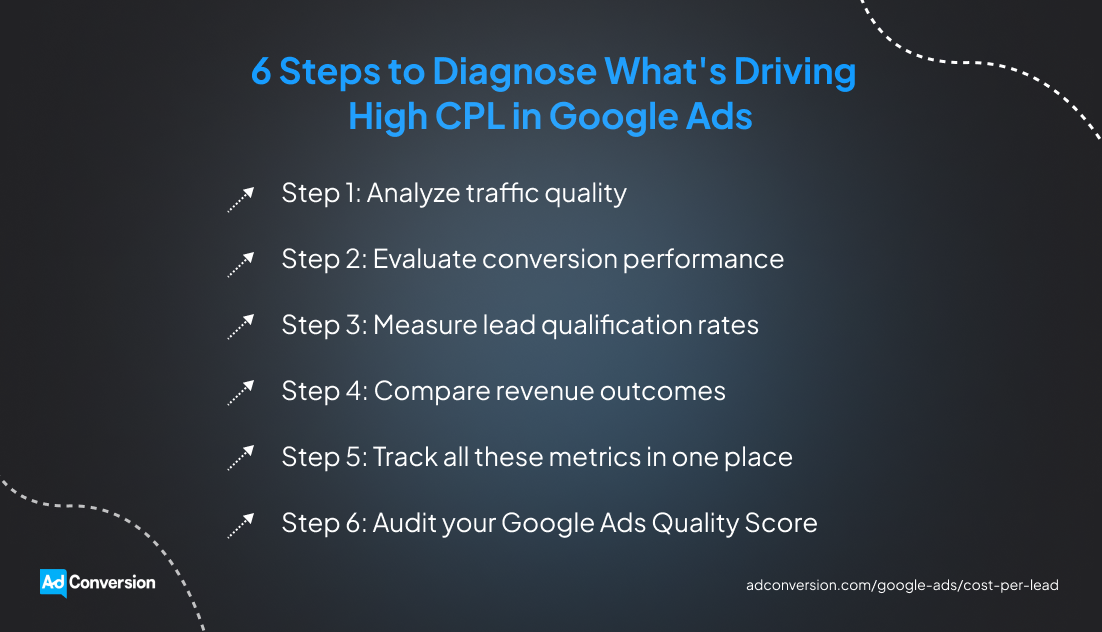
You can diagnose the root cause of high Google Ads cost per lead by figuring out where performance starts to break down.
Step 1: Analyze traffic quality
Look at your average CPC, click-through rate (CTR), and impression share. These metrics can tell you whether you're paying too much for traffic or attracting the wrong visitors.
For example, a rising CPC combined with a stable CTR usually indicates increased competition for valuable keywords.
On the other hand, if your CTR and impressions are dropping, your Google Ads might no longer match search intent.
Your search terms report can also reveal irrelevant traffic that drains ad spend without producing qualified leads.
For instance, you might find your ads are showing up for job searches, training programs, or free tools instead of commercial buying queries.
Step 2: Evaluate conversion performance
Check your landing page conversion rate, bounce rate, and form completion rate to see what happens after a user clicks on your ad.
A high bounce rate can indicate a mismatch between your ad copy and landing page messaging. Likewise, a low form-completion rate can suggest excessive form fields, unclear calls to action (CTAs), or an unfriendly user experience (UX).
Step 3: Measure lead qualification rates
Compare your marketing-qualified lead (MQL), sales-qualified lead (SQL), and opportunity rates.
If your paid search produces plenty of contacts but very few sales conversations, the issue might be audience targeting.
Step 4: Compare revenue outcomes
Review your customer acquisition cost (CAC), customer lifetime value (CLV), closed-won revenue, and return on ad spend (ROAS).
If two Google Ads campaigns have the same CPL, this doesn’t automatically mean they both bring in revenue. You need to compare their CAC, CLV, and ROAS to get a more realistic view of pay-per-click return on investment (ROI).
Looking at bottom-of-the-funnel (BOFU) metrics shows you which campaigns deserve more investment and which ones are wasting ad spend.
Step 5: Track all these metrics in one place
The only way to make an accurate diagnosis on a high CPL is to connect your Google Ads account to your customer relationship management (CRM) system. Otherwise, you'll only see what happens up to the conversion and miss everything that happens after that.
Once the two systems are connected, you can follow every prospect from their first ad click all the way to a closed or lost deal.
The only challenge is digging through endless CRM reports to make sense of all the data.
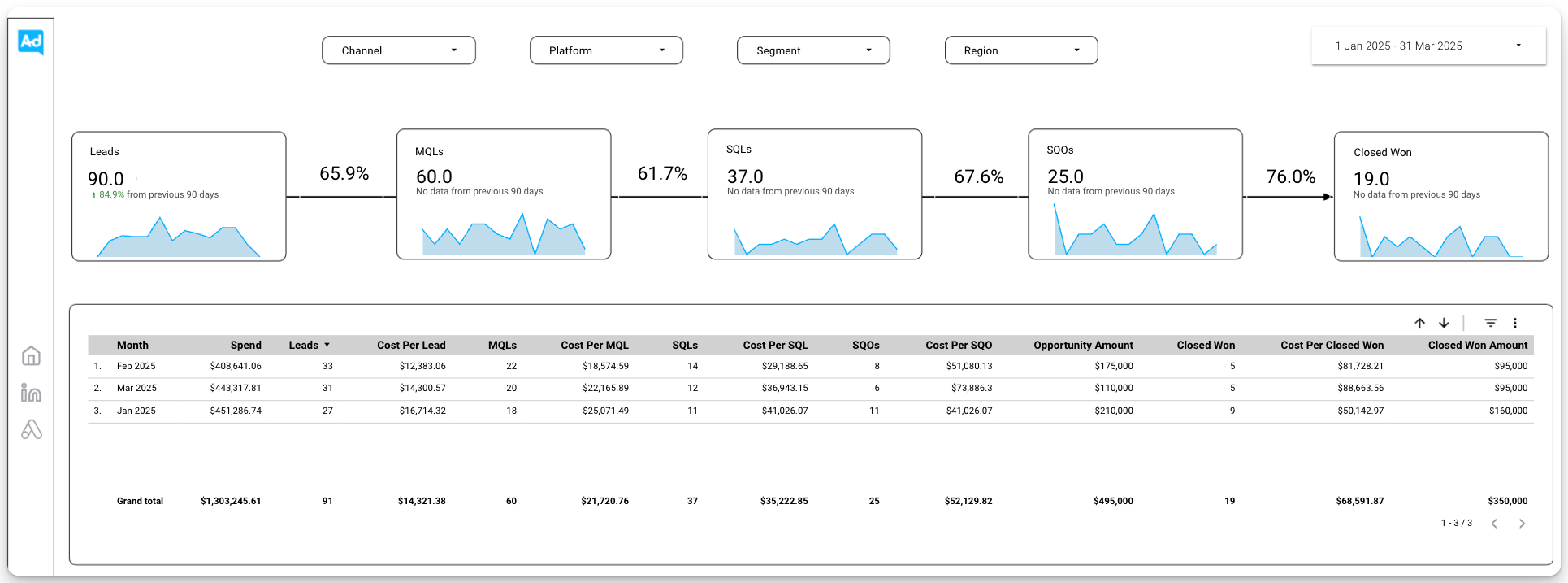
You can solve this by creating a dashboard that centralizes your traffic, conversion, qualification, and revenue metrics in a simple view.
If setting up this reporting system sounds like too much work, you can let a B2B paid media agency, like AdConversion, do it for you.
AdConversion’s Data Analytics Agency can build you a custom Paid Revenue Dashboard that integrates with your CRM and Google Ads account. The system can also connect to your other paid channels, like Meta, LinkedIn, and Reddit, to give you a complete view of advertising performance.
While reporting prioritizes pipeline and revenue metrics, it also tracks impressions, CTRs, and conversion data, so you won’t miss a thing.
Plus, the dashboard updates in real time, giving you access to the latest numbers.
Step 6: Audit your Google Ads Quality Score
Quality Score is a Google Ads metric that measures how relevant and useful your ads are to users. Google assigns a score from 1 to 10 based on expected CTR, ad relevance, and landing page experience.
You can audit your Quality Score by adding the Quality Score, Expected CTR, Ad Relevance, and Landing Page Experience columns to your Google keyword report.
This data helps you pinpoint whether low ad relevance, low CTRs, or a poor landing page experience is increasing your CPL. You can then fix what’s broken to get higher quality scores.
Take a look at AdConversion's complete guide to Google Ads’ Quality Score for a more detailed breakdown.
How Do You Know If Your Google Ads Cost Per Lead Is Too High?
Your Google Ads CPL is too high if it exceeds market averages or your budget.
Compare your CPL against industry benchmarks
A good starting point is to see how your numbers stack up against the rest of the market. Wordstream’s 2026 Google Ads report put the average CPL across all industries at $66.69.
However, B2B SaaS companies tend to operate in a completely different range. GrowthSpree’s 2026 Google Ads benchmarks show average SaaS CPLs between $180 and $350, with healthtech exceeding $380.
While these numbers help you spot outliers, you shouldn’t fixate on them. After all, every business has different pricing, margins, and sales cycles, so the same CPL can be acceptable for one company and unsustainable for another.
Calculate your maximum CPL
Instead of asking whether your cost per lead is too high, ask whether you can profitably afford it.
You can answer the question using this formula:
Maximum CPL = Target CAC x Lead-to-customer conversion rate
For instance, if your target customer acquisition cost is $5,000 and 5% of your prospects become customers, your maximum CPL will be $250.
If you'd rather skip the math, AdConversion’s free Google Ads Budget Calculator can calculate your target CPL automatically. Based on your revenue goals or historical performance, it estimates your target CPL for worst-, moderate-, and best-case scenarios.
The calculator also shows the target CAC, ROAS, and the ad budget required to hit your sales goals.
How Can You Reduce Cost Per Lead in Google Ads?
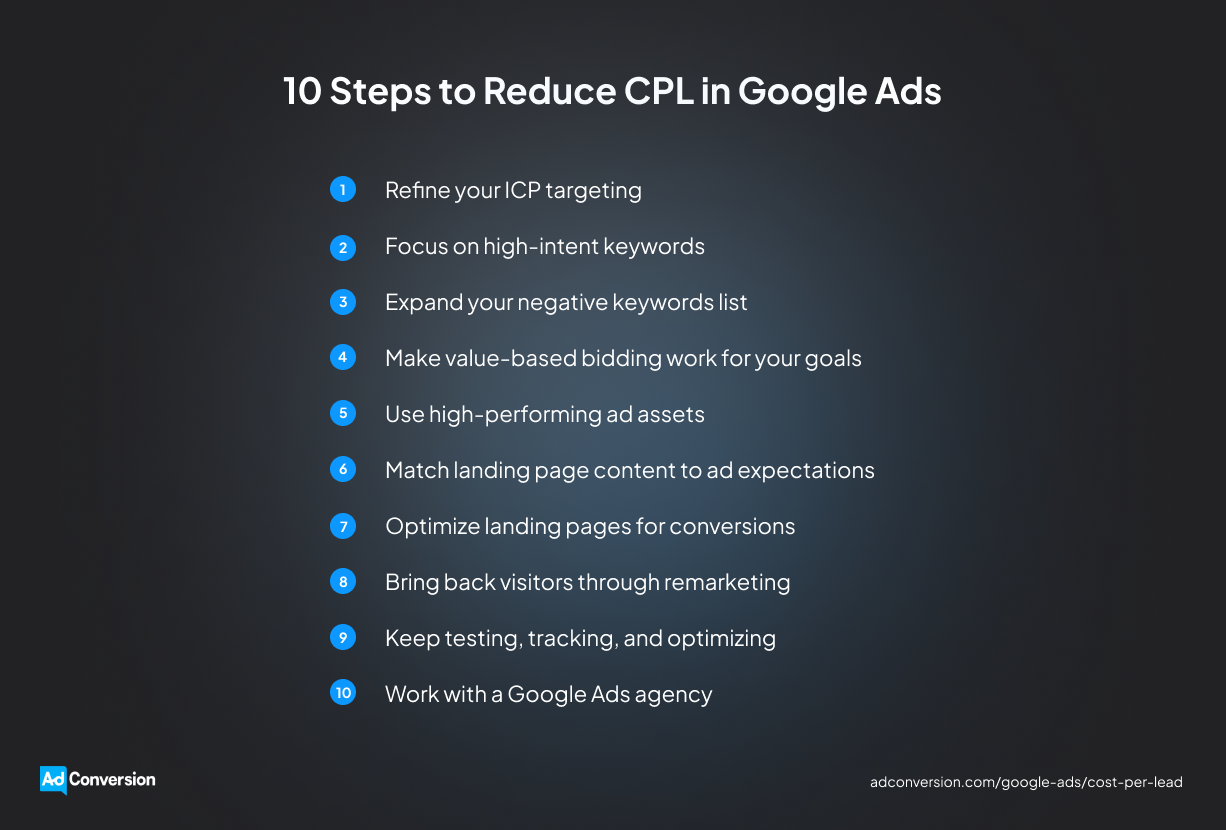
You can reduce cost per lead in Google Ads by cutting wasted clicks, improving conversion rates, and teaching Google which prospects actually turn into revenue.
1. Refine your ICP targeting
Instead of targeting everyone who could potentially buy your product, focus on the customers who already have.
Export closed-won accounts from your CRM and search for patterns in industry, company size, job title, location, and use case.
Then compare those criteria against the contacts coming from your paid search campaigns.
If certain industries rarely become SQLs or opportunities, you should exclude them from targeting.
On the other hand, if a specific segment continues to generate revenue, you can build audience targeting and ad messaging specifically around it.
2. Focus on high-intent keywords
Review your Google Ads search terms report to find the queries that typically generate SQLs and closed-won deals.
Searches that include words such as ‘pricing,’ ‘demo,’ ‘software,’ ‘alternative,’ ‘implementation,’ or ‘vendor’ come from buyers who are actively evaluating solutions.
Create dedicated ad groups for these high-intent keywords and allocate more budget to them to improve lead quality from Google Ads.
3. Expand your negative keywords list
Once again, you need to check your search terms report. This time, pull out the queries that don’t bring in high-quality leads.
Look for recurring themes such as ‘jobs,’ ‘salary,’ ‘free,’ ‘cheap,’ ‘certification,’ ‘courses,’ or ‘technical support.’ Then add them as negative keywords at the campaign or account level to block irrelevant searches.
Repeat this action every week to spot any new query variations you need to exclude.
For more actionable tips and examples, explore AdConversion’s guide to using negative keyword lists in Google Ads.
4. Make value-based bidding work for your goals
Value-based bidding (VBB) is a Google Smart Bidding strategy that uses AI to optimize for conversion value instead of conversion volume. In other words, it helps Google focus on the leads most likely to turn into customers.
Start by assigning conversion values based on the revenue each prospect generates for your company. For example, a booked demo from an enterprise is much more valuable than one from a small business.
Next, set up offline conversion tracking so your CRM can pass lead information back to Google Ads. Feed Google your conversion value data for about six weeks, then switch to VBB.
You can opt to maximize conversion value with or without a target ROAS, depending on how much control you want over profitability.
5. Use high-performing ad assets
Ad assets are additional content pieces you can include in Google ads to make them more visible and useful for searchers.
They give buyers more reasons to click your ads, increasing CTRs and ad relevance. Over time, this can lead to a higher Quality Score and lower CPC and CPL.
Some of the best-performing ad assets are:
- Sitelinks are extra links beneath your ad that let prospects jump directly to the information they need. They can lead to pricing pages, book-a-demo pages, customer stories pages, or integrations pages.
- Callouts are short text snippets that highlight key selling points without requiring an extra click. You can use them to promote Free Migration, SOC 2 Compliance, or 24/7 Support.
- Structured snippets are non-clickable elements where you can list your products, services, features, or industries.
- Image assets add visual appeal to your search ads, helping them stand out on the results page. Product screenshots, dashboard views, and platform previews work best.
6. Match landing page content to ad expectations
The headline, offer, and call to action of your landing pages should deliver on the promise made in the Google ad.
If someone clicks an ad about pricing, they should land on a pricing page, not a generic product overview.
Create dedicated landing pages for your most valuable keyword themes, including ‘demos,’ ‘pricing,’ ‘competitors,’ ‘integrations,’ or ‘industry-specific solutions.’ The closer the match between the keyword, ad copy, and landing page content, the more likely visitors will be to take action.
7. Optimize landing pages for conversions
Simplify the path to conversion by removing unnecessary links and distractions, and making your primary CTA the most prominent element on the landing page.
Then test one page element at a time using A/B testing to see which changes actually improve performance. Start with high-impact elements like headlines, CTA copy, form length, page layout, testimonials, and customer logos.
Don't stop after one test because conversion rate optimization (CRO) is an ongoing process. Keep refining your landing pages based on user behavior and conversion data.
8. Bring back visitors through remarketing
Remarketing campaigns show personalized ads to prospects who’ve already engaged with your website, but haven’t converted yet. The goal is to keep your business top of mind and push those buyers to come back and take action.
Start by segmenting remarketing audiences based on behavior. These groups can include high-intent visitors, product-page viewers, abandoned demo requests, and previous prospects.
Create tailored ads for each audience segment to address the specific questions or objections that prevented them from converting the first time.
For example, someone who viewed your pricing page might respond to customer success stories or a demo offer. At the same time, visitors to the comparison page might need more information about your competitive advantages.
If you need more info, check out AdConversion’s step-by-step guide to building a multichannel B2B retargeting strategy.
9. Keep testing, tracking, and optimizing
Stop wasting time on random campaign changes. Build a B2B Google Ads optimization workflow that keeps you focused on the highest-impact daily, weekly, monthly, and quarterly tasks.
For instance, you can monitor budget pacing daily, then use weekly reviews to expand your high-intent and negative keyword lists and pause underperforming ads.
Leave monthly and quarterly reviews for bigger-picture initiatives, such as auditing campaign settings and assessing pipeline impact.
10. Work with a Google Ads agency
Reducing cost per lead requires regular analysis, testing, optimization, and reporting. If your team doesn't have the time or expertise to do all that, partnering with a B2B Google Ads agency, like AdConversion, is a smart move.
AdConversion’s SaaS PPC Agency starts by diagnosing your high CPL. The team reviews your Google Ads account, targeting, keywords, conversion tracking, and campaign structure to uncover wasted ad spend and missed opportunities.
Based on this Google Ads audit, the agency builds a full-funnel strategy for you around your ideal buyer persona and revenue goals.
AdConversion also creates your ad copy and designs, develops dedicated landing pages for each campaign, and continuously runs CRO experiments to improve your conversion rates.
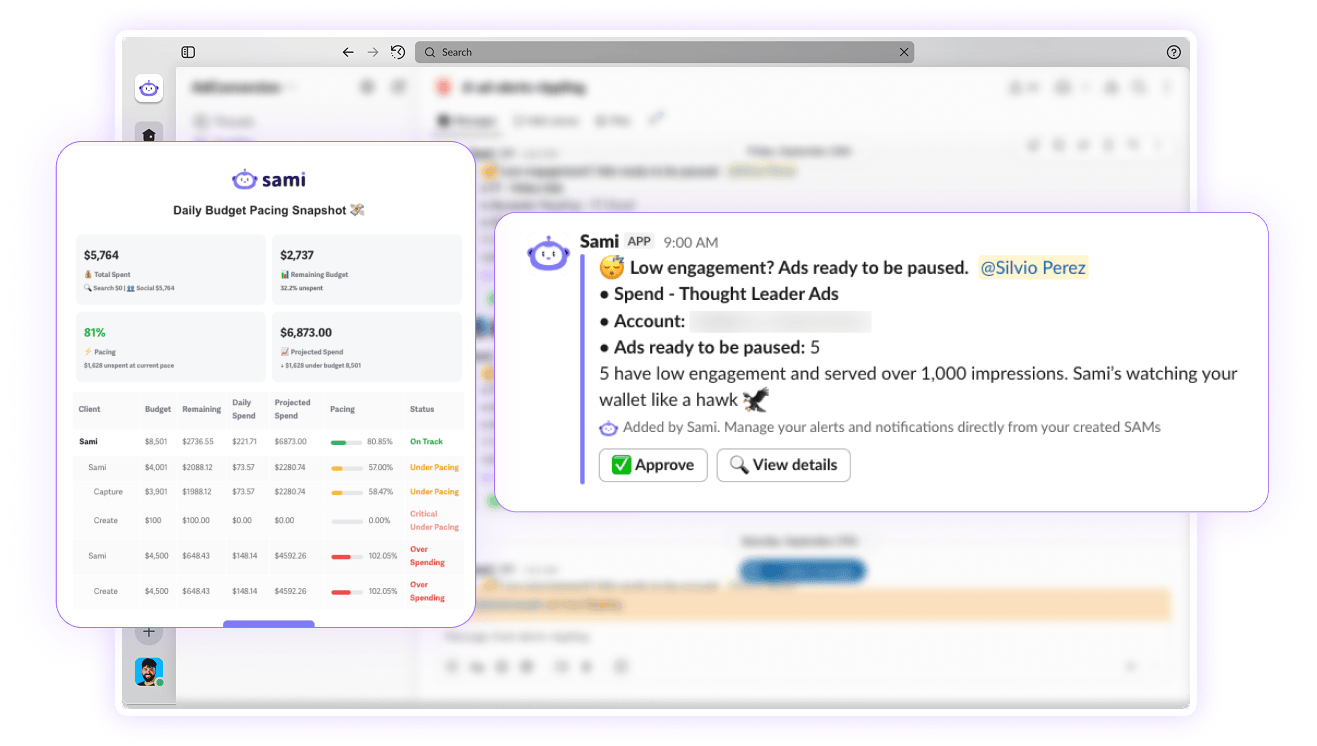
Your Google ads never run on autopilot because Sami, AdConversion’s proprietary AI ad optimization tool, watches over them 24/7.
If an ad exceeds your daily budget target or a keyword is not paying off, Sami automatically pauses it. This tool can also reallocate budget to high-converting campaigns to avoid wasted ad spend.
Why Doesn't a Lower Cost Per Lead Always Mean Better Results?
A lower cost per lead doesn’t mean your Google Ads campaigns are performing better unless it actually brings in more profitable customers:
- CPL doesn't measure pipeline contribution. A campaign can produce inexpensive leads all day long, but that doesn't mean those prospects will become SQLs, opportunities, or customers.
- Sales teams pay the price for poor lead quality. When marketing prioritizes low CPL over lead quality, sales reps spend more time chasing dead ends and less time closing revenue-generating deals.
- Your highest-CPL campaigns might be your most profitable. Prospects searching for pricing, demos, or alternatives from competitors typically cost more to acquire because they are closer to making a buying decision.
- Revenue determines profitability, not lead volume. The ultimate goal of Google Ads isn't to generate the cheapest leads possible, but to produce customers and revenue at a profitable cost.
Final Thoughts
Don't rush into changing bids, pausing campaigns, or cutting budget to reduce cost per lead in Google Ads.
Take the time to see where prospects are slipping through the cracks, then tackle one issue at a time. Small, regular improvements can add up surprisingly fast.
If you need a hand diagnosing or fixing your high CPL, have a quick chat with AdConversion.

.png)
Related Articles
How to Optimize Google Ads: A Step-by-Step Guide
10 Google Ads Automation Tools to Manage Paid Campaigns
How to Run Google Ads for Cybersecurity [Strategy Guide]
Join 0,000 B2B marketers leveling up their paid advertising skill set! 🚀
Join 0,000 B2B marketers leveling up their paid advertising skill set! 🚀


