



How to Audit B2B Google Ads Accounts [+Free Template]
%20-%20new%20v2.png)
Google Ads is not getting any cheaper, so frequently auditing your account is critical to keep your campaigns profitable.
In this step-by-step guide, I will walk you through the exact same process we use internally to audit our clients’ Google Ads accounts.
As a bonus, you can get a free copy of my 8-Part Google Ads Audit Checklist from Module 1, Lesson 5 of my B2B Google Ads 102 free course, so you can have it on hand while you go through the tasks below.
So let’s get started 👇
TABLE OF CONTENTS
- Part 1 - Account Review
- Part 2 - Campaign Review
- Part 3 - Ad Group Review
- Part 4 - Keyword Review
- Part 5 - Ads & Extensions Review
- Part 6 - Landing Page Review
- Part 7 - Budget & Performance Review
- Part 8 - Visibility Review
- Resources to Master B2B Google Ads
- Google Ads Audit FAQ
Part 1 - Account Review
First and foremost, you can’t improve your account performance without mastering the basics. So let’s dive in!
1. Billing Information
Is your billing information correct?
Checking this will ensure that your ads continue to run smoothly and you don't face any unexpected billing issues.
To check your billing information, follow these steps:
- Sign in to your Google Ads account.
- Click on the "Billing" icon on the left-hand menu.
- Click on "Settings" to view your current billing information.

Here, you can view your payment method, payer details (name, address, etc), and other important details.
Make sure all the information is correct and up-to-date. If you notice any errors, click on the pencil next to each detail to make the necessary changes.
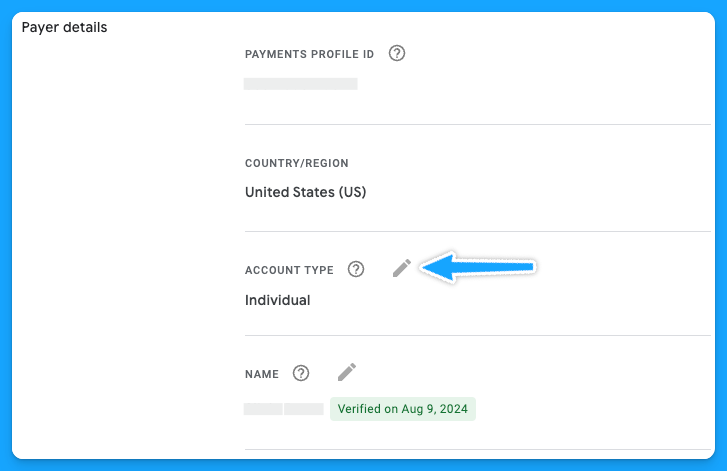
It's important to note that any changes you make to your billing information may take up to 24 hours to take effect.
Additionally, if you have any pending charges on your account, you won't be able to make changes until those charges are paid off.
2. Is your time zone correct?
The accuracy of your account's time zone setting is more crucial than it may seem at first glance. The time zone affects how you schedule ads, interpret performance data, and manage billing cycles.
You cannot change your time zone manually, and it can only be reset once, so as Google advises, choose your new time zone carefully.
To request a change, you’ll need to fill out this form and follow the instructions below:
- The form must be filled out by an Admin user of a manager account.
- Your time zone can only be shifted eastward, for example, from GTM (Greenwich Mean Time) to IST (India Standard Time).
3. Do you have auto-tagging turned on?
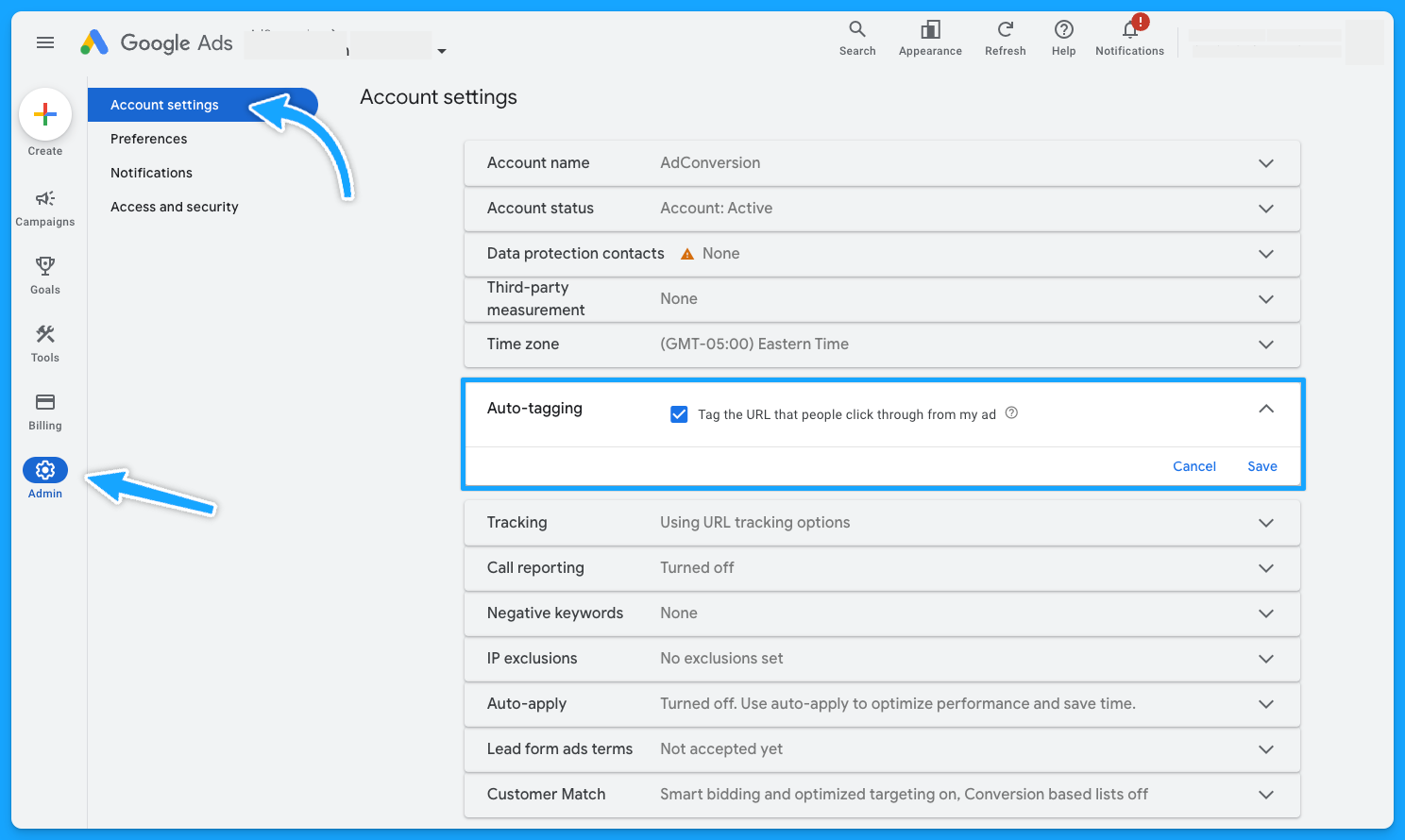
Auto-tagging is an easy 3-step process:
- Sign in to your Google Ads account
- On the left-hand side, under admin> click on Account Settings
- Click on “Auto-tagging” - check the box and save.
Once you enable this feature, Google will automatically mark your source_medium as “cpc”
4. Did you turn off ad suggestions?
Have you ever gone to your Google Ads account and noticed a bunch of changes that weren’t made by you or anyone on your team?This probably happened because you didn’t turn off the ad suggestions 😅
So follow these steps to have peace of mind:
- Sign in to your Google Ads account.
- Click on the "Campaigns" on the left-hand menu.
- Click on "Recommendations" and go to “Auto-apply”
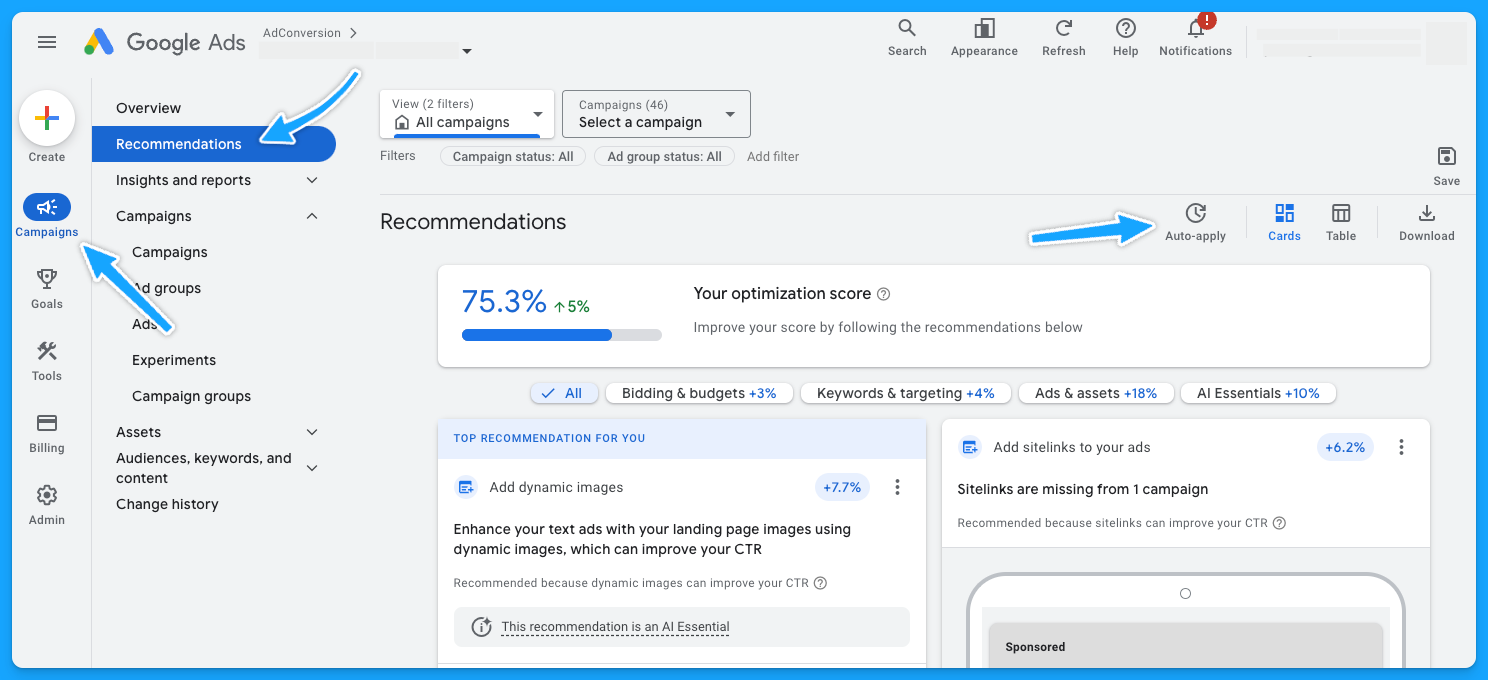
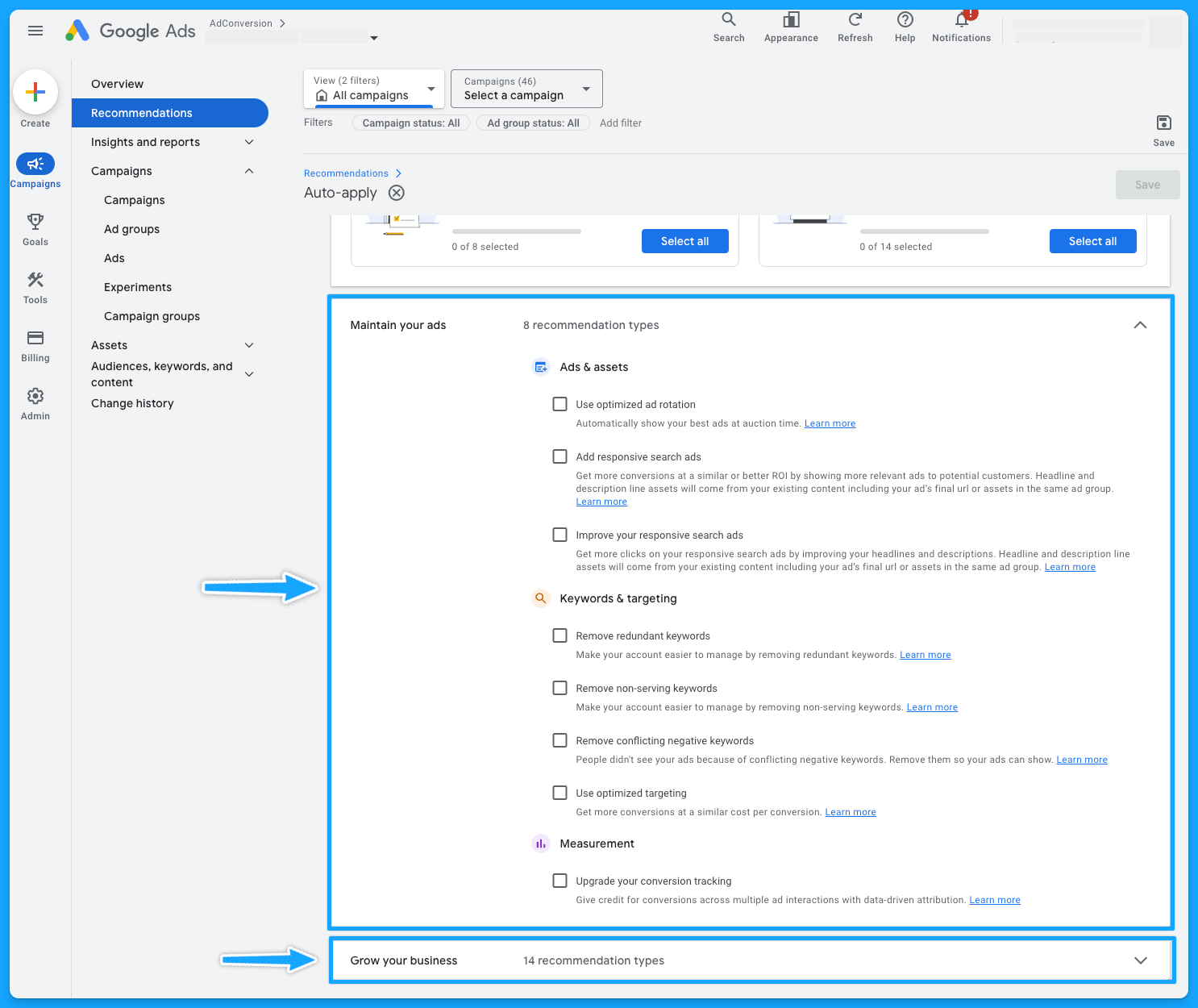
Make sure you turn off all of the recommendations that aren’t relevant to your account.
I personally like to turn off all of them, so I don’t have any changes made by Google without my consent.
5. Is your conversion tracking still working accurately?
This is crucial because if your conversion tracking is not working correctly, you won’t feed Google’s algorithm with essential data to make the best bidding choices for your conversion-based strategies.
Here’s how you can check if your tracking is in place:
- Sign in to your Google Ads account.
- Click on the "Goals" on the left-hand menu.
- Click on "Conversions" and go to “Summary”
- You’ll be able to see the status of your conversions - you want to see “Active”
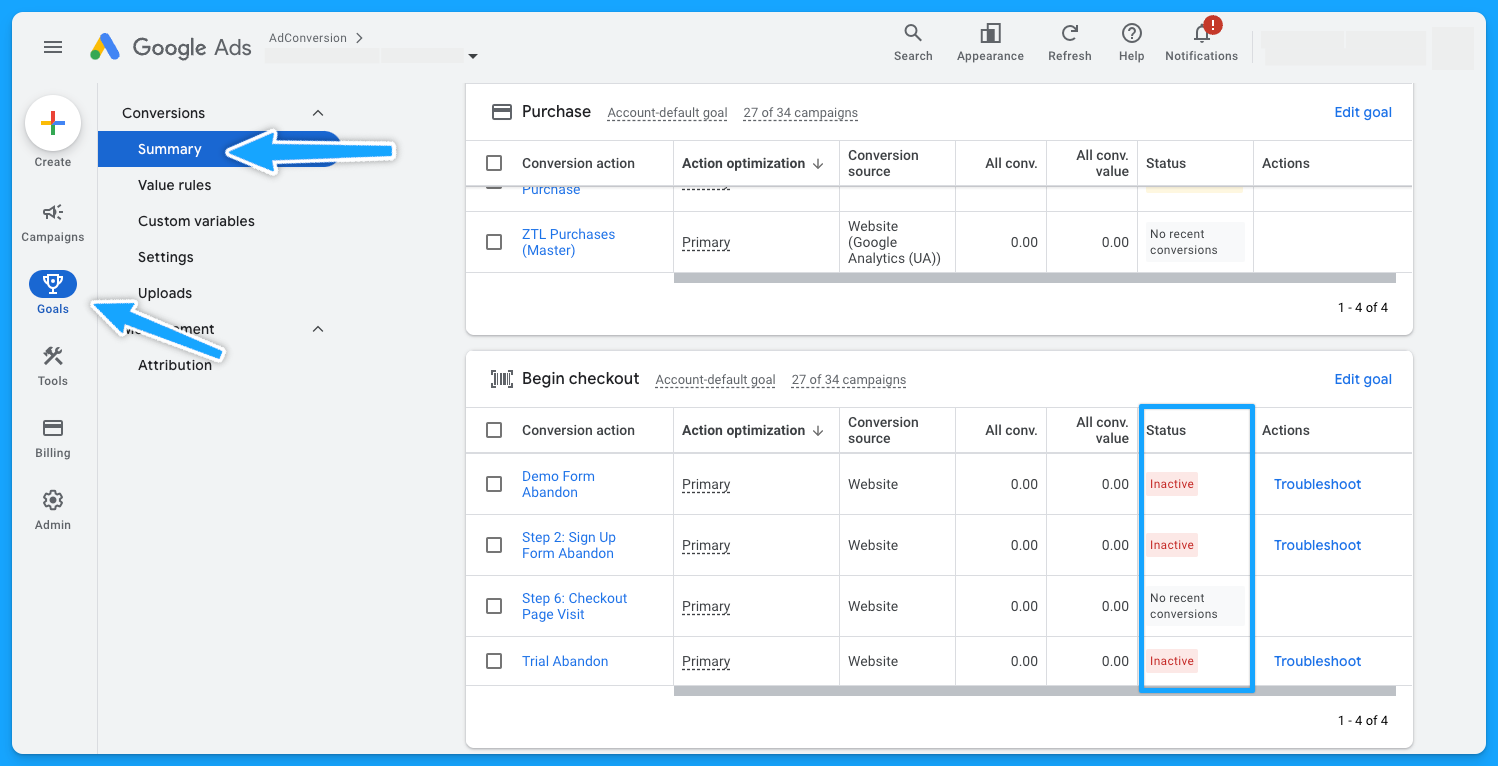
Pro-tip: If you see the status “No recent conversions” - search for your keyword on Google and submit a test.
If you don’t see any activity and have been running Google Ads campaigns for a while, it probably means you’ll need to see what’s going on to ensure the tracking setup is in place.
Part 2 - Campaign Review
Depending on the size and organization of the account, this step will take longer or shorter. So let’s go 👷♂️
1. Do your campaigns follow a logical naming convention?
Having a solid naming convention in place isn’t just about aesthetics, it’s the foundation for good account management.
My campaigns usually have a naming convention that follows this structure:
- Region (NA, EMEA, APAC)
- Campaign Theme (Brand, NonBrand, Generic, Competitor)
- Keyword Topic
- Network (Search, Display)
- Keyword Match Type (Exact, Phrase, Broad)
- Device (Desktop, Mobile, All Devices)
- Offer (Demo, Trial, etc)
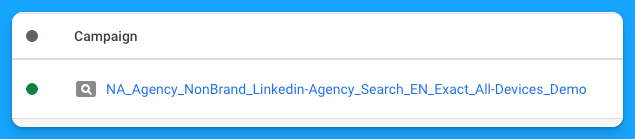
So if you have disjointed campaign names, it’s an opportunity to adjust that and make your life easier.
2. Are you targeting the right networks (display unchecked)?
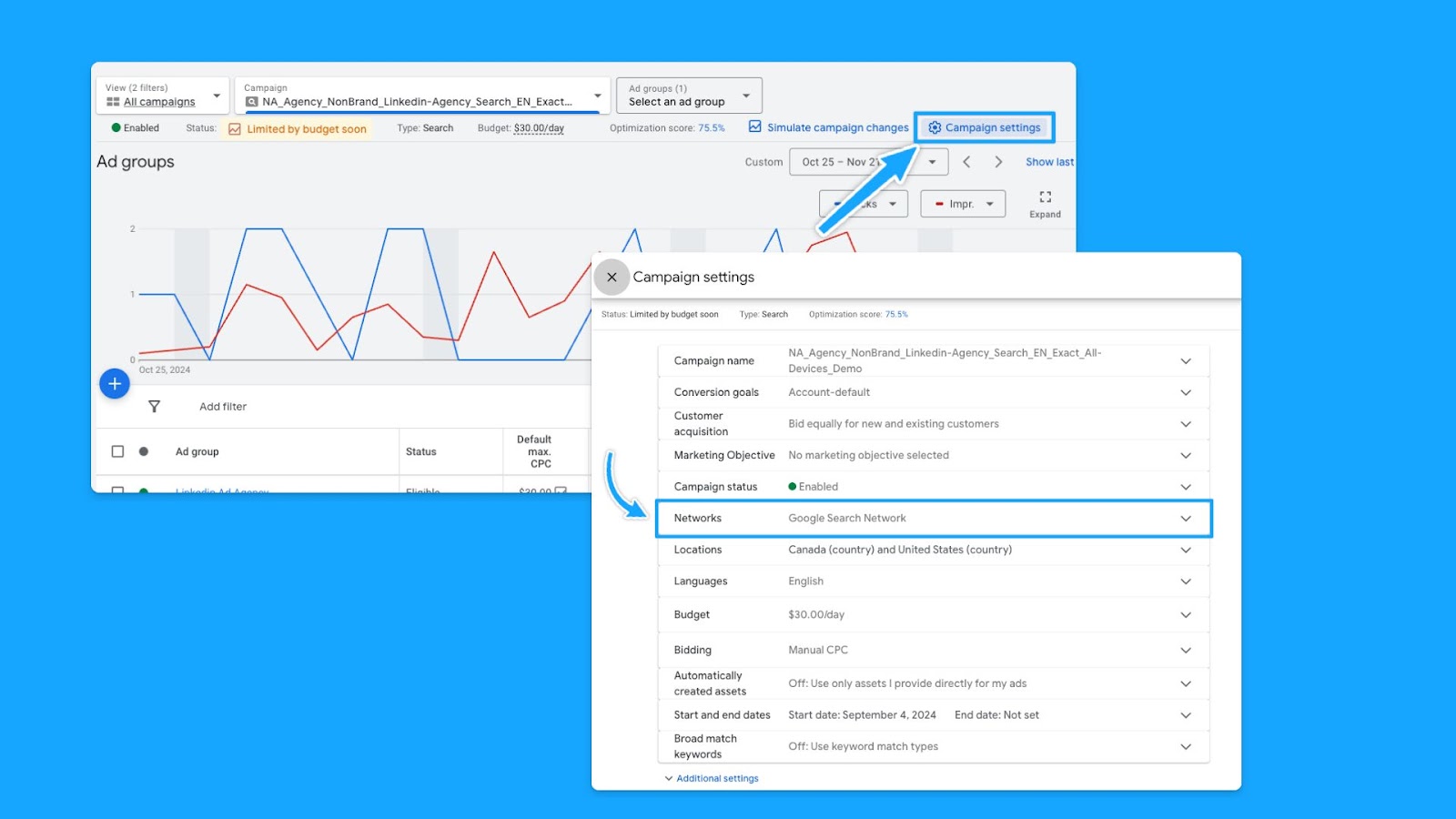
You want to focus on the Search Network and search partners, avoiding the Display Network unless it’s a separate campaign.
- Select the desired campaign
- Go to “Campaign Settings” (on the right-hand side)
- Click on Networks
- Choose the desired Network and save
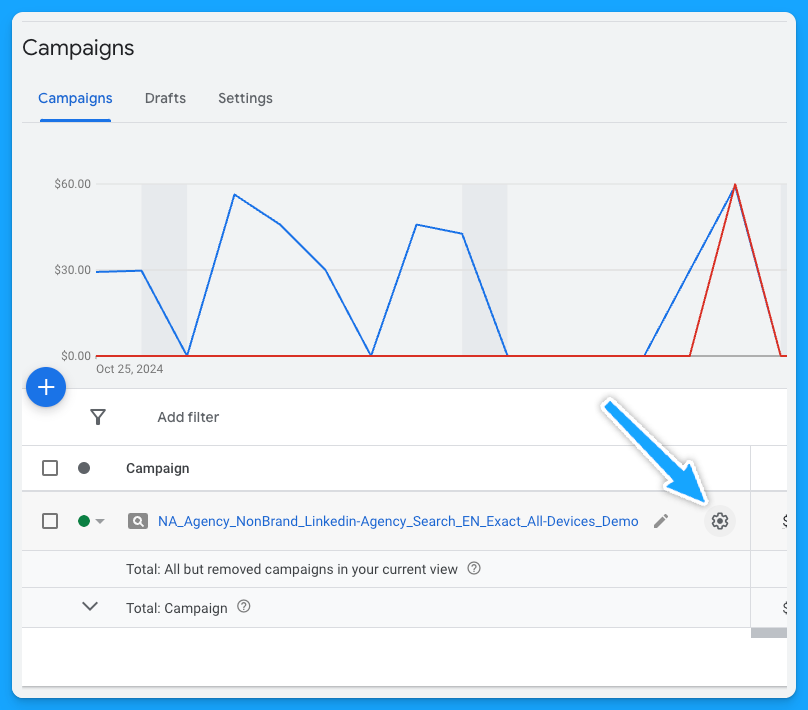
- At the campaign level
- Scroll over your campaign
- Setting logo will appear
- Click on the logo
- Under Networks, choose the desired Network and save.
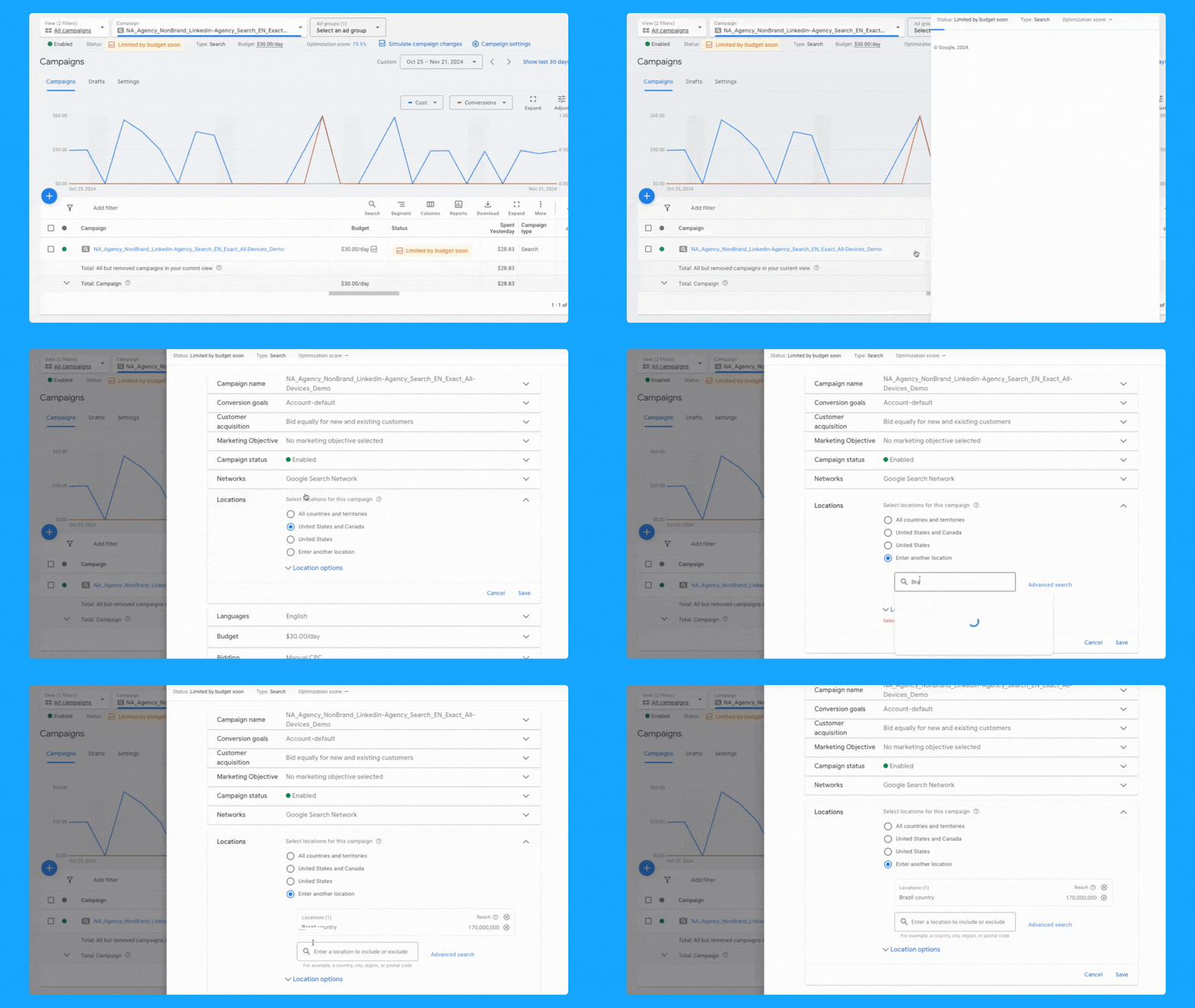
3. Is your location targeting and options still accurate?
If you have a proper naming convention, you should be able to tell where you intend to target your campaigns, but you still need to ensure the correct locations are selected.
Similar to Networks, there are two ways to check your locations:
- Select the desired campaign
- Go to Locations (on the left-hand side - Audiences, keywords and content)
- Click on the pencil icon
- Choose the desired locations and save
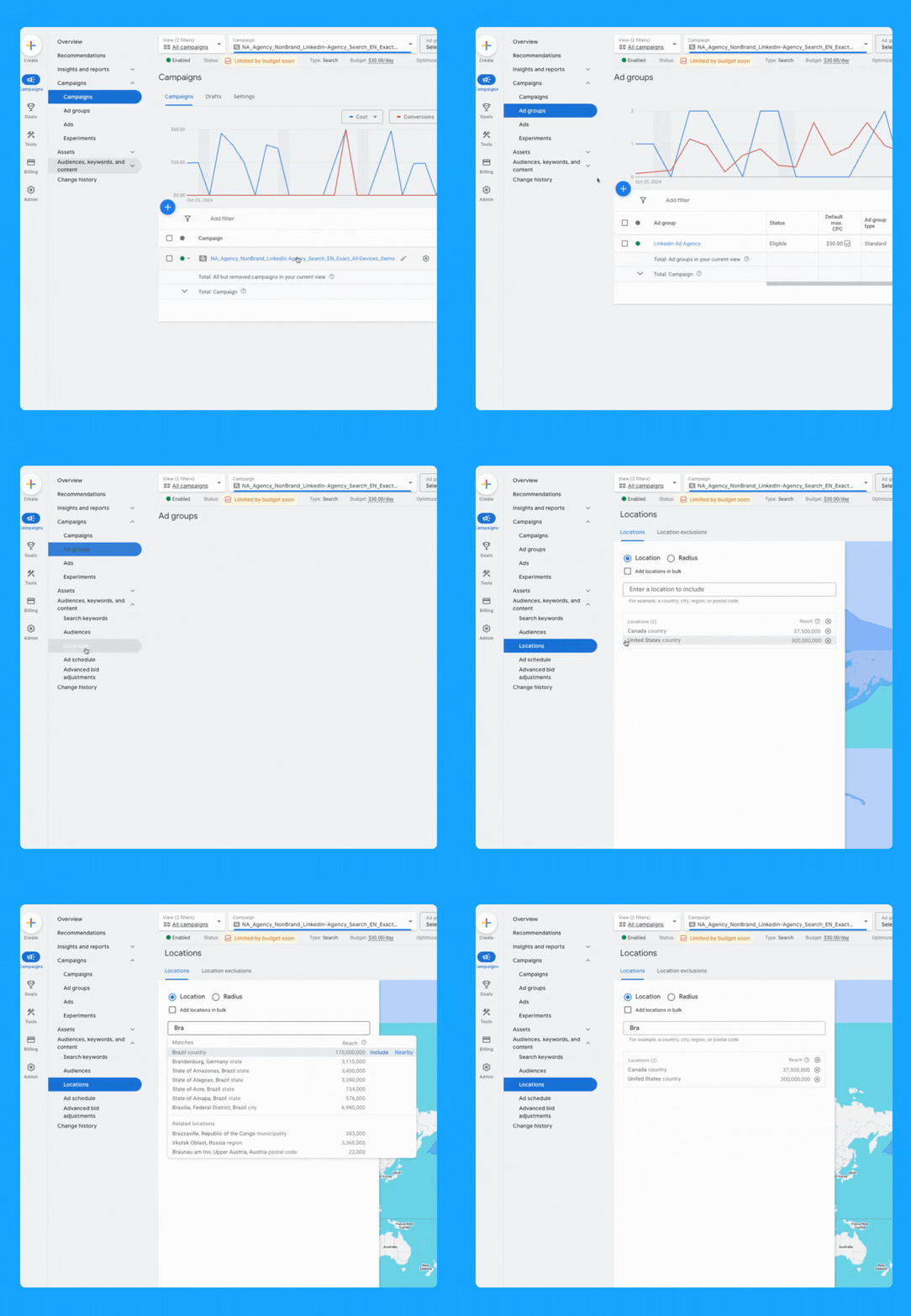
- At the campaign level > Scroll over your campaign
- The settings logo will appear
- Click on the logo
- Under Locations, Enter location(s) and Save.
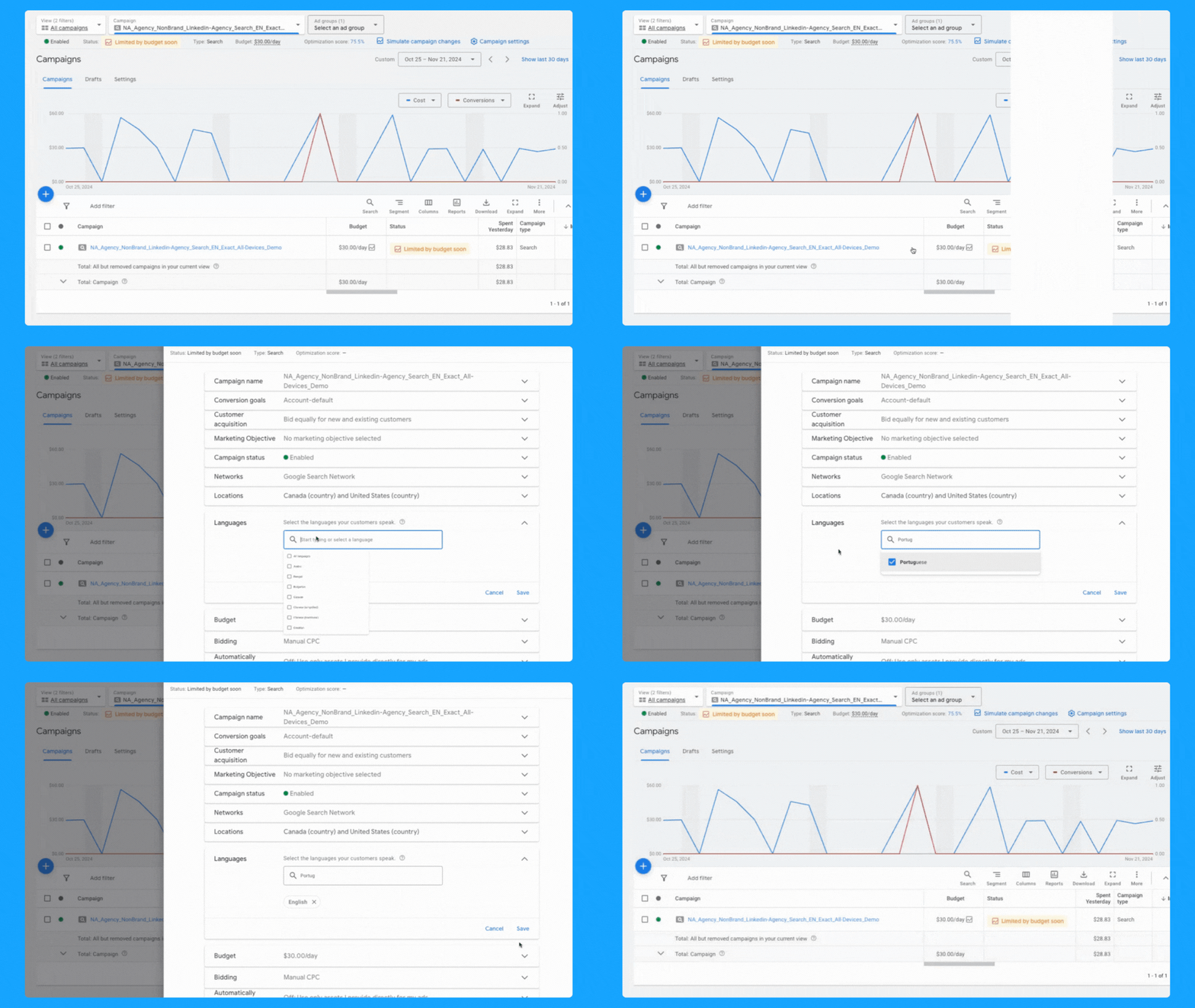
4. Are you targeting one language per campaign (with relevant ads + landing pages)?
In a perfect world, your ads and landing pages should match the primary language of the targeting locations.
Here’s how you can change the language of your campaigns:
- At the campaign level, toggle over your campaign name
- Click on the icon setting once it appears
- Under “Languages” you can select the desired language and click Save.
5. Is your daily budget still aligned with your goals?
Being an effective marketer involves strategically allocating your budget over the designated campaign duration while achieving the goals.
Ex. If your average cost per demo is $300 and you need to generate 10 demos, then you must have at least $3,000 - Now, if the plan is to run the campaign for 30 days, then you must allocate a $100 daily budget and check daily to make sure it’s pacing well.
Generally speaking, I don’t recommend running campaigns with less than $50/day for B2B campaigns, but this will obviously depend on your average cost per click.
Check our Google Ads Budget Calculator tool if you need help to define your budget 🙌
6. Are you using the correct bidding strategy?
When you’re first starting out, getting as many clicks as possible is important to get some early conversions, so the “Maximize Clicks” strategy is a good option.
If you have more than 15 conversions, you can switch to the “Maximize Conversions” strategy if your goal is to get as many conversions as possible.
If you have offline conversions set up, you can use the “Maximize Conversion Value” strategy or the “Target ROAS” strategy. These will help you get more relevant conversions.
Here are two ways to check your bidding options:
- Select the desired campaign
- Go to Setting (on the right-hand side)
- Click on Bidding > “Change bid strategy”
- From the dropdown menu, select the desired bidding strategy and save.
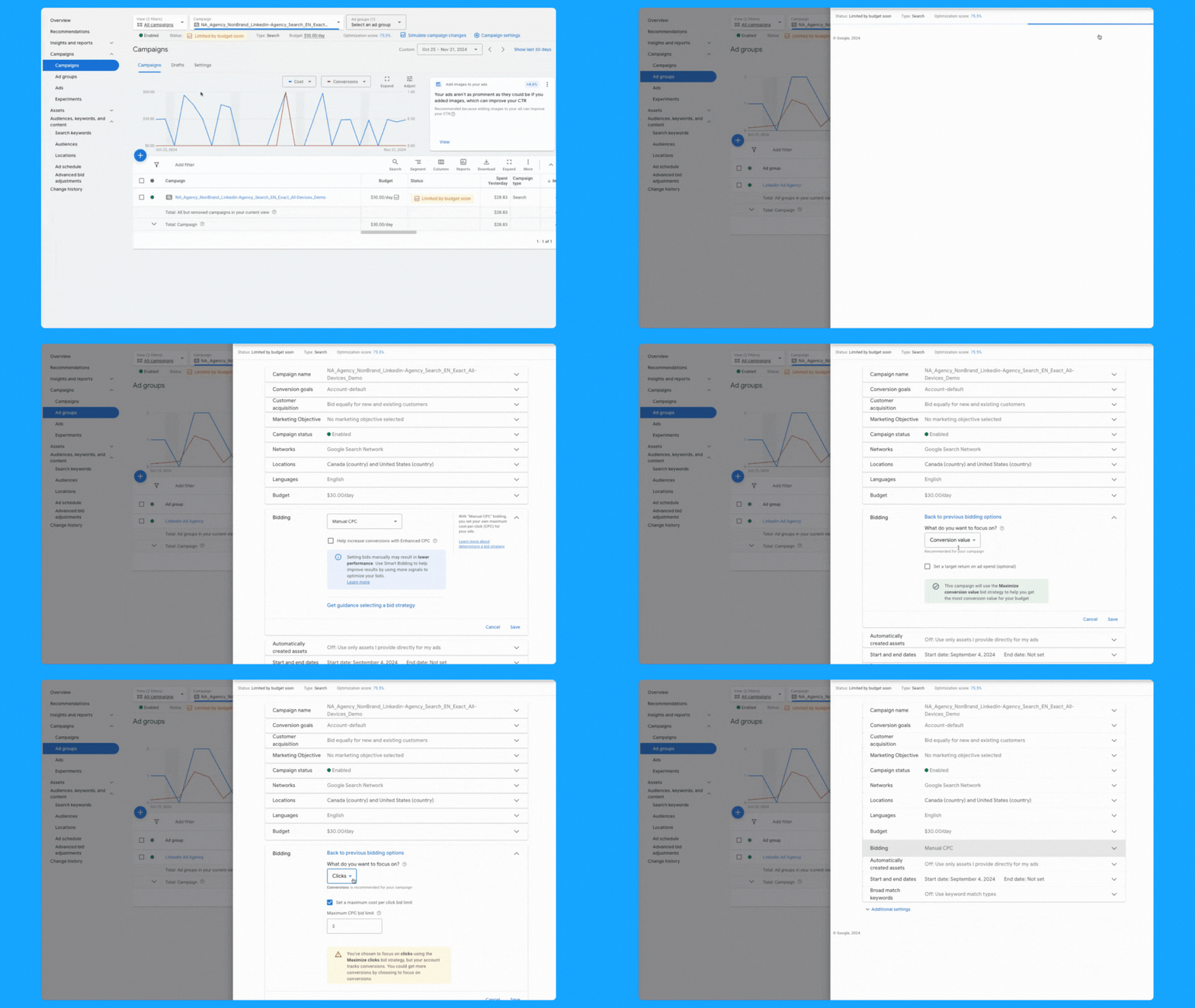
- At the campaign level > scroll over your campaign > Setting logo will appear
- Click on the logo
- Under Bidding, “Change bid strategy”
- From the dropdown menu, select the desired bidding strategy and save.
7. Do you have the correct conversion actions set? (if applicable)
Campaigns can inherit account-level conversions or have specific conversion actions set.
Both approaches are valid, but it’s essential to use the one that aligns with your campaign goals.
For instance, if a campaign-specific conversion action set is used, make sure it includes all relevant actions in the conversion funnel.
Follow the steps below to add/check conversion actions:
- At the campaign level > scroll over your campaign
- Setting logo will appear, click on the logo
- Under Goals, “Use campaign-specific goal setting”
- Click the pencil icon
- Select the appropriate (previously tested) conversions and save.

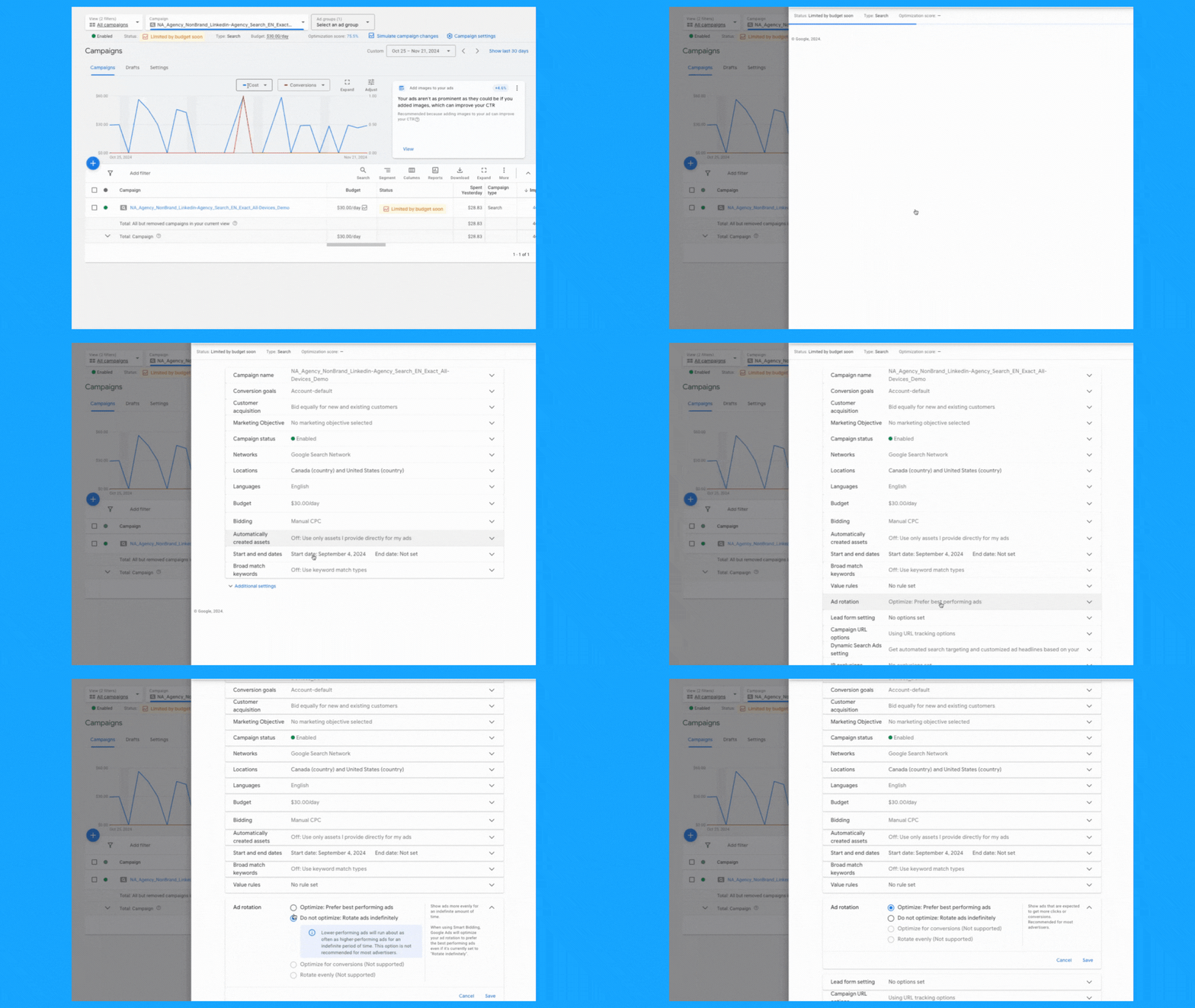
8. Are your ad rotation settings still accurate?
Generally speaking, I recommend using the “Best Performing Ads” option. This way, the Google algorithm will analyze your ads' performance and prioritize delivering the the ads with the best performance.
But if you see that Google is serving some ads dramatically more than others, then you can select “Rotate Ads Indefinitely” and Google will distribute each ad individually.
For conducting A/B testing on multiple ads, I recommend selecting the "Do not optimize" setting to make sure you’re collecting more precise data.
To review your ad rotation settings, follow these steps:
- At the campaign level > scroll over your campaign
- Setting logo will appear, click on the logo
- Click on additional settings > Ad rotation
- Click the pencil icon
- Select the preferred method and save.
You can also follow the steps above at the Ad Group level
9. Is your ad schedule still up to date?
You can review your campaign's performance by day of the week and time of day, then adjust your ad schedule as needed. To do so, follow these steps:
- Click on “Overview” on the left-hand side
- Under the “Day & Hour” table, you can choose the metrics that matter the most to you to view performance by Day and/or Hour.
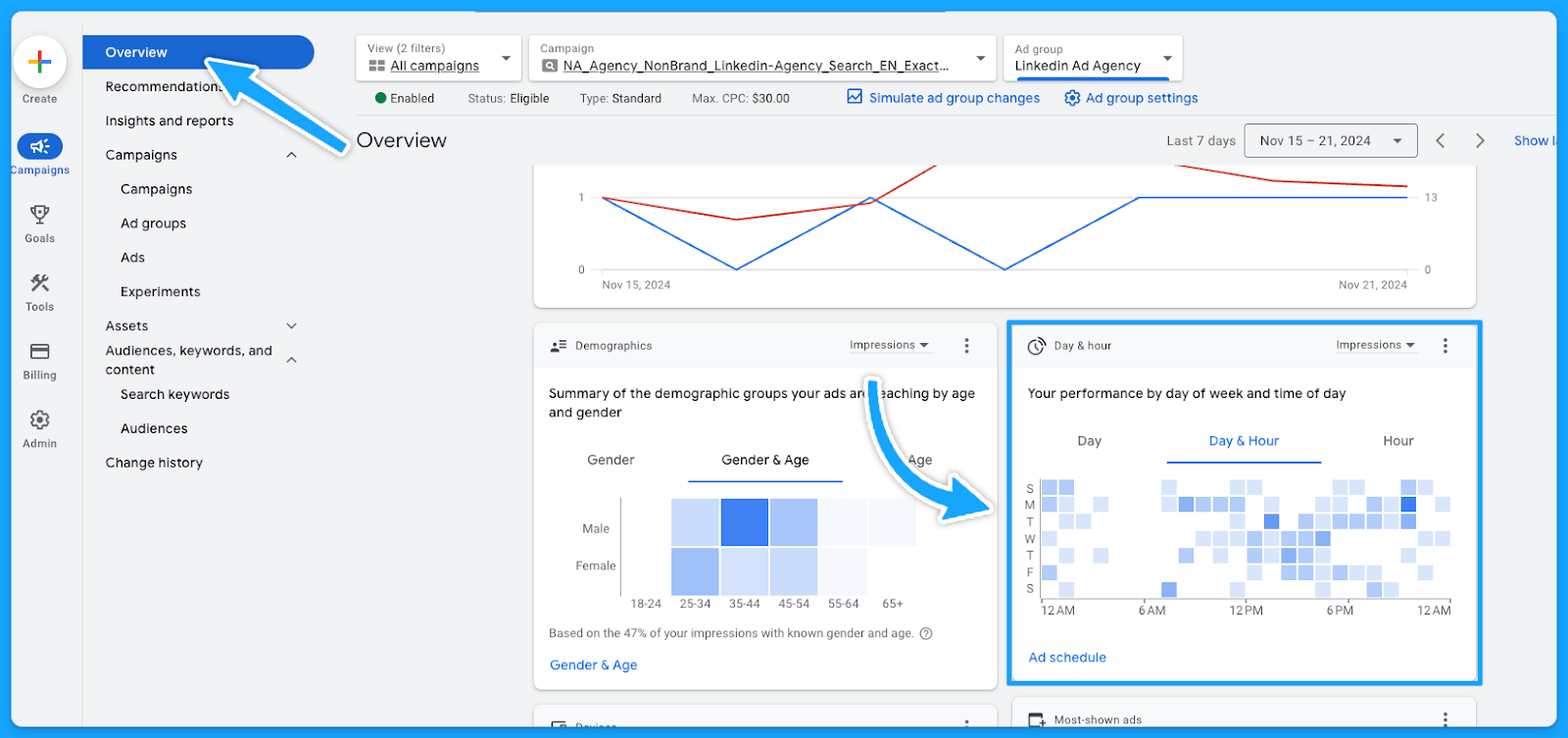
Now that you know which days and times generate the best results, you can tailor your ad scheduling accordingly.
- Select the campaign or ad group
- Click on Ad Schedule on the left-hand side
- Click the pencil icon
- Choose the optimal time and save.

10. Are you targeting the right devices?
Similar to the ad schedule, you can follow the same steps to find the best performance by device and make adjustments. Steps as follows:
- Click on “Overview” on the left-hand side
- Under the “devices” table, you can choose the metrics that matter the most to you.
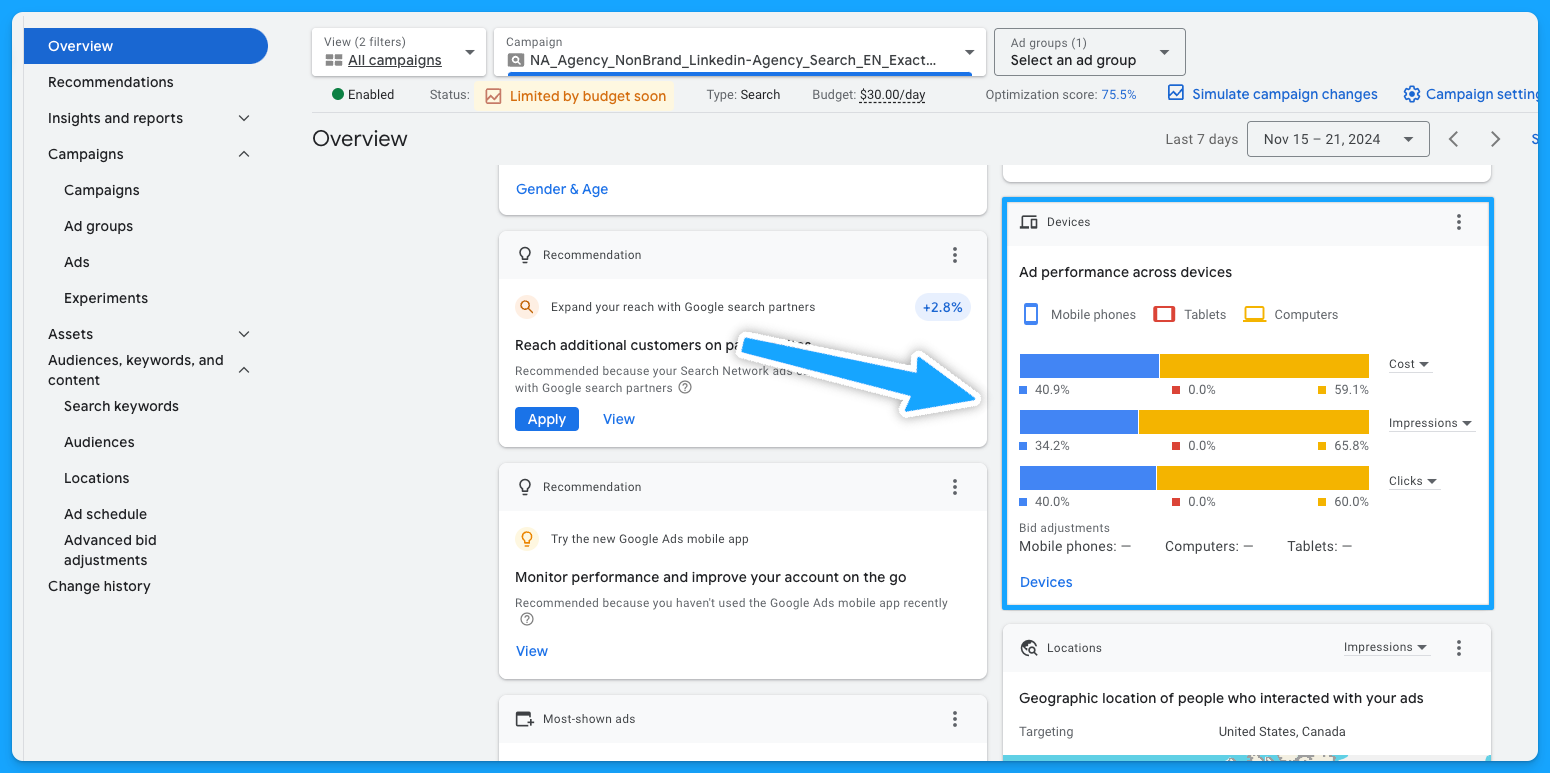
You can now update your targeting by device accordingly.
- Select the campaign or ad group
- Click on “When and where ads showed” on the left-hand side
- Edit bid adjustment
- To stop showing on a specific device, choose “Decrease with 100% ratio > Save

If you’re using the device on the campaign naming convention, you want to make sure the campaign is targeting the device it has on its name.
11. Are you excluding existing leads and sales from your campaigns? (bonus)
A practical approach to lowering costs involves not targeting existing leads and customers.
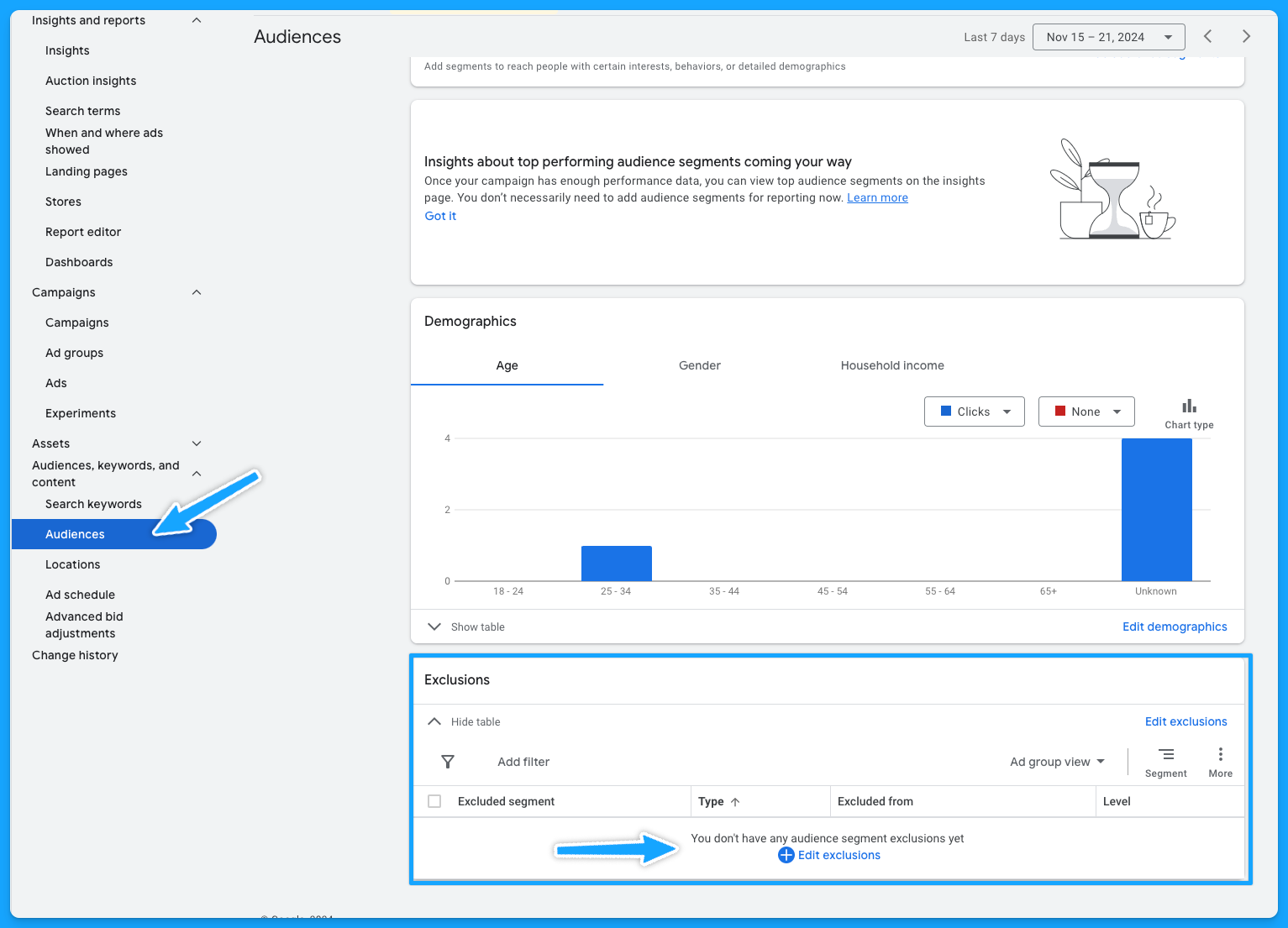
Google enables the upload of first-party data for use primarily in Remarketing Lists for Search Ads (RLSA) and for creating exclusions. Steps below:
- Select audiences on the left-hand side
- Edit exclusions
- Select the Campaign or Ad group
- Choose the previously uploaded audience > Save
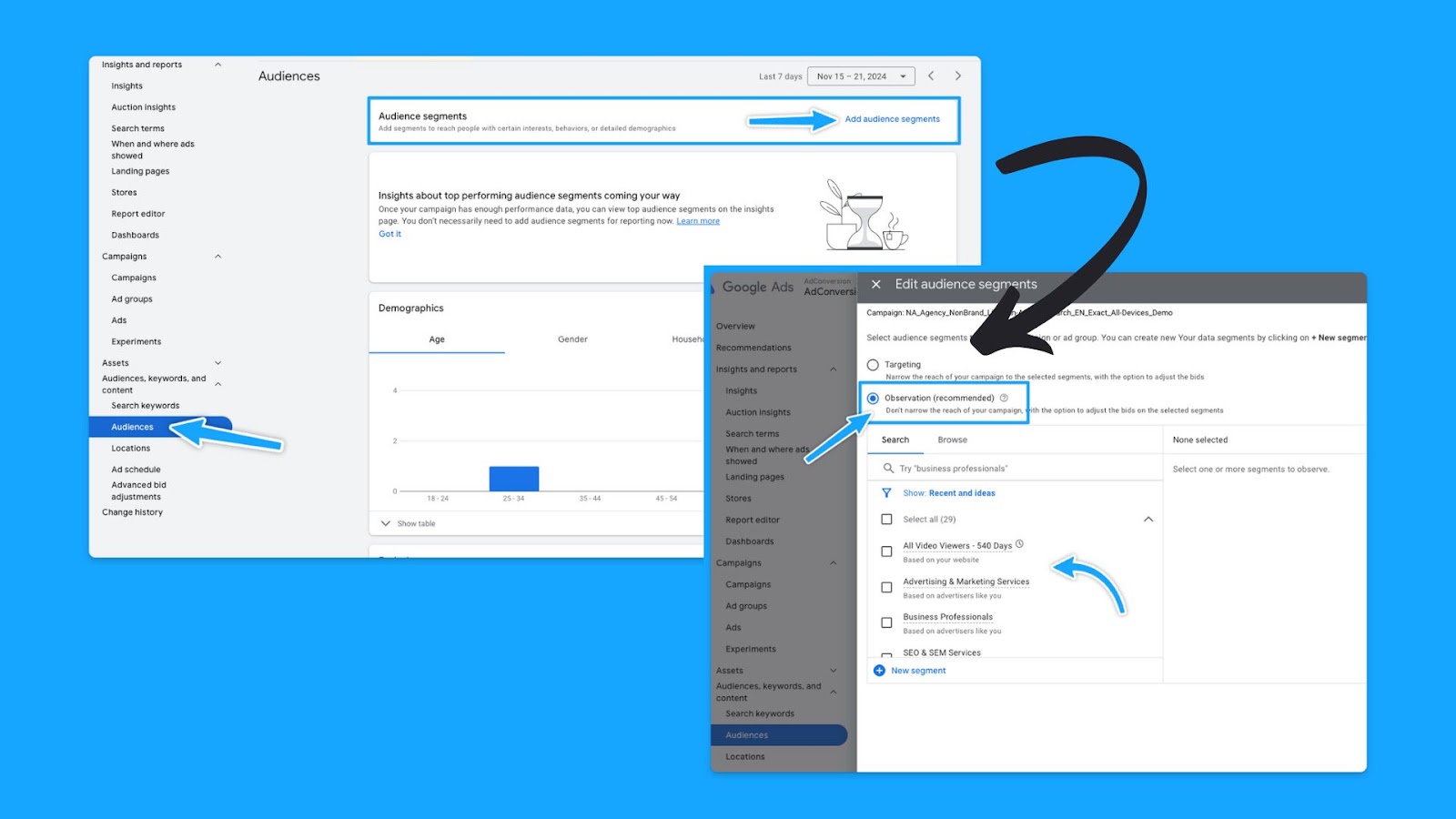
12. Do you have observational audiences added to your campaigns? (bonus)
Gain insights into how different audiences interact with your campaigns without altering who sees your ads:
- Select audiences on the left-hand side
- Audience segments
- Select Campaign or Ad Group
- Under observation, choose what is important to you and save.
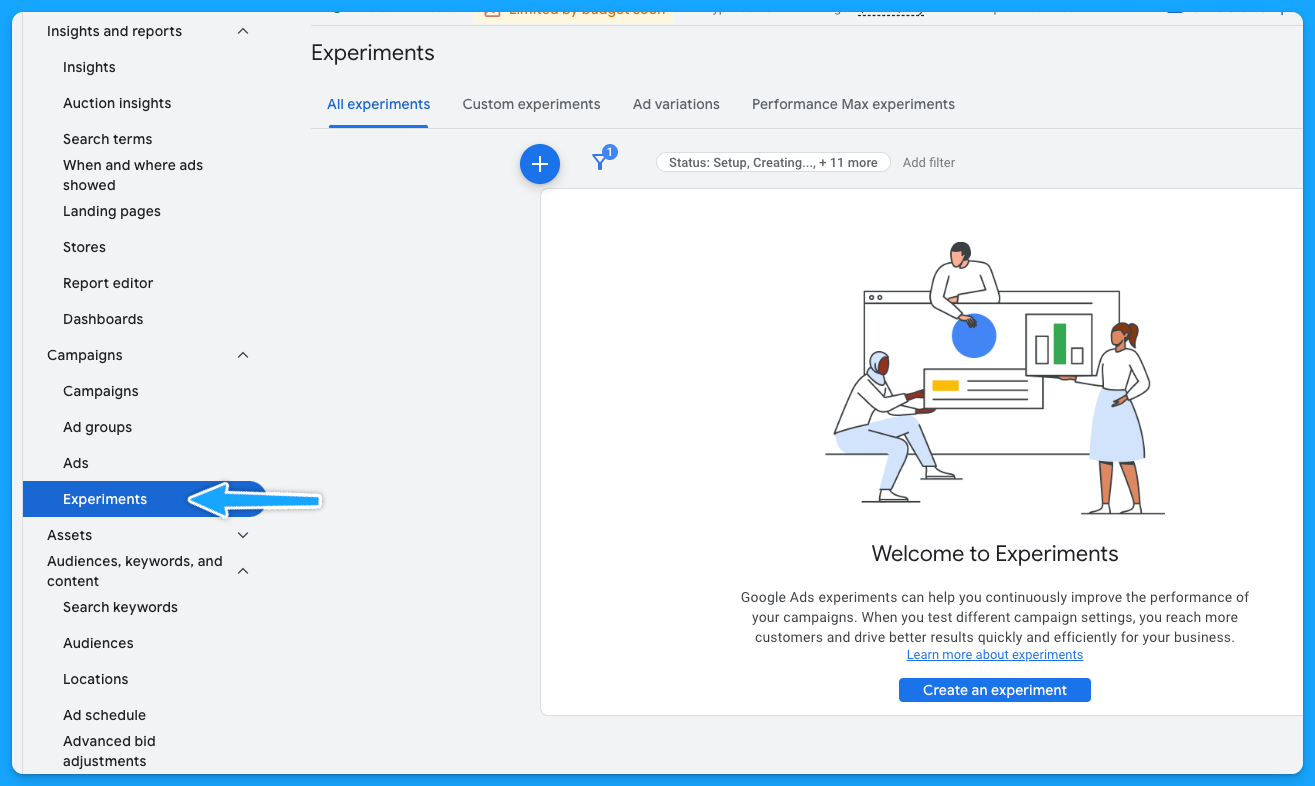
13. Have you been actively running campaign experiments in the past? (bonus)
With the Experiments feature, you can execute A/B tests without needing to set up new campaigns.
If the outcome proves successful, the winning campaign can then be chosen as the primary one.
Part 3 - Ad Group Review
1. Are your ad groups broken out logically into related themes?
There are generally 6 buckets of themes for search ads:
- Brand
- Non-brand
- Competitive
- RLSA (Search Remarketing)
- Content
- Dynamic Search Ads
A clear naming convention aids in quickly identifying campaign and group themes. Example:
Campaign: NA_Non-Brand_Search_EN_Exact_All-Devices_Demo
Group: Non-Brand_Software
If there is no proper naming convention, then we have some cleaning to do:
- Download the data at the keyword level
- Delete: Ad spend < $ 1
- Open a new column called “Theme” beside the Keywords
- Tag the Theme of the campaign/group according to the Keyword
- Turn it into a pivot table to get the data by Theme
- Update the naming convention
If you don’t do a good job separating your keywords into themed ad groups, it will hurt your quality score.
Because if you have too many keywords in your ad group, it’s hard to make sure that the ads are relevant to all these keywords.
2. Do you have less than 15 keywords per ad group?
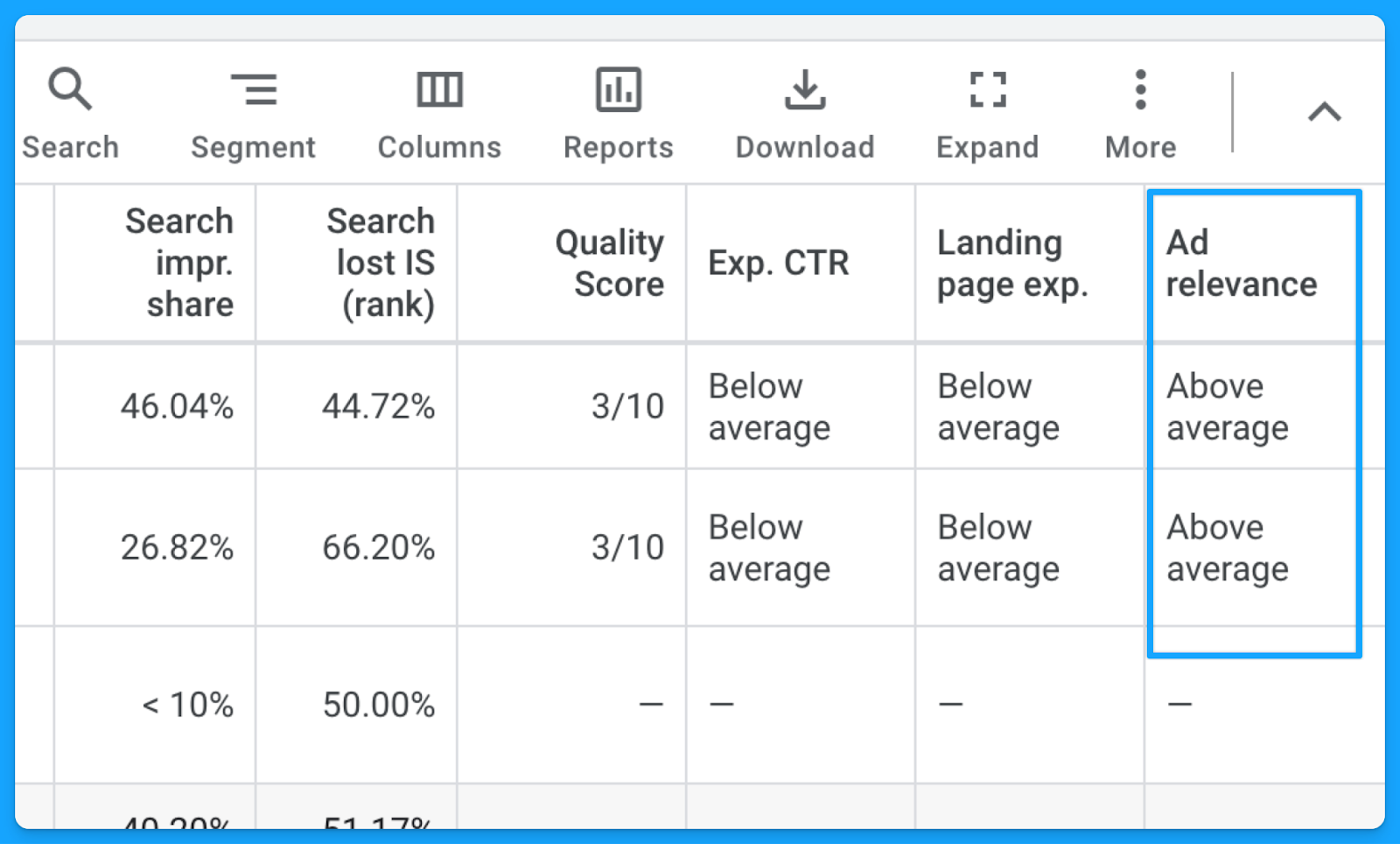
This is not a set-in-stone law, but it will help you mitigate the damage to your ad relevance.
Google allows up to 15 headlines and 4 descriptions in Responsive Search Ads. The goal is for keywords within each group to have a relevant ad to boost the quality score.
At the end of the day, you know you are doing a good job with your ad groups and how you structured your keywords if you see that your ad relevance is above average.
3. Are your ad groups filled with relevant keywords, ads, and landing pages?
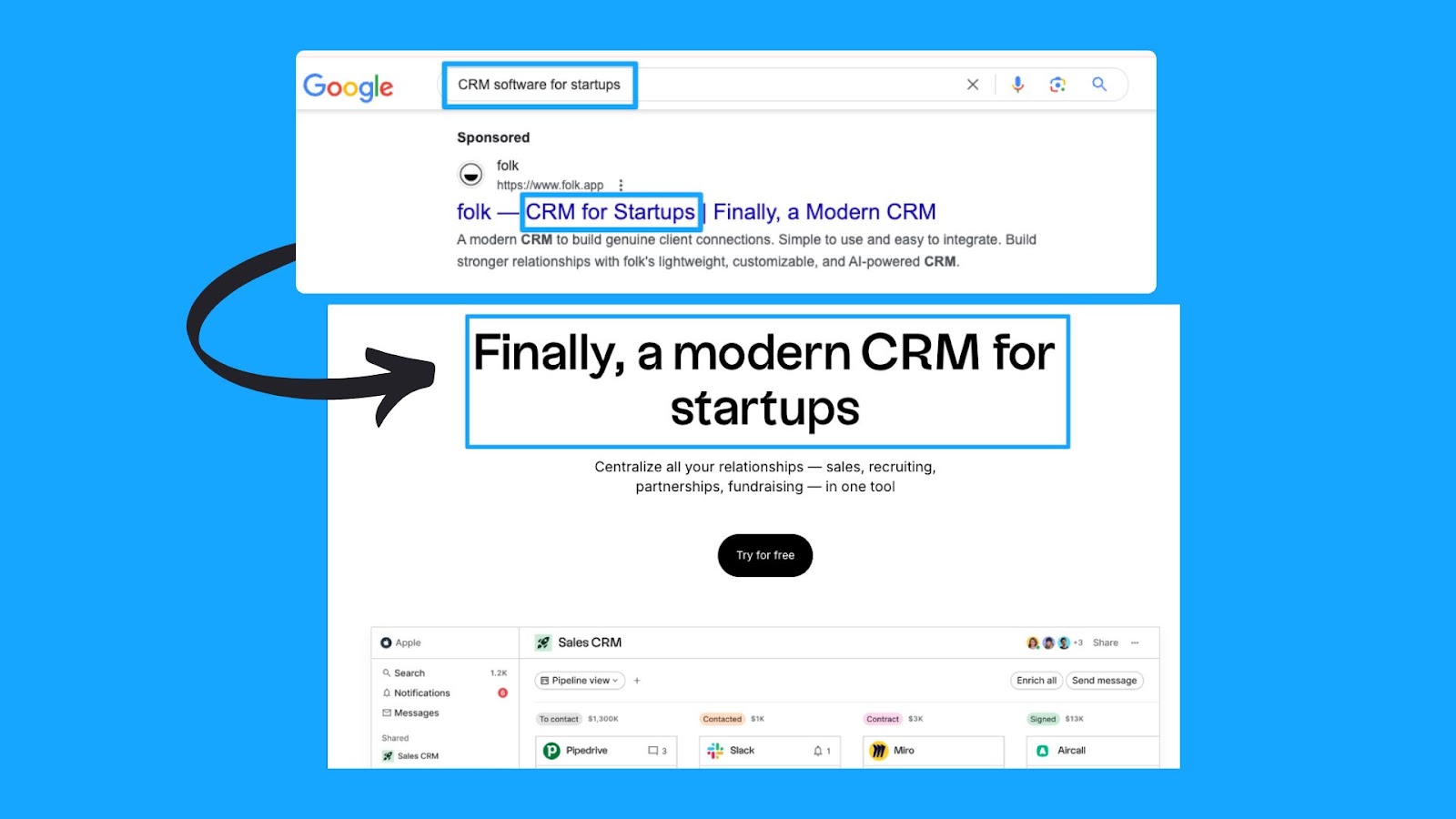
Each group’s keywords should align with an ad in the same language, context, and call to action as well as a landing page contextualizing the search terms.
Here’s a good example of a great message match from the CRM software folk.
They’re bidding on the keyword “CRM software for startups”, their ad mentions “CRM for startups”, and if you click on the ad, their landing page talks exactly about CRM for startups. Everything is aligned.
4. Are your best ad groups receiving enough budget?
With accurate conversion tracking in place for your campaigns (we covered this in Part 1), we can see which ad groups bring more conversions at a lower cost per conversion.After reviewing the ad group performance, you can optimize your ad groups in these ways:
- Pause the ad groups with more search volume that are just cannibalizing and eating up all the campaign budget without bringing conversions.
- Take the top performers' ad groups and put them into their own campaign.
- Run target CPA bidding and set different target CPA caps at the different ad group levels, so you can put a more restrictive cap on the one that’s eating up all the budget and then put a larger one on the one that hasn’t spent enough.
Part 4 - Keyword Review
1. Are your search terms as close to perfect as possible?
Regularly checking the search term report has 2 main benefits:
- Reduce CPA: Comparing the number of clicks to the number of conversions - exclude all irrelevant results.
- Increase Expected CTR: Compare the number of impressions to the number of clicks - exclude all irrelevant results.
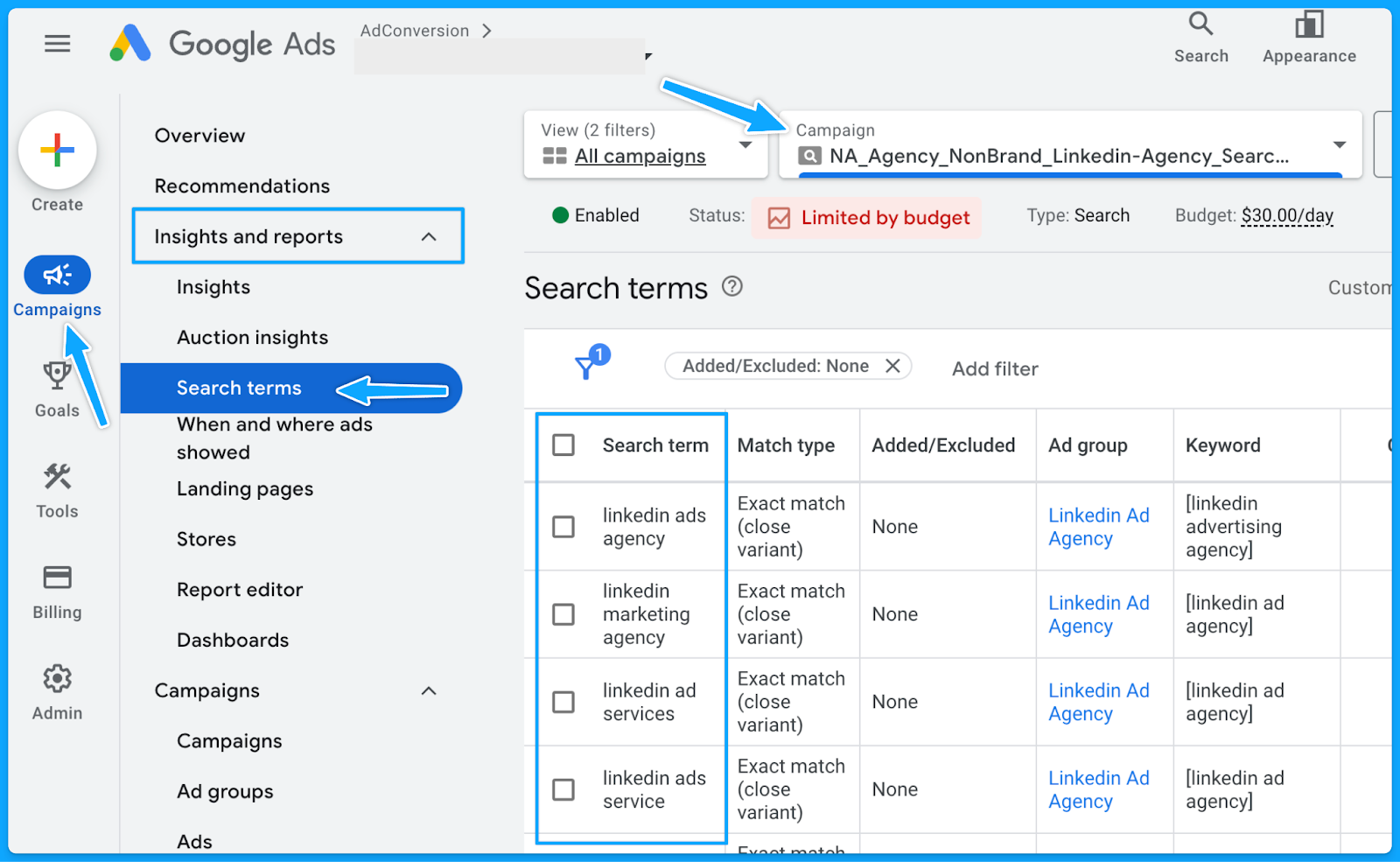
How to check the search term report in Google ads:
- Under “Campaigns” on the left-hand side > Click “Insights and reports”
- Select “Search terms”
- Filter by campaign
- Evaluate the above recommendations.
2. Do you have a strong negative keyword list in place?
Negative keywords help us reduce the wasted budget and increase the overall quality of ads.
The broader the match type, the more important it is to have an extensive list of negative keywords.
However, even with Exact match type, search terms must be regularly checked, and negative keywords constantly be updated.
Maintaining a universal negative keyword list for your entire account can be beneficial. This list might include words related to profanity, employment, bargaining, etc.
Below you can access a sample list we use in our agency.
👉 Master Negative Keyword List
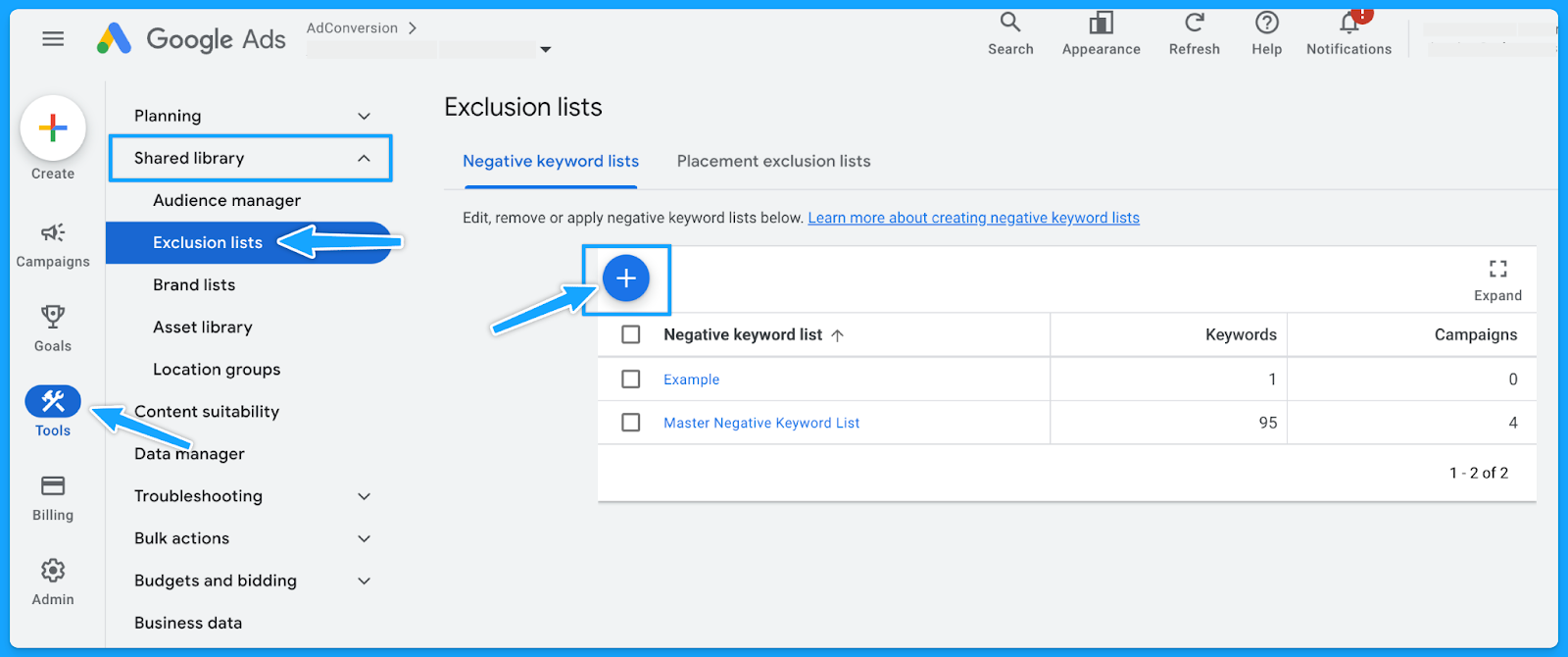
To avoid unintended blocking, please ensure these negative keywords apply to your business and do not overlap with any targeting keywords.How to create a new list in Google:
- Select “Tools” on the left-hand side
- Under “Shared library” click on “Exclusion lists”
- Select the “plus sign”
- Add the list of desired negative keywords and name the list accordingly.
3. Do you have the appropriate match types for your keywords?
If you don’t know which match type you should start with, then always start with the Exact match type and work your way up.
If you don’t get quality conversions with the Exact match type, then changing the match type won’t help.
Generally, Broad match types have the highest wasted budget - unless the campaign is layered with a first-data party audience.
4. Do you have underperforming keywords you can pause or optimize?
Usually, 20% of the keywords are responsible for 80% of the results. Make sure to check the performance of each keyword and pause underperformers continuously.
However, before pausing, analyze the relevance of search terms against keywords.
If they align, evaluate the click-through rate (CTR) to determine if the ad copy requires updates.
If users are still clicking on the ad without converting, consider revising the landing page.
5. Are your keyword bids set at an optimal amount? (if applicable)
If you're using automated bidding, you don't have to worry about this step.
But if you're using manual bidding, sometimes your manual bid is too low, so your ads won’t show on the first pages of the results.
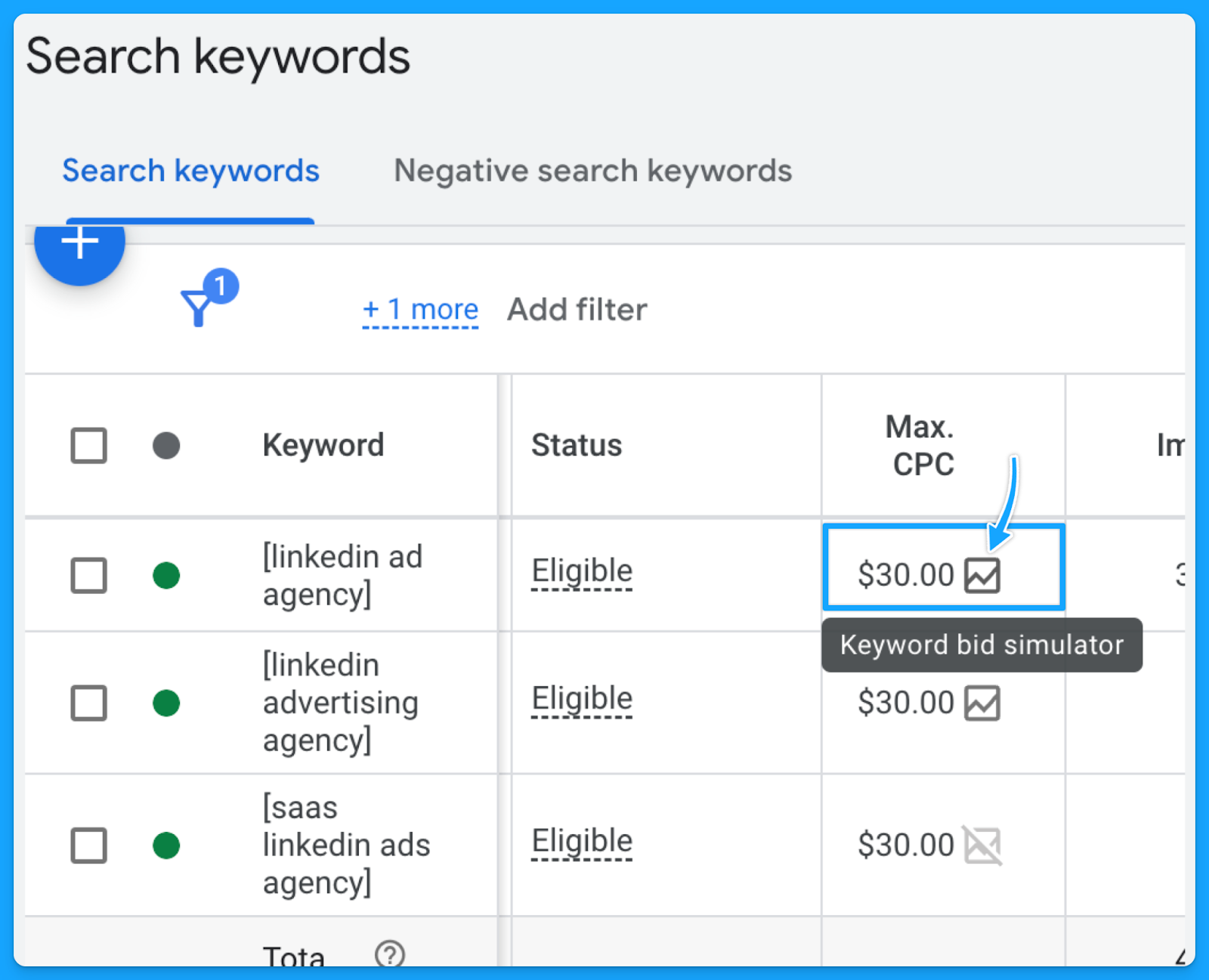
I recommend that your Max. CPC amount is at least high enough to the first page bid estimate.
You can find the keyword bid simulator by hovering over the small chart in the Max. CPC field.
Part 5 - Ads & Extensions Review
1. Are your keywords in your ad copy?
This is an easy way to increase ad relevance and ultimately get more clicks.
I can’t stress enough the importance of having a strong message match.
When users encounter their specific search terms within your ad—especially if these terms are variations of your targeted keywords—the likelihood of them proceeding to your landing page significantly increases.

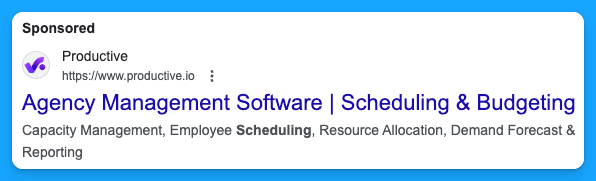
2. Are you title-casing the beginning of each letter in your ad?
Title casing is when you capitalize the letter of each important work in the sentence.
In my experience, title casing works better on paid search because your ads will look more professional, and it will enhance readability.
3. Do you have a minimum of two ads per ad group?
Running multiple ads allows for A/B testing or split testing, where different versions of ads can be compared to see which one performs better.
By consistently testing ads, you’ll drive a better click-through rate, and this will ultimately result in a better Expected Click-through rate, which will improve your quality score and reduce your costs while putting your ads in a better search results position.
4. Are you speaking one-to-one, communicating benefits, answering objections, and providing a CTA?
You want to make sure you are speaking one-to-one In your copy and not using corporate speak, where it seems you’re talking to an auditorium versus a person.Here are a few important points your ads should cover:
- Are you communicating benefits in the second headline to differentiate yourself from your competitors on the SERP?
- Are you answering objections? (If there are objections that you can answer on your copy)
- Are you providing a Call-to-Action (CTA) that moves people and motivates them?
Here’s a good example from Brevo:

- We can instantly see the benefit: 9000 emails free per month
- One-to-one communication: Don’t let them overcharge you
- CTA that motivates: Stop overpaying for email and get the best value in email delivery & email marketing tools.
5. Are you using all the characters available in your headline, description & path fields?
You don’t have to use every single one, but I recommend you use as many as you can.
Utilizing all available characters in Google Ads' headline, description, and path fields increases message clarity and impact, boosting click-through and conversion rates.
6. Are you using as many ad extensions (assets) as possible? (Especially core ones)
Extensions expand your presence on the search results page, improving the chances of receiving more clicks, which will increase your expected CTR and the overall quality score.
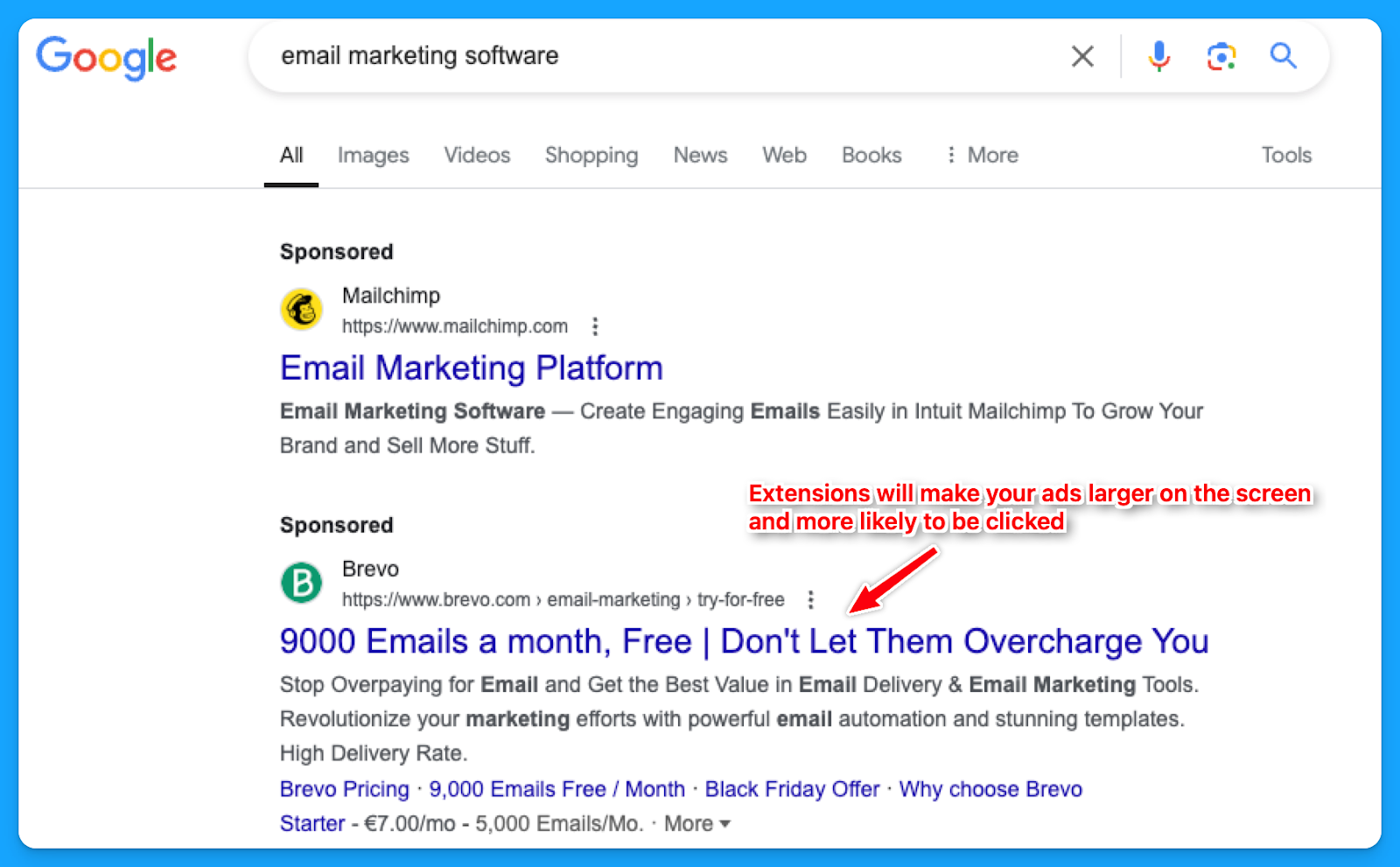
While assets such as the business logo and name are best set at the account level, it's often better to tailor other extensions, like callouts, structured snippets, sitelinks, etc., to reflect the the messaging of each campaign or ad group.
How to create new ad extensions in Google:
- Select “Campaigns” on the left-hand side
- Under “Assets” click on “Assets”
- Select the desired extension to see the ones you already have.
- Click on the “plus sign” to add new ad extensions.

7. Are you consistently testing new ad copy, types and modifiers?
If you are not doing this, you’ll know because you will see the click-through rate consistently going down week over week, month over month.
If you’re auditing someone else’s account, you can check the “Changes history” option to see if they are constantly testing new ads.
For modifiers, you can use dynamic keyword insertion in your ad copies to dynamically test different variations.
8. Are you sending searchers to relevant landing pages?
In my opinion, this is the most important thing.
If your prospects search for “CRM for startups”, your ads should say “CRM for startups”, and your landing page should say “CRM for startups”.
This sounds basic and trivial, but the amount of people who miss this is dramatic.
So make sure that you have a strong message match.
Part 6 - Landing Page Review
Remember that success will come from half traffic and half your landing page, so I highly recommend deep diving into your pages individually as you go through this.
1. Are you mirroring the message from your ad on the landing page?
As I mentioned in the last step of Part 5, the landing page experience is a crucial element of the quality score.
A page that fails to align with your ad's messaging is unlikely to offer value to the user.
2. Can the searcher understand what you do & why in 5 seconds or less?
This is called the five-second rule, and it’s essentially a test where if your prospects just look at the above the fold section of your landing page, can they understand in five seconds what you do and essentially why they should care?
In this example from Microsoft Clarity, we can easily understand that this is a free tool that will help you get insights into the behavior of users on your website so you can improve your products.
It’s also used by 100k+ sites worldwide and is GDPR & CCPA-compliant.
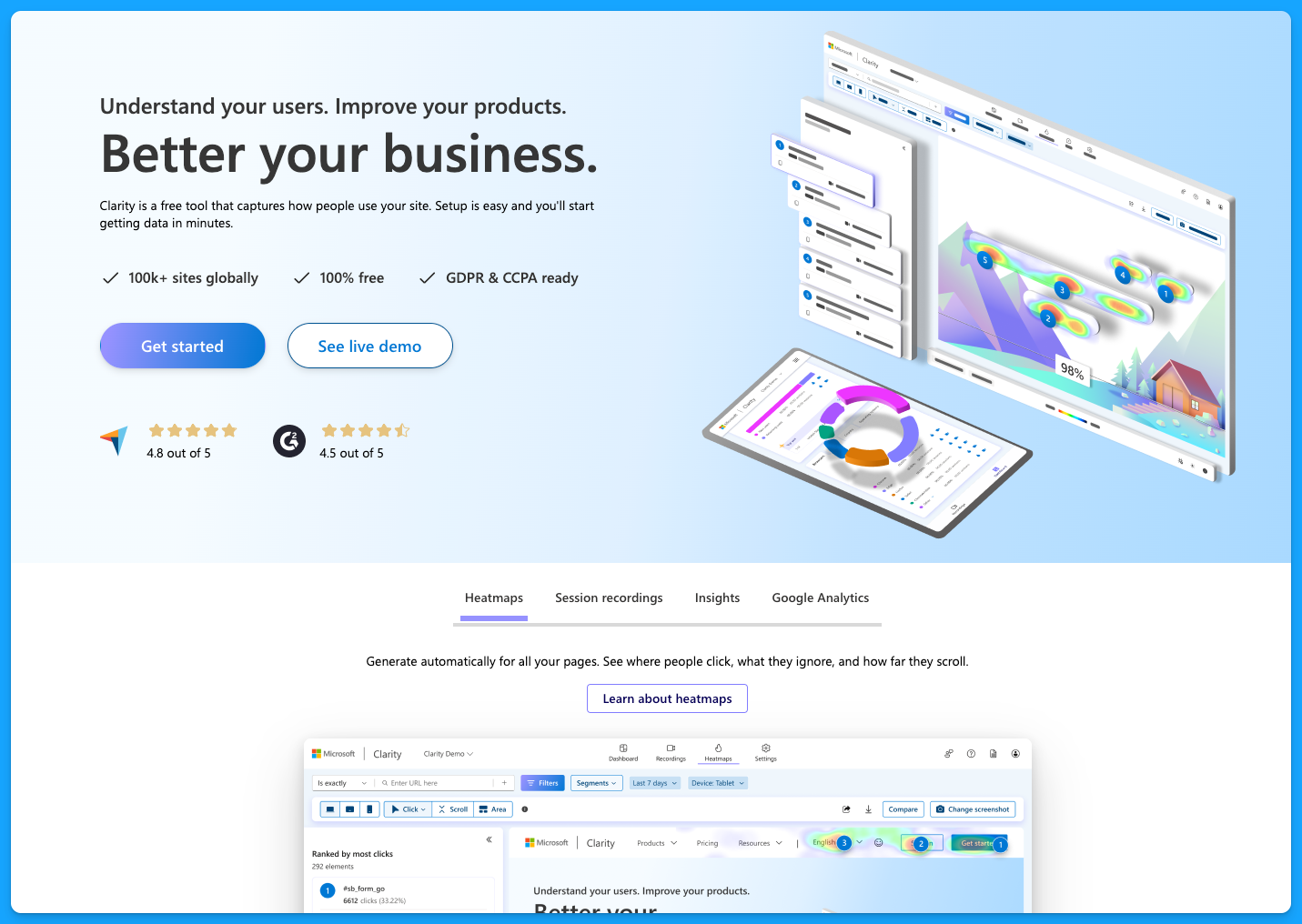
You don’t want to be vague on your landing pages, and you want to make sure that they have the following:
- Clear and concise headline
- Engaging subheadlines
- Visual elements
- Call to action (CTA) throughout the page
- Quick loading time for all devices
To learn more about landing page best practices, dive into the article below by Pedro Cortés:
10 Proven Landing Page Tips To Boost Your Conversion Rates
3. Is your landing page loading fast enough?
As mentioned above, the landing pages must load quickly on all devices. Tools like Lighthouse or PageSpeed Insights can help you better understand areas of opportunity.
I recommend you run your page through PageSpeed Insights and apply anything applicable.
You’re probably going to need the help of a developer, but it’s definitely worthwhile to improve the page speed because this is a big factor in terms of your landing page experience for quality score.
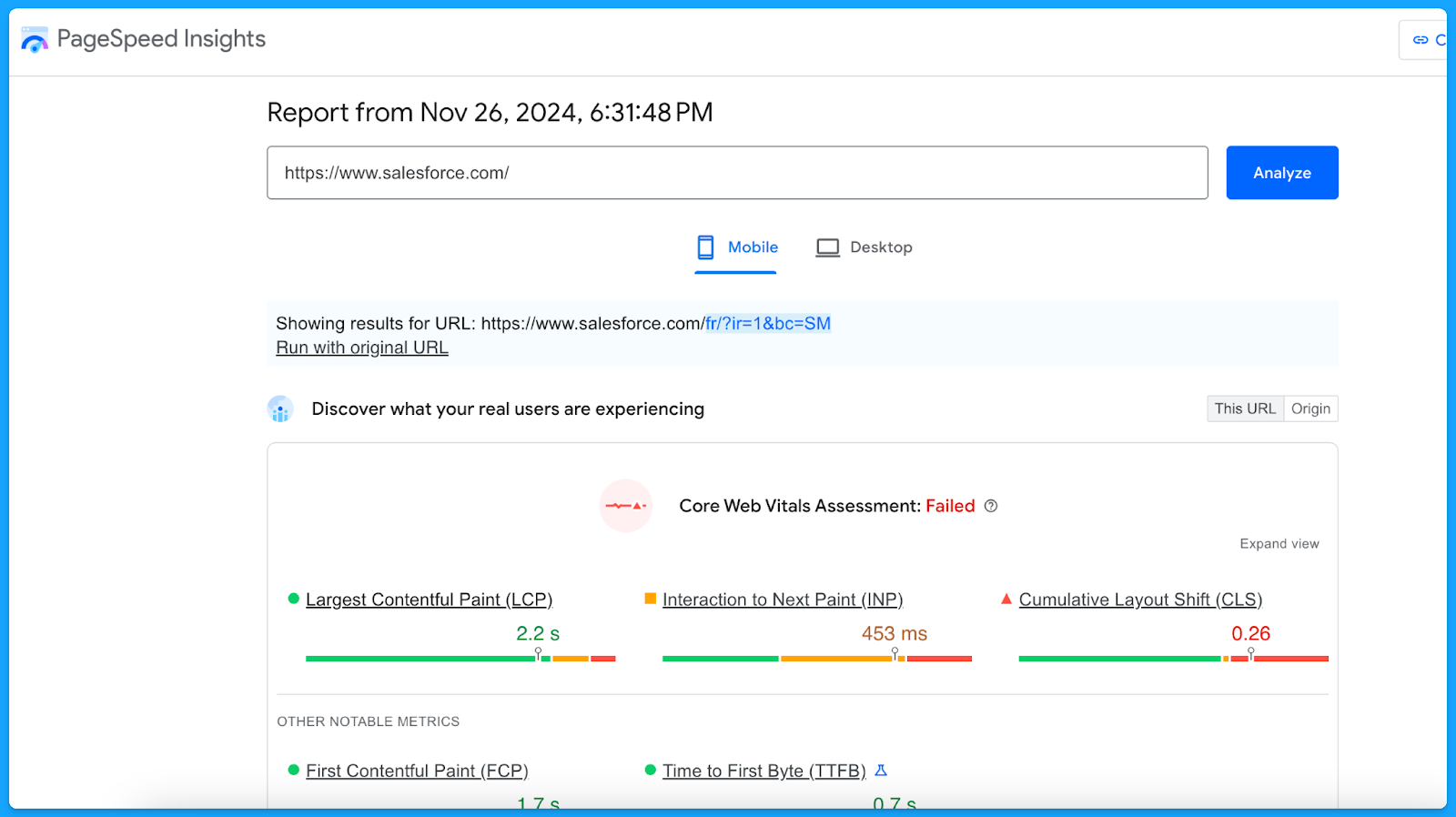
A simple thing to improve your landing page loading time is compressing the website images to reduce the file sizes.
4. Do you have one clear call to action on your landing page that mirrors your ad?
If your ad is talking about Downloading a Whitepaper but the landing page only has CTAs around Booking a Demo, then that will have a negative experience for the user.
Align landing page CTAs with ad promises to ensure a seamless user experience and encourage conversions.
5. Are you communicating benefits, answering objections, and providing a CTA?
The higher the ask, the more context must be provided on the page. This is specifically true for the “Book a Demo” CTA.
Ensure you address objections while emphasizing the key benefits of your product that will solve the users' problems.
I recommend that you talk with your sales team to get insights on different objections that come up in the sales process, this way you can add sections on your landing page to proactively communicate against those objections so that you can actually drive more quality leads.
6. Does your form, chatbot, or online booking widget still work?
Before launching any new offers, test the page to make sure everything is working as intended.
- Submit a fake test lead and see if it actually routes into your CRM.
- Go look for your lead record.
- Check if the page isn’t broken.
- Review what the experience looks like.
Make sure you audit that process because I can't tell you how many times people think their campaigns are failing, and then something just broke on the technical side.
Part 7 - Budget & Performance Review
1. What is the spread of budget and performance by campaign theme? (NonBrand, Brand, Competitive, RLSA, Content)
This is where you will need to export a lot of data from Google Ads and use Excel/Google Sheets.
👉 I recommend watching the Part 7 video above if you need a walkthrough on exporting and labeling the data to perform this analysis.
Here’s a common successful budget distribution you can use as guidance:
- Brand: < 20%
- Non-brand > 60%
- Competitive > 20%
You can use our free Google Ads Budget Calculator to find your ideal Google Ads budget.
2. What is the spread of budget and performance by region?
If you are targeting multiple regions, break out the campaign as such (ex: NA, EMEA, APAC).
👉 Check out the Part 7 video above if you need a walkthrough on the data analysis methodology using Excel.
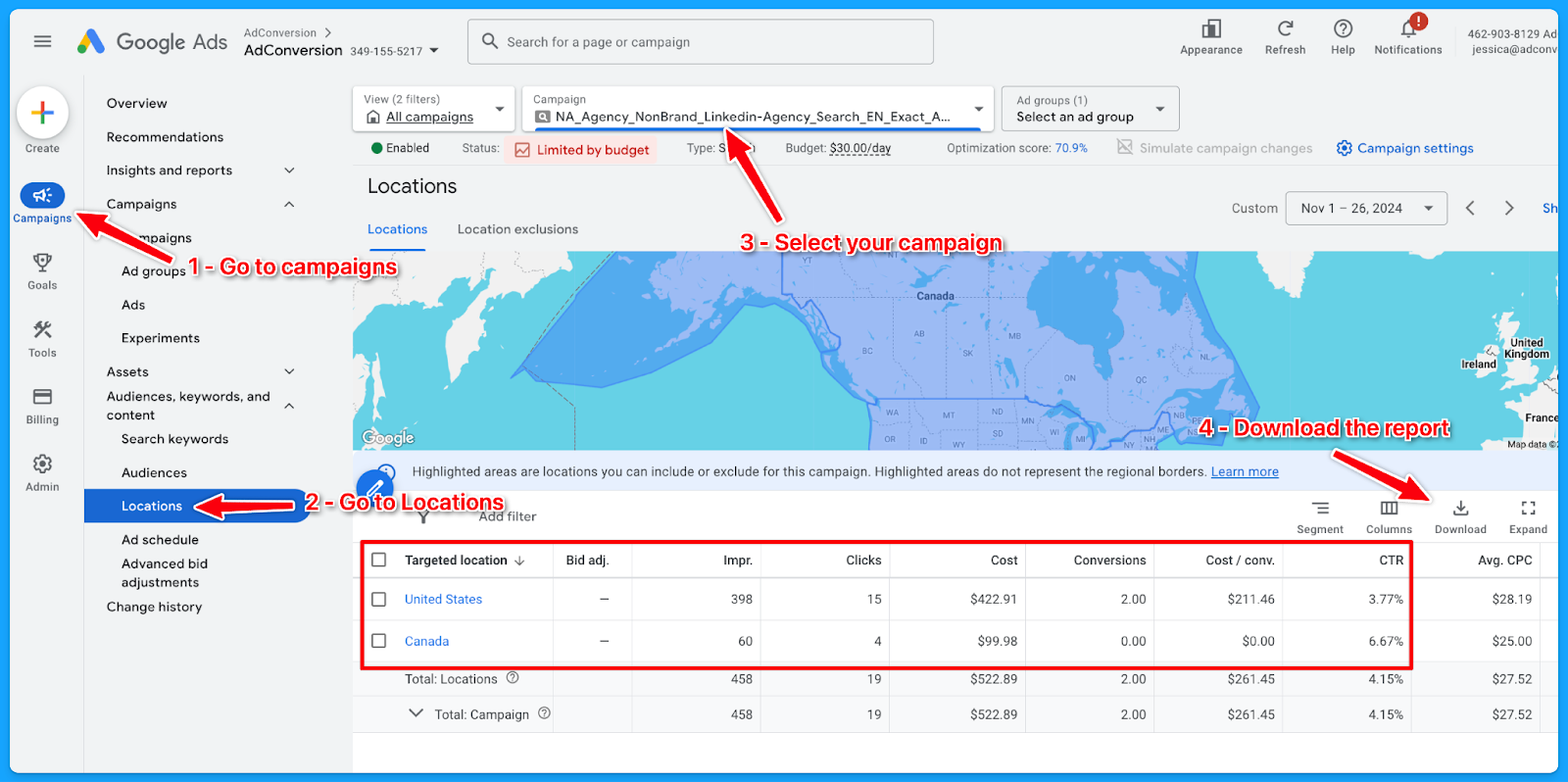
Look for the highest-performing locations for each region and make sure low-quality conversions are not wasting your budget. If you’re not separating your campaigns into regions, you can still check how the budget has been spread around different locations through the Locations report:
- Select “Campaigns” on the left-hand side
- Go to “Locations”, under “Audiences, keywords, and content”
- Select the desired campaign
- Download the data under Location
- Summarize into a pivot table to get:
- Ad spent
- Conversions
- Cost per conversion
3. What is the spread of budget and performance by offer?
If you are separating the campaigns by offer, break out the campaign as such (Demo, Trials, eBooks, etc)
👉 Check out the Part 7 video above if you need a walkthrough on the data analysis methodology using Excel.
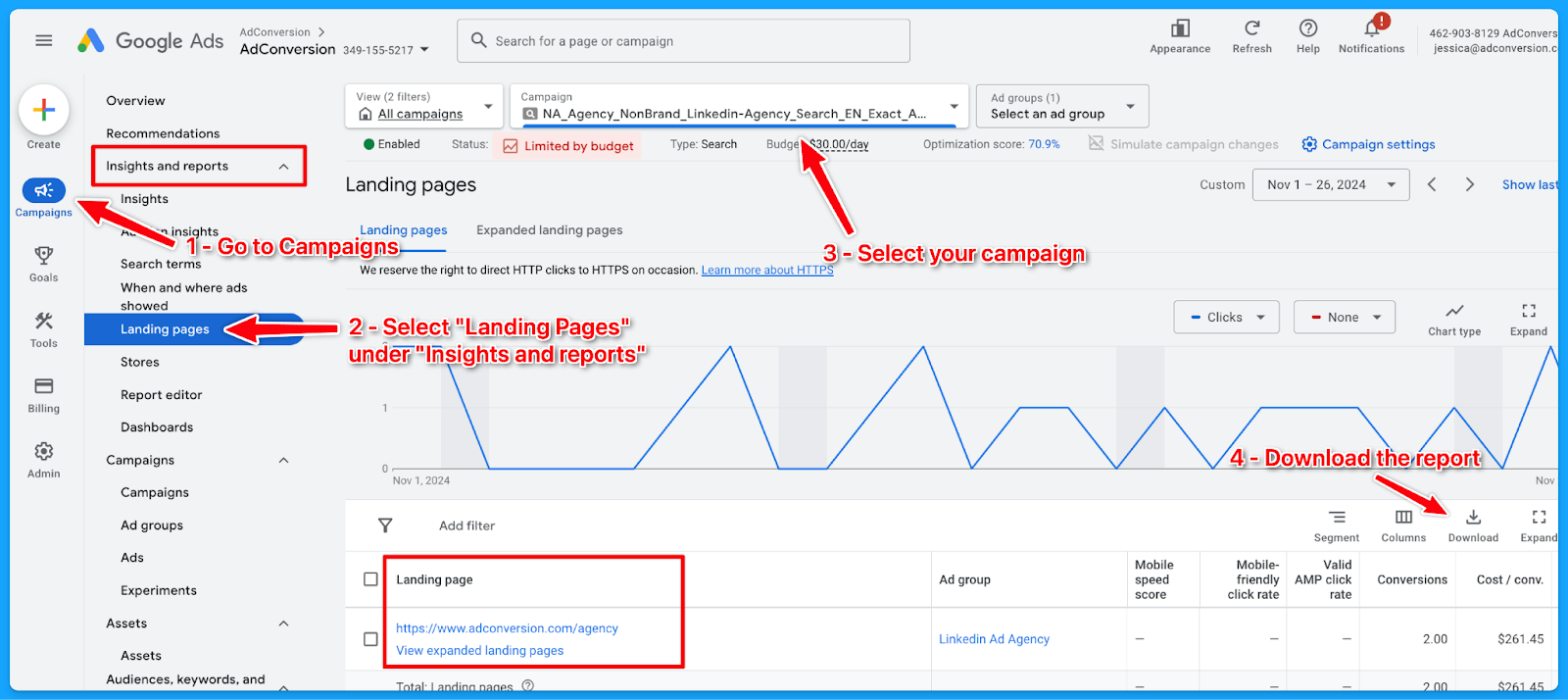
Here’s how to download the landing page report:
- Select “Campaigns” on the left-hand side
- Go to “Landing Pages”, under “Insights and Reports”
- Select the desired campaign
- Download the data
- On Excel:
- Delete: Ad spend <$1
- If there is no proper naming convention:
- Open a new column (Offer) beside the landing page (LP)
- Tag the offer of the campaign according to the LP
- Summarize into a pivot table to get:
- Ad spent
- Conversions
- Cost per conversion
6. What is the spread of budget and performance by match type?
If you are separating the campaigns by match type, break out the campaign as such (Exact, Phrase, Broad)
👉 Check out the Part 7 video above if you need a walkthrough on the data analysis methodology using Excel.
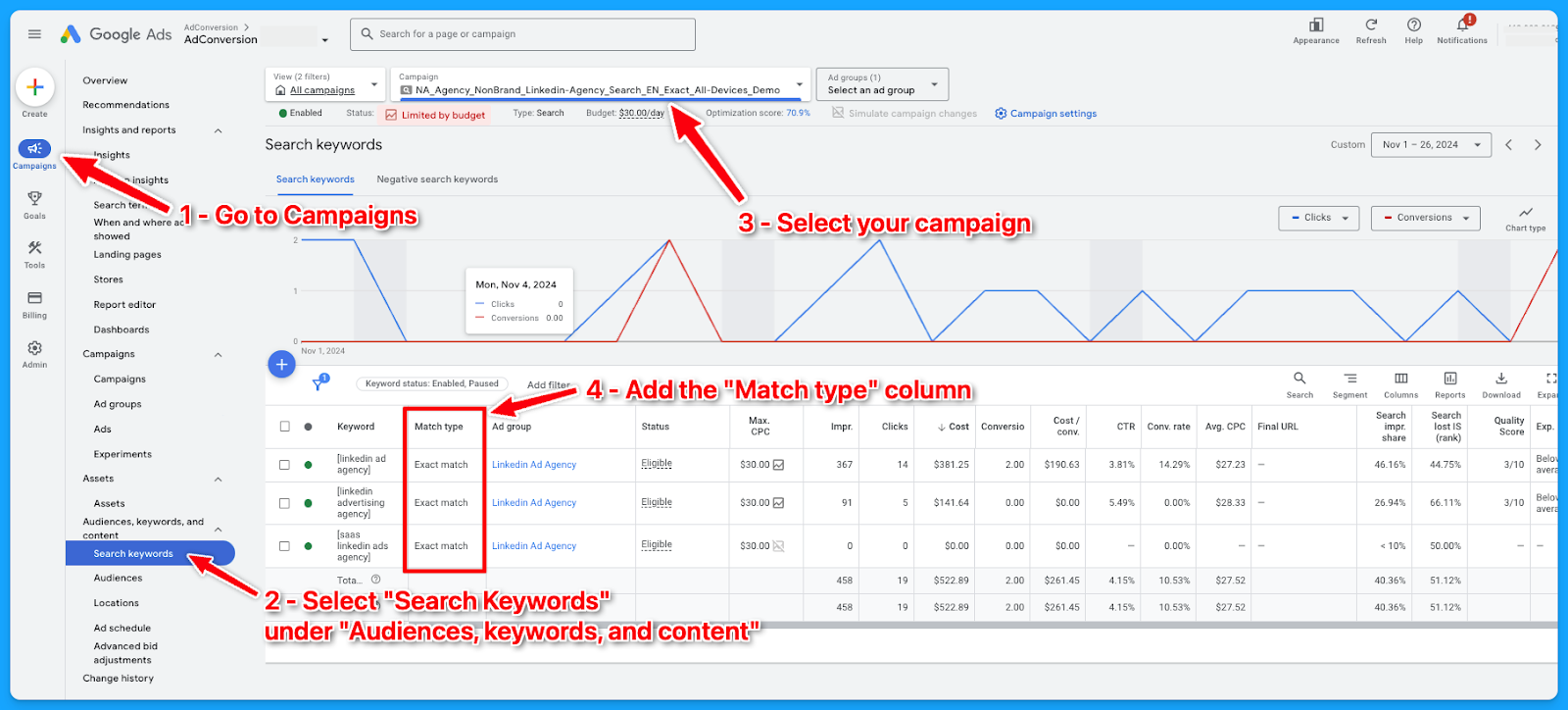
Here’s how to download the match type report:
- Select “Campaigns” on the left-hand side
- Go to “Search Keywords”, under “Audiences, keywords, and content”
- Select the desired campaign
- Add the column “Match type”
- Download the data
- On Excel, summarize into a pivot table to get:some text
- Ad spent
- Conversions
- Cost per conversion
7. What is the spread of budget and performance by device?
If you are separating the campaigns by devices, break out the campaign as such (Desktop, Mobile, Tablet, All Devices)
👉 Check out the Part 7 video above if you need a walkthrough on the data analysis methodology using Excel.
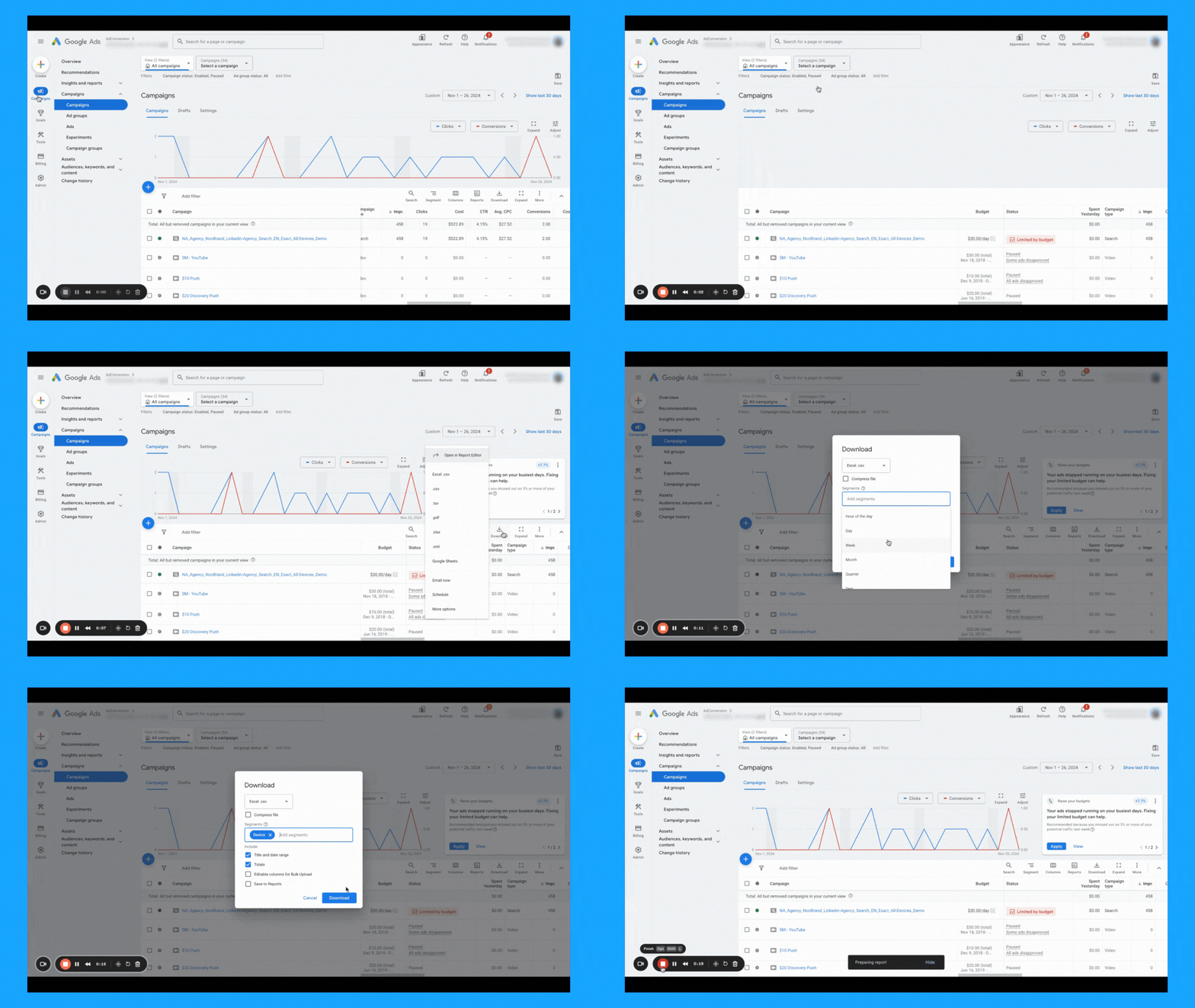
If the campaigns are not separated into devices, here’s how you can check the spread of budget and performance by device downloading the device report:
8. What is the spread of budget and performance by week days?
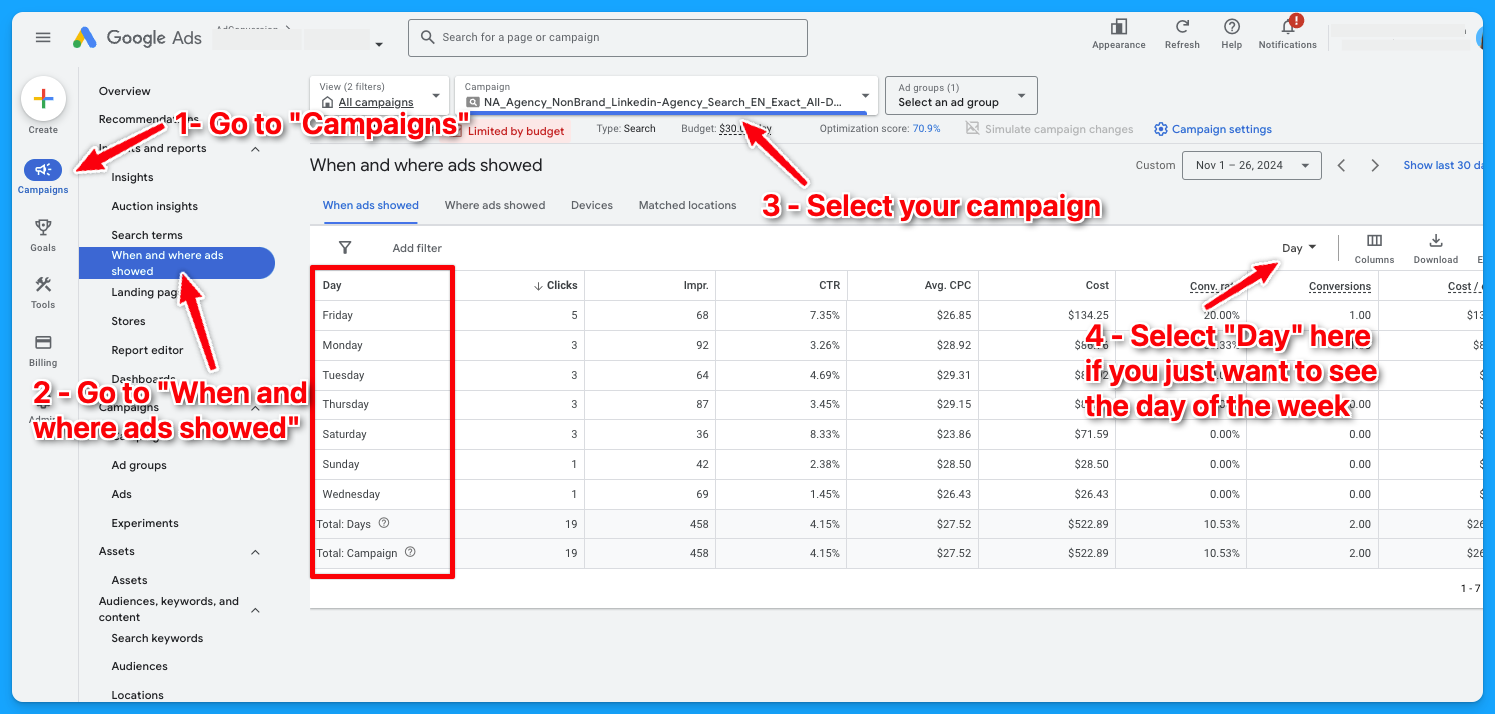
Check if you’re targeting all days of the week and if there’s opportunities to exclude some days when the performance is not good, so you can free up budget for the strongest days.Here’s how to download the day of the week report:
- Select “Campaigns” on the left-hand side
- Go to “When and where ads showed”, under “Insights and reportst”
- Select the desired campaign
- Choose “Day” in the right-side navigation if you only want to see the day of the week
- Download the data
- On Excel, summarize into a pivot table to get:some text
- Ad spent
- Conversions
- Cost per conversion
To learn more about how to create a winning Google Ads budget strategy, dive into the article below:
How to Create a Winning Google Ads Budget Strategy for B2B SaaS
Part 8 - Visibility Review
Here’s where we will talk more about Impression Share and Quality Score.
1. What is the search impression share by campaign theme? (NonBrand, Brand, Competitive, RLSA, Content)
There are different ways you can see the impression share by the campaign theme.
You can use Excel as I showed previously in Part 7, or you can go into your account and filter by campaign name, assuming you have good campaign naming conventions.
👉 Check out the Part 8 video above if you need a walkthrough on how to find this data.

2. What is the search lost rank by campaign theme? (NonBrand, Brand, Competitive, RLSA, Content)
The process here is the same from the previous task. The only difference is that you need to add the “Search lost IS (rank)” column.
👉 Check out the Part 8 video above if you need a walkthrough on how to find this data.
3. What is the search lost to budget by campaign theme? (NonBrand, Brand, Competitive, RLSA, Content)
The process here is the same from the previous tasks. The only difference is that you need to add the “Search lost IS (budget)” column.
👉 Check out the Part 8 video above if you need a walkthrough on how to find this data.
4. What is the search top IS by campaign theme? (NonBrand, Brand, Competitive, RLSA, Content)
The process here is the same from the previous tasks. The only difference is that you need to add the “Search top IS” column.
👉 Check out the Part 8 video above if you need a walkthrough on how to find this data.
5. Do 70% of your keywords have above 7 quality scores?
This is something I learned from Brad Geddes years ago, the OG of Google Ads.
Check the video below to see a complete guide on Quality Score and how to perform a Quality Score analysis:
6. What aspects of quality score do you need to improve?
After going going through the data in the previous task, summarize your findings to know where you have opportunities to improve.
Example:
- 100% of keywords have a Quality Score below 7.
- 94% of keywords are rated as “Below Average” for landing page experience.
- 45% have “Above Average” ad relevance.
- 100% have “Below Average” expected CTR.
Optimization strategies you can adopt to improve your Quality Score:
- Improve Landing Page Experience:
- Ensure pages are fast, relevant, and mobile-friendly
- Align ad copy with landing page content for a seamless message match.
- Ensure pages are fast, relevant, and mobile-friendly
- Refine Ad Relevance
- Group keywords into tightly themed ad groups.
- Write ads tailored to the specific intent of each group.
- Group keywords into tightly themed ad groups.
- Boost Expected CTR
- Test compelling ad headlines and descriptions.
- Use ad extensions to enhance visibility and clickability.
- Test compelling ad headlines and descriptions.
I hope you received a ton of value from this Google Ads Audit guide.
If you have any questions, feel free to connect with me on LinkedIn.
From Clicks to Conversions: Master Google Ads for B2B 🔥
If you want to become a Google Ads pro, check out our free B2B Google Ads courses, where you'll learn how to launch, optimize, and scale your campaigns to drive pipeline and revenue.

Here's what you'll learn in each course:
⚙️ B2B Google Ads 101 - How to Launch Dangerously Effective Campaigns for Beginners
- The Googleverse: The Game You're Playing & How To Win
- Measurement: How to Make Sure You're Profitable
- Targeting: How to Show Up For the Right Searcher
- Planning: Putting It All Together
🎯 Google Ads 102 - How to Clicks Into Profit
- Visibility: How To Find the Hole Sucking Profits
- Workflows: How to Optimize On a Daily, Weekly, Monthly & Quarterly Basis
- Experimentation: How to Test & Automate Profitability
- Troubleshooting: How To Solve Inevitable Problems
🚀 Google Ads 103 - How to Scale Google Ads For Advanced Advertisers
- Methodology: How to Vertically Scale Google Ads From A-Z
- Campaigns: Scaling Horizontally Through Campaign Themes
- Channels: Scaling Outside of Paid Search
Click Here to Join 1,000+ B2B Marketers Today and start leveling up your advertising skill set.
Takes < 90 seconds to sign up (seriously we timed it 😂)
People Also Ask
How can a Google Ads audit improve my campaign performance?
- A Google Ads audit can significantly enhance your campaign performance by identifying inefficiencies and areas for optimization within your account.
How often should I conduct a Google Ads audit?
- It is recommended to conduct a Google Ads audit at least once every quarter. For accounts with significant spending or those in highly competitive industries, more frequent audits may be beneficial to stay ahead of competitors and efficiently manage advertising spend.
What are the key components of a Google Ads audit?
- Budget Allocation: Analyzing how the budget is distributed across various channels and campaigns to identify opportunities for reallocation.
- Campaign Themes: Reviewing the balance between branded, non-branded, and competitive campaigns to ensure optimal allocation for reaching new customers.
- Device Usage: Evaluating performance across devices (mobile, computer, tablet, TV) to tailor strategies for each device type.
- Match Types: Assessing the use of exact, phrase, and broad match types in campaigns to ensure efficient targeting.
- Quality Score: Examining the quality score of keywords, focusing on ad relevance, landing page experience, and expected CTR to identify areas for improvement.
- Visibility Metrics: Analyzing impression share and losses due to rank and budget to optimize bid strategies and campaign visibility.
How often should I perform a Google Ads audit?
It’s recommended to conduct a comprehensive audit at least quarterly. However, for high-spending accounts or during periods of significant change (e.g., new product launches or market shifts), more frequent audits may be beneficial.
Can I perform a Google Ads audit myself, or should I hire a professional?
While self-auditing is possible, hiring a professional can provide deeper insights and a fresh perspective. Professionals are often equipped with advanced tools and expertise to identify issues that might be overlooked otherwise.

Heading 1
Heading 2
Heading 3
Heading 4
Heading 5
Heading 6
Lorem ipsum dolor sit amet, consectetur adipiscing elit, sed do eiusmod tempor incididunt ut labore et dolore magna aliqua. Ut enim ad minim veniam, quis nostrud exercitation ullamco laboris nisi ut aliquip ex ea commodo consequat. Duis aute irure dolor in reprehenderit in voluptate velit esse cillum dolore eu fugiat nulla pariatur.
Block quote
Ordered list
- Item 1
- Item 2
- Item 3
Unordered list
- Item A
- Item B
- Item C
Bold text
Emphasis
Superscript
Subscript

Heading
Heading 1
Heading 2
Heading 3
Heading 4
Heading 5
Heading 6
Lorem ipsum dolor sit amet, consectetur adipiscing elit, sed do eiusmod tempor incididunt ut labore et dolore magna aliqua. Ut enim ad minim veniam, quis nostrud exercitation ullamco laboris nisi ut aliquip ex ea commodo consequat. Duis aute irure dolor in reprehenderit in voluptate velit esse cillum dolore eu fugiat nulla pariatur.
Block quote
Ordered list
- Item 1
- Item 2
- Item 3
Unordered list
- Item A
- Item B
- Item C
Bold text
Emphasis
Superscript
Subscript
Heading
Heading 1
Heading 2
Heading 3
Heading 4
Heading 5
Heading 6
Lorem ipsum dolor sit amet, consectetur adipiscing elit, sed do eiusmod tempor incididunt ut labore et dolore magna aliqua. Ut enim ad minim veniam, quis nostrud exercitation ullamco laboris nisi ut aliquip ex ea commodo consequat. Duis aute irure dolor in reprehenderit in voluptate velit esse cillum dolore eu fugiat nulla pariatur.
Block quote
Ordered list
- Item 1
- Item 2
- Item 3
Unordered list
- Item A
- Item B
- Item C
Bold text
Emphasis
Superscript
Subscript
Heading
Heading 1
Heading 2
Heading 3
Heading 4
Heading 5
Heading 6
Lorem ipsum dolor sit amet, consectetur adipiscing elit, sed do eiusmod tempor incididunt ut labore et dolore magna aliqua. Ut enim ad minim veniam, quis nostrud exercitation ullamco laboris nisi ut aliquip ex ea commodo consequat. Duis aute irure dolor in reprehenderit in voluptate velit esse cillum dolore eu fugiat nulla pariatur.
Block quote
Ordered list
- Item 1
- Item 2
- Item 3
Unordered list
- Item A
- Item B
- Item C
Bold text
Emphasis
Superscript
Subscript
Heading
Heading 1
Heading 2
Heading 3
Heading 4
Heading 5
Heading 6
Lorem ipsum dolor sit amet, consectetur adipiscing elit, sed do eiusmod tempor incididunt ut labore et dolore magna aliqua. Ut enim ad minim veniam, quis nostrud exercitation ullamco laboris nisi ut aliquip ex ea commodo consequat. Duis aute irure dolor in reprehenderit in voluptate velit esse cillum dolore eu fugiat nulla pariatur.
Block quote
Ordered list
- Item 1
- Item 2
- Item 3
Unordered list
- Item A
- Item B
- Item C
Bold text
Emphasis
Superscript
Subscript
Heading
Heading 1
Heading 2
Heading 3
Heading 4
Heading 5
Heading 6
Lorem ipsum dolor sit amet, consectetur adipiscing elit, sed do eiusmod tempor incididunt ut labore et dolore magna aliqua. Ut enim ad minim veniam, quis nostrud exercitation ullamco laboris nisi ut aliquip ex ea commodo consequat. Duis aute irure dolor in reprehenderit in voluptate velit esse cillum dolore eu fugiat nulla pariatur.
Block quote
Ordered list
- Item 1
- Item 2
- Item 3
Unordered list
- Item A
- Item B
- Item C
Bold text
Emphasis
Superscript
Subscript
Heading
Heading 1
Heading 2
Heading 3
Heading 4
Heading 5
Heading 6
Lorem ipsum dolor sit amet, consectetur adipiscing elit, sed do eiusmod tempor incididunt ut labore et dolore magna aliqua. Ut enim ad minim veniam, quis nostrud exercitation ullamco laboris nisi ut aliquip ex ea commodo consequat. Duis aute irure dolor in reprehenderit in voluptate velit esse cillum dolore eu fugiat nulla pariatur.
Block quote
Ordered list
- Item 1
- Item 2
- Item 3
Unordered list
- Item A
- Item B
- Item C
Bold text
Emphasis
Superscript
Subscript
Heading
Heading 1
Heading 2
Heading 3
Heading 4
Heading 5
Heading 6
Lorem ipsum dolor sit amet, consectetur adipiscing elit, sed do eiusmod tempor incididunt ut labore et dolore magna aliqua. Ut enim ad minim veniam, quis nostrud exercitation ullamco laboris nisi ut aliquip ex ea commodo consequat. Duis aute irure dolor in reprehenderit in voluptate velit esse cillum dolore eu fugiat nulla pariatur.
Block quote
Ordered list
- Item 1
- Item 2
- Item 3
Unordered list
- Item A
- Item B
- Item C
Bold text
Emphasis
Superscript
Subscript
Heading
Heading 1
Heading 2
Heading 3
Heading 4
Heading 5
Heading 6
Lorem ipsum dolor sit amet, consectetur adipiscing elit, sed do eiusmod tempor incididunt ut labore et dolore magna aliqua. Ut enim ad minim veniam, quis nostrud exercitation ullamco laboris nisi ut aliquip ex ea commodo consequat. Duis aute irure dolor in reprehenderit in voluptate velit esse cillum dolore eu fugiat nulla pariatur.
Block quote
Ordered list
- Item 1
- Item 2
- Item 3
Unordered list
- Item A
- Item B
- Item C
Bold text
Emphasis
Superscript
Subscript
Heading
Heading 1
Heading 2
Heading 3
Heading 4
Heading 5
Heading 6
Lorem ipsum dolor sit amet, consectetur adipiscing elit, sed do eiusmod tempor incididunt ut labore et dolore magna aliqua. Ut enim ad minim veniam, quis nostrud exercitation ullamco laboris nisi ut aliquip ex ea commodo consequat. Duis aute irure dolor in reprehenderit in voluptate velit esse cillum dolore eu fugiat nulla pariatur.
Block quote
Ordered list
- Item 1
- Item 2
- Item 3
Unordered list
- Item A
- Item B
- Item C
Bold text
Emphasis
Superscript
Subscript
Heading
Heading 1
Heading 2
Heading 3
Heading 4
Heading 5
Heading 6
Lorem ipsum dolor sit amet, consectetur adipiscing elit, sed do eiusmod tempor incididunt ut labore et dolore magna aliqua. Ut enim ad minim veniam, quis nostrud exercitation ullamco laboris nisi ut aliquip ex ea commodo consequat. Duis aute irure dolor in reprehenderit in voluptate velit esse cillum dolore eu fugiat nulla pariatur.
Block quote
Ordered list
- Item 1
- Item 2
- Item 3
Unordered list
- Item A
- Item B
- Item C
Bold text
Emphasis
Superscript
Subscript
Heading
Heading 1
Heading 2
Heading 3
Heading 4
Heading 5
Heading 6
Lorem ipsum dolor sit amet, consectetur adipiscing elit, sed do eiusmod tempor incididunt ut labore et dolore magna aliqua. Ut enim ad minim veniam, quis nostrud exercitation ullamco laboris nisi ut aliquip ex ea commodo consequat. Duis aute irure dolor in reprehenderit in voluptate velit esse cillum dolore eu fugiat nulla pariatur.
Block quote
Ordered list
- Item 1
- Item 2
- Item 3
Unordered list
- Item A
- Item B
- Item C
Bold text
Emphasis
Superscript
Subscript
Heading
Heading 1
Heading 2
Heading 3
Heading 4
Heading 5
Heading 6
Lorem ipsum dolor sit amet, consectetur adipiscing elit, sed do eiusmod tempor incididunt ut labore et dolore magna aliqua. Ut enim ad minim veniam, quis nostrud exercitation ullamco laboris nisi ut aliquip ex ea commodo consequat. Duis aute irure dolor in reprehenderit in voluptate velit esse cillum dolore eu fugiat nulla pariatur.
Block quote
Ordered list
- Item 1
- Item 2
- Item 3
Unordered list
- Item A
- Item B
- Item C
Bold text
Emphasis
Superscript
Subscript
Heading
Heading 1
Heading 2
Heading 3
Heading 4
Heading 5
Heading 6
Lorem ipsum dolor sit amet, consectetur adipiscing elit, sed do eiusmod tempor incididunt ut labore et dolore magna aliqua. Ut enim ad minim veniam, quis nostrud exercitation ullamco laboris nisi ut aliquip ex ea commodo consequat. Duis aute irure dolor in reprehenderit in voluptate velit esse cillum dolore eu fugiat nulla pariatur.
Block quote
Ordered list
- Item 1
- Item 2
- Item 3
Unordered list
- Item A
- Item B
- Item C
Bold text
Emphasis
Superscript
Subscript
Heading
Heading 1
Heading 2
Heading 3
Heading 4
Heading 5
Heading 6
Lorem ipsum dolor sit amet, consectetur adipiscing elit, sed do eiusmod tempor incididunt ut labore et dolore magna aliqua. Ut enim ad minim veniam, quis nostrud exercitation ullamco laboris nisi ut aliquip ex ea commodo consequat. Duis aute irure dolor in reprehenderit in voluptate velit esse cillum dolore eu fugiat nulla pariatur.
Block quote
Ordered list
- Item 1
- Item 2
- Item 3
Unordered list
- Item A
- Item B
- Item C
Bold text
Emphasis
Superscript
Subscript
Heading
Heading 1
Heading 2
Heading 3
Heading 4
Heading 5
Heading 6
Lorem ipsum dolor sit amet, consectetur adipiscing elit, sed do eiusmod tempor incididunt ut labore et dolore magna aliqua. Ut enim ad minim veniam, quis nostrud exercitation ullamco laboris nisi ut aliquip ex ea commodo consequat. Duis aute irure dolor in reprehenderit in voluptate velit esse cillum dolore eu fugiat nulla pariatur.
Block quote
Ordered list
- Item 1
- Item 2
- Item 3
Unordered list
- Item A
- Item B
- Item C
Bold text
Emphasis
Superscript
Subscript
Heading
Heading 1
Heading 2
Heading 3
Heading 4
Heading 5
Heading 6
Lorem ipsum dolor sit amet, consectetur adipiscing elit, sed do eiusmod tempor incididunt ut labore et dolore magna aliqua. Ut enim ad minim veniam, quis nostrud exercitation ullamco laboris nisi ut aliquip ex ea commodo consequat. Duis aute irure dolor in reprehenderit in voluptate velit esse cillum dolore eu fugiat nulla pariatur.
Block quote
Ordered list
- Item 1
- Item 2
- Item 3
Unordered list
- Item A
- Item B
- Item C
Bold text
Emphasis
Superscript
Subscript
Heading
Heading 1
Heading 2
Heading 3
Heading 4
Heading 5
Heading 6
Lorem ipsum dolor sit amet, consectetur adipiscing elit, sed do eiusmod tempor incididunt ut labore et dolore magna aliqua. Ut enim ad minim veniam, quis nostrud exercitation ullamco laboris nisi ut aliquip ex ea commodo consequat. Duis aute irure dolor in reprehenderit in voluptate velit esse cillum dolore eu fugiat nulla pariatur.
Block quote
Ordered list
- Item 1
- Item 2
- Item 3
Unordered list
- Item A
- Item B
- Item C
Bold text
Emphasis
Superscript
Subscript
Heading
Heading 1
Heading 2
Heading 3
Heading 4
Heading 5
Heading 6
Lorem ipsum dolor sit amet, consectetur adipiscing elit, sed do eiusmod tempor incididunt ut labore et dolore magna aliqua. Ut enim ad minim veniam, quis nostrud exercitation ullamco laboris nisi ut aliquip ex ea commodo consequat. Duis aute irure dolor in reprehenderit in voluptate velit esse cillum dolore eu fugiat nulla pariatur.
Block quote
Ordered list
- Item 1
- Item 2
- Item 3
Unordered list
- Item A
- Item B
- Item C
Bold text
Emphasis
Superscript
Subscript
Heading
Heading 1
Heading 2
Heading 3
Heading 4
Heading 5
Heading 6
Lorem ipsum dolor sit amet, consectetur adipiscing elit, sed do eiusmod tempor incididunt ut labore et dolore magna aliqua. Ut enim ad minim veniam, quis nostrud exercitation ullamco laboris nisi ut aliquip ex ea commodo consequat. Duis aute irure dolor in reprehenderit in voluptate velit esse cillum dolore eu fugiat nulla pariatur.
Block quote
Ordered list
- Item 1
- Item 2
- Item 3
Unordered list
- Item A
- Item B
- Item C
Bold text
Emphasis
Superscript
Subscript
Heading
Once you understand the basics and set up initial campaigns, start A/B testing and experimenting. You could test many things, for example, different ad formats, creatives, messaging, campaign objectives or targeting - all of which can lead to better performance. From my experience, any significant improvement in advertising efficiency starts with a (sometimes random and "long shot") test. To make the testing process smooth and successful, I recommend starting with a hypothesis, creating a testing plan, and having clear KPIs and ways of tracking those.

Kris Wojcik
#1 tip for marketers getting into B2B advertising is to have fun with it. A lot of B2B brands take themselves really seriously to appeal to Enterprise buyers, but the reality is we're all human and you're marketing to humans.

Jess Bahr
People buy different, not better. So when you're advertising in B2B, it's crucial to sniff out your differentiator and explain that in a way that your buyers will clearly understand it, consume it, and resonate with it. Each of your buyers is different too so it's important to have a good mix of how you explain the difference.

Tim Davidson
One valuable tip I'd offer new marketers entering the realm of B2B advertising is to prioritize understanding your target audience deeply. B2B advertising differs significantly from B2C advertising in that you're not just targeting individual consumers but engaging with businesses, often involving nuanced decision-making units.
To effectively connect with your B2B audience, invest time researching and profiling your ideal customer profile (ICP). This means identifying their industry, company size, and job roles and delving into their pain points, challenges, and aspirations – try to get in the minds of your ICP from entry-level to executive.
By going that extra mile in understanding your audience, you can craft messaging and content that resonates with them—addressing their specific needs, providing solutions, and positioning your products or services as the standout choice.

Tyler Ray
Before you create any adverts, you need to figure out what your message is going to be. Don't rush into it until you know 'what problems you solve, how you solve them, and why your customer should solve them.' One sentence on each of those creates your elevator pitch, which should be present in some way, in all of your ads. It also represents the business case for your product. If you can't explain your story easily, how on earth do you expect your audience to remember it?

Joseph Hill
You know that crazy Marketing 'funnel' everyone talks about? Always start from the bottom up. Meaning, the first place to start is to know who your customers are and how they equate to revenue. Then work yourself up the funnel to drive the most impact.

Bryttney Blanken
Adopt the 'kill your darlings' mantra. You have to be ready to cut what you love if it isn't delivering results—be it an ad, keyword, or campaign. What was once a good performer might not stay that way, so never 'set and forget.' Always monitor and optimise.
Three macroeconomic principles should guide you:
1- Budget is limited.
2- Benchmark against your own metrics, not industry fluff.
3- Make trade-offs based on what performs better.
Kill the darlings that don't contribute to the revenue to make room for what does.

Canberk Beker
Focus on the audience/ICP first, not being the best/all-in-one product. When you address the pain and call the audience out, it resonates far more than simply stating 'We're #1/the best in ... category'. No one gives a shit about fancy review badges, Gartner, or other reports (maybe just a tiny bit) & enterprise studies/research. Everyone wants to know how your product will solve their pain or problem.
The best way (for me at least) to find out the actual problem of a customer is to go to G2 and your biggest/well-known competitor and read/scrape all the 'What problems is PandaDoc solving and how is that benefiting you?' answers. You'll find out that most answers are about one/two specific cases, and so then it's your job to address it right via website/ad copy messaging.

Alex Panchuk
Shift your mindset. You'll generate leads, but it's not just about lead generation. When they convert, focus on quality and intent. To do that, you need to understand the customer and how to reach them with the right and interesting message in the right places, consistently. Make it easy for them to remember you, find you, and buy from you when they are ready. For practical advice, Go through the LinkedIn ebook 'How B2B Brands Grow", study demand generation, join communities, and ask questions there.

Roman Krs
Before you blame the channel, do the research to see if there are some other reasons why leads aren't converting to opportunities.
For example:
WEBSITE
- Does the ad align with the landing page?
- Is it easy to understand how it works, who it's for, how much it costs, and the outcome it drives?
- Do you have relevant social proof?
CONVERSION
- Is the form simple and short?
- Does it offer an easy way to schedule a meeting?
- Are there clear CTAs across the website?
- Do you address common objections on the demo page?
LEAD HAND-OFF
- How long does it take to set up a meeting with a buyer after the form is filled take?
- Did we align the follow-up with the intent level?
- Do we offer a demo at the first meeting?
- Do we identify the core problems of the buyer and how our solution can help solve those issues?
SALES CYCLE
- Did we create a close plan?
- Have we gotten all key decision-makers involved?
- Do we add value along the sales process?
- Do we always set up the next meeting with a clear agenda?
- Have we properly differentiated ourselves against competitors and keeping with the status quo?
80% of the above don't directly involve the "channel"

Jonathan Bland
For someone starting with B2B advertising, I highly recommend following the right B2B content creators on LinkedIn, as well as other paid media ones - then block some time to go through their posts/videos to learn new strategies/tips, or merely understand their point-of-view. Then, find ways of testing those strategies/quick wins with your own clients to get your own insights and takeaways - plus, it's a great way of implementing what you learn

Gonçalo Prates
Make sure that you nail your fundamentals before you launch your campaign. Know where your ICP spends time online and what they are searching for.
If you don't, you won't be able to nail down your targeting for paid social and you won't go after the right keywords on paid search.
Start with the understanding of your buyer (the qualitative and quantitative) insights, and then go and build your strategy based off of that. There are a lot of great resources on how to technically set up your campaign - just keep it as simple as you can to begin with.
The final part of the fundamentals is to make sure you have tracking in place in your CRM. You need to be able to know what leads came in from your paid ads, and be able to track them throughout the sales process. Otherwise you'll never be able to answer the question at the executive level, "How are our ads performing?

Blake Strozyk
Seasonality in B2B is real & should be taken into account when optimizing & experimenting with paid ads.
Here is what I mean: We have grown very rapidly over the last 1.5 years and therefore don't have reliable base data from last summer, so only this year we started to feel the summer slow down properly. Many experiments that we ran have to be pre & post (sometimes it's technically not possible to run A/B), so if you launch an experiment in June & compare results with May the results will be heavily impacted by external factors (summer period slowdown).
It's not something new, but something we faced a lot this summer. So don't disregard the importance of taking seasonality into account.

Borys Khodan
1. When building advertising campaigns, be hyper focused on audience and targeting. Your best advertising campaign won't be successful unless you target the right people at the right time.
2. The biggest gold mine for ad copy is customer calls. If you have a tool like Gong, you should be listening to calls every day to find insights on what your customers care about.

Liam Barnes
The B2B Buyer's journey is complex, make sure you are filling all the content gaps on your paid ad strategy.

Miguel Sánchez
Offers are the most underused and underappreciated lever in B2B ad performance, and it’s not even close.
People associate Offers with e-commerce style, “buy one get one free” marketing messages. But the category is so much broader than that - it’s offering different things to your audience to see what they respond best to.
In short: Everything you promote with an ad is an Offer, whether you think of it that or not. Some example Offers that B2B companies can use:
a.) Click this ad and schedule a sales call
b.) Click this ad and get access to a demo
c.) Click this ad and get an eBook
d.) Click this ad and get an incentive.
You should start with an Offer when building campaigns, don't make it an afterthought.

Kevin Lord Barry
Advertising can be daunting as a new B2B marketer, when you don't have a full grasp on how the ad platforms work or you haven't spent as much money on them, you might feel like you are not ready to run ads.
But here's the thing, you will never be 100% ready till you actually take action, and as scary as this might feel, there's a great thing about this too, you are also more prepared than you actually think.
That first campaign won't be perfect, you will make mistakes, and you will lose some $$$ in the process (sad reality about advertising 😅), but as long as you see this as a learning experience, you will accelerate your knowledge about the platforms and become strong in them in no time.

Diego Oquendo
Never skip out on creative. With all the targeting features that we have access to as B2B marketers, creating content specific to the persona you're going after is important. Whether it's copy or the images you use, I recommend investing time into making sure they resonate with your ICP.

Ali Yildirim
Ultimately it boils down to establishing trust. Your objective is to educate prospects from various angles and persuade them to take the desired action. Providing value upfront through various means is the most sustainable approach to accomplish this.

Rory Conroy
Put a real effort into the ad creation on social channels. Create a list with the prospects’ pain points, their headaches, and how your product could solve any of these pain points, then transform it into ad copy that talks directly to your prospect in a humane language, it’s B2B but we’re talking to people, this will make ads that will stand out on the crowd. We can have the best audience and an infinite budget, but if we don’t master the message (and have a compelling design), chances are that our ads will not be noticed.

Jessica Amaral
Other Articles You May Enjoy.
10 Best B2B Demand Gen Agencies Scaling Revenue in 2026

B2B demand generation agencies are marketing experts that get your brand in front of the right people, spark interest, and turn that attention into sales conversations.
They use tactics like paid media, SEO, content, or outreach and track results to show you what's working.
Some of the top demand generation agencies for B2B are:
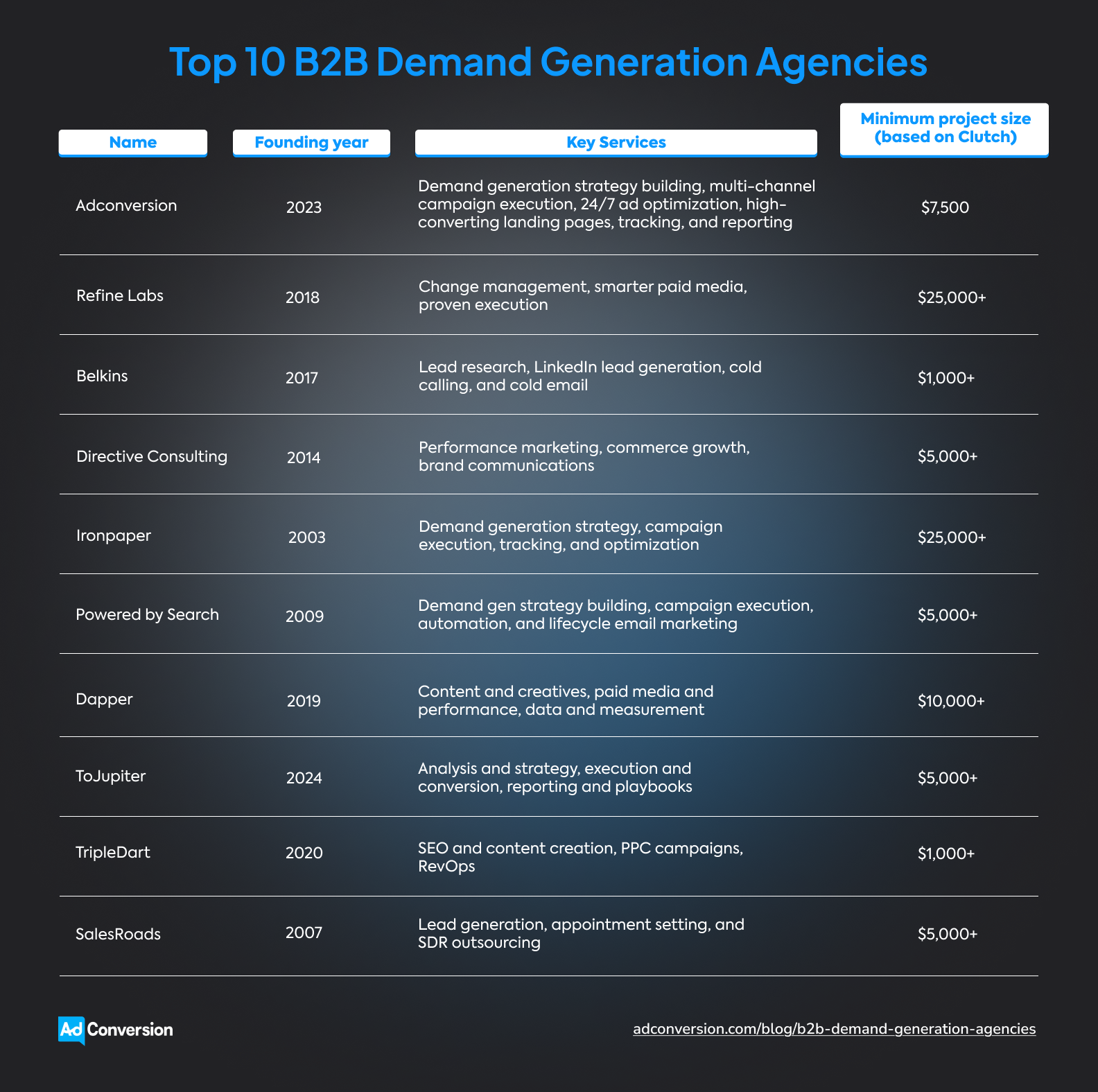
The tricky part is picking the right agency. Go with a team that truly understands your market, delivers real revenue impact, and knows how to generate sales-ready leads.
Disclosure: This article was created by AdConversion, a B2B demand generation agency, and includes its own services. The blog post was last updated in May 2026 and reflects the author’s perspective, not an independent editorial review. The agencies were evaluated using public website info and reviews from Clutch, G2, Trustpilot, and HubSpot. The order is random and doesn’t represent a ranking system. AdConversion has no affiliate or commercial ties to the other agencies listed.
Table of Contents
What Are the Top B2B Demand Generation Agencies for SaaS?
What Are the Best B2B Demand Generation Agencies for Startups?
What Are the Top B2B Demand Generation Agencies for Enterprises?
How Do You Choose a B2B Demand Generation Agency?
1. AdConversion
AdConversion is a B2B growth agency built for SaaS companies that want paid media to create real pipeline and revenue.
Silvio Perez launched the company in 2023, aiming to combine agency execution with hands-on education. Thanks to this unique approach, you now have two options:
- Train your in-house team for free, through AdConversion Academy, to step up your paid acquisition game. The beginner course to building a paid media program is an excellent starting point.
- Hand over the execution to the AdConversion Agency and let it run your ad campaigns end-to-end, from strategy and creatives all the way to tracking and reporting.
The AdConversion Demand Generation Agency works with B2B SaaS companies that keep investing in paid media but have little to show for it.
Some teams are generating leads that never turn into sales opportunities, while others are burning through their budgets with no change in lead volume.
AdConversion steps in to fix the problems causing all that waste. The company audits your current setup, finds what’s hurting performance, and rebuilds your paid media program around demand generation.
The best part is that AdConversion targets revenue metrics that help you grow. These include cost per sales-qualified lead (SQL), customer acquisition cost (CAC), return on ad spend (ROAS), closed revenue, and more.
You’ll also be assigned your very own senior strategist who knows everything about your account and can make quick decisions and changes without waiting for approvals.
Rippling, ActiveCampaign, Checkr, DigitalOcean, and Warmly are just a few clients who stand as proof that AdConversion can help your paid advertising turn the corner.
Services:
Pros:
Client reviews and portfolio testimonials point to a few standout strengths:
- AdConversion drives more sales opportunities, reduces your cost per marketing-qualified lead (MQL), and improves ROAS, while keeping an eye on revenue.
- The agency is always one step ahead, closely monitoring ad performance, spotting problems early, and pushing new ideas to achieve better results.
- Campaigns move quickly because ad creatives are produced in-house, leading to fewer delays, faster launches, and greater brand consistency.
Cons:
Feedback from Clutch shows that:
- AdConversion needs reliable CRM data to do its best work, so messy setups can delay progress.
- Not every experiment is a success, so you might see short-term dips while the agency tests new ideas.
Case studies:
Minimum project size (based on Clutch):
$7,500
Good to know: AdConversion uses a flat monthly pricing model instead of chasing percentages of your ad spend. So, even if you decide to invest more in ads, you’ll pay the same management fee.
2. Refine Labs
Refine Labs is a B2B demand gen agency that replaces old-school lead generation with modern growth strategies.
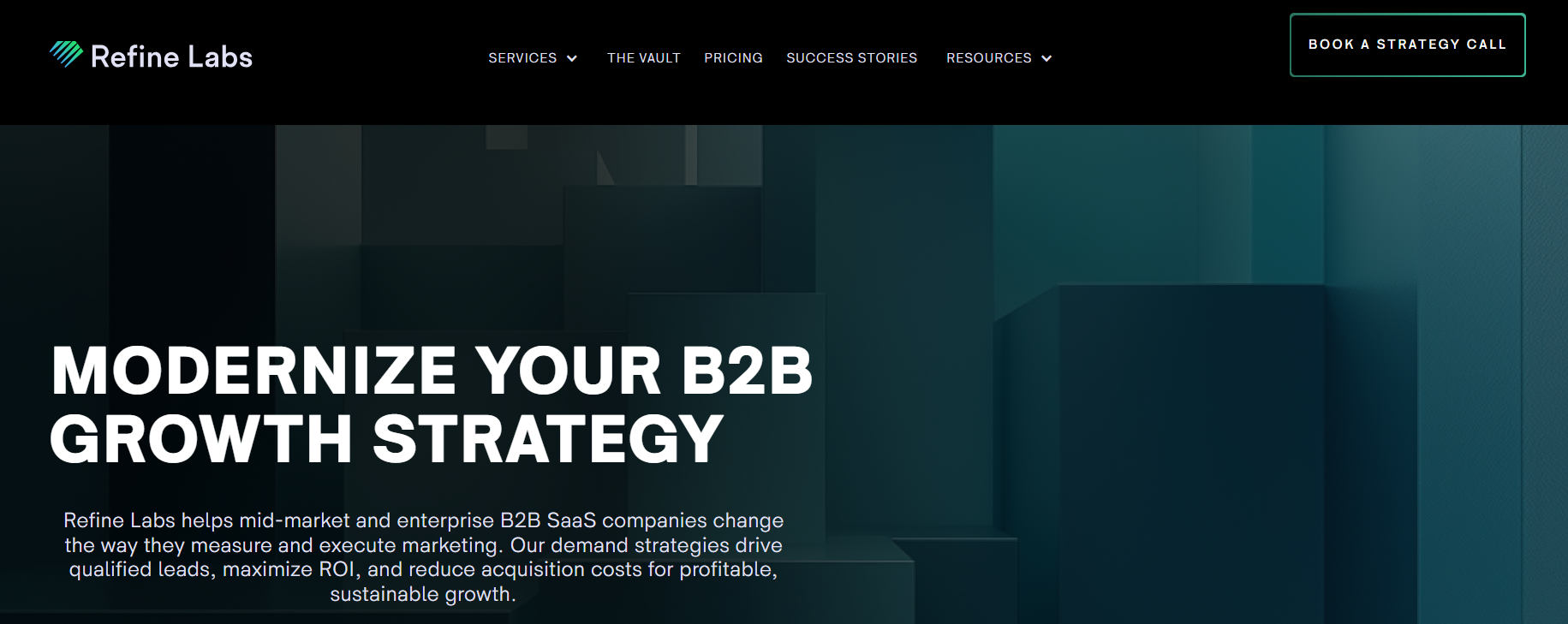
Founded in 2018, the agency partners with B2B SaaS brands like myCOI, Splash, and Loxo.
Refine Labs works closely with your internal teams, pushing them to stop chasing form-fills and start building awareness, capturing intent, and expanding revenue from the right accounts.
Services:
Pros:
Based on limited G2 reviews:
- Refine Labs offers deep market research and advanced strategy skills, giving your team a smarter path to growth.
- The agency helps you reach new audiences and buyer groups that your previous marketing efforts missed.
- The company’s brand strategies continue to generate awareness and return on investment (ROI) even months after the initial setup.
Cons:
The only downside mentioned on G2 is:
- Since brand awareness is not always easy to measure, it can take time to see positive results.
Case studies:
Minimum project size (based on Clutch):
$25,000+
3. Belkins
Belkins is a B2B lead generation agency launched in 2017 that helps companies book more sales meetings through outbound outreach and appointment setting.
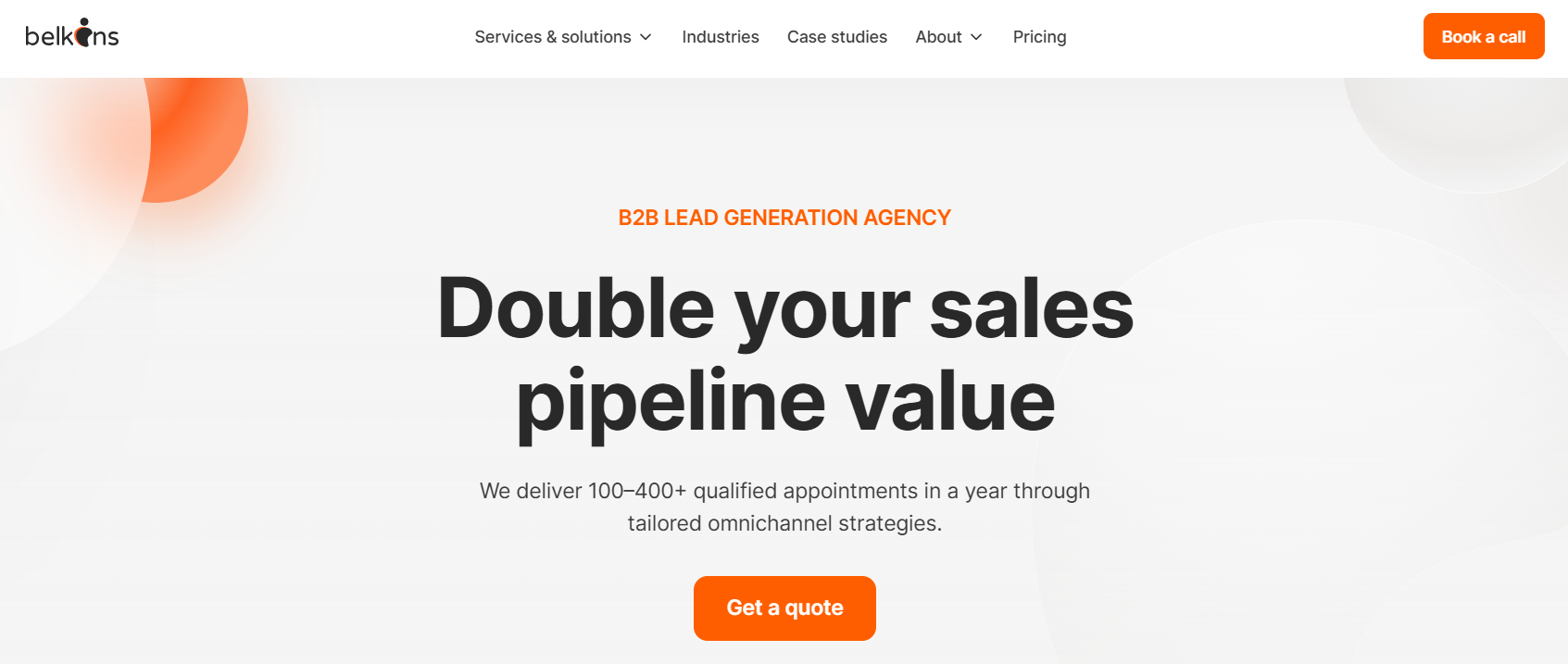
The agency specializes in over 50 industries, including SaaS, healthcare, manufacturing, and financial services. Maark, Disability Solutions, and Fire Safety and Protection (FSP) are some of its clients.
While other agencies focus on paid media or inbound marketing, Belkins operates on an outbound-first model, helping you start conversations directly with decision-makers.
Services:
Pros:
Reviews from Clutch show that:
- Belkins can book you a healthy number of relevant meetings and increase your email open and reply rates.
- The agency hits outreach goals quickly and leaves you with a high-quality prospect database for future campaigns.
- The team takes the time to learn your product in detail and can even refine your ideal B2B buyer persona.
Cons:
Some client reviews point out that:
- Better integration with the clients’ sales systems could make day-to-day work easier.
- The agency could offer more strategic input early on to improve lead quality from the first campaigns.
- Email templates can take longer than expected to get right, and you need to be involved.
Case studies:
Minimum project size (based on Clutch):
$1,000+
4. Directive Consulting
Directive Consulting is a B2B marketing agency that transforms buying intent into sales opportunities.
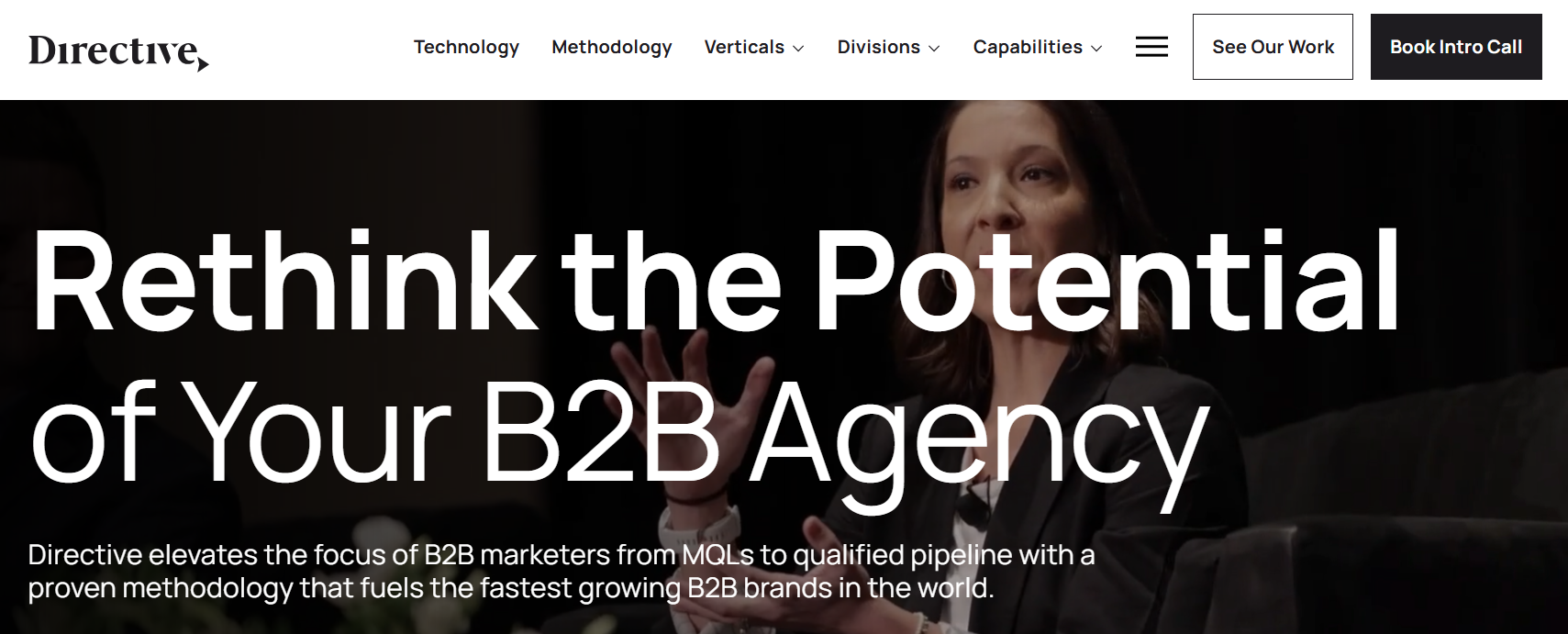
The agency started in 2014 and has a proven track record of working with technology and service brands such as Skillable, Arctic Wolf, and WordPress VIP.
What sets Directive Consulting apart is its focus on meeting potential buyers the moment they start researching solutions, comparing vendors, and getting ready to talk to sales.
Services:
Pros:
Directive Consulting clients appreciate that:
- The agency knows the B2B SaaS space well and provides useful benchmark data to help you make better marketing decisions.
- The team pushes your budget where it can create the best return, based on CAC, lifetime value (LTV), and ROI.
- The agency improves your traffic quality and lowers acquisition costs through a mix of SEO and pay-per-click (PPC).
Cons:
Some of the downsides Clutch reviewers mention are:
- Directive Consulting is a better fit for companies looking for performance marketing rather than a broad, full-service partner.
- Keeping up with the agency’s volume of reporting and recommendations can be hard.
- Since the agency doesn’t offer marketing automation, you might need another partner to help out with lead nurturing and conversion workflows.
Case studies:
Minimum project size (based on Clutch):
$5,000+
5. Ironpaper
Ironpaper is a B2B growth agency built for companies that need marketing to drive high-quality opportunities and sales.
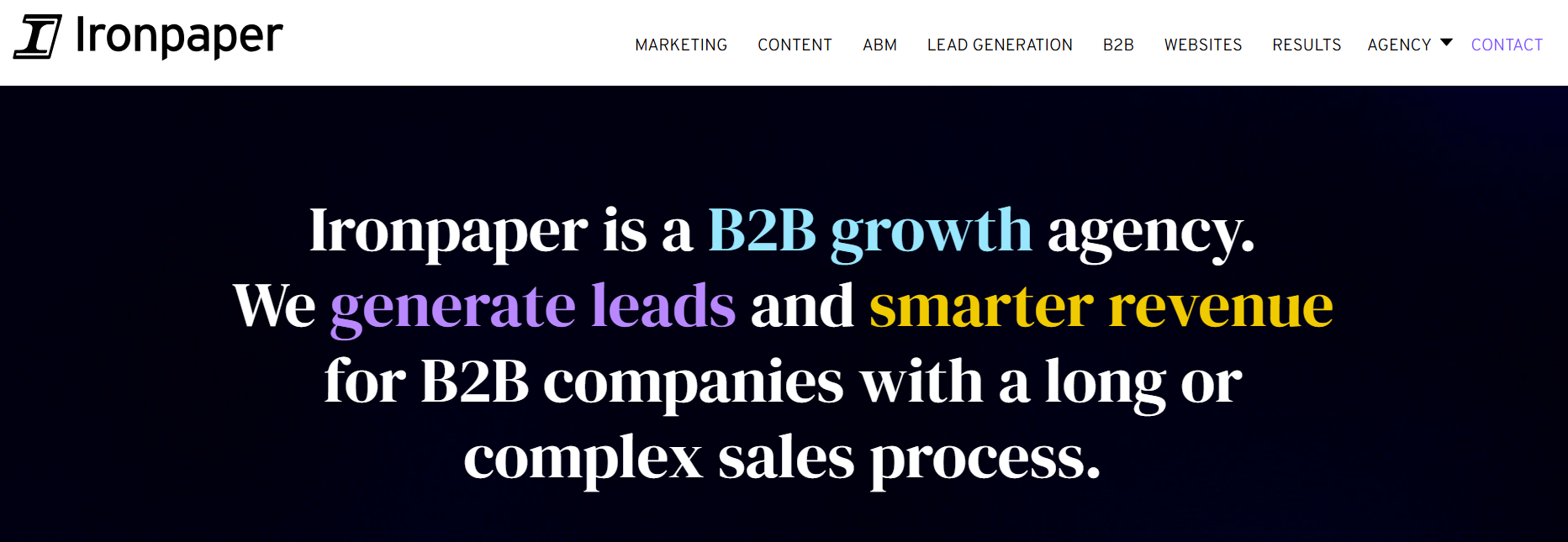
Since 2003, the agency has partnered with B2B companies in technology, manufacturing, healthcare, and energy that have complex sales cycles. Ambi Robotics, Mobilewalla, and Lightning Step are part of its client roster.
Ironpaper treats marketing and sales processes as a single growth system, judging every campaign by the number of qualified leads, target account engagement, and real opportunities created.
Services:
Pros:
Limited G2 reviews show that:
- Ironpaper dives deep into your sales funnel, showing what’s working, what’s hurting results, and how to improve.
- The agency delivers quick lead gen wins while also putting a longer-term growth plan in place.
Cons:
Reviewers also cite a couple of limitations:
- It can take some time to get in sync with the agency before the partnership starts working smoothly.
- Your first assigned account manager might not always be the right fit, but Ironpaper is quick to reassign when needed.
Case studies:
Minimum project size (based on Clutch):
$25,000+
6. Powered by Search
Powered by Search is a B2B marketing agency that helps clients break out of slow growth and start seeing more demos, trials, and sales opportunities.
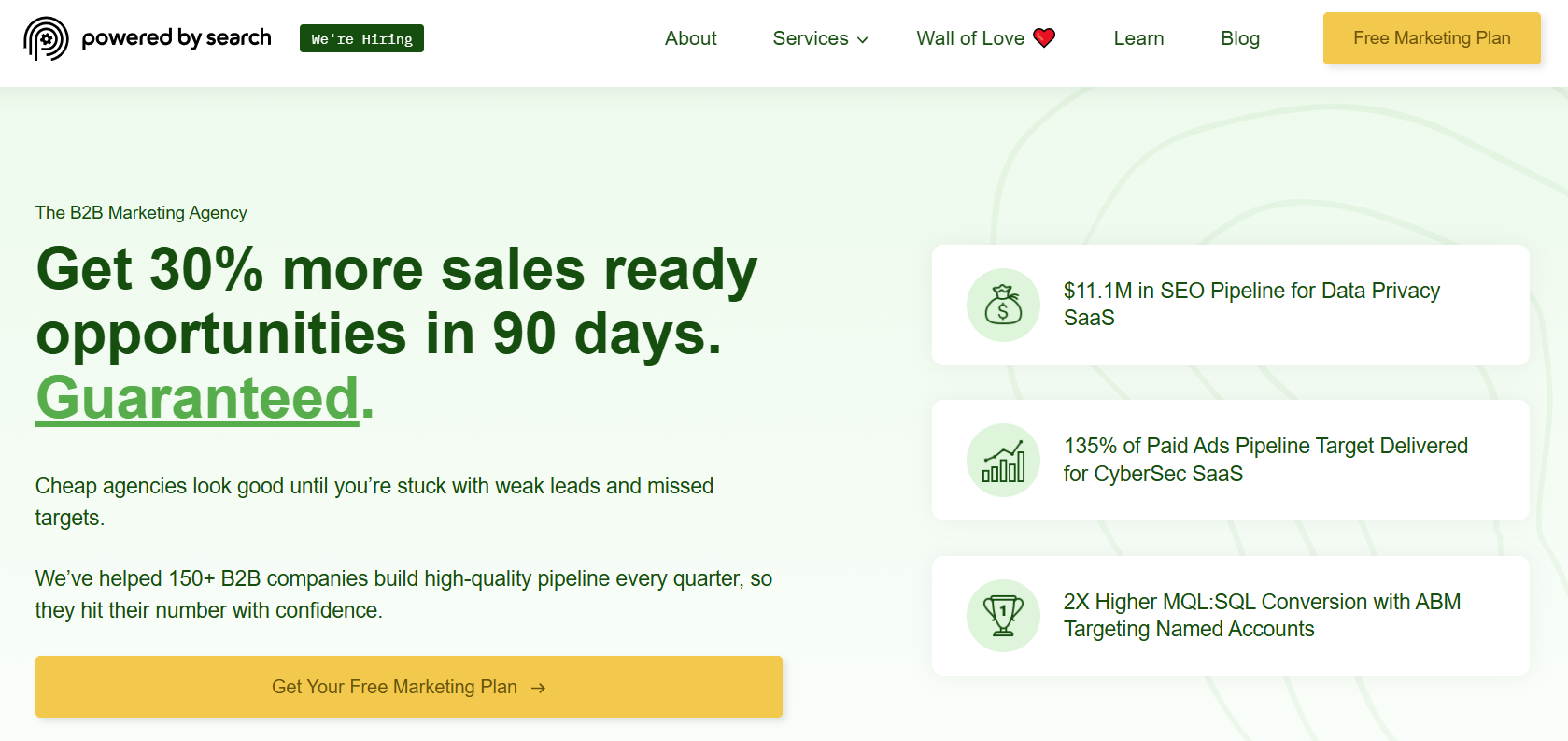
The agency has been around since 2009, working with B2B software and technology companies in finance, healthcare, legal, and cloud. Its client list includes brands like Cyera, iWave, and Fortra.
Powered by Search fixes your entire funnel, bringing in the right traffic and turning it into real interest.
Services:
Pros:
Based on the only client review available on HubSpot:
- Powered by Search can get your desired keyword to the number one position on Google, attract qualified leads, and increase conversions in 90 days.
Cons:
A potential downside might be:
- Since the agency works best when it integrates closely with your team, you’ll probably need to stay involved every step of the way.
Case studies:
Minimum project size (based on Clutch):
$5,000+
7. Dapper
Dapper is a B2B demand gen agency that keeps brands on the ideal customer’s radar until they’re ready to buy.
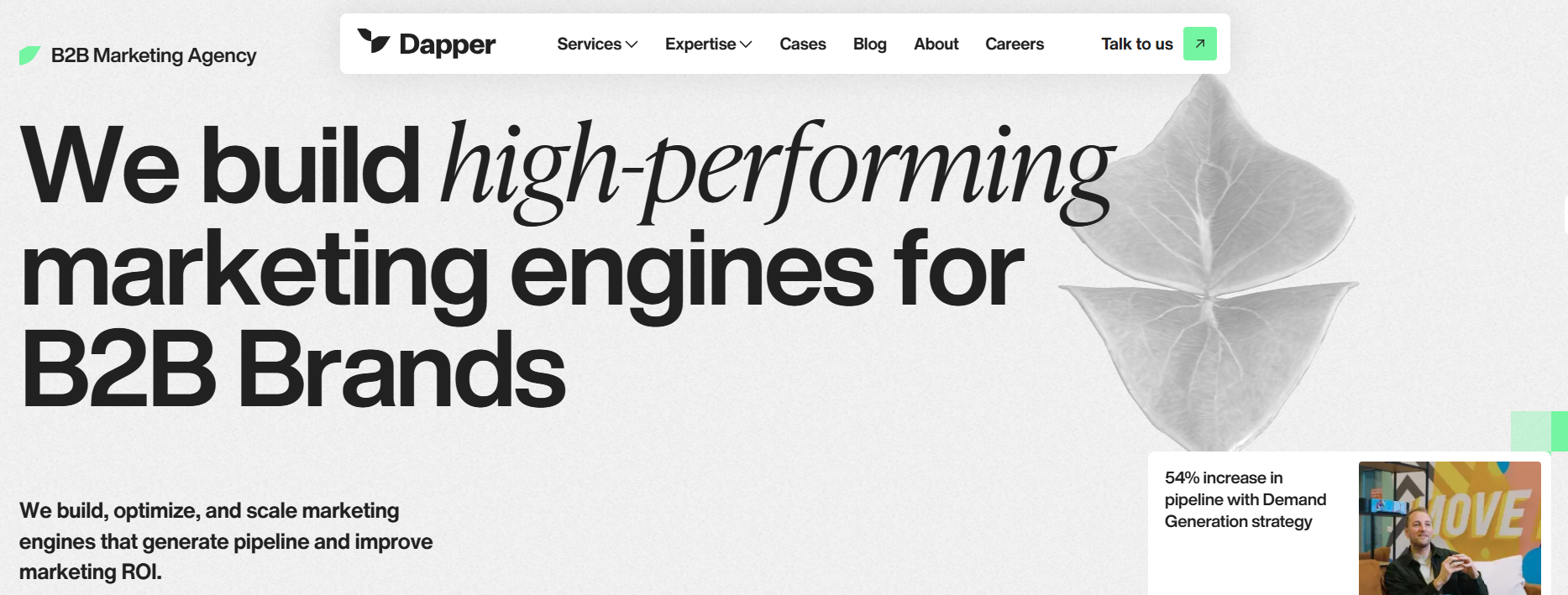
Launched in 2019, the agency targets B2B SaaS, service, and hardware businesses. Its list of happy customers includes Online Payment Platform, Bluebird, and FOCUS-ON.
Dapper is best-known for its ‘niche-famous’ approach. The agency makes sure your target accounts keep seeing your brand, so when the buying moment comes, yours is the first name that pops into their heads.
Services:
Pros:
Clutch feedback highlights that:
- Dapper’s paid and organic campaigns can double your customer base and social community.
- The agency offers detailed analytics that help you understand engagement better and move prospects further down the funnel.
- The team responds quickly, sends you regular updates, and keeps projects on track.
Cons:
A few trade-offs found in client reviews include:
- The project management tools can be a bit overwhelming, especially if you prefer a simpler way to track progress.
- Changes in the account team can sometimes disrupt continuity.
- It can take a bit of time for the team to fully align creatives with your brand guidelines.
Case studies:
Minimum project size (based on Clutch):
$10,000+
8. ToJupiter
ToJupiter is a B2B demand generation agency founded in 2024 that plugs into your GTM team to help you focus on what actually brings in revenue.
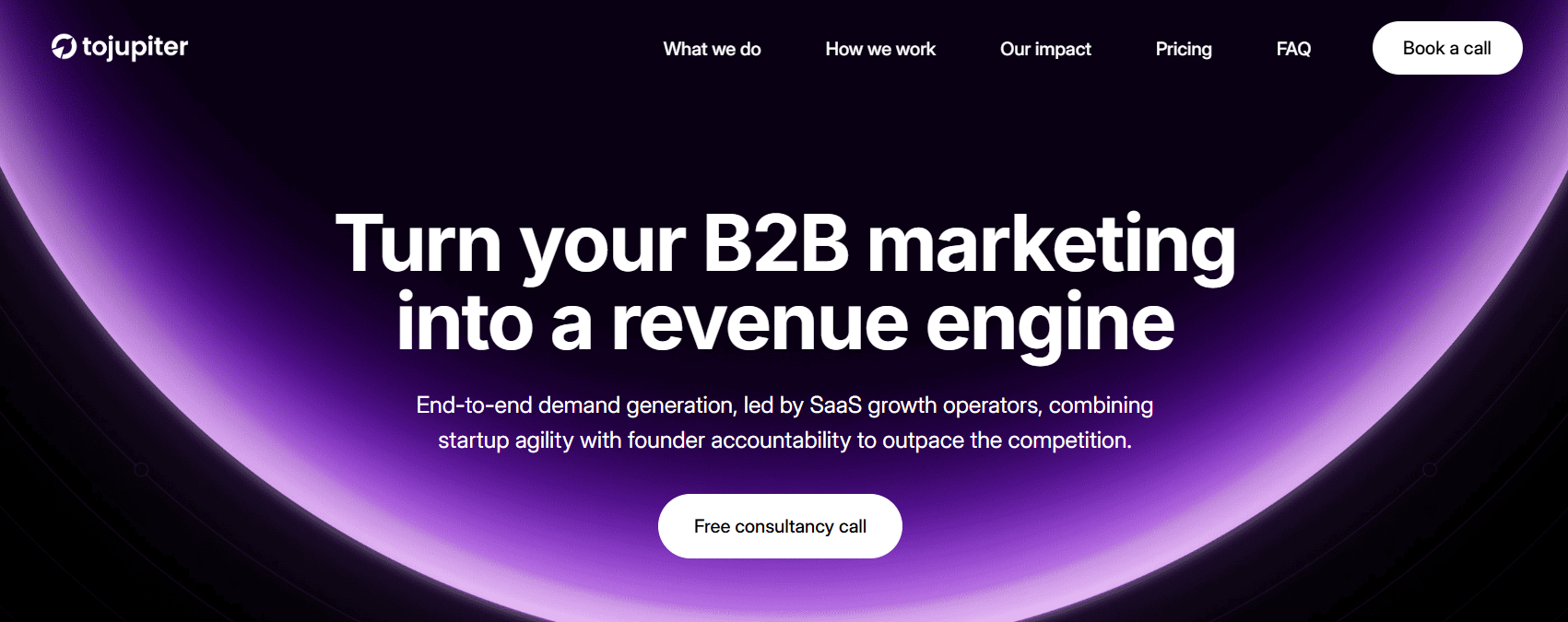
The agency partners with fast-growing SaaS startups like Goldcast, Brevo, and Level that want to create a predictable growth engine.
ToJupiter has two goals: speed and accountability. Its team quickly finds what drives results, prioritizes winning channels, and helps you create, capture, and convert demand into real deals.
Services:
Pros:
Customer reviews indicate that:
- ToJupiter can quickly boost MQLs, improve alignment with target accounts, and help you book more qualified meetings.
- The agency knows paid media well and moves fast, getting campaigns live without missing key details.
- The team is proactive and flexible, adjusting quickly when plans change.
Cons:
Reviewers also note a few downsides:
- Things can feel a bit hectic at first, with a lot of back-and-forth before everything settles into place.
- Your team needs to keep up with the agency’s fast pace, which can be difficult at times.
Case studies:
ToJupiter doesn’t have any published case studies, but its customer testimonials show it to be the real deal:
- Intechnica: 563% increase in marketing-sourced deals
- Lunio: 250% year-on-year growth driven by marketing
- Netacea: 80% total pipeline contribution from marketing
Minimum project size (based on Clutch):
$5,000+
9. TripleDart
TripleDart is a B2B SaaS marketing agency designed to turn traffic into pipeline and pipeline into revenue.
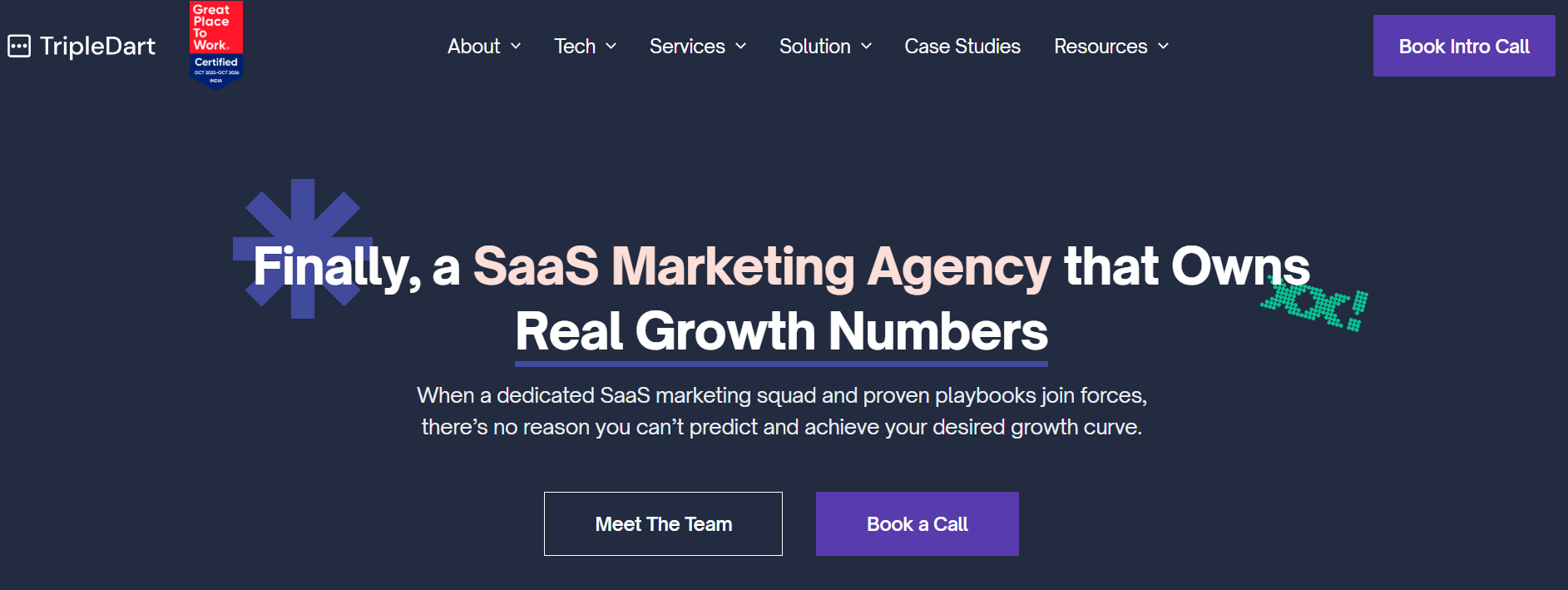
The agency started in 2020 and has clients across 12 countries, including brands such as CleverTap, Signeasy, and Airbase.
TripleDart quickly audits your programs, sets 30-, 60-, and 90-day targets, and works side by side with your team to double down on the channels that deliver predictable results.
Services:
Pros:
From what users mention in Trustpilot reviews:
- TripleDart‘s reporting is easy to follow, showing you what’s changing in your campaigns and what’s producing results.
- The team delivers ad creatives that fit your brand and speak to the right buyers.
- Communication runs smoothly, even when working across different time zones.
Cons:
Agency clients also call attention to:
- During active testing, updates and campaign changes may take a bit longer than expected.
- The agency might work best for teams still building their paid media foundation rather than those managing more advanced setups.
Case studies:
Minimum project size (based on Clutch):
$1,000+
10. SalesRoads
SalesRoads is a B2B sales outsourcing agency founded in 2007 that fills your calendar with qualified sales conversations.
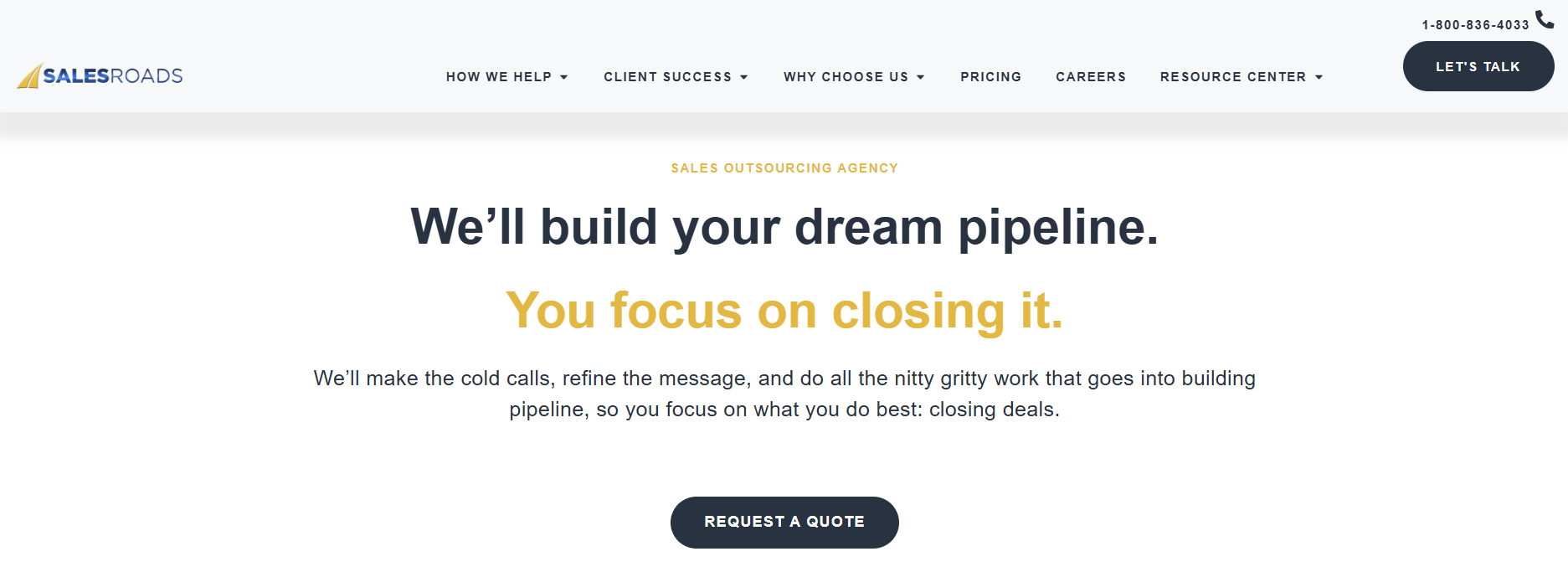
The agency targets B2B brands in multiple industries, including SaaS, manufacturing, and healthcare. Its client base includes companies like AchieveIt, Parker Hannifin, and Factor Architecture & Engineering.
What makes SalesRoads different is its outbound-first approach to demand creation. The agency uses trained sales reps to handle prospecting, outreach, and qualification, so your sales team can focus only on closing deals.
Services:
Pros:
Several clients mention these strengths:
- SalesRoads turns more calls into qualified follow-ups and can help you exceed your ROI targets.
- The agency puts in the work to understand your ICP and keeps refining the approach to get better results over time.
- The team delivers items on time, adapts quickly, and offers helpful input to keep campaigns moving.
Cons:
Reviewers report a few challenges:
- Your sales team needs to stay involved and give regular feedback, or results might not meet expectations.
- Email outreach could be used more effectively as part of the overall strategy.
Case studies:
Minimum project size (based on Clutch):
$5,000+
What Are the Top B2B Demand Generation Agencies for SaaS?
Top B2B demand generation agencies for SaaS understand product-led growth, long sales cycles, and how to convert demand into deals:
- AdConversion builds and executes SaaS paid media campaigns that target each stage of the buyer journey to drive more sales opportunities and tie every campaign back to CRM revenue.
- Refine Labs helps SaaS teams build demand early, improve messaging, and align marketing efforts with how buyers actually research and choose products.
- TripleDart is a good solution for SaaS brands that want to increase their online visibility quickly and fix CRM and funnel gaps to turn more traffic into qualified opportunities.
What Are the Best B2B Demand Generation Agencies for Startups?
The best B2B demand generation agencies for startups move quickly, test channels without wasting budget, and turn early traction into customer acquisition:
- AdConversion serves Series A+ startups struggling with inefficient, high-cost paid ads. The agency experiments with different ad platforms and creatives to reach the right buyers quickly and cut wasted ad spend.
- Powered by Search helps startups attract sales-ready leads and convert them into demos and trials quickly, using paid media, SEO, and content.
- ToJupiter fits startups that want hands-on support, acting like part of the team to launch campaigns fast, test ideas, and align closely with sales to turn interest into real deals.
What Are the Top B2B Demand Generation Agencies for Enterprises?
Top B2B demand generation agencies for enterprises know how to handle complex sales cycles, large budgets, and multiple stakeholders while keeping everything revenue-focused:
- AdConversion runs enterprise-level programs using effective ABM tactics across paid search and social, and regularly handles $150K/month ad budgets. The agency also tracks how every touchpoint turns into revenue, giving you full visibility into every campaign.
- Belkins uses research, outreach, and appointment setting to connect enterprises with the right decision-makers and keep sales teams focused on closing.
- Ironpaper manages enterprise ABM campaigns that engage key accounts, align marketing and sales, and push buyers toward a purchase.
How Do You Choose a B2B Demand Generation Agency?
Choose a B2B demand generation agency that understands your growth model and knows how to generate real demand and revenue.
Always keep an eye on these criteria:
- Specialization: Look for an agency that already works with B2B companies like yours and knows how your sales cycles and buying journey actually work, so you can see results faster.
- Services: Make sure the agency covers the channels and tactics you need, whether that’s paid search or YouTube ads, content marketing, ABM, or lifecycle campaigns. Gartner’s 2025 CMO Spend Survey shows that paid media remains the front runner, accounting for 30.6% of B2B marketing budgets.
- Results: Search for case studies tied to SQLs, conversion rates, and revenue growth that prove that the agency can deliver on its promises.
- Reviews: Check client feedback on platforms like Clutch, G2, and Trustpilot to see how the agency communicates, adapts, and performs over time.
- Pricing: Choose a pricing model that fits your stage and budget, and make sure you understand exactly what you’re paying for before you commit.
Final Thoughts: Choosing the Right Partner for Your Demand Gen Strategy
At the end of the day, picking a B2B demand generation agency means finding a partner that gets how your buyers think and can turn attention into opportunities and sales.
Some agencies focus on sales outreach, while others are centered around paid media, content, or SEO. The best choice depends on what’s holding your growth back right now.
If you want to increase demand from your ad spend, have a quick chat with AdConversion to see if it makes sense for you.
10 Voice of Customer Marketing Tips to Create High-Converting Campaigns

If I had to boil down my entire job as a marketer into one sentence, it’d be this: I listen to customers and then build campaigns that sound like them.
Voice of customer (VOC) isn’t just a tactic. It’s the strategy. It’s the thing AI can’t fake, dashboards can’t predict, and competitors can’t steal. It’s also where all my best ideas come from.
Here are 10 detailed ways I collect, activate, and scale the voice of a customer across everything I do.
1. Start every new role by talking to customers. Relentlessly.
When I joined ContactMonkey, the very first thing I did wasn’t digging into attribution models or revamping landing pages. It was scheduling as many customer and prospect conversations as I could fit into my calendar.
I even made it part of my official 30-60-90 plan.
In those early weeks when your brain is still fresh and your to-do list is short, there’s nothing more valuable than hearing firsthand what people love, hate, and don’t understand about your product or category.
One of my favorite moves?
Posting on LinkedIn asking if anyone in my network is willing to get on a quick call. In this case, I posted asking if anyone in my network owns internal comms and would be willing to chat (our ICP at ContactMonkey).
I offered to buy them a coffee in exchange for a chat (no sales pitch).
I got 12+ responses. If you don’t have a network in your space yet, no problem.
Shadow your CS or AM teams. Listen to support calls. It’s not about volume, it’s about patterns.
When I start hearing the same pain points and language again and again, that’s when I know I’ve struck gold.
2. Replace vague promises with oddly specific customer results
Years ago at Chili Piper, we ran one of our most successful landing page tests using a stat pulled directly from a customer.
The control copy said “Double your meetings”. A nice round promise. The variation said “Book 48% more meetings”. Not as flashy, but 100% real results from a real customer.
And it crushed. Why?
Because people can smell BS. “Double” sounds too good to be true.
But “48%” feels like someone actually ran the numbers. The same logic applied to our newsletter sign-up. We swapped “Join 15k+ marketers” for the actual number, like “14,889 marketers”, and updated it monthly. Way better engagement.
I’ve learned that authenticity beats hyperbole every single time.
Whether it’s landing pages, ads, or CTAs, I always ask: can I anchor this in a real result? If I can, that’s the copy I go with.
3. Scale testimonial collection
Most marketers want more testimonials. But very few make it easy for customers to give them.
That’s where tools like testimonial.io come in. At Chili Piper, we used it to collect both video and text testimonials at scale.
What I loved is that it wasn’t just a form. It created a nice-looking landing page where we could showcase quotes, filter by industry or persona, and make it dead simple for sales to grab proof on demand.
We even layered in rewards: For example, $10 for a written review, $20 for a video.
It made the process feel fun, not transactional. If you don’t have the budget for a tool, you can still make this work with forms and folders. It just requires more manual work.
But either way, the key is removing friction. Make it easy, incentivize smartly, and watch the social proof roll in.
4. Map the moments when asking for testimonials feels natural
I used to be hesitant about asking happy customers for quotes or reviews. It felt too much like asking someone who’s already paying us for more favors.
Now I’ve learned that timing is everything and when you get it right, people are actually eager to help.
At Chili Piper (and coming soon to ContactMonkey!), we built simple workflows around high-NPS scores.
If someone gave us a 9 or 10, they’d get an email asking if they’d share a quick testimonial (with an incentive if we needed it).
Renewal time is another great moment. If the CSM is having a positive QBR, that’s your window.
And if you have an in-app experience, even better. Prompt people when they’ve just hit a milestone or seen a big win.
These are the moments when they’re feeling the value and that’s when you should make the ask. Not months later in a generic email blast.
5. Mine sales calls using Gong alerts
If your sales team uses Gong, Clari, or any call recording tool, you’re sitting on a goldmine of unfiltered customer language.
At Chili Piper, I set up custom alerts for keywords like “love this,” “so helpful,” or “amazing”.
Whenever a prospect or customer said something positive, I’d get an alert. Sometimes we’d clip those and turn them into ads. Other times we’d just use them for internal messaging work.
At ContactMonkey, I’ve taken it further. I created an alert for the word “chaos” because we were testing a new homepage copy around that theme.
Now I can see in real time if that word is spiking in conversations. It’s like a heartbeat monitor for customer sentiment.
Pro tip: Make sure your alerts only track customer speech, not your reps. Otherwise, you’ll get a lot of noise. This is one of the lowest-lift, highest-impact VOC tactics I’ve ever used.
6. I always prioritize real photos over polished stock
In one of my previous companies, we ran a bunch of Facebook ads targeting college professors. We tested beautifully lit, high-production images.
We even went to a local university campus and took our own photos.
But the creative that won?
A grainy, dimly lit shot of a real professor with a projector half-illuminating his face. It looked like a scene from a low-budget documentary and it worked like magic.
Why?
Because it was instantly recognizable to our audience. They saw themselves in that ad. That lesson stuck with me.
I now prioritize real customer images (with permission, of course) over generic visuals, especially on social platforms like LinkedIn.
Even if the photo isn’t perfect, the context is. It builds trust faster than any stock model with a laptop ever could.
7. Engineer VOC moments at in-person events
One of the most underrated ways to capture and activate the voice of a customer is through small, curated in-person dinners.
At Chili Piper, we’d pick anchor events, like INBOUND or SaaStr, and then build a dinner party around them. We invited a mix of customers and high-fit prospects. No pitch. Just dinner.
But the magic was in the seating chart.
When a prospect ends up next to a customer, the VOC starts flowing naturally. It’s not a case study. It’s a conversation. And it’s way more persuasive than sitting them beside someone from your sales team.
These dinners don’t have to break the bank. We’d partner with other Martech brands targeting the same ICP, split the cost, and divide the invite list. We typically budgeted around $200 per head depending on the city (this can vary wildly).
But if you can’t swing a dinner? Start by gifting tickets to customers so they can attend the event. That alone builds goodwill and puts your brand top of mind.
8. Create memorable, feel-good moments for customers
One of my favorite VOC plays was when we ran a billboard that was not about us, but celebrating our customers.
People took selfies with it. It created a moment.
You can apply the same principle with award nominations, speaking opportunities, or simply amplifying your customers’ successes.
These aren’t transactional gestures. I don’t do them expecting a quote or post in return. I do them because they’re the right thing to do.
People remember how you made them feel. When you make your customers feel seen and valued, they’re more likely to become your advocates.
Reciprocity is real but only when it’s authentic. Whether it’s putting them on stage, giving them swag, or celebrating their wins, this kind of VOC is quiet but powerful.
9. Recycle everything into retargeting gold
Once you start collecting VOC, don’t let it sit in Notion or your testimonial page. Use it. In your retargeting campaigns especially.
At Chili Piper we ran video snippets from customer calls as YouTube pre-roll. We sliced a single testimonial video into six different LinkedIn ads. We even ran static image ads that are just screenshots of nice LinkedIn posts or tweets.
If someone says something amazing about you on LinkedIn, screenshot it and run it as an ad. That’s what I used to do before Thought Leader ads were even a thing.
Don’t worry about fancy production. Don’t wait until you have a full video library. Start with what you have.
Voice of the customer doesn’t always need tons of polish. It needs visibility.
10. Amplify customers with Thought Leader ads (yes, from their accounts)
This one is super meta, but wildly effective.
If a customer writes a post about your event, product, or company, don’t just repost it from your brand page.
With LinkedIn’s Thought Leader ad type, you can run their post as an ad from their account. It’s voice of customer, directly from the customer’s mouth.
Chili Piper is doing this with people who attended their ChiliPalooza event. They encouraged them to post their takeaways, then promoted those posts with paid. I haven’t tested it yet at ContactMonkey, but it’s high on my list.
It’s a modern version of influencer marketing, except the influencer is your actual user. Just make sure they’re comfortable with it, and always get consent.
Bonus: If you can’t run it as an ad, screenshot it and use it in your retargeting. It still works.
The voice of the customer isn’t a box I check. It’s the lens I try to apply to everything I do, from homepage headlines to how I design event experiences.
Because at the end of the day, no copy I write will ever be more compelling than something a real customer says when they don’t know they’re being marketed to.
That’s the voice that cuts through the noise.
Hope you found this article helpful!
If you’re looking to pick up an advertising course, check out these free courses that will teach you how to launch, optimize, and scale ad campaigns effectively.
And if you have any questions about using the voice of the customer in your campaigns, feel free to send me a message on LinkedIn, I love connecting with fellow marketers!
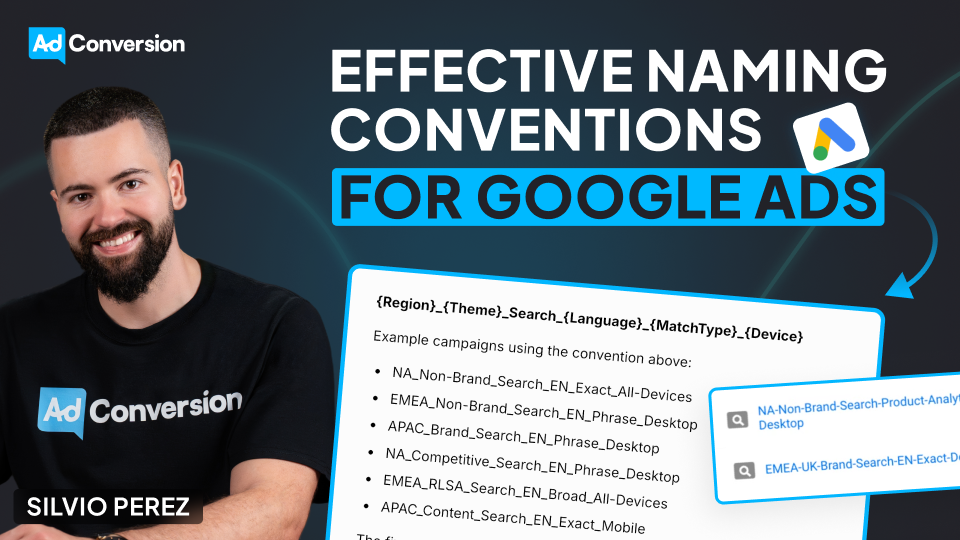
How to Create an Effective Naming Convention for Your Google Ads Campaigns
One of the most overlooked but crucial aspects of running a successful Google Ads campaign is our naming conventions.
I’ve worked with countless clients optimizing their ad performance, and I can tell you that this is the one thing that makes everything easier — or breaks everything.
Why Naming Conventions Matter
A naming convention is the process I follow repeatedly when naming my campaigns.
And from my experience, having a consistent and logical naming convention is essential for my organization and productivity when managing them.
A messy campaign structure makes performance tracking, reporting, and optimization significantly harder.
I feel like trying to find something in a cluttered room — wasting my time and effort. And it can be even worse.
Think about this like sharing a room with a messy roommate. If everything is disorganized, I’ll struggle to find what I need, and so will anyone else trying to help me. But if everything has a place, everything is easier to manage.
A strong naming convention ensures that I, my team, and my tools can quickly understand and filter campaigns without unnecessary frustration.
How to Structure a Naming Convention
Here’s my recommendation to create a naming convention that makes everything easier, based on tests on my campaigns:
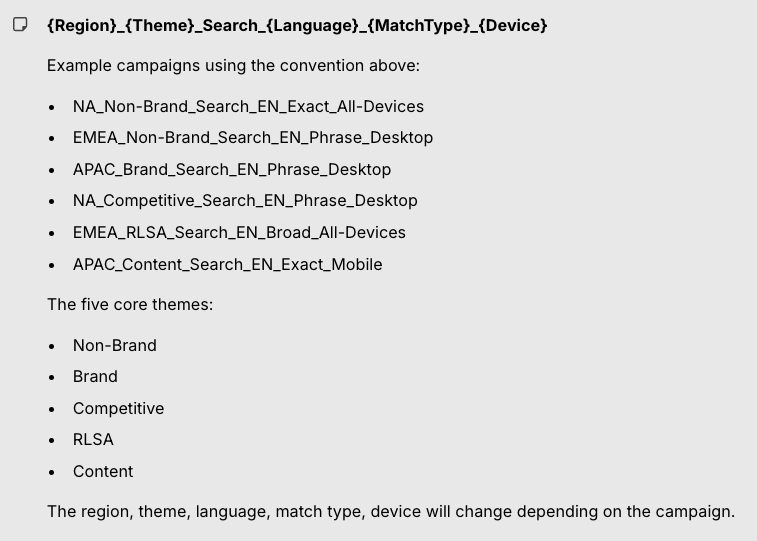
- Region: Where the campaign is being targeted. For example, NA for North America, or EMEA for Europe, the Middle East, and Africa.
- Campaign Theme: The general type of campaign. The five core themes are: Brand, Non-Brand, Competitive, RLSA, and Content.
- Search Type: Identifies that this is a search campaign.
- Language: The language of the campaign (EN for English, ES for Spanish, for example).
- Match Type: The type of keyword match being used: Exact, Phrase, Broad, etc.
- Device: The primary device targeting, generally All Devices, Desktop, or Mobile.
This structure allows us to quickly filter and analyze data in Excel, Google Ads, or any reporting tool.
Examples of Naming Conventions
I came up with some examples of how to apply naming conventions to your campaigns:
A campaign targeting North America, focused on non-brand searches in English, using exact match keywords, and targeting all devices would be named: NA_NonBrand_Search_EN_Exact_AllDevices
A campaign targeting Europe, the Middle East, and Africa, focused on content searches in English, using phrase match keywords, and targeting only mobile would be named: EMEA_Content_Search_EN_Phrase_Mobile
A campaign that targets the Asia-Pacific region, focused on brand searches in English, using phrase match keywords, targeting desktops would be named: APAC_Brand_Search_EN_Phrase_Desktop
A campaign targeting North America, focused on competitive searches in English, using phrase match keywords, targeting desktops would be named: NA_Competitive_Search_EN_Phrase_Desktop
And finally, a campaign targeting Europe, the Middle East, and Africa, focused on RLSA searches in English, using broad match keywords, targeting all devices would be named: EMEA_RLSA_Search_EN_Broad_All-Devices
Benefits of a Good Naming Convention
A well-structured naming convention helps in three major ways:
- Better Performance Tracking: With a clear naming structure, I can instantly see how different segments of my campaigns are performing. No need to dig into settings — everything is in the campaign name itself. This makes it much easier to analyze trends and optimize based on what’s working.
- Efficient Team Collaboration: If multiple people are working on the account, a consistent naming convention ensures everyone understands what each campaign is for. When a new team member joins, they won’t have to waste hours figuring out the structure.
- Faster Reporting & Filtering: When I export campaign data, a structured naming convention lets me quickly filter and sort campaigns based on region, keyword type, device, and more. This makes reporting significantly more efficient.
Should we name our campaigns the same across platforms?
Absolutely!
Naming our campaigns the same across all platforms helps us maintain consistency, simplify analysis, and easily compare performance across different channels when reporting on your overall campaign results.
Please notice that slight platform-specific details might need to be added to the campaign name to account for unique targeting options or features on each platform, but as a whole, having consistent names allows us to easily group data and compare results without confusion.
To sum up
A good naming convention costs you nothing — but the benefits are enormous.
Get it right, and you’ll make everything in your Google Ads campaigns easier to manage, optimize, and scale.
So don’t wait. Go set up your naming convention and start running smarter campaigns!
And if you really want to level up your B2B advertising game, there’s more to master than just negative keywords.
That’s where Google Ads course by AdConversion comes in.
Join 5000+ B2B marketers who are sharpening their paid media skills inside AdConversion’s free, on-demand courses.
Here’s why you should sign up:
✅ 100% free access – No hidden fees, no fluff.
✅ Taught by vetted industry experts – Learn from people who run high-budget B2B campaigns.
✅ Workbooks, resources & templates – So you can implement, not just watch.
✅ Bite-sized lessons (<10 min each) – Easy to fit into your schedule.
Click here to join in under 90 seconds (seriously, we timed it 😂)
How to Track Form Submissions in Google Tag Manager?

I’ve spent a lot of time wrestling with tracking form submissions in Google Tag Manager (GTM), and I know how frustrating it can be when things just don’t work as expected.
Forms behave in all sorts of unpredictable ways. Some refresh the page, some stay put, and others redirect users to a "Thank You" page.
And because there’s no universal rule for how developers build forms, you and I need different tracking approaches depending on the situation.
And since chances are you’re using form submission to also track how your Google ad campaigns are converting, it becomes super critical for us to get this right.
That’s why in this guide, I’ll break down the most effective ways to track form submissions, step by step, so you don’t have to figure it all out the hard way like I did.
Understanding the Tag and Trigger Relationship in GTM
Before we dive into the methods, let’s quickly cover the basics. GTM relies on two key components:
- Tags: These send data to platforms like Google Analytics 4 (GA4).
- Triggers: These tell GTM when to fire a tag.
To track form submissions properly, you need:
- A GA4 event tag that sends a form submission event to GA4.
- A trigger that detects when a form is successfully submitted.
Step-by-Step: Creating a GA4 Event Tag
- Go to Tags in GTM and click New.
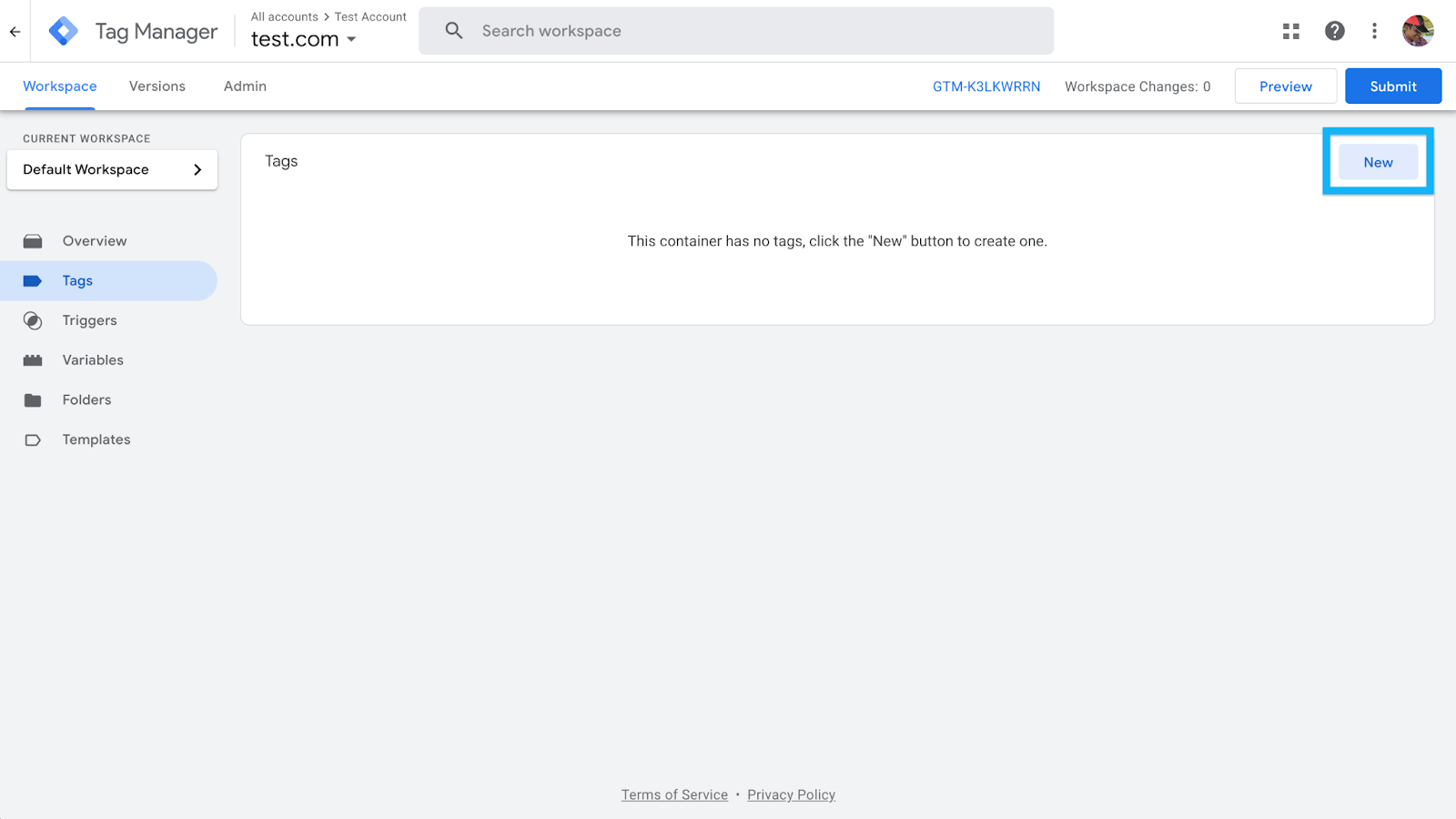
- In Tag Configuration, select Google Analytics: GA4 Event.
- In the Measurement ID field, insert your GA4 tracking ID (or use a Constant Variable if you’ve set one up).
- In the Event Name field, enter "generate_lead" (this is a recommended GA4 event, but you can change it if needed).
- Leave the Triggering section empty for now. We’ll configure that next.
- Click Save.
At this point, the tag exists but doesn’t do anything because there’s no trigger.
Now, let’s set that up based on how your form behaves.
Method 1: Track Form Submission Using GTM’s Built-in Form Submission Trigger
In an ideal world, GTM’s built-in Form Submission trigger would work for every form.
But in my experience, it rarely does. This trigger only works if the form fires a native submit event, which many modern forms (especially AJAX-based ones) don’t.
Step-by-Step: Configuring the Form Submission Trigger
- In GTM, go to Variables > Configure and enable all Form Variables (Form ID, Form Classes, Form Target, Form Text, etc.).
- Navigate to Triggers and create a new trigger:
- Choose Form Submission as the trigger type.
- Choose Form Submission as the trigger type.

- Check Wait for Tags and set a delay (e.g., 2000 milliseconds) to ensure tracking before the page redirects.
- Enable Check Validation to ensure only valid submissions are tracked.
- Under "Enable this trigger on…", set Page Path contains / so it works across the site.
- Click Save.
Assigning the Trigger to the GA4 Event Tag
- Open the GA4 event tag.
- In the Triggering section, select the Form Submission trigger you just created.
- Click Save.
- Enable Preview Mode in GTM and test it by submitting a form.
- Check the GTM Debug Panel to see if a Form Submit event appears.
- If it appears, great! The trigger works.
- If it doesn’t, your form likely prevents the submit event. Move on to the next method.
- If it appears, great! The trigger works.
Method 2: Track Form Submissions via a "Thank You" Page
If your form redirects users to a confirmation page after submission, this is the easiest and most reliable tracking method.
The one mistake I see folks repeat often is they link to this thank you or add it in your sitemap.
The way this method works is it sends an event every time this page is loaded.
So you want to double check to ensure that people don’t land on this page through other sources.
Step-by-Step: Setting Up a Thank You Page Trigger
- In GTM, go to Triggers and create a new trigger.
- Choose Page View as the trigger type.
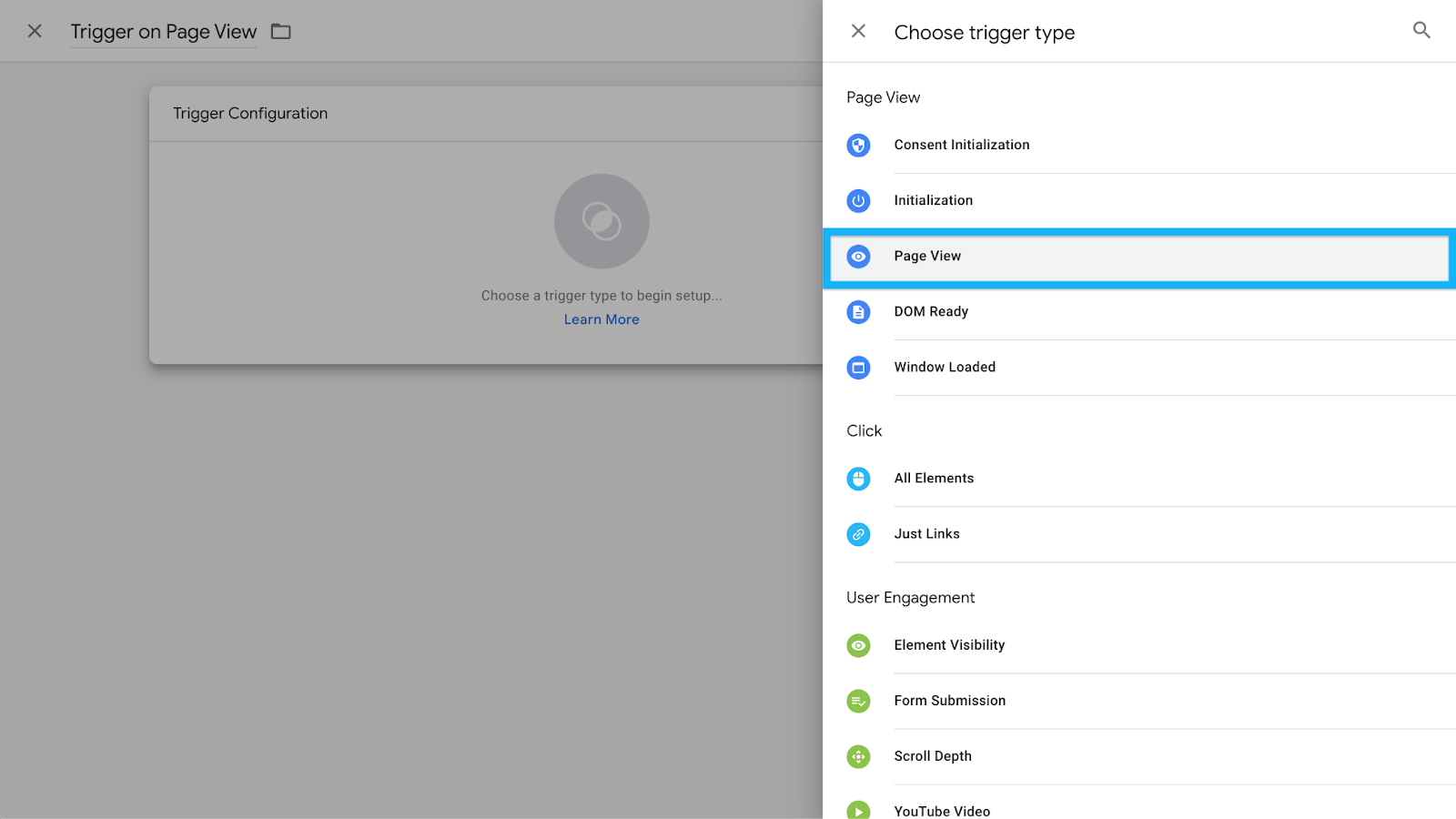
- Select Some Page Views and define the condition:
- If the URL is static (e.g., https://www.example.com/thank-you), set Page Path equals /thank-you.
- If the URL is dynamic, use Page URL contains thank-you (just make sure it’s unique).
- If the URL is static (e.g., https://www.example.com/thank-you), set Page Path equals /thank-you.
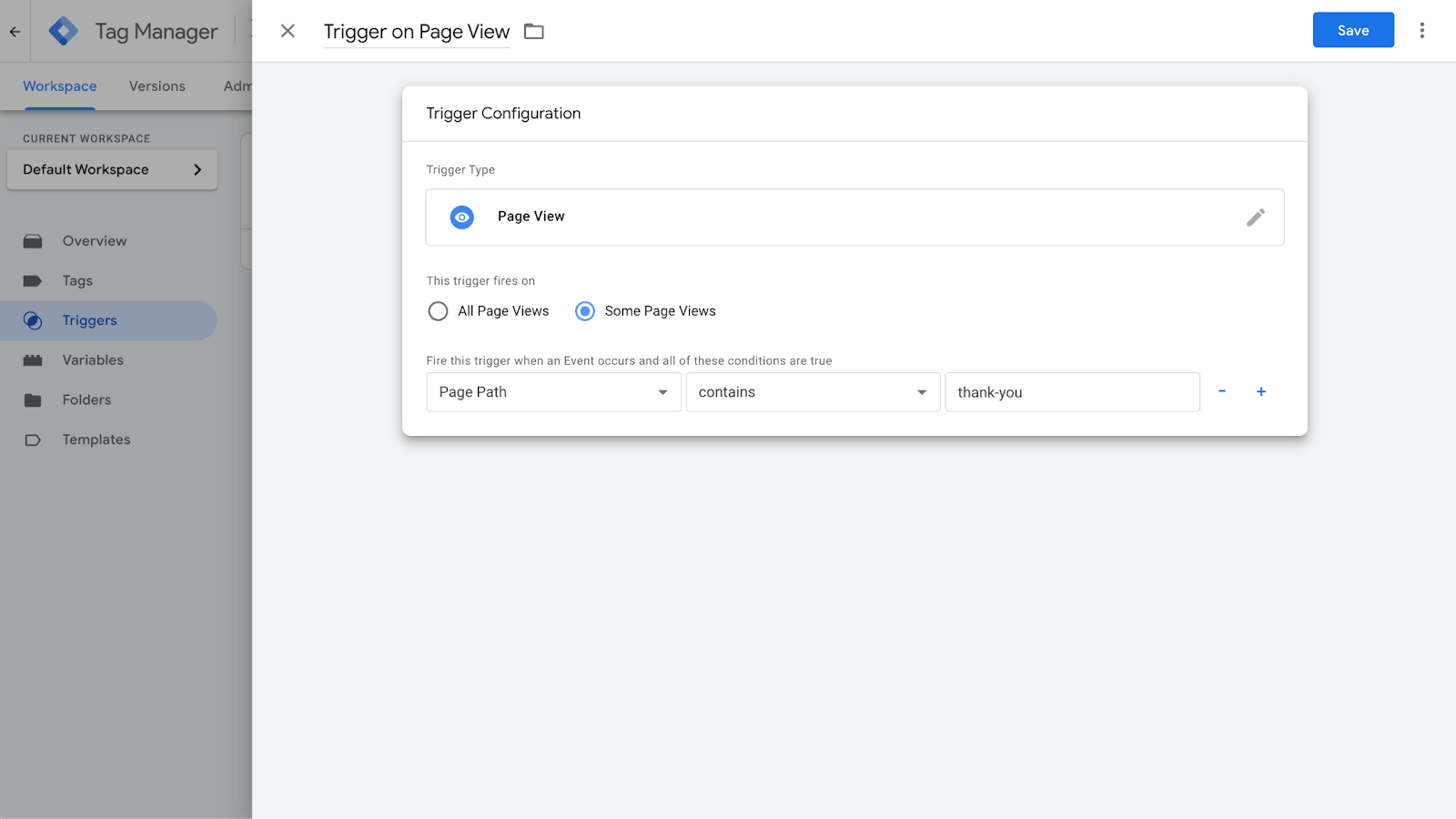
- Name the trigger something clear (e.g., "Pageview – Form Submission").
- Click Save.
Assigning the Trigger to the GA4 Event Tag
- Open the GA4 event tag.
- In the Triggering section, select the Thank You Page trigger.
- Click Save.
- Enable Preview Mode and test by submitting the form.
- Verify in GA4 Debug View that the event fires only when users reach the confirmation page.
This method is foolproof as long as users can’t access the "Thank You" page without actually submitting the form.
Enhancing Tracking with Custom Parameters
If you have multiple forms on your website, tracking just a generic "form submission" event isn’t enough.
You need to capture more details that help differentiate between each form submission, such as:
- Form ID: A unique identifier assigned to each form, which can be extracted using GTM’s built-in variables.
- Form Name: Some forms may not have an explicit ID, but they may have a specific name attribute that can be tracked.
- Page URL: If each form is located on a unique page (e.g., /contact-us vs. /signup), capturing the URL will help differentiate where the submission occurred.
- Form Type: If you have multiple lead capture forms (e.g., demo request, newsletter signup, contact form), you can categorize submissions based on the form's purpose.
Step-by-Step: Adding Custom Parameters to the GA4 Event Tag
- Enable Form Variables: Go to Variables > Configure, and enable all Form Variables (Form ID, Form Classes, Form Target, Form Text, etc.).
- Modify Your GA4 Event Tag:
- Open your GA4 event tag in GTM.
- In the Event Parameters section, click Add Row.
- Define custom parameters for form tracking:
- Parameter Name: form_id → Value: {{Form ID}}
- Parameter Name: form_name → Value: {{Form Name}}
- Parameter Name: page_path → Value: {{Page Path}}
- Parameter Name: form_id → Value: {{Form ID}}
- Open your GA4 event tag in GTM.
- Save and Test:
- Enable Preview Mode in GTM.
- Submit different forms on your site and check if the correct form details appear in the GTM Debug Panel.
- If the values are being captured correctly, publish the changes.
- Enable Preview Mode in GTM.
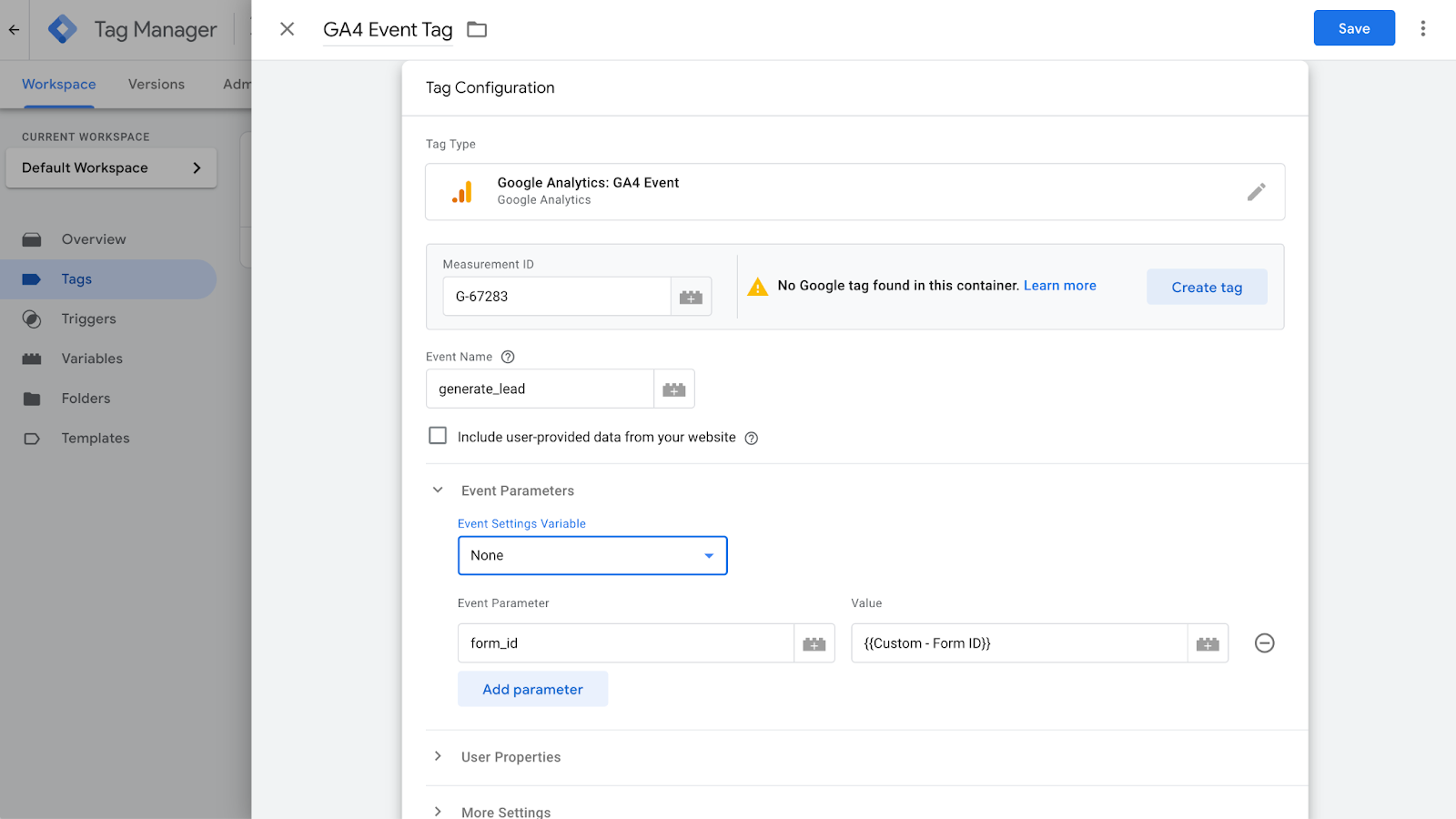
If you want to use this data in GA4 reports, you’ll need to register it as a Custom Dimension:
- In GA4, go to Admin > Custom Definitions.
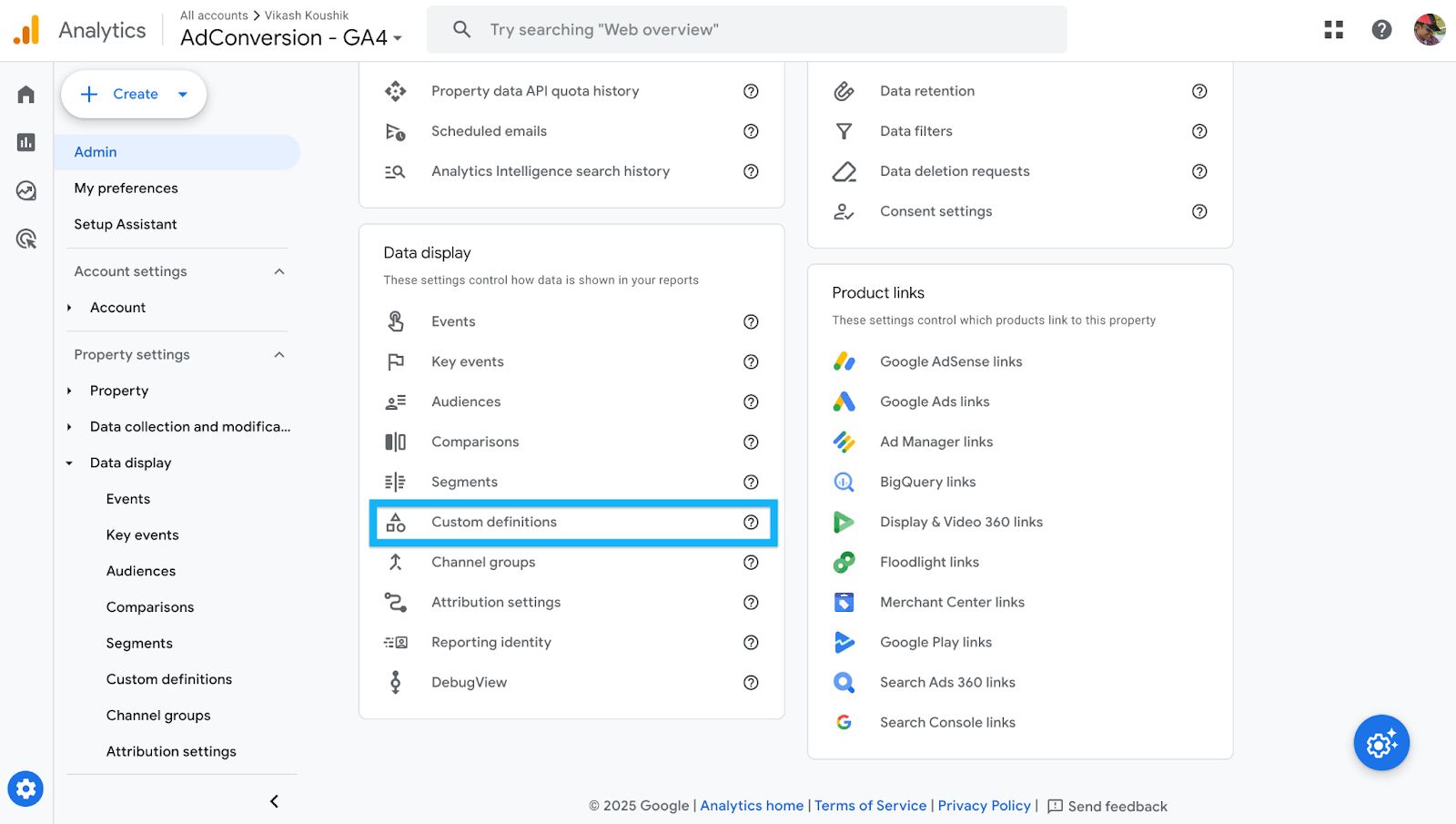
- Click Create Custom Dimension.
- Define each parameter:
- Name: Form ID → Event Parameter: form_id → Scope: Event
- Name: Form Name → Event Parameter: form_name → Scope: Event
- Name: Page Path → Event Parameter: page_path → Scope: Event
- Name: Form ID → Event Parameter: form_id → Scope: Event

- Click Save.
By implementing this setup, you ensure that every form submission is attributed to the right form, providing clearer insights into form performance, lead quality, and conversion attribution.
PRO TIP 💡
Form submission is just one step in the buyer’s journey.
To truly track and optimize for conversions, map the entire journey. Start from initial engagement to the final revenue event, and track each step.
By tracking and feeding all these data points back into ad networks, you help the algorithm prioritize high-intent users.
Here’s an example of how the buyer journey might look like:
Sales-led Company:

Product-led Company:

We covered how to set it up in detail in this free Google Ads course, which also walks you through full-funnel tracking and measurement strategies.
Conclusion
The right tracking method depends on how your form behaves:
- Use the Form Submission trigger if GTM’s listener detects the event.
- Use the Thank You page method if the form redirects after submission.
- Use click tracking for AJAX-based forms.
Test everything thoroughly in Preview Mode to ensure you’re capturing data correctly.
I’ve been through enough form tracking struggles to know that what works on one site may completely fail on another.
Hopefully, this guide saves you a lot of time and frustration!
If you’re looking to see what the paid media marketing pros are up to, you should come and hang with them in the community.
The community is where you can ask the questions you wouldn’t post on LinkedIn and get insights that you wouldn’t find on Google.
You get access to:
- Weekly experiments with real data: No guesswork, just tested strategies from real campaigns.
- Templates & playbooks: Proven frameworks to streamline our processes and improve efficiency.
- Masterminds & expert discussions: Stay ahead of strategies, tactics, and ad platform changes instead of reacting late.
- Benchmarking against top B2B advertisers: Learn what’s working for others running high-budget campaigns.
Come, sign up and see what the pros are talking about in the community. It takes less than a minute to sign up.
10 Tips for Running ABM and LinkedIn Ads That Actually Work
.jpeg)
I see a lot of companies completely overcomplicate ABM on LinkedIn.
Some think they need an expensive ABM platform just to get started. Others assume that simply uploading an account list and running ads will magically drive pipeline.
Neither approach works.
I’ve tested LinkedIn Ads for ABM across different industries, budgets, and company sizes, and I’ve seen what actually moves the needle. The key isn’t just running ads. It's getting the fundamentals right and making sure ads, targeting, and sales outreach all work together.
In this post, I’m breaking down 10 practical, no-BS strategies I use to make ABM campaigns on LinkedIn drive real results. If you’re tired of wasted budget and low engagement, this is for you.
TABLE OF CONTENTS
- Tip 1: Your Account List is the Foundation. Get It Right
- Tip 2: Upload a Company List, Not a Contact List
- Tip 3: Monitor and Manage Ad Frequency
- Tip 4: Cap Impressions Using LinkedIn’s Company Feature
- Tip 5: Test One-to-One ABM Ads (But Avoid Germany)
- Tip 6: Use LinkedIn Ad Engagement as a Sales Trigger
- Tip 7: Split Campaigns by Employee Size
- Tip 8: Create ABM-Specific Remarketing Lists
- Tip 9: Don’t Sleep on Exclusions
- Tip 10: LinkedIn Ads Are Just One Part of ABM
Tip 1: Your Account List is the Foundation. Get It Right
The account list is the backbone of any ABM campaign.
If your account list is wrong, everything else will fail. Your targeting, your engagement, your pipeline.
A lot of companies just pull a list from a data provider using filters like industry, employee size, and technology stack and assume it’s good to go. But here’s the issue:
- Data providers are never 100% accurate. I’ve used ten different data providers, and they all have their problems.
- You’ll end up with bad data. You might export 5,000 accounts, but not all of them are actually relevant.
How to Build a Better Account List
- Work with sales. Most companies create their ABM list in a vacuum and don’t loop in sales. That’s a mistake.
- Look at past closed-won deals. If you’re just pulling a list of the biggest logos you can think of (Nike, Google, Microsoft) you’re probably missing accounts that actually convert.
- Check the late-stage pipeline. What do these accounts have in common?
- Ensure coverage. What accounts are missing? Just because a sales rep Slack-ed over a few high-profile accounts doesn’t mean they’re the only accounts worth targeting.
A well-built account list makes every impression valuable. If your impression itself isn’t worth anything, your list is wrong.
Tip 2: Upload a Company List, Not a Contact List
Once you have a strong account list, the next step is uploading it to LinkedIn Ads.
This is where a lot of folks make a critical mistake. They upload a contact list instead of a company list.
Why Contact Lists Are a Bad Idea
- Low match rates: You’ll be lucky to get 30-70% of your contacts matched in LinkedIn.
- People change jobs constantly: Your contact list gets stale fast. People get promoted, leave, or switch roles.
- You’ll miss key decision-makers: If someone new joins a company in the target role, they won’t be in your contact list.
Why Company Lists Work Better
- Match rates are 95-100%: LinkedIn recognizes companies better than individual contacts.
- Dynamic audience updates: If someone gets promoted or a new decision-maker joins the company, they’ll automatically be included.
- More precise targeting: You can layer on job titles, seniority, and functions to ensure you’re reaching the right people within those accounts.
If you only upload a contact list, you’ll have to constantly update it. That’s an operational nightmare.
If you upload a company list and use job title filters, LinkedIn does the updating for you. Plus, you get better match rates.
Tip 3: Monitor and Manage Ad Frequency
Since ABM campaigns target smaller audiences, ad frequency can get out of control fast if you’re not careful.
If people see the same ad 40 times in a month, they won’t just ignore you, they’ll actively resent your brand.
I always check my frequency metrics and aim for around three impressions per week per person.
If my frequency goes beyond that, I rotate in new creatives.
How to Manage Frequency
- If an ad is performing well, keep it running until engagement drops.
- If performance starts declining, pause it and swap in a new version.
- Small tweaks work. You don’t need an entirely new creative. Sometimes just changing the headline, background color, or image is enough to reset engagement.
A good ABM strategy requires constant creative refreshes.
If you don’t monitor frequency, you’re going to annoy your target accounts instead of influencing them.
Tip 4: Cap Impressions Using LinkedIn’s Company Feature
One of the biggest budget-wasters in LinkedIn ABM campaigns is uneven ad distribution.
Let’s say you’re targeting 500 companies. If Amazon is on that list, Amazon employees alone might eat up 50% of your budget. Why? Because Amazon has more employees in your target roles than smaller companies.
How to Fix This
LinkedIn has a Company Engagement Feature that lets you cap impressions per company.
- Create dynamic exclusion lists for companies that have received 500+ impressions in the past 7 days.
- Once a company hits that limit, it gets automatically excluded, forcing LinkedIn to spread the budget to other accounts.
How to Adjust Your Cap
- If none of the companies hit the cap → Lower the threshold (e.g., 300 impressions).
- If too many companies are excluded → Raise the cap (e.g., 700 impressions).
This simple tweak ensures that no single company dominates your budget, and every account on your list gets a fair share of impressions.
Tip 5: Test One-to-One ABM Ads (But Avoid Germany)
I’ve been testing one-to-one ABM ads for a while now, and the results have been insane.
A standard LinkedIn image ad usually gets a 0.5% to 1% click-through rate.
But when I run personalized one-to-one ABM ads, I’m seeing 5% - 10% CTRs.
How to Run One-to-One ABM Ads
- Create a simple template.
- Dynamically insert the company name or logo.
- Tweak the messaging slightly to make it feel personal.
These ads stand out because they look like they were designed specifically for the company.
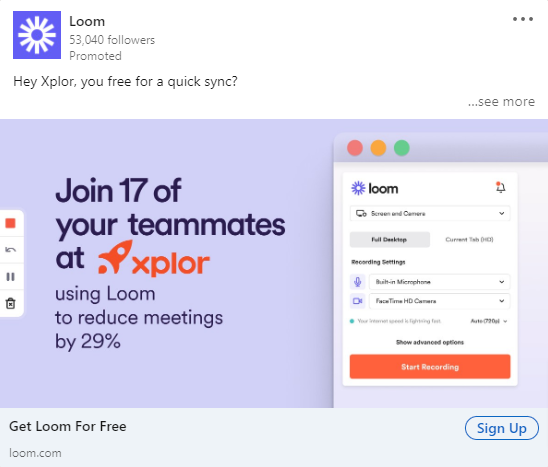
But before you go all-in, there are two major caveats:
- Don’t run these in Germany: German companies will hit you with a legal notice if you use their name or logo in an ad.
- This works best for MarTech, SalesTech, and Customer Success industries: If you’re targeting IT buyers, this approach might feel too aggressive.
If you’re hesitant to use logos, you can still personalize these ads by:
- Mentioning the company in the ad copy instead of the image.
- Using a screenshot from the company’s website instead of their logo.
One-to-one ABM ads aren’t for every industry, but in the right space, they massively outperform standard image ads.
Tip 6: Use LinkedIn Ad Engagement as a Sales Trigger
A big mistake I see in ABM campaigns is running LinkedIn ads in isolation and expecting them to create pipeline on their own.
That’s not how it works.
You need to use LinkedIn ad engagement as a sales trigger to prioritize outreach.
Instead of sales reaching out cold, why not time it based on actual engagement? If an account is consistently clicking on ads or engaging with content, that’s a strong signal that they might be open to a conversation.
LinkedIn lets you create dynamic audience lists based on engagement, which means I can track things like:
- Paid clicks: Who has clicked on an ad multiple times over a set period?
- Video views: Who has watched a certain percentage of a video ad?
- Impressions: Which accounts have received a high volume of impressions?
I can then send this data to sales as a prioritized list of accounts.
A sales rep reaching out to an account that has clicked on an ad three times in the past two weeks is going to have way more success than reaching out completely cold.
Some companies use tools like Fibbler to track progression of clicks over a period of month, all the way towards becoming an opportunity.
But even if you’re just using LinkedIn’s native company engagement feature, you can still set up alerts for sales when an account’s activity spikes.
This is one of the easiest ways to align marketing and sales, yet most companies don’t do it. If you’re just running LinkedIn ads without tying them into your outbound strategy, you’re leaving money on the table.
Tip 7: Split Campaigns by Employee Size
A CEO at a 50-person company is very different from a VP at a 10,000-person company.
You can’t treat them the same.
The way LinkedIn distributes ad spend also makes this even more important. If you mix small and large companies in the same campaign, the large companies will dominate your spend.
Why? Because they have more employees that fit your targeting criteria.
I split campaigns into two groups:
- 500+ employees: Exclude managers. There are too many, and they don’t always have decision-making power.
- Under 500 employees: Keep managers in. At smaller companies, managers have more influence over decisions and often report directly to the CEO.

At big companies, targeting managers is usually a waste of money.
If I’m running an ad campaign for a marketing software company, the CMO at Amazon isn’t going to care about my ad.
But at a 200-person company, the CEO or VP of Marketing might be the final decision-maker.
This segmentation also allows me to write better ad copy. If I know I’m speaking to executives at smaller companies, my messaging will be more direct and high-level.
If I’m speaking to senior managers at larger companies, I might focus more on how my product solves day-to-day problems.
If you’re running a single campaign for all employee sizes, chances are your budget is being wasted on the wrong people at big companies while ignoring the right people at smaller ones.
Tip 8: Create ABM-Specific Remarketing Lists
Most people run generic remarketing campaigns, but for ABM, you need to build remarketing lists specific to your target accounts.
This means you’re not just retargeting anyone who clicked on an ad. You’re only retargeting people from your ABM account list who showed engagement.
Here’s how I structure my ABM remarketing lists:
- Image ad remarketing: People from ABM accounts who clicked on an image ad.
- Video view remarketing: People from ABM accounts who watched at least 50% of a video ad.
- Website remarketing: Visitors from ABM accounts who landed on key pages (e.g., demo request, pricing, case studies).
This ensures I’m spending remarketing dollars on accounts that actually matter rather than random people who engaged once and never came back.
What should you show in these remarketing campaigns?
In remarketing, I shift the content to focus on social proof and direct response ads. This could be:
- Case studies featuring similar companies
- Testimonial ads showing a customer’s face and a short quote
- Comparison ads (e.g., "Us vs. Them")
- Before and after ads that show the pain before using my product and the results after
In some cases, I also test demo CTAs and incentives, especially for enterprise deals where a small push (like a free assessment or report) can make a big difference.
If you’re only running top-of-funnel awareness ads and never segmenting high-intent ABM accounts into remarketing, you’re missing a huge opportunity to convert engaged prospects.
Side Note: Check out all the cool ads that Tim Davidson put together over here.
Tip 9: Don’t Sleep on Exclusions
A lot of people think that because they’re targeting an account list, they don’t need to add exclusions.
That’s a mistake.
Even if your account list is perfect, LinkedIn’s targeting isn’t.
Here’s the problem: LinkedIn doesn’t always match job titles and company names correctly. If someone has multiple roles in their profile, LinkedIn might target them under the wrong company.
For example, let’s say someone runs a side business while working full-time at Amazon. LinkedIn might show them your ad under both companies, meaning you’re wasting budget on someone who isn’t actually part of your ABM target.
To fix this, I always:
- Check LinkedIn’s Demographics Report to see which job titles and industries are getting served ads.
- Exclude job functions that don’t matter. If I’m selling to CMOs and VPs of Marketing, I don’t want my ads going to HR or IT.
- Exclude competitors.
Just because you’re running ABM doesn’t mean you can trust LinkedIn to get everything right.
If you’re not actively reviewing exclusions, you’re burning ad dollars.
Tip 10: LinkedIn Ads Are Just One Part of ABM
I need to make this very clear. Running LinkedIn Ads alone is not ABM.
ABM is about orchestrating multiple touch points across marketing and sales. If you’re just running ads and waiting, you’re missing the point.
Here’s how I integrate LinkedIn Ads into a full ABM strategy:
- Pick a set of high-priority accounts (start with 50-100).
- Run LinkedIn ads to build awareness.
- Monitor engagement signals (clicks, views, impressions).
- Trigger sales outreach when accounts show activity.
- Use email, cold calls, events, and direct mail to reinforce messaging.
- Retarget engaged accounts with case studies and demo CTAs.
- Track movement through the funnel and adjust the strategy.
One of the best ways to start is by working closely with an enterprise sales rep.
Pick 100 accounts and run a coordinated campaign, where marketing runs ads and sales follows up based on engagement.
If you’re just running LinkedIn Ads and calling it ABM, you’re not doing ABM. You’re just running ads to a list.
Hope you found this article helpful!
If you’re looking to learn more about LinkedIn Ads, check out these free LinkedIn Ads courses, that will teach you how to launch, optimize, and scale LinkedIn Ads campaigns effectively or hire LinkedIn Ads agency services.
And if you have any questions about LinkedIn Ads, feel free to send me a message on LinkedIn.

10 Best Agencies for LinkedIn Ads in B2B: A Detailed List [2026]
Table of Contents
- 1. AdConversion
- 2. Impactable
- 3. TripleDart
- 4. B2Linked
- 5. Disruptive Advertising
- 6. OmniLab
- 7. Remotion
- 8. Cleverly
- 9. Stop The Scroll
- 10. Thrive Internet Marketing Agency
- What Are the Top LinkedIn Ads Agencies for SaaS?
- What Are the Best B2B LinkedIn Ads Agencies for Startups?
- What Are the Best LinkedIn Ads Agencies for B2B Enterprises?
- How Do You Choose a B2B LinkedIn Ads Agency?
- How Much Does It Cost to Hire a LinkedIn Ads Agency in B2B?
B2B LinkedIn ads agencies are specialized partners that help you turn LinkedIn into a real source of quality leads instead of a money pit. They plan, launch, and optimize your ad campaigns to reach the decision-makers in companies you want to attract as clients.
The ultimate goal here is to inspire these decision-makers to act, meaning contact your business for your services or product.
Some of the top LinkedIn ads agencies for B2Bs are:

Read through each option to figure out which agency best fits your B2B brand. Focus on what they actually do, how they run campaigns, and whether that matches your business needs and goals.
Disclaimer: The information on these agencies is accurate as of March 2026.
1. AdConversion
AdConversion is a full-service B2B advertising agency and education platform founded by Silvio Perez in 2023.
The company has two business units that can come in handy:
- AdConversion Academy gives you access to free coaching and community resources to level up ad performance on your own.
- AdConversion Agency builds and manages paid media campaigns for you end-to-end.
Source: www.adconversion.com
AdConversion’s LinkedIn Ads Agency usually works with B2B SaaS companies that are fed up with paying for expensive LinkedIn ads without seeing any results.
DigitalOcean, OpenSesame, Warmly, and Checkr are some of the brands that reached out for help. After the agency rebuilt their ad strategies, these clients started to attract real sales opportunities.
AdConversion is one of the best B2B LinkedIn ads agencies because it designs campaigns around demand generation and revenue.
The company works on connecting you with the right people, turning more LinkedIn users into customers, and reducing the cost of getting high-quality sales leads.
The best part is that there’s no oblivious client success manager slowing down execution. You work directly with the senior performance marketer running your campaigns. This person knows your strategy inside out, so they can offer guidance and make changes without any back-and-forth.
Services:
- LinkedIn ads strategy building starts with a full audit of your existing ad account, targeting setup, messaging, and conversion tracking. Based on this data and the agency’s Five Stages Model (Create, Capture, Accelerate/Activate, Revive, and Expand) AdConversion creates a full-funnel strategy for your B2B company.
- Ad creative production provides ad copy and visuals and constantly tests different LinkedIn ad formats, such as video, carousel, and thought leader, to keep your target audience on its toes.
- 24/7 campaign optimization uses AdConversion’s AI-powered ad automation software, Sami, to monitor your ad performance in real time. This tool tracks key performance indicators (KPIs) such as click-through rate (CTR), cost per SQL (CPSQL), and ad fatigue, and automatically pauses weak ads.
- Analytics and reporting run through a LinkedIn ads performance dashboard custom-built for you. The agency also shares daily updates, weekly reports, and detailed creative insights so you always know where your campaigns stand.
- Conversion rate optimization (CRO) and landing pages focus on what happens after the click. AdConversion builds you fully optimized landing pages and experiments with different funnel setups, such as demand gen and account-based marketing (ABM), to improve your conversions.
Pros
Clutch reviews and portfolio testimonials show that:
- AdConversion can turn LinkedIn into your primary pipeline source within a well-defined, full-funnel strategy.
- The agency improves cost per marketing-qualified lead (CPMQL), return on ad spend (ROAS), and attribution accuracy from the very first month, rather than focusing on vanity metrics.
- The marketing team stays proactively engaged week after week, not just in the beginning. They continually review your data and push for new experiments and improvements, rather than letting your campaigns run on autopilot or waiting for your instructions.
- Ad execution is quick and painless because AdConversion handles copy and design, matching your brand guidelines from the start.
Cons
Based on verified client reviews from Clutch:
- Progress can slow down if you don’t give AdConversion access to your internal data.
- Some experiments and optimizations might not work as expected, causing temporary performance drops before the agency gets your campaigns back on track.
Minimum project size (based on Clutch):
$7,500
Good to know: Unlike other agencies, AdConversion charges a flat monthly retainer with zero ad spend fees, so you can increase your ad budget without costs going up.
2. Impactable
Impactable is a LinkedIn marketing agency founded in 2020 by Justin Rowe. It offers both paid ad management and thought-leadership content creation.
Whether your B2B company specializes in SaaS, financial, or marketing services, Impactable can adapt to your needs.
Some of the agency’s clients are Beko Technologies, Relish, and Spiro.ai.
Source: impactable.com
Impactable puts most of its focus on LinkedIn advertising for long B2B sales cycles.
The agency builds demand-generation systems that combine paid ads, account-based marketing (ABM), retargeting, and LinkedIn content.
This multi-touch approach allows the right audience to see and get to know your brand before they reach out.
Services:
- LinkedIn ad creatives use segmentation, different ad formats, and A/B testing to build role-based ads and matching landing pages that improve conversion rates.
- LinkedIn ad scheduling uses Impactable’s DemandSense marketing automation software to deliver ads automatically when your target audience is most active.
- LinkedIn reporting goes beyond the default LinkedIn analytics to provide demographic insights, track custom ad performance metrics, and create visual reports.
Pros
According to Clutch reviewers:
- Impactable builds LinkedIn ad funnels that can get you a predictable return on ad spend.
- Clients report increases in traffic, engagement, and B2B brand visibility after launching LinkedIn and Google Ads campaigns with the agency.
- The team provides frequent updates, closely monitors campaigns, and suggests changes to maintain high-performing LinkedIn ads.
Cons
Clutch reviewers also mention some areas for improvement:
- Account managers leading a client engagement sometimes change, affecting campaign progress.
- Since Impactable doesn’t target a single industry, its team needs more time to fully understand a client’s field, services, and messaging.
Minimum project size (based on Clutch):
$1,000+
3. TripleDart
TripleDart is a B2B Marketing Agency founded by Shiyam Sunder in 2020, operating in the U.S., Europe, India, Singapore, and Thailand.
The company usually partners with startups and scaleups to help them build a predictable pipeline strategy through paid media, content strategy, and analytics.
Some of the agency's customer success stories include Teamed, Everstage, and Dyte.
Source: www.tripledart.com
TripleDart’s LinkedIn Ads Agency handles campaign planning, management, and growth.
The marketing team studies your past performance, creates campaigns based on buyer personas, and tests various ad formats to improve results.
Services:
- LinkedIn audience targeting uses firmographic filters, high-intent data, and behavioral signals to find businesses that are actually looking for solutions like yours.
- Ad creatives speak to each buyer persona and encourage them to take action by addressing their pain points.
- Campaign reporting tracks key metrics such as CTR, conversions, and cost per lead (CPL) and uses them to adjust targeting and budgets.
Pros
Feedback from Trustpilot client reviews suggests the following pros:
- TripleDart offers detailed reports and explanations to help you understand why campaign results improve or decline.
- It takes the time to learn your ideal customer profile and then creates high-quality creatives that fit your brand.
- Communication is smooth even when working in different time zones.
Cons
Based on Trustpilot reviews, TripleDart has a couple of limitations:
- The feedback cycles and campaign adjustments during active testing phases can be slow.
- This digital marketing agency might be a better fit for companies early in their paid media journey than for established teams with complex ad programs.
Minimum project size (based on Clutch):
$1,000+
4. B2Linked
B2Linked is a LinkedIn advertising and consulting agency founded in 2014 by A.J. Wilcox.
B2B brands such as Plannuh, Qualio, and Flourish typically reach out to B2Linked to maximize LinkedIn ad spend and improve lead-generation quality.
Source: b2linked.com
B2Linked works with your in-house marketing team to fix inefficient LinkedIn ad campaigns.
The agency improves targeting accuracy and makes sure your ads reach the people who actually influence buying decisions.
Services:
- LinkedIn ads management builds you full-funnel strategies, sets up segmented audiences, and runs regular tests to lower cost per lead and improve campaign quality.
- Proprietary B2Linked tools analyze performance data, schedule ads at the best times, and make changes to optimize enterprise accounts.
- LinkedIn consulting and account audits review past campaign data, identify wasted ad spend, and recommend improvements to targeting, bidding, and campaign structure.
Pros
Client reviews on Clutch point out that:
- B2Linked offers useful LinkedIn ads insights and clear next steps that you can apply right away.
- Once the agency takes over your LinkedIn marketing strategy and management, you notice increases in conversion rates.
- The team responds quickly to questions and concerns, communicates effectively, and delivers on time.
Cons
Clutch feedback also mentions a few drawbacks:
- The pricing might be too high for smaller businesses.
- If you don’t have clear goals from the start, the process can be slow.
Minimum project size (based on Clutch):
Undisclosed
5. Disruptive Advertising
Disruptive Advertising, a digital marketing agency specializing in paid social media, lead gen, and SEO, was founded by Jake Baadsgaard in 2012.
The company targets both B2C and B2B growth-focused companies in e-commerce, SaaS, and other service fields, including Adobe, KPMG, and Instructure.
Source: disruptiveadvertising.com
Disruptive Advertising builds and expands B2B LinkedIn ad campaigns through research and testing.
The agency analyzes audience data, compares targeting options, and adjusts campaign settings until your ads start delivering measurable results.
Services:
- LinkedIn ad audits review your current campaigns, analyze KPIs, and spot areas where better targeting, messaging, or budget allocation can improve results.
- Audience segmentation uses advanced filters, such as job title, company size, industry, and skills, to target professionals more likely to convert.
- Data analytics automatically track campaign metrics that match your business goals. Based on this data, the agency shows you how to adjust bids, creatives, and targeting to achieve better outcomes.
Pros
Disruptive Advertising clients talk about these strengths:
- Its LinkedIn ad creatives can improve audience engagement.
- The agency’s paid ad campaigns can increase LinkedIn lead generation and the quality of those leads.
- The marketing team is responsive, comes prepared to meetings, and finds new ways to improve your results.
Cons
Some of the downsides Clutch reviewers mention are:
- Frequent changes in account managers can slow down your campaigns.
- It can take around three months for the agency to understand your company’s needs and expectations as a new client.
- Reporting is pretty basic, so you might need additional tools for more detailed campaign insights.
Minimum project size (based on Clutch):
$5,000+
6. Omni Lab
Omni Lab is a paid media marketing agency that helps SaaS brands get more leads from their paid ad platforms.
The company was founded in 2020 by Jason Steele and Jonathan Bland and has worked with B2B brands like Routeware, Shipwell, and Splash.
Source: www.omnilabconsulting.com
Omni Lab builds campaigns based on your ideal customer profile, sales cycle, and the offers that move prospects closer to a demo call.
Services:
- LinkedIn account audits break down your existing ad campaigns to find wasted spend, weak targeting, and messaging that doesn't convert.
- Demand generation planning creates a multi-channel strategy for all your paid media, including LinkedIn, to make your brand more visible and attract better leads.
- Conversion tracking monitors all your paid ads and matches high-intent actions to revenue in a custom Google Tag Manager (GTM) workspace. These actions can include booking a demo, requesting a quote, or starting a free trial.
Pros
The only available Omni Lab review on Clutch notes that:
- The agency’s outreach marketing services can increase your marketing-qualified and sales-qualified leads, as well as your conversions.
Cons
The same Clutch review claims that:
- Omni Lab might need to learn more about the software laboratory space to better meet client needs.
Minimum project size (based on Clutch):
$10,000+
7. Remotion
Remotion is a LinkedIn ads agency that optimizes and scales advertising strategies for B2B SaaS startups.
Founded in 2016 by Gabriel Ehrlich, the agency has worked with brands like WordPress VIP, Pentera, and Connecteam.
Source: www.remotion.io
Remotion builds LinkedIn ad strategies based on audience research and creative testing.
The agency then optimizes your campaigns using lead-quality data and sales feedback to deliver the best results.
Services:
- Audience targeting finds the companies and niche segments that match your ideal customer profile, even in very narrow B2B markets.
- Creative consulting improves LinkedIn ad performance by recommending format, messaging, and design changes your team can apply straight away.
- Reporting combines LinkedIn data with CRM metrics to track CPL, SQLs, opportunities, and closed deals so you can see which campaigns generate revenue.
Pros
Since Remotion doesn’t have any public reviews, these pros come from their client testimonials:
- After applying the agency’s campaign optimization suggestions, you can expect to see an increase in pipeline and a decrease in CPL.
- The marketing team pays close attention to detail and is committed to helping your campaigns succeed.
Cons
Some potential downsides can include:
- Since the agency only focuses on strategy and consulting, your team needs to handle ad creative production on its own.
- Reporting relies on your HubSpot data, so if you use a different CRM, you need to manually export and share your data with the agency.
Minimum project size (based on Clutch):
$10,000+
8. Cleverly
Cleverly is a B2B lead generation agency founded in 2017 by Nicholas Verity.
Businesses like Full Pipe, Productiv, and Adaptable work with Cleverly to attract new prospects through LinkedIn ads and outreach.
Source: www.cleverly.co
Cleverly’s LinkedIn marketing agency plans ad campaigns based on the type of customers you want to close.
The company studies your past deals to see who is most likely to buy, then builds you a full-funnel ad strategy.
Services:
- Audience research identifies your ideal customer, segments your market, and sets up LinkedIn targeting for your campaigns.
- Funnel setup designs different LinkedIn ad types, creates retargeting campaigns, automates follow-ups, and sets up CRM integrations for tracking.
- Ongoing testing and optimization replace low-performing ads, adjust targeting, and review campaign data regularly to keep lead quality high.
Pros
Cleverly clients appreciate that:
- Its LinkedIn campaigns can increase your brand’s reach and contact network.
- Sales teams often see more prospects engaging and asking for calls.
- The agency takes the time to understand your target audience and tailors campaigns to match your ideal customers.
Cons
A few Clutch reviewers reveal that:
- Communication can sometimes be slower or less detailed than expected.
- Even though the campaigns generate connections, many leads might be unqualified.
- You need to go through the agency to make any changes to your campaigns.
Minimum project size (based on Clutch):
$1,000+
9. Stop The Scroll
Stop The Scroll is a LinkedIn ads and content agency that helps B2B companies gain more visibility and sales opportunities.
The company was founded by Elizabeth and Justin Berg in 2025 and has ongoing partnerships with brands like Lacuna Talent, Rock The Rankings, and Legally.
Source: www.stopthescroll.io
Stop The Scroll works closely with you to create LinkedIn ad campaigns that match your expertise and brand voice.
The agency tracks success by pipeline impact and adjusts strategy based on what brings revenue.
Services:
- Audience and funnel mapping breaks down your target audience, sales cycle, and funnel into cold, warm, and retargeting segments that align with the buying journey.
- Ad creative development creates LinkedIn ads for each stage of the funnel, using different messages and formats to grab attention and push prospects closer to a decision.
- Campaign launch and testing apply A/B testing, performance checks, and creative updates to improve campaign results.
Pros
Since Stop The Scroll doesn’t have any online customer reviews yet, these pros are based on their case studies:
- The agency’s LinkedIn ads and content strategies can increase inbound leads, engagement, and impressions.
- Stop The Scroll can help you gain followers and sales opportunities through a mix of LinkedIn content, videos, and outreach.
Cons
Some potential limitations of Stop The Scroll include:
- Since the agency specializes only in LinkedIn marketing, you’ll have to hire extra help to explore other platforms.
- The monthly cost can be higher than that of other agencies offering multi-channel paid media management.
Minimum project size (based on Clutch):
$5,000+
10. Thrive Internet Marketing Agency
Thrive Internet Marketing Agency specializes in different types of digital marketing, including paid ads, SEO, content, and social media.
Founded by Matt Bowman in 2005, the agency helps B2C and B2B brands improve their reach and lead gen quality.
ComplianceHR, Geoforce, and Datadobi are among the agency’s satisfied clients.
Source: thriveagency.com
Thrive’s LinkedIn Advertising Agency manages campaign setup and ongoing data-driven changes to help you reach your target audience.
Services:
- LinkedIn ad audits and strategy planning review your current campaigns, define buyer personas, and create a targeting and bidding plan that aligns with your goals.
- Ad copy and creative production build LinkedIn ads with eye-catching visuals and messaging that attract prospects and drive action.
- Retargeting and campaign optimization re-engage users who interacted with your brand and adjust targeting, creatives, and budgets to improve results over time.
Pros
Feedback from Clutch shows that:
- The agency’s social media campaigns can increase your follower count and engagement on different platforms.
- Consistent campaign management can result in higher sales.
- The team communicates efficiently, meets deadlines, and maintains a reliable working relationship throughout the engagement.
Cons
Thrive reviewers also cite a few limitations:
- The agency might not be able to take over all aspects of your social media and digital presence.
- Frequent changes in team members can affect campaign continuity.
Minimum project size (based on Clutch):
$1,000+
What Are the Top LinkedIn Ads Agencies for SaaS?
The best LinkedIn ads agencies for SaaS understand long buying journeys and know how to turn your ad spend into sales opportunities:
- AdConversion is specifically designed for B2B SaaS companies that want to predictably generate pipeline and improve the pipe-to-spend ratio through precise audience targeting (including ABM), creative testing, and revenue-based tracking.
- Omni Lab helps SaaS companies track outcomes by directly linking LinkedIn ad performance to CRM metrics and revenue.
- Impactable combines LinkedIn advertising, content, and ABM to keep SaaS brands visible throughout the buying journey.
What Are the Best B2B LinkedIn Ads Agencies for Startups?
The best LinkedIn ads agencies for startups help you gain early traction, validate messaging, and produce qualified leads without burning through your ad budget:
- AdConversion works best for Series A+ B2B SaaS startups with existing paid media budgets that want to turn LinkedIn ads into consistent demand generation and pipeline.
- Remotion improves LinkedIn ad performance for Series A-E startups through audience research, creative testing, and lead-quality feedback.
- TripleDart supports Series A startups with LinkedIn ad campaigns built around segmentation, personalization, and ongoing optimization.
What Are the Best LinkedIn Ads Agencies for B2B Enterprises?
The best LinkedIn ads agencies for B2B enterprises can handle large ad spend, complex targeting, and long buying journeys with multiple decision-makers:
- AdConversion supports mature B2B SaaS companies by creating full-funnel LinkedIn ad programs that attract qualified pipeline and measurable revenue impact, while keeping cost per SQL in check.
The team regularly manages large client budgets (around $150K/month in ad spend), so they know how to handle complex buying committees and multi-touch attribution across long sales cycles.
- B2Linked helps enterprise teams improve LinkedIn campaign efficiency through advanced segmentation and testing.
- Thrive Internet Marketing Agency creates LinkedIn ads for enterprises as part of a broader marketing strategy that includes SEO and content marketing.
How Do You Choose a B2B LinkedIn Ads Agency?
Choose a B2B LinkedIn ads agency by determining whether the team can manage your campaigns effectively and deliver results that match your business goals.
Some factors to consider include:
- Specialization in B2B SaaS proves the agency understands long sales cycles, buyer personas, and how to reach the right decision-makers through LinkedIn ads.
- Services should cover everything you need, from campaign management and audience targeting to ad creatives and reporting.
- Results from past campaigns demonstrate agency performance. Look for case studies and metrics tied to SQLs, conversion rates, and return on ad spend, and check the LinkedIn Ads Library for visuals.
- Reviews from other clients give you real insight into how the agency communicates, delivers work, and handles issues during the engagement.
- Pricing should match your ad budget and expectations. Be wary of dynamic ad spend fees and choose an agency that operates on a flat-fee model to keep costs predictable.
Check out AdConversion’s 10 tips for hiring an ad agency to make a smart decision.
How Much Does It Cost to Hire a LinkedIn Ads Agency in B2B?
Hiring a B2B LinkedIn ads agency can cost anywhere between $2K and $15K per month, based on the pricing structures of the 10 companies in this guide and others.
The main factors that affect pricing are the scope of services, your ad spend, and campaign complexity:
- Agencies that handle full campaign management, ad creative, and reporting usually charge more than those offering only consulting.
- Pricing models vary between flat fees and percentage-based fees tied to ad spend.
- Costs usually increase if you target multiple buyer personas, run full-funnel campaigns, or need advanced attribution and CRM integration.
Final Thoughts: Choosing the Right Partner for Your LinkedIn Strategy
The right LinkedIn ads agency can turn this paid media channel into a continual source of revenue for your B2B brand. The trick is to find a partner that truly understands your audience and knows how to get results.
Each agency on this list operates differently, so take the time to match their strengths with your goals, resources, and growth stage before making a decision.
If you need more info, schedule a chat with AdConversion.


