LinkedIn Ads: The Complete Guide for B2B SaaS Companies

Make SaaS PPC work harder for your B2B growth. Get the essentials on strategy, budgets, keywords, optimization, and more.
September 21, 2026
SaaS PPC



Silvio Perez
Founder @AdConversion
LinkedIn Ads give B2B SaaS companies a direct line to the decision-makers involved in buying their software.
But reaching the right buyers is only one piece of the puzzle.
You also need to know how much to spend, which ad formats to use, how to turn interest into leads, and whether those leads eventually turn into pipeline and revenue.
This guide covers all of that and more, so you can get the full picture of LinkedIn Ads and dig deeper into the areas that matter most to you.
What Is LinkedIn Ads?
LinkedIn Ads is a paid advertising platform that lets you target people based on who they are professionally.
That’s what sets it apart from other ad platforms. Paid search captures existing demand, while other paid social platforms, such as Facebook, Instagram, or YouTube, rely more on interests, behaviors, and broader audience signals.
LinkedIn advertising brings professional data into the mix. You can zero in on the people you want to reach by their job title, seniority, the size of the company they’re in, industry, and more.
You don’t have to wait around for buyers to start searching for software like yours. LinkedIn Ads lets you get on their radar early and stay top of mind as they move closer to a purchase.
LinkedIn Ads for SaaS
LinkedIn Ads for SaaS helps you stay in front of the people involved in buying your software throughout long B2B sales cycles.
There’s rarely just one person to win over. End users, managers, executives, finance, and other stakeholders can all influence which software solution makes the cut.
LinkedIn helps you reach those buyers at different stages. You can introduce your brand with educational content before they’re ready to buy. Then, use customer stories, product-focused offers, and retargeting to keep the conversation going as intent builds.
You’re not betting everything on one ad, one click, or one decision-maker. Instead, you can build familiarity across the buying committee and give your software more chances to make the shortlist.
Dig into AdConversion’s complete LinkedIn Ads for SaaS guide to learn how to turn that visibility into qualified pipeline.
LinkedIn Ads Cost
LinkedIn Ads costs can be tricky to pin down because there’s no standard price tag. You’re bidding against other advertisers for the same target audience, and the more competition there is, the pricier it gets.
LinkedIn also uses different pricing models based on your campaign objective, including:
- Cost per click (CPC): For when you want prospects to click through and take the next step beyond the ad.
- Cost per 1,000 impressions (CPM): For when you want to build brand awareness by showing your ads to target buyers, even if they don't click.
- Cost per send (CPS): Applies to message ads, where you pay for each message successfully delivered to a user’s LinkedIn inbox.
- Cost per view (CPV): For video campaigns optimized to get more people watching your ads.
Your bidding strategy and ad relevance also influence costs. So even if two campaigns are chasing similar LinkedIn audiences, there’s no guarantee they’ll cost the same amount.
LinkedIn Ads Budget
Once you understand how pricing works, you can start putting together a LinkedIn Ads budget that makes sense for your B2B SaaS business.
Just a word of warning: there’s no magic number.
Start with how many new customers you want to acquire and how much you can afford to spend to win each one. Then use your expected conversion rates to estimate how many leads you'll need and what it might cost to generate them on LinkedIn.
From there, you can control your spend in two main ways:
- Daily budgets set the average amount you want LinkedIn to spend each day.
- Lifetime budgets put a cap on what you’re willing to spend across an entire LinkedIn ad campaign.
Whichever route you take, leave some breathing room for testing. You need enough budget to experiment with different audiences, ads, and offers, while collecting enough data to see what works.
If you spread your budget too thin, you could end up with a lot of LinkedIn advertising campaigns but very little to learn from.
LinkedIn Ads Targeting
A healthy budget only gets you so far if you’re spending it on the wrong audience.
LinkedIn Ads targeting gives you plenty of ways to zero in on potential buyers. The hard part is knowing how far to take it.
Instead of throwing every available filter into the mix, follow these steps:
- Define the right-fit companies using criteria like industry and company size to stay close to your ideal customer profile (ICP).
- Find the people who matter inside those companies using job function, seniority, skills, and other professional attributes tied to the buying process.
- Don’t target yourself into a corner. Watch LinkedIn’s forecasted audience size and avoid piling on filters until there’s barely anyone left.
And you don’t have to do all the heavy lifting yourself. Auto-Targeting, Audience Expansion, Buyer Groups, and Predictive Audiences use LinkedIn’s AI to help you find relevant prospects beyond the audience you build manually.
LinkedIn Matched Audiences
LinkedIn Matched Audiences take targeting a step further by putting your own data to work.
You can build custom audiences from three valuable sources:
- Company lists help you reach people at the accounts your sales and marketing teams already have their eyes on.
- Contact lists bring known prospects and other contacts from your database into your LinkedIn ad campaigns.
- Engagement data lets you build audiences from people who have already interacted with your business, such as website visitors or people who engaged with your LinkedIn ads.
You can still layer LinkedIn attributes like job function or seniority onto company and contact lists if you want to tighten the audience further.
LinkedIn Ads Conversion Tracking
LinkedIn Ads conversion tracking gives the platform something concrete to optimize your campaigns toward. That’s why you should set it up before you start spending.
First, decide which actions are actually worth optimizing for. For example, a demo request or trial signup gives LinkedIn a much more useful signal than a low-intent website action.
Choose how you’ll send those actions back to LinkedIn:
- The LinkedIn Insight Tag captures activity on your website.
- Conversions API (CAPI) connects LinkedIn directly with your server or another data source and can send both online and offline events.
- CRM Sync brings sales data into LinkedIn Campaign Manager, including deeper-funnel actions like qualified leads.
Check that everything is firing correctly before launching the campaign. Otherwise, you risk sending LinkedIn’s algorithm incomplete or inaccurate signals right when it’s starting to learn.
LinkedIn Single Image Ads
With your audience and conversion tracking in place, you can turn your attention to the ads buyers will actually see.
LinkedIn single image ads are sponsored content ads built around one static visual. Since you only get one image to work with, you need to make it count.
Pick one idea you want buyers to remember and build the ad around it. It could be a pain point they deal with daily, one reason your product makes their job easier, a customer result that turns heads, or an offer worth trading a click for.
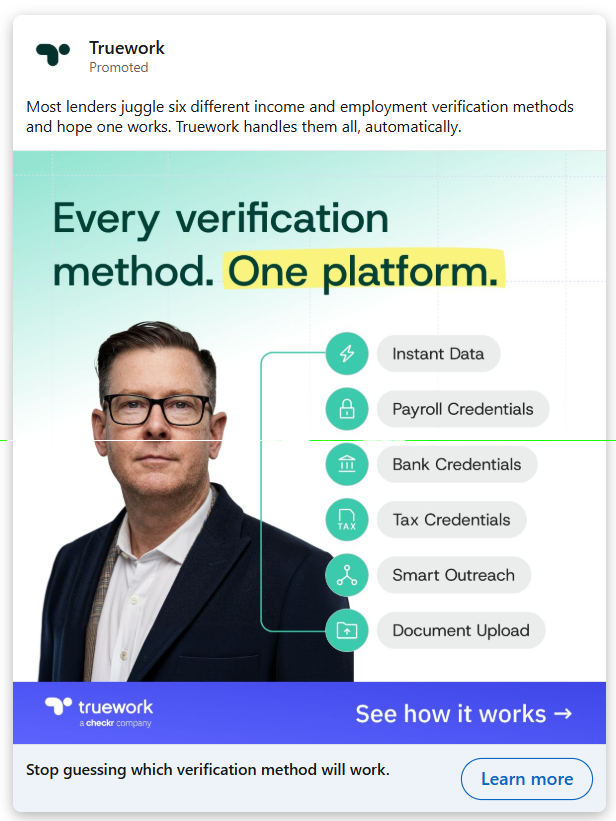
You can use single image ads to build brand awareness, drive traffic to a landing page, or generate leads.
Their simplicity also makes A/B testing a whole lot easier. Swap the hook, visual, or message, and you can quickly learn which angle gives your audience a reason to stop scrolling.
LinkedIn Carousel Ads
LinkedIn carousel ads let you string together two to 10 swipeable image cards in a single sponsored content ad. That extra space comes in handy when one image can’t do your message justice.
Give buyers a reason to keep swiping. Each card should move the story forward instead of feeling like just another ad squeezed into the same carousel.
You can use that sequence to:
- Walk buyers through a product or workflow one step at a time.
- Show different parts of your product while keeping everything tied to one clear message.
- Turn a customer result or useful insight into a story that builds as people swipe.
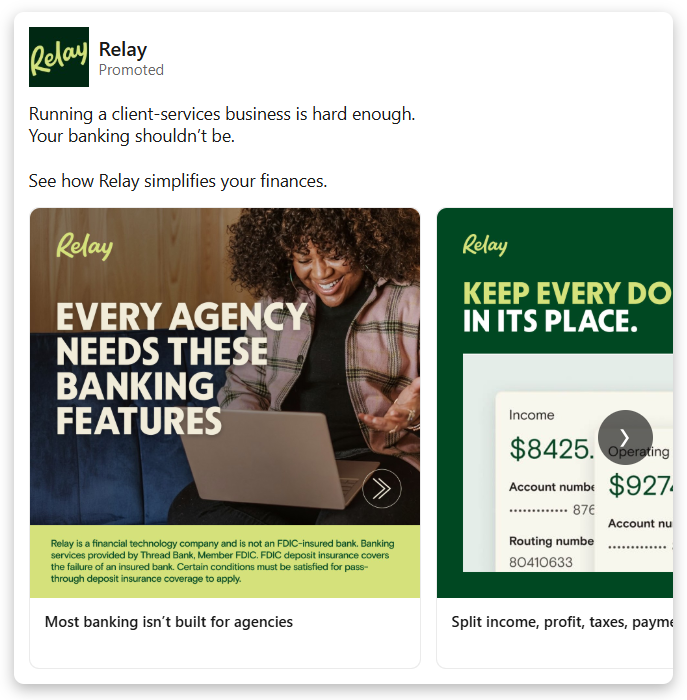
Individual cards can also point to different landing pages, giving buyers more than one path to explore your offer further.
LinkedIn Video Ads
LinkedIn video ads give you more room to show your SaaS product at work and bring your message to life in the feed.
Give buyers a quick look at the product, show how a common workflow plays out, let a customer tell the story, or take a complex idea and make it easier to digest.
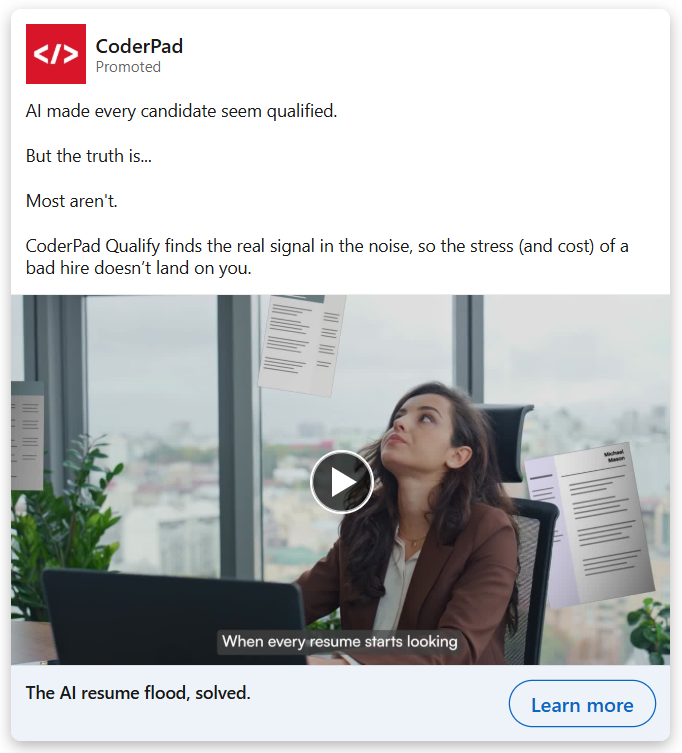
Just don’t save the good stuff for later. LinkedIn video ads autoplay with the sound off, so the first few seconds need to grab attention and make sense without audio.
And don’t try to squeeze your entire pitch into 30 seconds. Focus on one clear story that’s easy to follow and remember.
LinkedIn Document Ads
LinkedIn document ads bring reports, guides, case studies, and other long-form content directly into the feed. Buyers can then flip through the pages without clicking away.
That gives you a chance to prove your content is worth their time before asking them to take another step.
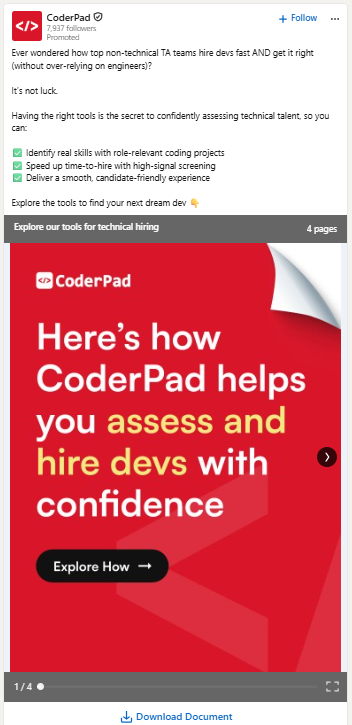
You can leave the entire document open or gate part of it with a LinkedIn lead gen form. If you go the gated route, buyers can preview a set number of pages before sharing their details to unlock the rest.
Make that preview earn the form fill. Lead with an insight, finding, or piece of the story that offers buyers something useful right away while giving them a reason to keep reading.
LinkedIn Thought Leader Ads
LinkedIn Thought Leader Ads let you take a post from a real person and promote it with paid distribution.
You can promote a founder’s take on a problem your product solves, have an employee break down a use case, or amplify a customer talking about the results they achieved with your software.
The post still comes from that person’s profile. You get to push it beyond their organic audience and put it in front of the buyers you want to reach.
But be picky about what gets your ad budget. A generic company update won’t suddenly become interesting because a founder posted it. Look for posts with a useful point of view, real expertise, or a customer experience buyers can learn something from.
You’ll also need the author’s permission before LinkedIn lets you sponsor their content.
LinkedIn Message Ads
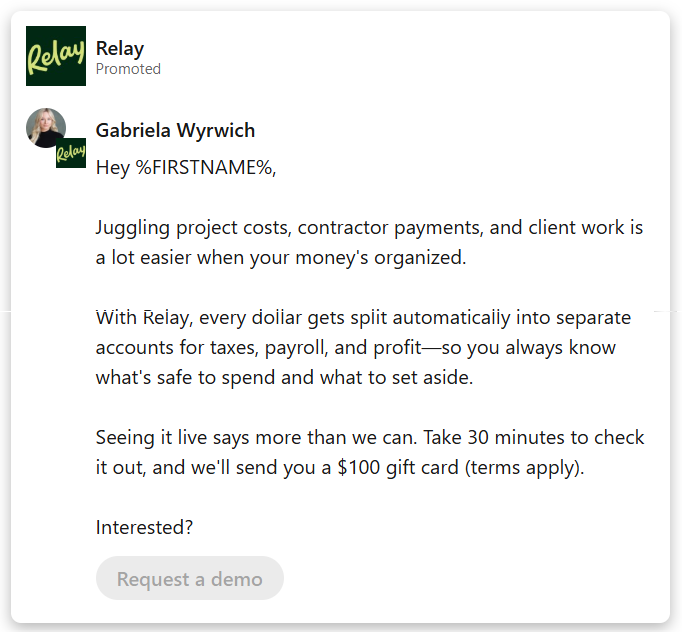
LinkedIn message ads let you skip the feed and show up directly in a buyer’s LinkedIn Messaging inbox.
The message comes from a real LinkedIn member you choose as the sender, so who it comes from matters almost as much as what you have to say.
Make sure you don’t waste that inbox visit on a generic sales pitch. Instead, give buyers something worth clicking for. That could be an invite to a webinar they’d actually attend, a useful piece of content, or a demo that makes sense for where they are in the buying journey.
These sponsored messaging ads also keep things pretty simple. You get one main call to action (CTA), so there’s no room for five different next steps competing for the buyer’s attention.
LinkedIn Conversation Ads
LinkedIn conversation ads let buyers decide what happens after your message lands in their inbox. That's particularly useful when you’re trying to reach different members of a B2B buying committee.
You can use multiple CTA buttons to offer each of them something worth their while.
An end user might click to see your SaaS product in action, while their manager checks out a customer story and an executive digs into the business case.
Each button can take the buyer to a landing page, open a lead gen form, or trigger another message with a new set of choices.
Just don’t get carried away with all those options. Too many branches can quickly turn a conversation into a confusing maze.
LinkedIn Lead Gen Forms
LinkedIn lead gen forms save buyers the extra trip to your landing page when they’re ready to convert.
They can click an ad and the form opens right inside LinkedIn with details from their profile already filled in. This means less typing for buyers and one less chance for you to lose them along the way.
But that convenience can also work against you. If you make the form too easy to submit, you risk paying for leads your sales team has no interest in talking to.
So, don’t chase the shortest form possible. Ask for enough information to figure out if someone could actually be a good fit for your SaaS product.
LinkedIn Retargeting
Whichever LinkedIn ad formats make it into your campaigns, the first interaction doesn’t have to be the last.
LinkedIn retargeting gives you another shot at reaching potential buyers who showed interest but weren’t ready to take the next step.
You can retarget people who watched your videos, engaged with your ads, opened a lead gen form, interacted with your company page, and more.
Just don’t dump all those people into one audience and hit them with the same sales pitch. Use their last interaction with your brand as a clue for what to show them next.
Someone who watched a product video could see a customer story next. A buyer who spent time on your pricing page might be ready for a demo offer.
The point is to keep things interesting by making each ad feel more relevant than the last.
LinkedIn Ads Benchmarks
Once your campaigns are up and running, LinkedIn Ads benchmarks give you something to compare your numbers against. Just don’t let them become your only definition of success.
Dreamdata’s 2026 LinkedIn Ads B2B Benchmarks Report shows just how different the story can look depending on the metric you’re watching.
Across the B2B customer data it analyzed, the average LinkedIn Ads:
- Cost per click (CPC) was $6.78*
- Cost per 1,000 impressions (CPM) was $38.91
- Click-through rate (CTR) was 0.57%
These numbers are handy for a quick gut check. But clicks and impressions only tell you so much about B2B performance.
The same report found that LinkedIn averaged $79.46 per company influenced and delivered a 121% return on ad spend (ROAS).
So, if your CPC looks high, don’t hit the panic button just yet. Check whether you’re reaching the right accounts and what those interactions eventually turn into. Pipeline and revenue can tell a very different story.
*Dreamdata reports these benchmarks in euros, so we converted all figures to USD using the exchange rate as of September 29, 2026.
LinkedIn Ads ROI
Benchmarks give you a useful reality check, but LinkedIn Ads return on investment (ROI) shows you if your campaigns are actually paying off.
To get a better read on this:
- Follow your LinkedIn leads past the form fill to see which ones become qualified leads, opportunities, and customers.
- Connect the dots between ad spend and revenue so you know which campaigns are actually adding to your pipeline and bottom line.
- Put more budget behind campaigns that pull their weight, and lower the budget on the ones that keep spending with nothing to show for it.
Make sure you give your campaigns enough time to prove their worth. If your B2B SaaS sales cycle takes months, the leads you generated last week haven’t had a chance to turn into revenue yet.
Until they do, keep an eye on the signals that show they’re moving in the right direction, like qualified leads and pipeline.
LinkedIn Ads Automation Tools
Getting a clear read on ROI is only half the job. You still need to keep optimizing your active campaigns.
LinkedIn Ads automation tools for B2B can make that easier, but they don’t all work the same way. Some help with a handful of campaign tasks, while others can take a much bigger chunk of the day-to-day work off your plate.
Sami, AdConversion’s AI ad optimization tool, takes the latter approach. It keeps tabs on your LinkedIn ad account around the clock and automatically adjusts bids, budgets, and ads based on the rules you set.
This means you don’t have to check Campaign Manager every five minutes to see what needs attention. You’ve got a 24/7 babysitter ready to step in when your rules say it should.
Compare the best LinkedIn Ads automation tools for B2B to find the right fit for your campaigns.
SaaS LinkedIn Ads Agencies
Running LinkedIn Ads in-house makes sense when you have the time and expertise to do it well. But your team can only stretch so far.
A specialized SaaS LinkedIn Ads agency can fill the gaps that are holding your campaigns back. Maybe you need someone who knows the platform inside out, more hands for testing, or help making LinkedIn play nicely with the rest of your paid media.
Just double-check what you're signing up for because no two agencies bring the same services to the table.
For example, AdConversion’s LinkedIn Ads Agency takes the full-service route. You get a dedicated senior performance marketer to handle strategy, ad creatives, landing pages, A/B testing, tracking, and optimization for you.
Explore more SaaS LinkedIn Ads agencies to find the kind of backup your team actually needs.
Over to You
LinkedIn Ads gives you plenty of ways to reach B2B SaaS buyers, but having more options doesn’t automatically make your campaigns better.
The more you learn about who you’re targeting, what gets their attention, and what happens after they click, the easier it becomes to make smarter budget decisions.
Use this guide as your starting point, but keep testing what works for your buyers and follow the results all the way to pipeline and revenue.
If you want to get more comfortable with the platform first, AdConversion's free LinkedIn Ads 101 course can help you get your first campaigns up and running.
And if you need expert help along the way, have a quick chat with AdConversion.