SaaS PPC Case Study: PayHOA Cuts Ad Spend by 34%

See how PayHOA reduced ad spend by 34%, lowered cost per opportunity by 40%, and improved lead quality in this AdConversion SaaS PPC case study.
SaaS PPC



Silvio Perez
Founder @AdConversion
Getting more leads from Google Ads sounds great, until you realize they’re not turning into sales opportunities.
That’s the problem PayHOA faced. Its paid search costs started climbing, but too many leads didn't make it through the sales funnel.
So the B2B SaaS company partnered with AdConversion to figure out how to spend less without hurting its pipeline.
This SaaS pay-per-click (PPC) case study looks at what AdConversion changed and why it worked. You’ll also learn what you can take from PayHOA’s playbook to improve your own paid search campaigns.
Main Objective: Improve SaaS PPC Lead Quality and Efficiency
PayHOA helps self-managed community associations and property management companies handle the day-to-day work of running their communities. Its all-in-one software brings everything from payments and accounting to voting and resident requests into one place.
Google Ads was a key part of PayHOA's paid search strategy, helping it reach buyers actively searching for homeowners association (HOA) management software.
But midway through the year, the company’s paid search performance started to slip. Google Ads was optimizing for multiple conversion types, and acquisition costs were climbing.
The problem was that Google’s bidding algorithm was getting mixed signals from different stages of the sales funnel. That made it harder to optimize for the outcomes that mattered.
After all, a decent overall conversion rate might look good in Google Ads, but it doesn’t automatically bring you closer to a customer.
AdConversion's job was to get PayHOA's campaigns focused on qualified pipeline instead of just conversion volume.
Step 1: Optimize Google Ads for Higher-Quality Conversions
AdConversion first needed to figure out which conversions actually mattered for PayHOA's Google Ads campaigns.
Test deeper-funnel conversion signals
The team started testing offline conversion actions tied to four stages: marketing-qualified leads (MQLs), sales-qualified leads (SQLs), opportunities, and customers.
The idea was to help Google’s bidding algorithm identify the clicks that led to qualified pipeline and customers, not just signups. But the experiment didn’t go as planned.
With several conversion actions feeding into campaign optimization, the signals became too diluted. Performance was inconsistent, and acquisition costs kept climbing.
Here's the catch: B2B sales cycles can be long, and deeper-funnel conversions happen less frequently. A signup might happen today, but that lead could take weeks to become an opportunity and provide return on your investment (ROI).
That gives Google's algorithm fewer conversion signals to learn from.
Simplify conversion optimization
So AdConversion simplified PayHOA’s setup and focused Google Ads optimization on a single conversion action: Signup Complete. This gave Google’s bidding system a more frequent, consistent event to work with.
PayHOA could still track MQLs, SQLs, and opportunities to see whether those signups were turning into qualified pipeline.
If you're running paid search for your own B2B SaaS company, start with a Google Ads audit to check which conversions your campaigns are optimizing for. Then compare those results with what's actually making it into your pipeline. If the numbers don't add up, it's time to rethink your conversion goals.
With the conversion setup simplified, AdConversion turned its attention to PayHOA’s campaign structure and underperforming keywords.
Step 2: Consolidate Google Ads Campaigns and Cut Underperforming Keywords
Choosing the right keywords is a big part of making Google Ads profitable. If your ads keep showing up for searches that don’t turn into qualified leads, you’re paying for traffic that isn’t doing much for your business.
And that’s exactly the kind of wasted spend AdConversion wanted to cut from PayHOA’s account.
Cut keywords that aren’t earning their place
AdConversion went through PayHOA’s keyword performance and paused the ones that weren’t delivering worthwhile results.
Think about it. A keyword can have a good click-through rate (CTR) and bring in plenty of clicks at a reasonable cost per click (CPC). But if those visitors rarely become qualified leads, keeping that keyword running can get expensive.
For your own campaigns, look beyond CTR and CPC when reviewing keyword performance. Check which keywords are generating MQLs, SQLs, and opportunities before deciding where to spend more.
Simplify the campaign structure
AdConversion also consolidated PayHOA’s campaigns and organized them into five groups based on keyword match types and search intent:
- Broad Match: Shows your ads for a wider range of related searches, even when they don't use the exact keyword, such as 'HOA management software.'
- Phrase Match: Covers searches that include the meaning of your keyword, even when the wording differs. For instance, 'best HOA software for small communities.'
- Exact Match: Keeps your ads closely aligned with your keyword's meaning or intent, like 'HOA software.'
- Competitor: Puts your ads in front of people searching for competing software providers, such as 'AppFolio alternatives.'
- Branded: Focuses on searches that include your company's name, like 'PayHOA pricing.'
The point wasn't just to make the account easier to manage. Someone searching for PayHOA by name is already familiar with the company, while someone comparing HOA management software providers might still be exploring their options.
Separating those groups gave AdConversion a clearer view of performance and more control over where the budget went.
Before shifting your budget around, compare how your branded, competitor, and non-branded campaigns perform. That way, you can put more money behind the searches that actually bring in qualified leads.
Once you know what's working, explore other Google Ads strategies for SaaS to get more from those campaigns.
Step 3: Drop Performance Max and Refocus on Search Campaigns
Performance Max can look like an easy way to get more leads from Google Ads. It runs ads across Google's channels, including Search, YouTube, and Display, and uses automation to find potential customers.
AdConversion decided to give it a shot for PayHOA to see if it could bring in more leads than traditional Search campaigns.
Look beyond cheap leads
At first, the results looked promising. Performance Max was bringing in leads at a relatively low cost.
But there was a catch: Those leads weren’t qualified enough to justify the spending.
That’s the problem with judging a SaaS PPC campaign by cost per acquisition (CPA) alone. You could pay $20 for a lead that never speaks to sales or $100 for someone who eventually becomes a customer. The cheaper lead isn’t necessarily the better deal.
Put the budget back into search campaigns
Once AdConversion saw the lead quality issues, it shut down PayHOA’s Performance Max campaigns. Instead, the team shifted its focus back to keyword-driven search campaigns, which were already bringing in qualified leads.
This gave AdConversion more control over which searches they targeted and where the budget went.
Performance Max isn't always the right fit for B2B SaaS. If your Search campaigns bring in better leads, put your Google Ads budget where it's actually working.
Step 4: Cut PPC Spend Without Sacrificing Lead Quality
Cutting your Google Ads budget is easy, but doing so without hurting your pipeline is where things get tricky.
After cleaning up PayHOA's campaigns, AdConversion had a chance to put that to the test.
Stop paying for traffic that isn’t producing qualified leads
AdConversion could have simply lowered PayHOA's budgets across the board. But that would’ve meant spending less on the campaigns that were actually bringing in qualified leads.
Instead, the team pulled back on inefficient keywords and campaigns while continuing to invest in the search traffic that was already working.
The same goes for your own Google Ads account. Before you start cutting budgets, make sure you're not taking money away from the campaigns your sales team relies on.
Protect lead quality while lowering the budget
Even after you've identified wasted spend, you still need to be careful about how much you cut.
If you reduce budget too aggressively, even your best-performing campaigns can lose traffic and potential customers.
In PayHOA’s case, AdConversion reduced paid search spend by more than $100,000 in August and September compared with June and July while maintaining healthy MQL volume.

Key Results from PayHOA’s SaaS PPC Case Study
By the end of Q3, PayHOA was spending considerably less on Google Ads while generating more sales opportunities.
Here's what that looked like in numbers:
- 34% reduction in total program spend quarter-over-quarter: PayHOA cut its ad spend by more than a third without slowing down its pipeline.
- 15% lower cost per MQL: The company was paying less for leads that met its marketing qualification criteria.
- 24% lower cost per SQL: The cost of getting leads through to the sales team dropped, too.
- 40% lower cost per opportunity: This was the biggest win. PayHOA could now generate sales opportunities at a much lower cost.
- 4% increase in opportunities: Even with fewer leads coming in, more of them were turning into actual sales opportunities.
PayHOA ended up getting more opportunities for less money. And that's exactly what AdConversion set out to achieve.
Wrapping Up
This study of PayHOA’s SaaS PPC strategy shows that getting more leads from Google Ads isn't always the answer. Sometimes, it's about making better use of the budget you already have.
By simplifying its conversion goals and restructuring its campaigns, PayHOA cut costs and brought in more sales opportunities.
And that's something worth keeping in mind before you decide to increase your own Google Ads budget.
If your Google Ads spend isn’t bringing in enough qualified leads, have a quick chat with AdConversion about turning things around.
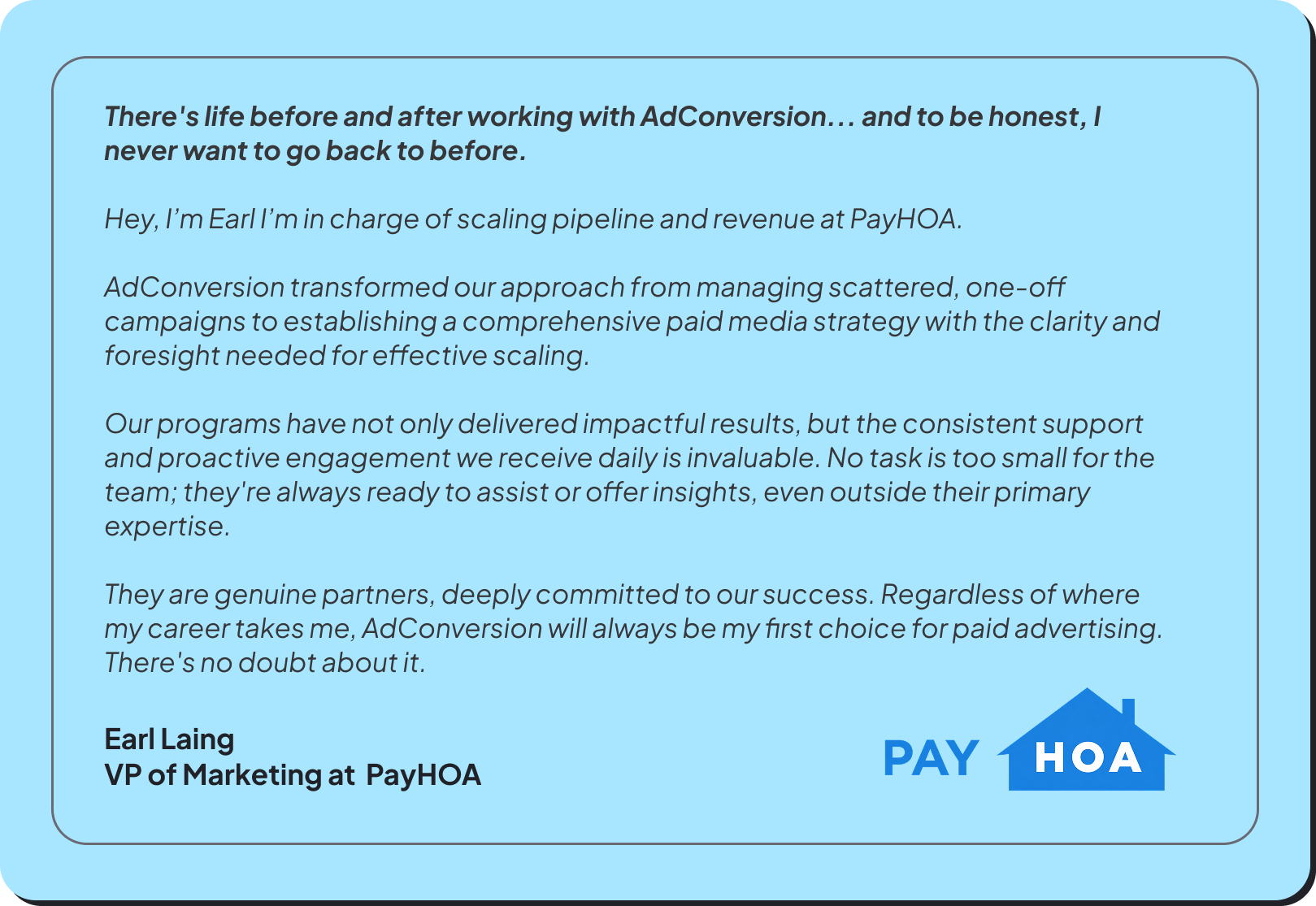
There's life before and after working with AdConversion... and to be honest, I never want to go back to before.